Solved Two explorer.exe, One taking all of my RAM's Memory

So upon searching for explorer.exe in my system this is what shows up, imgur: the simple image sharer.
I use an Intel cpu and nvidia graphics card but yet AMD shows up is this suppose to be there or not? im not to sure about it
 

My Computer My Computer

Computer type
PC/Desktop
Computer Manufacturer/Model Number
Custom Build
OS
Windows 7 Home Premium 64bit
CPU
Intel i5 quad core CPU 3470 3.20GHz
Memory
8GB Corsair Ram
Graphics Card(s)
EVGA 650 2gb
Antivirus
Microsoft Security Essentials
Browser
Google Chrome
AMD shows up

So upon searching for explorer.exe in my system this is what shows up, imgur: the simple image sharer.
I use an Intel cpu and nvidia graphics card but yet AMD shows up is this suppose to be there or not? im not to sure about it

Well as far as I can work out - it's not a problem. Looking at other members system specs who also have Intel CPU and Nvidia graphics cards I see the same entry in logs that they've posted.

7-Zip is free so try removing it then rebooting. It's a long shot though! As for uninstalling software including 7-zip give Geek uninstaller a try and let it remove any left over files' folders and registry entries.

GeekUninstaller | GeekUninstaller

As for the rest if it - I can upload a script to deal with the Avast entry but do you see any Avast related folders if you search for them? If that's the case try the removal tool. Same goes for Kaspersky.

Kaspersky Removal Tool

Avast Removal Tool - only run this if you can still find your old Avast program folder.

Don't worry too much about VLC - unless you also use Windows Media Player as your default media player.

As for flash player - do you have iTunes installed? The only reference that I could find to that file mentioned iTunes and I've never installed it. In any case it's possible to do a clean install of flash player but it's unlikely to cause the explorer.exe problem.

Also if you've got any software installed that you no longer use - uninstall it using Geek Uninstaller. Check for software updates for anything that you want to keep installed.

Another question. If you boot into safe mode do you still see two explorer.exe processes running?
 

My Computer My Computer

Computer type
Laptop
Computer Manufacturer/Model Number
ASUS
OS
Microsoft Windows 7 Home Premium 64-bit 7601 Multiprocessor Free Service Pack 1
CPU
AMD C-60 APU with Radeon(tm) HD Graphics
Motherboard
ASUSTeK COMPUTER INC. X501U
Memory
4.00 GB
Graphics Card(s)
AMD Radeon HD 6290 Graphics
Sound Card
(1) AMD High Definition Audio Device (2) Realtek High Defi
Screen Resolution
1366 x 768 x 32 bits (4294967296 colors) @ 60 Hz
Hard Drives
Hitachi HTS545050A7E380 SATA Disk Device
Antivirus
Comodo CIS & FW, SecureAplus App Whitelisting, Threatfire
Browser
Cyberfox 64bit, Opera 64bit, Airfox
Other Info
Spy-The-Spy, HitmanPro.Alert, Norton Connect Safe, MJRegWatcher, BitDefender TrafficLight, Voodoo Shield, Zemana AntiMalware
If i boot into safe mode there is no second Explorer.exe
 

My Computer My Computer

Computer type
PC/Desktop
Computer Manufacturer/Model Number
Custom Build
OS
Windows 7 Home Premium 64bit
CPU
Intel i5 quad core CPU 3470 3.20GHz
Memory
8GB Corsair Ram
Graphics Card(s)
EVGA 650 2gb
Antivirus
Microsoft Security Essentials
Browser
Google Chrome
Software issues

It seems to be a third party software or shell extension issue. For now try running this fix for those context menu issues.

Download the attached file and rename it giving it a .uvk extension instead of .txt extension - and save it to your desktop.

View attachment UVK Fix List.txt

So you should now have a file named UVK Fix List.uvk on your desktop.

Run UVK and from the welcome screen choose "Run Scripts" then "Import Commands From File"

In the drop down box browse to UVK Fix List.uvk on your desktop and click "Open"

Then click "Run / Fix Listed"

When complete a log should open. Save the log and attach it to your next post. If UVK requests a reboot - then reboot.
 
Last edited:

My Computer My Computer

Computer type
Laptop
Computer Manufacturer/Model Number
ASUS
OS
Microsoft Windows 7 Home Premium 64-bit 7601 Multiprocessor Free Service Pack 1
CPU
AMD C-60 APU with Radeon(tm) HD Graphics
Motherboard
ASUSTeK COMPUTER INC. X501U
Memory
4.00 GB
Graphics Card(s)
AMD Radeon HD 6290 Graphics
Sound Card
(1) AMD High Definition Audio Device (2) Realtek High Defi
Screen Resolution
1366 x 768 x 32 bits (4294967296 colors) @ 60 Hz
Hard Drives
Hitachi HTS545050A7E380 SATA Disk Device
Antivirus
Comodo CIS & FW, SecureAplus App Whitelisting, Threatfire
Browser
Cyberfox 64bit, Opera 64bit, Airfox
Other Info
Spy-The-Spy, HitmanPro.Alert, Norton Connect Safe, MJRegWatcher, BitDefender TrafficLight, Voodoo Shield, Zemana AntiMalware

My Computer My Computer

Computer type
PC/Desktop
Computer Manufacturer/Model Number
Custom Build
OS
Windows 7 Home Premium 64bit
CPU
Intel i5 quad core CPU 3470 3.20GHz
Memory
8GB Corsair Ram
Graphics Card(s)
EVGA 650 2gb
Antivirus
Microsoft Security Essentials
Browser
Google Chrome
More info requested

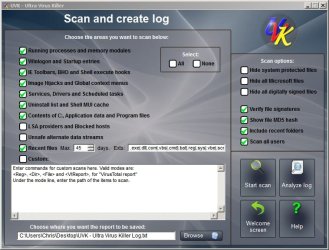
This is a strange one. I still believe that it's software related rather than malware. If you like you could perform a more in depth scan using UVK with the following scan settings applied:

UVK Scan settings.jpg

Note:

Don't choose to hide microsoft files.
Change recent file search to 45 days as it covers the period when the problem started. The recent file search part of the scan only looks for executable files.

Upload the log to Dropbox and PM me the link to download - unless you have no privacy concerns and wish to post the link in your reply so that anyone can download the log.
 

My Computer My Computer

Computer type
Laptop
Computer Manufacturer/Model Number
ASUS
OS
Microsoft Windows 7 Home Premium 64-bit 7601 Multiprocessor Free Service Pack 1
CPU
AMD C-60 APU with Radeon(tm) HD Graphics
Motherboard
ASUSTeK COMPUTER INC. X501U
Memory
4.00 GB
Graphics Card(s)
AMD Radeon HD 6290 Graphics
Sound Card
(1) AMD High Definition Audio Device (2) Realtek High Defi
Screen Resolution
1366 x 768 x 32 bits (4294967296 colors) @ 60 Hz
Hard Drives
Hitachi HTS545050A7E380 SATA Disk Device
Antivirus
Comodo CIS & FW, SecureAplus App Whitelisting, Threatfire
Browser
Cyberfox 64bit, Opera 64bit, Airfox
Other Info
Spy-The-Spy, HitmanPro.Alert, Norton Connect Safe, MJRegWatcher, BitDefender TrafficLight, Voodoo Shield, Zemana AntiMalware
Okay so i just PMed you the new scan and create log file from dropbox and just wanted to let you know i have remove 7zip and a few other software using geekuninstaller also today I booted up windows defender offline from a usb to do a full scan and nothing was found
 

My Computer My Computer

Computer type
PC/Desktop
Computer Manufacturer/Model Number
Custom Build
OS
Windows 7 Home Premium 64bit
CPU
Intel i5 quad core CPU 3470 3.20GHz
Memory
8GB Corsair Ram
Graphics Card(s)
EVGA 650 2gb
Antivirus
Microsoft Security Essentials
Browser
Google Chrome
No sign of malware

Okay so i just PMed you the new scan and create log file from dropbox and just wanted to let you know i have remove 7zip and a few other software using geekuninstaller also today I booted up windows defender offline from a usb to do a full scan and nothing was found

I've downloaded your log file and there's a fair amount of information to look through. The good news is that there's no sign of any malware running at all.

I will have a few questions and suggestions and I'll post later. Time to sleep now.

Just one question for now - are you seeing any apps crashing recently and has explorer crashed at all recently?
 

My Computer My Computer

Computer type
Laptop
Computer Manufacturer/Model Number
ASUS
OS
Microsoft Windows 7 Home Premium 64-bit 7601 Multiprocessor Free Service Pack 1
CPU
AMD C-60 APU with Radeon(tm) HD Graphics
Motherboard
ASUSTeK COMPUTER INC. X501U
Memory
4.00 GB
Graphics Card(s)
AMD Radeon HD 6290 Graphics
Sound Card
(1) AMD High Definition Audio Device (2) Realtek High Defi
Screen Resolution
1366 x 768 x 32 bits (4294967296 colors) @ 60 Hz
Hard Drives
Hitachi HTS545050A7E380 SATA Disk Device
Antivirus
Comodo CIS & FW, SecureAplus App Whitelisting, Threatfire
Browser
Cyberfox 64bit, Opera 64bit, Airfox
Other Info
Spy-The-Spy, HitmanPro.Alert, Norton Connect Safe, MJRegWatcher, BitDefender TrafficLight, Voodoo Shield, Zemana AntiMalware
There is indeed a handful of folks stricken with a 'mystery second explorer.exe' using 2-3 GB or more of RAM, and, the screenshot I saw of Proc Explorer, it appeared ok, vice one version was Explorer.exe, the other explorer.exe...

Given the buildup of folks out there with similar issues, I'd guess some sort of new unnamed malware....
 

My Computer My Computer

Computer type
PC/Desktop
Computer Manufacturer/Model Number
HP
OS
Windows 7 Home Premium 64 bit
CPU
AMD A4
Memory
5 GB
Graphics Card(s)
Integrated Radeon
Hard Drives
500 gb WD
Antivirus
360 TS
Browser
IE
Update software

Okay well I've seen the same issue on my machine and it wasn't down to malware. It was down to buggy unpatched software and shell extensions. The problem is that it can be tricky to pin down.

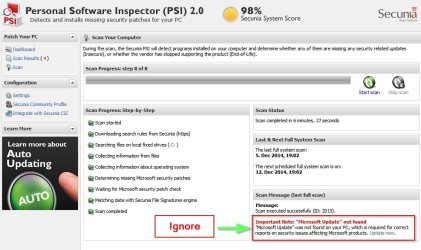
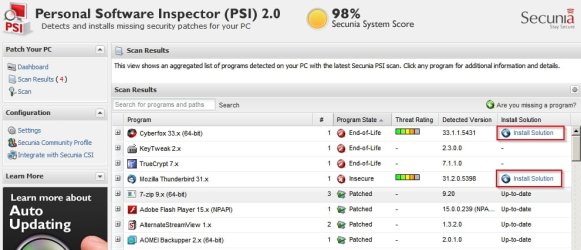
Anyway there are a few things to try. Start off by checking for software updates. I'm going to PM you a link to download Secunia PSI 2.0 - it will check most of your installed software to see if there are updates available and provide links to download any missing updates. It's better to use Secunia PSI 2.0 rather than the current version as it gives you more control over updates and doesn't run in the background at all times.

Once installed it should start a scan automatically. Also check the following settings and apply them.

Ignore this warning - it doesn't apply to Windows 7.

Secunia PSI Ignore.jpg

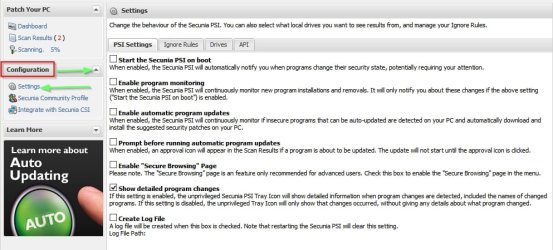
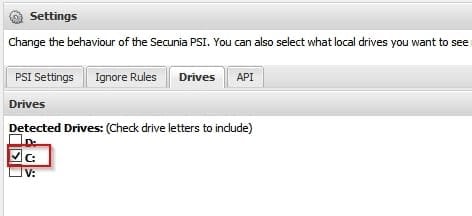
Click the arrow next to "Configuration" then click "Settings" and apply the ones shown below:

Secunia PSI Settings.jpg

Secunia PSI Drives.jpg

When the scan is complete apply any updates one at a time by clicking on the "Install Solution" link.

If a reboot is requested at any point - reboot then continue with another scan.

Secunia PSI Install Updates.jpg

Once all updates have been installed - reboot again and see if you've still got the two explorer.exe's running.

If that's the case there are more things to try.
 

My Computer My Computer

Computer type
Laptop
Computer Manufacturer/Model Number
ASUS
OS
Microsoft Windows 7 Home Premium 64-bit 7601 Multiprocessor Free Service Pack 1
CPU
AMD C-60 APU with Radeon(tm) HD Graphics
Motherboard
ASUSTeK COMPUTER INC. X501U
Memory
4.00 GB
Graphics Card(s)
AMD Radeon HD 6290 Graphics
Sound Card
(1) AMD High Definition Audio Device (2) Realtek High Defi
Screen Resolution
1366 x 768 x 32 bits (4294967296 colors) @ 60 Hz
Hard Drives
Hitachi HTS545050A7E380 SATA Disk Device
Antivirus
Comodo CIS & FW, SecureAplus App Whitelisting, Threatfire
Browser
Cyberfox 64bit, Opera 64bit, Airfox
Other Info
Spy-The-Spy, HitmanPro.Alert, Norton Connect Safe, MJRegWatcher, BitDefender TrafficLight, Voodoo Shield, Zemana AntiMalware
Trying to do "Install solution" for some of the programs but its not working at all any ideas? when i click on the application downloaded nothing opens up

- Screenshot by Lightshot -
 

My Computer My Computer

Computer type
PC/Desktop
Computer Manufacturer/Model Number
Custom Build
OS
Windows 7 Home Premium 64bit
CPU
Intel i5 quad core CPU 3470 3.20GHz
Memory
8GB Corsair Ram
Graphics Card(s)
EVGA 650 2gb
Antivirus
Microsoft Security Essentials
Browser
Google Chrome
Remove Flash Player

Trying to do "Install solution" for some of the programs but its not working at all any ideas? when i click on the application downloaded nothing opens up

- Screenshot by Lightshot -

Is should open the dowload link for the program update in your default browser. What is your default browser?

Try exiting Secunia then:

Start> Run

then type:

RUNAS "C:\Program Files (x86)\Secunia\PSI\psi.exe"

Then it will run with admin rights. Also check your AV/ Firewall to see if it blocked anything.
 

My Computer My Computer

Computer type
Laptop
Computer Manufacturer/Model Number
ASUS
OS
Microsoft Windows 7 Home Premium 64-bit 7601 Multiprocessor Free Service Pack 1
CPU
AMD C-60 APU with Radeon(tm) HD Graphics
Motherboard
ASUSTeK COMPUTER INC. X501U
Memory
4.00 GB
Graphics Card(s)
AMD Radeon HD 6290 Graphics
Sound Card
(1) AMD High Definition Audio Device (2) Realtek High Defi
Screen Resolution
1366 x 768 x 32 bits (4294967296 colors) @ 60 Hz
Hard Drives
Hitachi HTS545050A7E380 SATA Disk Device
Antivirus
Comodo CIS & FW, SecureAplus App Whitelisting, Threatfire
Browser
Cyberfox 64bit, Opera 64bit, Airfox
Other Info
Spy-The-Spy, HitmanPro.Alert, Norton Connect Safe, MJRegWatcher, BitDefender TrafficLight, Voodoo Shield, Zemana AntiMalware
Google Chrome is my default browser,
Secunia is running as Admin and when clicking install solution anything an example being "Adobe Flash Player 11 x (ActiveX)" then this is downloaded - Screenshot by Lightshot - but when running the downloaded application "Flashplayer 15.0.0239 Active X SPS.exe" nothing happens even if runned as an Admin. Do i have to do something specific that im missing or something? I tried just launching it by double clicking it and also trying Run as Admin but nothing opens up or happens after that
 

My Computer My Computer

Computer type
PC/Desktop
Computer Manufacturer/Model Number
Custom Build
OS
Windows 7 Home Premium 64bit
CPU
Intel i5 quad core CPU 3470 3.20GHz
Memory
8GB Corsair Ram
Graphics Card(s)
EVGA 650 2gb
Antivirus
Microsoft Security Essentials
Browser
Google Chrome
Flash Player

Google Chrome is my default browser,
Secunia is running as Admin and when clicking install solution anything an example being "Adobe Flash Player 11 x (ActiveX)" then this is downloaded - Screenshot by Lightshot - but when running the downloaded application "Flashplayer 15.0.0239 Active X SPS.exe" nothing happens even if runned as an Admin. Do i have to do something specific that im missing or something? I tried just launching it by double clicking it and also trying Run as Admin but nothing opens up or happens after that

Well if you're using Chrome to download did you try copying the downloaded file to your desktop, exiting Chrome and exiting Secunia, then running the downloaded file?

The thing about Chrome is that it uses it's own built in version of flash player so try updating chrome first and it should also update the flash player for Chrome.

https://support.google.com/chrome/answer/108086?hl=en

If Secunia still detects other old versions of flash player afterwards you can try other methods of clean installing flash player.

Try updating the other stuff too - Java and the rest.
 

My Computer My Computer

Computer type
Laptop
Computer Manufacturer/Model Number
ASUS
OS
Microsoft Windows 7 Home Premium 64-bit 7601 Multiprocessor Free Service Pack 1
CPU
AMD C-60 APU with Radeon(tm) HD Graphics
Motherboard
ASUSTeK COMPUTER INC. X501U
Memory
4.00 GB
Graphics Card(s)
AMD Radeon HD 6290 Graphics
Sound Card
(1) AMD High Definition Audio Device (2) Realtek High Defi
Screen Resolution
1366 x 768 x 32 bits (4294967296 colors) @ 60 Hz
Hard Drives
Hitachi HTS545050A7E380 SATA Disk Device
Antivirus
Comodo CIS & FW, SecureAplus App Whitelisting, Threatfire
Browser
Cyberfox 64bit, Opera 64bit, Airfox
Other Info
Spy-The-Spy, HitmanPro.Alert, Norton Connect Safe, MJRegWatcher, BitDefender TrafficLight, Voodoo Shield, Zemana AntiMalware
So I have clicked install solutions for everything that needed it and some of em worked but adobe flash, iTunes and etc when clicking on the downloaded file it still does not do anything. iv ran another scan and even the things that were updated like Google chrome or pdfxchange still show up as insecure or End-Of-Life even after updating it. Also if uninstall adobe flash just now and uninstalled quick time. What else can we do to figure this thing out?
 

My Computer My Computer

Computer type
PC/Desktop
Computer Manufacturer/Model Number
Custom Build
OS
Windows 7 Home Premium 64bit
CPU
Intel i5 quad core CPU 3470 3.20GHz
Memory
8GB Corsair Ram
Graphics Card(s)
EVGA 650 2gb
Antivirus
Microsoft Security Essentials
Browser
Google Chrome
Chrome - remove old versions

Sorry about the delay in replying. Needed sleep.

If you click the "+" sign next to Chrome in the Secunia PSI scan report it should show you where old versions of chrome are located and you can delete them manually. For a better explanation read this:

https://www.raymond.cc/blog/remove-outdated-google-chrome-files/

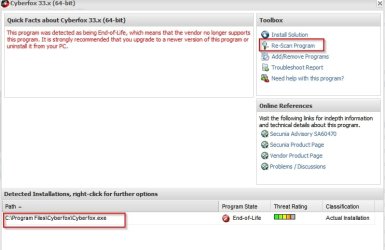
Reboot after removal of the old versions. Open the Secunia PSI once more and for anything still showing up as out of date - Double click the program in the Secunia Psi window and a new window will open up with more details. Choose to rescan the program. Let us know if anything is still showing up as out of date when you've done this.

Secunia PSI Rescan.jpg

Don't worry too much about flash player. Just get Chrome sorted out then we can sort out any flash player leftovers.

Re: iTunes - sorry but I know nothing about it as I've never used it. I'm guessing that it's similar to Chrome in not removing old versions when updating. Perhaps you could post another question and get help from iTunes users. On the other hand if you've got the up to date version installed then it should be okay.

Re: PDFxchange - is that the free or paid version?
 

My Computer My Computer

Computer type
Laptop
Computer Manufacturer/Model Number
ASUS
OS
Microsoft Windows 7 Home Premium 64-bit 7601 Multiprocessor Free Service Pack 1
CPU
AMD C-60 APU with Radeon(tm) HD Graphics
Motherboard
ASUSTeK COMPUTER INC. X501U
Memory
4.00 GB
Graphics Card(s)
AMD Radeon HD 6290 Graphics
Sound Card
(1) AMD High Definition Audio Device (2) Realtek High Defi
Screen Resolution
1366 x 768 x 32 bits (4294967296 colors) @ 60 Hz
Hard Drives
Hitachi HTS545050A7E380 SATA Disk Device
Antivirus
Comodo CIS & FW, SecureAplus App Whitelisting, Threatfire
Browser
Cyberfox 64bit, Opera 64bit, Airfox
Other Info
Spy-The-Spy, HitmanPro.Alert, Norton Connect Safe, MJRegWatcher, BitDefender TrafficLight, Voodoo Shield, Zemana AntiMalware
Hello thanks for replying and don't worry about replying late I'm actually not going to be home, where my computer is for today and tomorrow so I'll just try to answer whatever I can from my phone.
Pdf xchange is a free version but I honestly don't even know what it is not do u remember installing it other than yesterday from the ios install solution for it. I do not use Itunes any more do I can remove it if needed also I've removed Adobe flash and shockwave from my pic via ccleaner. When I get home tomorrow late art night I will try to do as you said with the Google chrome. Much thanks for all the replies callender.
 

My Computer My Computer

Computer type
PC/Desktop
Computer Manufacturer/Model Number
Custom Build
OS
Windows 7 Home Premium 64bit
CPU
Intel i5 quad core CPU 3470 3.20GHz
Memory
8GB Corsair Ram
Graphics Card(s)
EVGA 650 2gb
Antivirus
Microsoft Security Essentials
Browser
Google Chrome
Old Chrome versions

Yes, try to sort out your Chrome installation so that the old files are removed. If you don't need pdfxchange and it shows up as insecure just uninstall it.

As for using Ccleaner to uninstall flash player - it will not get the job done. There's a dedicated removal tool from Adobe along with some detailed instructions that should be followed exactly including the final step which is a reboot.

Dedicated Flash Player Removal Tool

Note: Close all browsers before running the tool. Also close Secunia PSI if you've got it running.

If you'd rather use a script to delete the leftover files and folders you can use this and run it as a script from UVK like you did before. (Save to desktop and rename with .uvk extension)

View attachment UVK Remove Flash Player Leftovers.txt

Edit: You'd still need to run the Flash Player removal tool before running the script. I didn't make that clear.

Once removed - reboot and rescan with Secunia PSI.

Unfortunately there's still more to do but one step at a time is best.
 
Last edited:

My Computer My Computer

Computer type
Laptop
Computer Manufacturer/Model Number
ASUS
OS
Microsoft Windows 7 Home Premium 64-bit 7601 Multiprocessor Free Service Pack 1
CPU
AMD C-60 APU with Radeon(tm) HD Graphics
Motherboard
ASUSTeK COMPUTER INC. X501U
Memory
4.00 GB
Graphics Card(s)
AMD Radeon HD 6290 Graphics
Sound Card
(1) AMD High Definition Audio Device (2) Realtek High Defi
Screen Resolution
1366 x 768 x 32 bits (4294967296 colors) @ 60 Hz
Hard Drives
Hitachi HTS545050A7E380 SATA Disk Device
Antivirus
Comodo CIS & FW, SecureAplus App Whitelisting, Threatfire
Browser
Cyberfox 64bit, Opera 64bit, Airfox
Other Info
Spy-The-Spy, HitmanPro.Alert, Norton Connect Safe, MJRegWatcher, BitDefender TrafficLight, Voodoo Shield, Zemana AntiMalware
Removing Avast

Also, would you run this script (using UVK) to remove some Avast leftovers?

View attachment UVK - FixList Avast.txt

Download and rename the attached file with the .uvk extension then run it as a UVK script.

Will you also look at C:\Program Files for a zero byte folder named 005 and confirm that it's empty?

Thanks.
 

My Computer My Computer

Computer type
Laptop
Computer Manufacturer/Model Number
ASUS
OS
Microsoft Windows 7 Home Premium 64-bit 7601 Multiprocessor Free Service Pack 1
CPU
AMD C-60 APU with Radeon(tm) HD Graphics
Motherboard
ASUSTeK COMPUTER INC. X501U
Memory
4.00 GB
Graphics Card(s)
AMD Radeon HD 6290 Graphics
Sound Card
(1) AMD High Definition Audio Device (2) Realtek High Defi
Screen Resolution
1366 x 768 x 32 bits (4294967296 colors) @ 60 Hz
Hard Drives
Hitachi HTS545050A7E380 SATA Disk Device
Antivirus
Comodo CIS & FW, SecureAplus App Whitelisting, Threatfire
Browser
Cyberfox 64bit, Opera 64bit, Airfox
Other Info
Spy-The-Spy, HitmanPro.Alert, Norton Connect Safe, MJRegWatcher, BitDefender TrafficLight, Voodoo Shield, Zemana AntiMalware
Here is C:\Program Files - Screenshot by Lightshot.
Iv run the avast uvk script, manualy removed chrome by deleting old_chrome and used the dedicated flash uninstaller going to run the uvk flash uninstaller now after i reboot and do a scan

So after doing the Adobe Uninstallers and rebooting it is still showing up in secunia but google chrome isnt showing up anymore - Screenshot by Lightshot .

EDIT

did a rescan with secunia heres what is shown - Screenshot by Lightshot
 
Last edited:

My Computer My Computer

Computer type
PC/Desktop
Computer Manufacturer/Model Number
Custom Build
OS
Windows 7 Home Premium 64bit
CPU
Intel i5 quad core CPU 3470 3.20GHz
Memory
8GB Corsair Ram
Graphics Card(s)
EVGA 650 2gb
Antivirus
Microsoft Security Essentials
Browser
Google Chrome
Back
Top