the dwindling free space on my C

icacream

New member
Member
Local time
3:40 PM
Messages
89
hello !
I am for ever fighting to retain free space on C (it's a 120 Gb SSD)
I deleted the hibernation file (thanks to some reading I did here)
and I keep trying to contain the restore points usage to 12% - it keeps jumping to 25% :(
when I reduce the alloted maximum usage, all my restore points get deleted... why ?

did it day before yesterday - no more restore points !
so I created a manual restore point, the current usage went to 82.03 Mb

today I noticed again that the free space on C had dwindled down
I checked the restore config - back up to 25% and current usage 25.31 Gb !!!!
for one single restore point ? :huh:

for I only have one restore point on offer : a window critical update dated today
so the manual restore point I created two days ago simply vanished ?!!!

if anyone of you can cast some light on this story, I would be most grateful.... :sick:
 

My Computer My Computer

Computer type
PC/Desktop
OS
win7 x64 ultimate
CPU
3.30 gigahertz Intel Core i5-4590
Motherboard
Asus H97M-PLUS
Memory
8 MB
Graphics Card(s)
PNY Quadro K600
Screen Resolution
1920 x 1080
What anti-virus are you using?

Run this command from a command prompt and tell us what it says:

vssadmin list shadowstorage

Or just post a screen shot of the command's output.
 

My Computer My Computer

Computer type
PC/Desktop
Computer Manufacturer/Model Number
Ignatz Special; 4 speed manual gearbox; factory air conditioning; one of one
OS
Windows 7 Home Premium SP1, 64-bit
CPU
Intel Skylake i5-6600K, not overclocked
Motherboard
AsRock Z170M Extreme 4, micro ATX
Memory
8 GB HyperX DDR4-2666 (2 x 4 GB)
Graphics Card(s)
none; graphics are integrated on CPU
Sound Card
onboard: Realtek ALC1150; external: USB Behringer UF0-202
Monitor(s) Displays
Dell S2340M 23 inch IPS
Screen Resolution
1600 x 900
Hard Drives
System: Crucial MX100 series SSD, 128 GB;
Data: Samsung Spinpoint 103SJ, 1 TB;
Backup: WD Caviar Green WD30EZRX-00D8PB0, 3 TB
PSU
Rosewill SilentNight 500 watt fanless, semi-modular
Case
Antec Solo II
Cooling
Noctua NH-U12S; Noctua F12 intake, Noctua S12A exhaust
Keyboard
Microsoft 200 6JH-00001 USB
Mouse
Dell or Microsoft optical wired; USB
Antivirus
Microsoft Security Essentials and Malwarebytes Premium
Browser
Pale Moon
Other Info
All fans PWM; speeds at idle: CPU circa 500 rpm; intake circa 600 rpm; exhaust circa 600 rpm; CPU temps 27 idle and 47 C load in a warm room (27 C/81 F) when running Intel Extreme Tuning Utility stress test.
using avast free

here is the result :

sto_zpsu6asya9v.jpg


I hate to say it... but it means nothing to me :o
 

My Computer My Computer

Computer type
PC/Desktop
OS
win7 x64 ultimate
CPU
3.30 gigahertz Intel Core i5-4590
Motherboard
Asus H97M-PLUS
Memory
8 MB
Graphics Card(s)
PNY Quadro K600
Screen Resolution
1920 x 1080
The last few lines of that pic shows that you have nearly 26 GB allocated to System Restore.

I'm guessing that's not by your choice and more than you'd prefer.

Avast has some sort of bug that causes this. There are numerous mentions of it on this forum and elsewhere over the last few months.

Last I heard, Avast knew about it, but no fix was in sight for several months.

You can live with it and manually keep deleting restore points and re-checking the amount allotted to System Restore within the Windows interface.

Or you can say goodbye to Avast.

Or wait for the fix.

You might be able to get more current info by prowling the Avast forum.
 

My Computer My Computer

Computer type
PC/Desktop
Computer Manufacturer/Model Number
Ignatz Special; 4 speed manual gearbox; factory air conditioning; one of one
OS
Windows 7 Home Premium SP1, 64-bit
CPU
Intel Skylake i5-6600K, not overclocked
Motherboard
AsRock Z170M Extreme 4, micro ATX
Memory
8 GB HyperX DDR4-2666 (2 x 4 GB)
Graphics Card(s)
none; graphics are integrated on CPU
Sound Card
onboard: Realtek ALC1150; external: USB Behringer UF0-202
Monitor(s) Displays
Dell S2340M 23 inch IPS
Screen Resolution
1600 x 900
Hard Drives
System: Crucial MX100 series SSD, 128 GB;
Data: Samsung Spinpoint 103SJ, 1 TB;
Backup: WD Caviar Green WD30EZRX-00D8PB0, 3 TB
PSU
Rosewill SilentNight 500 watt fanless, semi-modular
Case
Antec Solo II
Cooling
Noctua NH-U12S; Noctua F12 intake, Noctua S12A exhaust
Keyboard
Microsoft 200 6JH-00001 USB
Mouse
Dell or Microsoft optical wired; USB
Antivirus
Microsoft Security Essentials and Malwarebytes Premium
Browser
Pale Moon
Other Info
All fans PWM; speeds at idle: CPU circa 500 rpm; intake circa 600 rpm; exhaust circa 600 rpm; CPU temps 27 idle and 47 C load in a warm room (27 C/81 F) when running Intel Extreme Tuning Utility stress test.
ignatzatsonic is correct; Avast is known for this problem.

The Avast forum might have a fix by now. It's been a few weeks that this problem has been around.
 

My Computer My Computer

Computer type
PC/Desktop
Computer Manufacturer/Model Number
Home made Desktop
OS
Windows 10 Pro. 64/ version 1709 Windows 7 Pro/64
CPU
Intel i7-6800K @ 4.3
Motherboard
ASUS X-99 Deluxe II
Memory
Corsair Platinum 16 gig @2400
Graphics Card(s)
EVGA GTX 1070 OC
Monitor(s) Displays
Asus 27" LED LCD/VE278Q
Screen Resolution
1920-1080 or 1280-720 HDMI
Hard Drives
INTEL SSD 730-240 Gb Sata 3.0/
PSU
EVGA Platium 1200W
Case
Phanteks Luxe Tempered Glass 8 fans/ one radiator
Cooling
XSPC/ Water Cooled CPU
Keyboard
Das 4 Professional
Mouse
Logitech M705/MX Anywhere 2-S
Internet Speed
100 mbits
Antivirus
Microsoft Security Essentials/ Malwarebytes Premium 3.0/ SAS
Browser
I.E. 11 default/Firefox/ ISP Time Warner Cable/Spectrum
Other Info
LG BluRay Burner/
Sound system-KLipsch-THX/
Icy Dock ssd Hot Swap bays.
well, it's a pain but does not prevent the use of my PC
so I guess I'll give some time to avast and go prowl their forum as you suggested ignatzatsonic (and thanks for your 3 brain cells supporting this layback bear !!!)

in the meantime can you tell me what is the normal space a restore point should use
I mean, the one I created manually used 82 Mb - does this seem as it should to you ?

ignatzatsonic, THANKS ! (you helped me some months ago, am not allowed more than "thanks" to you ! :( )
 

My Computer My Computer

Computer type
PC/Desktop
OS
win7 x64 ultimate
CPU
3.30 gigahertz Intel Core i5-4590
Motherboard
Asus H97M-PLUS
Memory
8 MB
Graphics Card(s)
PNY Quadro K600
Screen Resolution
1920 x 1080
in the meantime can you tell me what is the normal space a restore point should use
I mean, the one I created manually used 82 Mb - does this seem as it should to you ?

82 mb seems very small to me. I suppose it's possible.

I allot 7 gb to System Restore and at any given moment I have maybe a dozen restore points--so each restore point takes up roughly 1/2 gb.

Do you have very little occupied space on your C partition? I have 37 gb occupied on C.

Can you in fact restore that 82 mb restore point?
 

My Computer My Computer

Computer type
PC/Desktop
Computer Manufacturer/Model Number
Ignatz Special; 4 speed manual gearbox; factory air conditioning; one of one
OS
Windows 7 Home Premium SP1, 64-bit
CPU
Intel Skylake i5-6600K, not overclocked
Motherboard
AsRock Z170M Extreme 4, micro ATX
Memory
8 GB HyperX DDR4-2666 (2 x 4 GB)
Graphics Card(s)
none; graphics are integrated on CPU
Sound Card
onboard: Realtek ALC1150; external: USB Behringer UF0-202
Monitor(s) Displays
Dell S2340M 23 inch IPS
Screen Resolution
1600 x 900
Hard Drives
System: Crucial MX100 series SSD, 128 GB;
Data: Samsung Spinpoint 103SJ, 1 TB;
Backup: WD Caviar Green WD30EZRX-00D8PB0, 3 TB
PSU
Rosewill SilentNight 500 watt fanless, semi-modular
Case
Antec Solo II
Cooling
Noctua NH-U12S; Noctua F12 intake, Noctua S12A exhaust
Keyboard
Microsoft 200 6JH-00001 USB
Mouse
Dell or Microsoft optical wired; USB
Antivirus
Microsoft Security Essentials and Malwarebytes Premium
Browser
Pale Moon
Other Info
All fans PWM; speeds at idle: CPU circa 500 rpm; intake circa 600 rpm; exhaust circa 600 rpm; CPU temps 27 idle and 47 C load in a warm room (27 C/81 F) when running Intel Extreme Tuning Utility stress test.
I set my Restore Points to 5 % of the drive space. It gives me lots of restore points without using a lot of drive space. At the present time I have 20 Restore Points.
 

My Computer My Computer

Computer type
PC/Desktop
Computer Manufacturer/Model Number
Home made Desktop
OS
Windows 10 Pro. 64/ version 1709 Windows 7 Pro/64
CPU
Intel i7-6800K @ 4.3
Motherboard
ASUS X-99 Deluxe II
Memory
Corsair Platinum 16 gig @2400
Graphics Card(s)
EVGA GTX 1070 OC
Monitor(s) Displays
Asus 27" LED LCD/VE278Q
Screen Resolution
1920-1080 or 1280-720 HDMI
Hard Drives
INTEL SSD 730-240 Gb Sata 3.0/
PSU
EVGA Platium 1200W
Case
Phanteks Luxe Tempered Glass 8 fans/ one radiator
Cooling
XSPC/ Water Cooled CPU
Keyboard
Das 4 Professional
Mouse
Logitech M705/MX Anywhere 2-S
Internet Speed
100 mbits
Antivirus
Microsoft Security Essentials/ Malwarebytes Premium 3.0/ SAS
Browser
I.E. 11 default/Firefox/ ISP Time Warner Cable/Spectrum
Other Info
LG BluRay Burner/
Sound system-KLipsch-THX/
Icy Dock ssd Hot Swap bays.
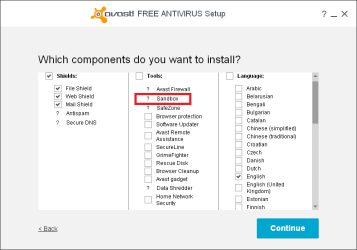
The problem is caused by the Avast Secure Virtual Machine tool, which is also known as Sandbox or Avast NG.
This tool should not be available in the free version, but an Avast program update somehow installed it for me.
I uninstalled it.

Go to Control Panel > Programs and Features
Select the Avast program in the list and click Change
If you have Secure Virtual Machines checked, uncheck it and continue to uninstall it.
Uninstalling it should fix the problem so Avast won't change your Restore Points and max usage.

Here is what I have installed for Avast (nothing but the basic shields).

Avast_01.PNG
 

My Computer My Computer

Computer type
PC/Desktop
Computer Manufacturer/Model Number
home built
OS
Multi-Boot W7_Pro_x64 W8.1_Pro_x64 W10_Pro_x64 +Linux_VMs +Chromium_VM
CPU
AMD Athlon II x4 620
Motherboard
Gigabyte GA-MA785G-UD3H
Memory
6GB GSkill DDR2 800
Graphics Card(s)
AMD 4670 GPU + AMD 4200 IGP
Sound Card
on board Realtek ALC889A
Monitor(s) Displays
RCA 40" LCD TV, Insignia 32" LCD TV, HP 15" LCD monitor
Screen Resolution
1680 x 1050
Hard Drives
OCZ Vertex 3 120GB,
Samsung F3 1TB (3),
Several others - WD, Seagate, Hitachi, ...
PSU
Corsair 500 W
Case
Rosewill mid tower
Cooling
CM 90mm rifle
Keyboard
Gyration wireless, Logitech wireless, Dell USB wired
Mouse
Gyration wireless, Logitech wireless, V7 USB wired
Internet Speed
Spectrum - 100Mbps D / 10Mbps U
Antivirus
Avast, MBAM3, EMET, WinPatrol
Browser
Pale Moon, Firefox, IE
Other Info
2 multi-boot PC's
Mainly HTPC/Office/Gen purpose (no gaming).
Trendnet USB KVM.
LG DVD burner/Blue Ray Player.
Tray system for removable SATA backup drives.

Not currently OCd, under-volted.
I use Hybrid sleep, rarely re-boot or shutdown.

Hauppauge HD-PVR, Avermedia PCIe TV Tuner, Hauppauge PCI TV Tuner.
Thank you DavidE for the information. That will be handy information for many.
 

My Computer My Computer

Computer type
PC/Desktop
Computer Manufacturer/Model Number
Home made Desktop
OS
Windows 10 Pro. 64/ version 1709 Windows 7 Pro/64
CPU
Intel i7-6800K @ 4.3
Motherboard
ASUS X-99 Deluxe II
Memory
Corsair Platinum 16 gig @2400
Graphics Card(s)
EVGA GTX 1070 OC
Monitor(s) Displays
Asus 27" LED LCD/VE278Q
Screen Resolution
1920-1080 or 1280-720 HDMI
Hard Drives
INTEL SSD 730-240 Gb Sata 3.0/
PSU
EVGA Platium 1200W
Case
Phanteks Luxe Tempered Glass 8 fans/ one radiator
Cooling
XSPC/ Water Cooled CPU
Keyboard
Das 4 Professional
Mouse
Logitech M705/MX Anywhere 2-S
Internet Speed
100 mbits
Antivirus
Microsoft Security Essentials/ Malwarebytes Premium 3.0/ SAS
Browser
I.E. 11 default/Firefox/ ISP Time Warner Cable/Spectrum
Other Info
LG BluRay Burner/
Sound system-KLipsch-THX/
Icy Dock ssd Hot Swap bays.
thanks davidE !
Secure Virtual Machines was checked, I unchecked it
I'll be very happy to have the last say on what space should be used for restore points !
 

My Computer My Computer

Computer type
PC/Desktop
OS
win7 x64 ultimate
CPU
3.30 gigahertz Intel Core i5-4590
Motherboard
Asus H97M-PLUS
Memory
8 MB
Graphics Card(s)
PNY Quadro K600
Screen Resolution
1920 x 1080
Do you have very little occupied space on your C partition? I have 37 gb occupied on C.

Can you in fact restore that 82 mb restore point?

I have 49.8 GB free of 111 GB on my C drive
I cannot restore that 82 mb restore point as, as I mentioned yesterday, it vanished

stranger, I changed avast as DavidE suggested, yet did not restart my computer (as requested)
but the space in current use for restore points went from the 25.31 GB I reported yesterday down to 5.87 GB
BUT the restore point which had been created by a win update yesterday has vanished !
I only have two system restore points created by avast just now !
now, why should yesterday restore point have vanished, the allocated space is still set at 27.89 GB
I am puzzled ! :shock:
 

My Computer My Computer

Computer type
PC/Desktop
OS
win7 x64 ultimate
CPU
3.30 gigahertz Intel Core i5-4590
Motherboard
Asus H97M-PLUS
Memory
8 MB
Graphics Card(s)
PNY Quadro K600
Screen Resolution
1920 x 1080
DavidE, thanks for the reminder! I totally forgot to UNcheck during custom/advanced install what I don't want. One done, two more to do when I get home.

Addendum: I'm guessing Secure Virtual Machines is a subset of Sandbox. Sandbox is gone from all my Avast programs.
 
Last edited:

My Computer My Computer

Computer type
PC/Desktop
Computer Manufacturer/Model Number
Antec desktop; Acer Aspire laptops
OS
Windows 7 Professional 64-bit
CPU
Desktop i5; Acers i5 & i7
Memory
desktop 16GB; 1 Acer 8GB & 1 Acer 16GB
Hard Drives
1TB split into 2 equal partitions [OS and data] usable by RJS
Internet Speed
AT&T DSL
Browser
FF, GChrome, msIE
Other Info
Windows 7 Firewall, Emsisoft AM/AV, MSE [scan-only], SpywareBlaster, Ruiware/BillP combine
Back
Top