

sillysoraya
New member
- Local time
- 12:54 PM
- Messages
- 2
Hi everyone,
So my computer has gone a bit mad today. It started doing this sporadically last night, but today is doing it every time despite restarting, and is really affecting my general computer usage.
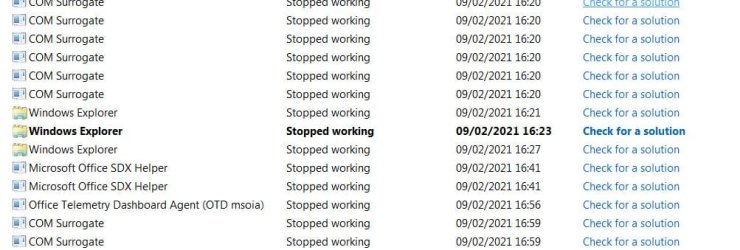
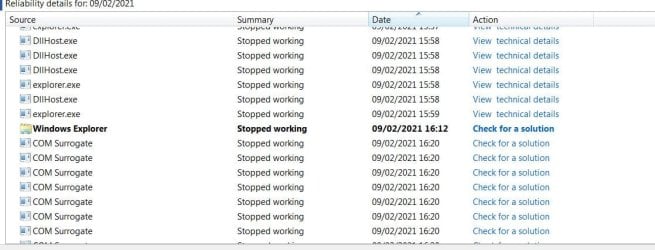
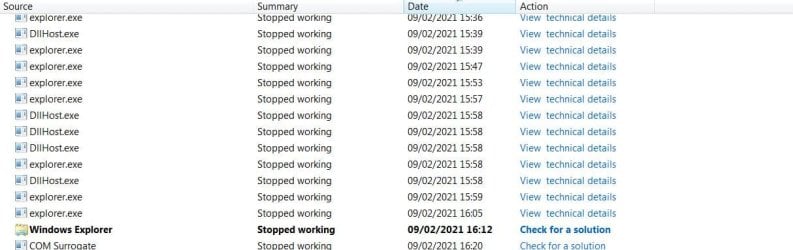
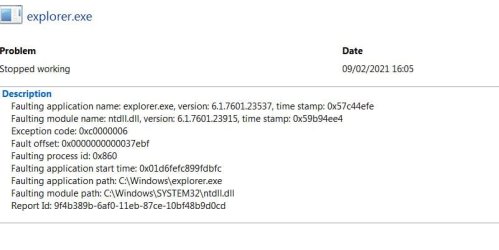
If I go into a folder with a photo file in e.g. a .jpg and left click it (not open etc just simply select it), Windows Explorer crashes, then restarts. It also does this when I go into a folder with photos and try to change the sort-by option. This is happening in more than one specific folder and to many files.
In fact, after taking these screenshots of my action centre reliability monitor below using the snip tool, snip crashed every single time, after saving the file. :shock: Strangely, windows explorer did not crash when I selected the files to be uploaded here.
I also re-installed my Nvidia graphics driver even though it was the most up to date driver already, and have done virus scans.
I can upload more screenshots from the reliability monitor if needed, or anything else that might be helpful. I can also post this under drivers instead if that seems more likely. As I said although I had the most up-to-date nvidia drivers, I did a reinstall anyway and am getting the same issues.
I really appreciate any insight you guys might have, as even after googling I'm at a complete loss.
So my computer has gone a bit mad today. It started doing this sporadically last night, but today is doing it every time despite restarting, and is really affecting my general computer usage.
If I go into a folder with a photo file in e.g. a .jpg and left click it (not open etc just simply select it), Windows Explorer crashes, then restarts. It also does this when I go into a folder with photos and try to change the sort-by option. This is happening in more than one specific folder and to many files.
In fact, after taking these screenshots of my action centre reliability monitor below using the snip tool, snip crashed every single time, after saving the file. :shock: Strangely, windows explorer did not crash when I selected the files to be uploaded here.
I also re-installed my Nvidia graphics driver even though it was the most up to date driver already, and have done virus scans.
I can upload more screenshots from the reliability monitor if needed, or anything else that might be helpful. I can also post this under drivers instead if that seems more likely. As I said although I had the most up-to-date nvidia drivers, I did a reinstall anyway and am getting the same issues.
I really appreciate any insight you guys might have, as even after googling I'm at a complete loss.
Attachments

My Computer
- Computer type
- PC/Desktop
- Computer Manufacturer/Model Number
- Asus
- OS
- Windows 7 Home Premium 64bit
- CPU
- Intel Core i7-3770 @ 3.40GHz
- Motherboard
- P8Z77-V LX
- Memory
- 8gb
- Graphics Card(s)
- Nvidia GeForce GTX 1650 Super
- Antivirus
- Avast, Malwarebytes
- Browser
- Google Chrome


