
Why so many "created shadow copies at a time"

rev1775

New member
Local time
4:25 AM
Messages
79
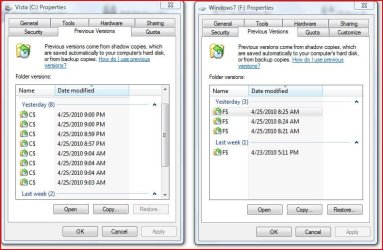
I usually delete all but the most recent shadow/previous versions when I tighten up my drives usually daily or every few days. Today when I looked at the previous versions screen both with 7 and vista there are multiple versions sometimes 6 or more within a few minutes.. See pic... I didn't install anything during those times nor update anything... Any thoughts why this happens occasionally?
 

Attachments
  • Capture.JPG
    Capture.JPG
    77.1 KB · Views: 41

My Computer My Computer

Computer Manufacturer/Model Number
Home Built
OS
7-Pro-64
CPU
Intel Dual Core E5400 2.7
Motherboard
Asus P5Q Pro Turbo
Memory
2gig DDR2 800
Graphics Card(s)
XFX Radeon HD 4770 512MB
Sound Card
Onboard
Monitor(s) Displays
19" Wide screen
Screen Resolution
1440x900
Hard Drives
Seagate 320 Sata2 (2)
Seagate 750 Sata2 (1)
PSU
Corsair HX520W
Sometimes this is caused by defragmenting programs. If you're running a defragmenting program, simply clear your system restore/previous versions after you defragment.

You can also limit the amount of space system restore and shadow copies can use through their settings.

Start > Right Click Computer > Advanced System Settings > System Protection Tab
 

My Computer My Computer

Computer Manufacturer/Model Number
Apple Macbook Pro (April 2009)
OS
W7 Ult. x64 | OS X
CPU
Intel Mobile Core 2 Duo 2.93Ghz [T9800 Penryn]
Motherboard
NVIDIA nForce 730i Rev. B1 [Mac-F2268EC8 (U2E1)]
Memory
4096MB Samsung DDR3 Dual Channel [PC3-8500F 1066Mhz]
Graphics Card(s)
NVIDIA GeForce 9600M GT 512MB [G96M Rev. C1]
Sound Card
SB X-Fi Surround 5.1 USB | Onboard Realtek (Disabled)
Monitor(s) Displays
Acer x223wbd 22" | Apple Anti-Glare 17" (Disabled)
Screen Resolution
{Current} 1440x900 {Acer} 1680x1050 {Apple} 1920x1200
Hard Drives
{Internal}
Seagate Momentus 320GB 2.5" 7200RPM [ST9320421AS]

{Externals}
LaCie 320GB USB 2.0 HDD [301284UR]
LaCie 750GB USB 2.0 FW400 eSATA HDD [301314U]
LaCie 1TB USB 2.0 HDD [301304UR]
PSU
Magsafe
Case
Aluminum/Unibody (MBP52)
Cooling
2 x 6000 RPM Fans
Keyboard
Logitech G-15v2 [PN 920-000379]
Mouse
Logitech G-9 [PN 910-000338]
Internet Speed
12Mbps/2.5Mbps w/ 24Mbps Speed Boost [Comcast]
Other Info
Logitech X-540 Speakers [PN 970223-0122]
Sennheiser PC-151 Headset
Thanks, I will check how I have the defrag program setup to run and I am not using a 3rd party program just the windows program. If it is the defrag program doing that ( I wouldn't have thought the standard windows defrag was THAT efficient ) it does seem a bit over the top to create 3 in a minute...
 

My Computer My Computer

Computer Manufacturer/Model Number
Home Built
OS
7-Pro-64
CPU
Intel Dual Core E5400 2.7
Motherboard
Asus P5Q Pro Turbo
Memory
2gig DDR2 800
Graphics Card(s)
XFX Radeon HD 4770 512MB
Sound Card
Onboard
Monitor(s) Displays
19" Wide screen
Screen Resolution
1440x900
Hard Drives
Seagate 320 Sata2 (2)
Seagate 750 Sata2 (1)
PSU
Corsair HX520W
Previous Versions monitors the change of multiple files, every file change ripples up the file system tree. There fore you will have have several versions.
 

My Computer My Computer

Computer type
PC/Desktop
Computer Manufacturer/Model Number
Alienware Aurora ALX R4
OS
Windows 10 Pro (x64)
CPU
Intel Core i7-3930K (3.2GHz - 4.5GHz)
Motherboard
Alienware Aurora-R4 x79
Memory
4x Samsung 4GB PC3-12800 DDR3 (16GB 1600MHz)
Graphics Card(s)
Nvidia Geforce GTX 690
Sound Card
SteelSeries Siberia Elite
Monitor(s) Displays
Dell UltraSharp U3011
Screen Resolution
2560x1600
Hard Drives
Samsung 850 Pro 256 GB, Seagate 1TB Desktop Hybrid HDD, 2x Western Digital 4TB Green HDD
PSU
875W Some Dell PSU <.<
Case
Alienware Aurora ALX
Cooling
Custom Liquid Cooling (EK CPU & GPU blocks) dual EK 480RAD
Keyboard
Logitech G710+ Mechanical
Mouse
Logitech G700s
Internet Speed
Verizon Fios (50 mbps average)
Other Info
Server: Intel NUC D54250WYK: i5-4250U, 16GB, 256 GB mSATA, Windows Server 2012 R2
Back
Top