
- Local time
- 10:02 AM
- Messages
- 50,634
Is there any problem with this file now as downloaded from http://thefilmreel.tk/Config.xml and if so would you please replace that link in post #15 before it gets any more widely distributed?


There may have been considerations made with the way the config.xml file, with an unsupported gadget and recent Windows Updates interact that a reworking of the config file was necessary, but that is speculation on my part.Quote: Originally Posted by maxseven

What is bizarre to me is that there isn't anything else that is different about the contents of the file; nothing else to suggest why the gadget starts to work again.
bk4, The values you say need changing are already in place on the filmreel link, but you seem to be using them as your own, and you're evading maxseven's question. Can you verify why a reworking of the config file was necessary?Quote: Originally Posted by bk4him
Hi folks, just to clear up the confusion, here's the manual process for repairing your Config.xml. I just compiled one myself to save you all the hassle.
Open "%userprofile%\AppData\Local\Microsoft\Windows Live\Services\Cache\Config.xml" in Notepad or other plain text editor.
Change the values in these lines at the top of the file:
<services refresh="60"> -- change from 60 to 45
<service name="weather">
<operation interval="30"/> -- change from 30 to 15
and also the values in these lines at the bottom:
<service name="stocks">
<operation interval="15"/> -- change from 15 to 10
</service>
<service name="currency">
<operation interval="30"/> -- change from 30 to 15
Upon restarting your machine or sidebar.exe, all gadgets should function properly.
Greg I believe you meant post #14Quote: Originally Posted by gregrocker
Is there any problem with this file now as downloaded from http://thefilmreel.tk/Config.xml and if so would you please replace that link in post #15 before it gets any more widely distributed?
I found no instructions at thefilmreel.tk ; when I click on your link:Quote: Originally Posted by bk4him
The file thefilmreel.tk/Config.xml is the repaired version of Config.xml and there are no problems with it. The instructions provided were so those interested or skeptical about the changes made by the new Config.xml could perform the changes manually.
and that tree has nothing but service and language elements associated with it.there appears to be an XML file that does not appear to have any style information associated with it. The document tree is shown below,
Replace this Config.xml file with the one located at http://thefilmreel.tk/Config.xml
(right click, save link as or save target as)
That maybe due to Windows Updates or an unsupported gadget Greg, again that is speculation on my part.Quote: Originally Posted by gregrocker
Thanks. This thread will soon find it's way to the top of search results for Win7 gadget fix, so we want to be sure that file continues to work as it has for me on 4 out of 5 PC's here so far on the Win7 weather gadget.
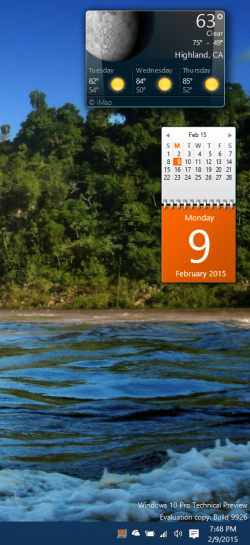
It has also worked to revive that weather gadget on Windows 10 installed as part of 8GadgetPack. Strange that only that weather gadget, originally the stock gadget on Windows 7, got corrupted as the one in Windows 7 did:
Attachment 349266
Not to be brutal bk4, but even after 21546041's validation that your filmreel find works, you are still evading maxseven's question; Don't just say or be happy that what you found works, either corroborate your find with more than saying it has been repaired; Why was it repaired?Quote: Originally Posted by bk4him
This will work on any OS that is 7+, including 10TP. Glad it worked out for you!


I had found the fix at windows 7 weather gadget cannot connect to service - Microsoft Community
I had found the fix at windows 7 weather gadget cannot connect to service - Microsoft Community
Too much misinformation, along with very outdated posts. People are assuming that changing values within the config file is correcting the issue when simply modifying the file by clicking "file->save" with 0 changes is enough to solve the issue.
notepad "%userprofile%\AppData\Local\Microsoft\Windows Live\Services\Cache\Config.xml"Hi again folks, apologies for the confusion.
I am the owner of thefilmreel.tk, and I have created the modified Config.xml file at thefilmreel.tk/Config.xml. The only changes I made were the ones I had previously listed.
I had found the fix at windows 7 weather gadget cannot connect to service - Microsoft Community
As the above forum states, there is no known reason for why the fix works. My best estimation is that MS changed something on their sever end (MSN possibly?). It's equally strange that not all systems were affected.

 rb:
rb:A word of caution if more eyes are going to be seeing this...
Using gadgets provides your machine an easy target for attack. The vast majority of gadgets do not implement secure code so if you do not trust either the route to the server or the server itself that the gadget is connecting to, then don't use gadgets. A "coffee shop pineapple" can see gadget traffic and spoof the update server so he can inject his own code as your "update." And, since there's no security certificate mismatch warning because everything is happening over plain-text, the entire attack can be performed covertly in the background. This was well documented over 2 years ago. Take a look around youtube for some hilarious PoC's. Microsoft didn't want to deal with it because I'm assuming that would mean an entire overhaul of the gadget platform to act more like a traditional browser with anti-XSS protection and the prevention of accessing any ActiveX object or PowerShell script. At that time, they were focused on "Metro" apps anyway. #cringe
It's a shame too because of the usefulness of internet-related gadgets. If you still REALLY want to use gadgets then I would suggest only using "local" gadgets and setup a firewall rule to block all outgoing traffic from sidebar.exe. To me, it's a classic case of too much usability access has resulted in glaring security issues.
I read some think the security issue is overblown.
What port(s) does sidebar use?
What port(s) does sidebar use?
Depending on your IE or proxy configuration settings, 0 to 65535. Sidebar is an IE process.
Using gadgets provides your machine an easy target for attack

That is CONFIRMED! It WORKS! Some dude on MS community suggested overwriting this file and a whole load of other folders and files from a Windows 7 system with working gadgets, but that was an overkill and you needed a second system.Wow, strangely enough that works. I've verified this fix on 2 systems here.
So the new best way to fix this, as you said is to:
in Run Dialog, at command prompt, or in Start Menu search box, paste,
and press return.Code:notepad "%userprofile%\AppData\Local\Microsoft\Windows Live\Services\Cache\Config.xml"
File > Save or Ctrl+S
Place gadget back on desktop, restart sidebar.exe, or wait for existing gadgets to become operational.
That's fine with me. I don't do online shopping nor do I transfer billions of dollars from my PC (actually I prefer real money in my pocket, even for larger amounts, for obvious reasons). What else can these so called "attacks" do to me?A word of caution if more eyes are going to be seeing this...
Using gadgets provides your machine an easy target for attack.
 but did not fix my currency gadget
  .
.


