Weather widget replacement for Windows 7

View attachment 350640
To solve ALL of the "weather gadget" problems, It is from MS, it is CLEAN (no virus/malware) it works 100%, does NOT need to be repaired every couple of days, looks, and functions exactly like the stock one.
I only zipped it to upload here. PLEASE share this, or point others to this thread to solve the problem with the weather gadget. (only the weather gadget) Open zip, double click, install, and go....
This solves it once, and for all. :):):D:D:cool:

Have a great day everybody

Can someone cite the original source for this file? Maybe I'm paranoid, but I'd like to see the original download site rather than someone's upload. Not that I don't appreciate it, but. . . .

What say ye?

Jim (JR)
It is from MICROSOFT.....as in above <from MS>.
It was on the ORIGINAL gadget gallery....no longer available. Will never (to my knowledge) be able to view original source. It is CLEAN (no virus, malware, extra Bu**sh**). I am here to help as much as I know how, that means, to me anyway, I will not try to harm/infect/mess up/damage ANYONES computer. I only zipped the file in order to upload it here, to HELP others. But I also understand the need for caution,...please note, I don't mean to sound snarky, or anything like that, I just want to be clear.

Have a great one. :D:D:D
 

My Computer

Computer type
Laptop
Computer Manufacturer/Model Number
Dell Latitude E6410
OS
Windows 7 Home Premium (64 bit)
CPU
Intel I5 520m
Memory
8 GB
Graphics Card(s)
Intel integrated
Sound Card
IDT Digital Audio
Monitor(s) Displays
Dell ST2010
Screen Resolution
1600X900
Hard Drives
WD Scorpio Black 750GB
Keyboard
Microsoft Wireless Comfort Keyboard 5000
Mouse
Microsoft Wireless Mouse 5000
Internet Speed
350 mb/s down 12 mb/s up
Antivirus
NIS
Browser
Firefox
Other Info
Repaired trash lappy
Can someone cite the original source for this file? Maybe I'm paranoid, but I'd like to see the original download site rather than someone's upload. Not that I don't appreciate it, but. . . .

What say ye?

Jim (JR)

It is from MICROSOFT.....as in above <from MS>.
It was on the ORIGINAL gadget gallery....no longer available. Will never (to my knowledge) be able to view original source. It is CLEAN (no virus, malware, extra Bu**sh**). I am here to help as much as I know how, that means, to me anyway, I will not try to harm/infect/mess up/damage ANYONES computer. I only zipped the file in order to upload it here, to HELP others. But I also understand the need for caution,...please note, I don't mean to sound snarky, or anything like that, I just want to be clear.

Have a great one. :D:D:D

gldndragn,

I don't want you to think that I am questioning your motives, (or anything else!), here. . . I've just learned that "discretion is the better part of valor" over the years. Or as a Master Chief I once knew in the Navy said: "Be careful where you put that thing!" ;)

I was hoping that there was a visible, current source for this that I could point others toward as well, but then again, I was hoping to win the twenty-bazillion dollar power-ball. . . (As well as peace in the Middle East and the Ukraine, and honest government, and. . . .)

I'll have to give it a try.

(snarky comment)
I wonder. . . . The "original" gadgets are (ahem!), "security risks", but this one isn't. (Because it's from Microsoft) So, why didn't Microsoft publish/re-publish this particular "gadget" as a fix for the "defective" ones? (i.e. They took down the entire original gadget gallery instead of just removing the "broken" gadgets.)

The only sense I can see is that Microsoft is pushing the whole Win8 experience, apps, cruft, junk, etc. etc. etc.
:axe: :orb:
(/snarky comment)

Sigh. . . .

What say ye?

Jim (JR)
 

My Computer

Computer type
PC/Desktop
OS
Two soup cans and some string.
CPU
Multi-Processor - TWO large rubber bands!
Memory
Huh? Wassit?! I don't remember. . .
Monitor(s) Displays
Etch-a-Sketch.
Screen Resolution
To have less glitches this year.
Mouse
Nope. Killed 'em all off last summer.
Other Info
I actually have several machines that all frustrate me. That's why I'm here, not to try and impress people with sordid tales of outrageous hardware.
I'll have to give it a try.
I did, and it seemed OK, though on one computer of mine it didn't want to install normally and I had to do a workaround to get it to work.

A very odd thing was when I ran TDSSKiller on this computer today to check something else, it reported my sidebar.exe as "forged" somehow and quarantined it.

So my gadgets are turned-off ATM. Anyone know why Sidebar.exe might be disliked by Kaspersky TDSS Killer????
 

My Computer

Computer type
Laptop
Computer Manufacturer/Model Number
Dell Latitude E6540 Laptop
OS
Windows 7 Professional 64bit
CPU
Intel Core i7 4600M @ 2.90GHz
Motherboard
Dell Inc. 0CYT5F (SOCKET 0)
Memory
16.0GB Dual-Channel DDR3 @ 797MHz (11-11-11-28)
Graphics Card(s)
Intel HD Graphics 4600 (Dell) 2048MB ATI AMD Radeon HD 8790M
Sound Card
Realtek High Definition Audio
Monitor(s) Displays
HP ZR30w (2560x1600@60Hz)
Hard Drives
256GB LITEONIT LMT-256M6M-41 mm SATA (SSD)
1TB Samsung SSD 860 EVO mSATA SATA (SSD)
2TB USB 3.0 USB Device
115GB SanDisk Ultra Fit USB
Other Info
Multiple Dell E-Port Plus II Port Replicator/Docking Stations 0Y72NH USB 3.0 + 130W AC Adapters
It is from MICROSOFT.....as in above <from MS>.
It was on the ORIGINAL gadget gallery....no longer available. Will never (to my knowledge) be able to view original source.

As the late Dr. Edward Teller once said: "Of course, not true." (Trinity and Beyond)

Source #1: The Internet Wayback Machine
Internet Archive Wayback Machine

Source #2: A site that appears to mirror what the "www.gallery.microsoft.com" site used to look like at some point in time:
MSN Weather 2.0 - Windows Sidebar Gadget Gallery

Notes:

  • The Wayback Machine snapshots do not always link to active downloads.
  • The "gallery-live.com" site is of unknown integrity, (i.e. I don't know if the gadgets there are legit, skumware, or what), however the MSN Weather 2.0 download from this site has exactly the same MD5 and SHA1 hash values as the one posted here.
It would be tremendously helpful if someone out there in Television Land could vet and/or recommend alternate gadget sources that are not known skumsites.

What say ye?

Jim (JR)
 
Last edited:

My Computer

Computer type
PC/Desktop
OS
Two soup cans and some string.
CPU
Multi-Processor - TWO large rubber bands!
Memory
Huh? Wassit?! I don't remember. . .
Monitor(s) Displays
Etch-a-Sketch.
Screen Resolution
To have less glitches this year.
Mouse
Nope. Killed 'em all off last summer.
Other Info
I actually have several machines that all frustrate me. That's why I'm here, not to try and impress people with sordid tales of outrageous hardware.
Hello!
I replace weather gadget this gadget:
Weather - Windows 7 Desktop Gadget
But save config.xml (original gadget) working some days.
How to replace this url (original gadget)?:gadgets.live.com/configW7.xml
 

My Computer

Computer type
PC/Desktop
Computer Manufacturer/Model Number
Asus
OS
Vista Ultimate, Windows 7 Professional
CPU
i3 3230
Motherboard
Asus
Memory
8GB
Browser
Mozilla
Hello!
I replace weather gadget this gadget:
Weather - Windows 7 Desktop Gadget
But save config.xml (original gadget) working some days.
How to replace this url (original gadget)?:gadgets.live.com/configW7.xml

Gabee,

I am not sure what you are trying to tell me here. Let me see if I understand.

You tried to:

  • Install a new weather gadget to replace the original weather gadget supplied with Windows.
  • However, you tried to use the config.xml file from the original gadget, instead of letting the new gadget create a new one for itself.
Am I right?

Assuming that I am, I am not sure that it will work that way. The best way is to remove the original gadget from your desktop, install the new gadget, and then place it on your desktop from the gadget menu. You should also allow the gadget to create whatever supporting configuration files it needs instead of trying to re-use the configuration files from the original gadget.

What I would have done is this:

  • Install the new gadget into the system by double clicking the gadget file.
  • Open the "Gadget" menu by right-clicking on an unused section of your desktop and selecting "Gadgets" from the drop-down menu.
  • Move the newly installed gadget to the desktop, placing it wherever you want it, allowing it to create its own configuration files.
  • Configure the gadget however you want as far as location, units of measure, size, etc.

To remove the new gadget and replace it with the old one, you should:

  • Use the "X" selection in the gadget's side-bar menu to remove the existing gadget from your desktop. (See upload "Gadget showing side-bar menu")
  • Right-click on an unused area of your desktop, select "Gadgets", and then move the original Weather gadget, (that looks like a "sun"), onto your desktop. Then configure the gadget however you wish.
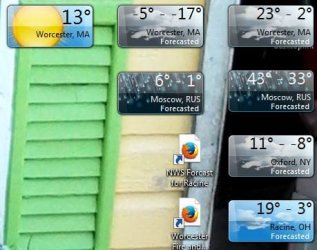
When I installed the MSN Weather 2.0 gadget on my desktop, I wanted to compare it to the gadgets I had already installed, so I installed it alongside my pre-existing gadgets as shown in the snapshot file "gadget snapshot" that I have attached. I placed it that way so that I could compare the new gadget with the original ones. (The new gadget is the one that's working, the others that say "forecasted", are the old Windows gadgets that are giving us so much grief. :banghead:

Note that I do not know if uploaded files retain their original filenames after being uploaded. In case they do not, the files are as follows:

  • "Gadget showing side-bar menu.jpg" has an uploaded size of 8.7 KB, and is a small image.
  • "gadget snapshot.jpg" has an uploaded size of 43.3 KB, and is a much larger image.
I hope this helps answer your question. If I have misunderstood, please let me know and I will try to explain better.

What say ye?

Jim (JR)
 

Attachments

  • Gadget showing side-bar menu.jpg
    Gadget showing side-bar menu.jpg
    8.7 KB · Views: 136
  • gadget snapshot.jpg
    gadget snapshot.jpg
    43.3 KB · Views: 134

My Computer

Computer type
PC/Desktop
OS
Two soup cans and some string.
CPU
Multi-Processor - TWO large rubber bands!
Memory
Huh? Wassit?! I don't remember. . .
Monitor(s) Displays
Etch-a-Sketch.
Screen Resolution
To have less glitches this year.
Mouse
Nope. Killed 'em all off last summer.
Other Info
I actually have several machines that all frustrate me. That's why I'm here, not to try and impress people with sordid tales of outrageous hardware.
A quick fix - once and for all

OK, everybody!

For the last seven pages or so, we've all been talking about how to "solve" the problem with these [$%#&^@!!!] gadgets that M$ has so, so very thoughtfully decided to depreciate on us.

People are installing VB scripts, using new versions of gadgets, burning brown rice, sacrificing small rodents, dancing by the dark of the moon, and other similarly productive things. ;)

Here's a quick guaranteed fix that requires no brown rice, no blood sacrifice, is totally transparent, and does not require you to replace any gadgets.

Theory:
As someone noted; if you can manage, somehow or other, to "touch" the config.xml file in your %userprofile%\AppData\Local\Microsoft\Windows Live\Services\Cache directory, it resets the gadgets back to their working state. . . . Untill the poison-pill times out again, which usually takes a few days.

If you can, somehow or other, automate the task of "touching" this file, you can prevent the poison-pill from ever timing out and your gadgets should continue to work as they always did. That is until M$ decides to depreciate the server these gadgets depend on.
:axe: :orb:

Solution:
I created a simple batch file that I have placed in the "startup" folder within the Start menu, that I call "gadgetKITA.bat" (Gadget Kick-in-the-@$$) that gives them a kick up the bum each time the system starts.

Viz.:
Code:
@echo off
copy /Y "%userprofile%\AppData\Local\Microsoft\Windows Live\Services\Cache\Config - Copy.xml" "%userprofile%\AppData\Local\Microsoft\Windows Live\Services\Cache\Config.xml"
This is how I did it:

  1. Navigate to your AppData\Local\Microsoft\Windows Live\Services\Cache directory.
  2. Right-click on your pre-existing Config.xml file, and select "Copy"
  3. Left-click on any blank space in the directory, (to remove the focus from the "Config.xml" file), right-click, and select "Paste". You should now have a new file named "Config - Copy.xml" in that directory too.
  4. Right-click somewhere in the directory, select "New" --> "Text File". Name the text file "gadgetkita" (which becomes "gadgetkita.txt")
  5. Copy and paste the contents of the code block above into that text file, save it and close.
  6. Rename the text file from "gadgetkita.txt" to "gadgetkita.bat" - which automagically transforms it into a Mighty Batch File!
  7. Right click the batch file you just created, select copy.
  8. Left click anywhere else (to remove the focus from the batch file), and select "Paste Shortcut" which places a shortcut into the directory.
  9. Copy (move) the shortcut to your Start --> startup directory and you're done!
  10. Or. . . You can use the batch file I uploaded, which is exactly the same as the code block above. You can place this into your Cache directory, (after you made the copy of the Config.xml file described in steps 1-3!), and use that.
    1. Note that the batch file expects to find a file named "Config - Copy.xml" in the Cache directory. If that file does not exist, the batch file will fail.

To test it:

  1. Delete the "Config.xml" file from the directory - or rename it if you're as paranoid as I am!
  2. Double-click the batch file in that directory.
  3. Verify that the "Config.xml" file reappears.
Now, every time you restart your system, the gadget poison-pill timer gets reset. If you're like me, you restart your system at least once a day, so you should be golden!

What say ye?

Jim (JR)
 

Attachments

Last edited:

My Computer

Computer type
PC/Desktop
OS
Two soup cans and some string.
CPU
Multi-Processor - TWO large rubber bands!
Memory
Huh? Wassit?! I don't remember. . .
Monitor(s) Displays
Etch-a-Sketch.
Screen Resolution
To have less glitches this year.
Mouse
Nope. Killed 'em all off last summer.
Other Info
I actually have several machines that all frustrate me. That's why I'm here, not to try and impress people with sordid tales of outrageous hardware.
I'm curious. Just what is the footprint of malware that allows you to claim you've never seen one come through Gadgets? I mean how do you know? What in the malware is a sign that excludes Gadgets?
 

My Computer

Computer type
PC/Desktop
Computer Manufacturer/Model Number
Built 2/11/2011
OS
Windows 7 Pro-x64
CPU
i7-2600 3.4GHz - 3.8GHz Turbo
Motherboard
Intel DH67BL-B3
Memory
8Gb - 2x4GB, Muskin 991770 PC3-1333
Graphics Card(s)
Integrated Intel HD 2000
Sound Card
Integrated Intel 10.1 HD, RealTek ALC892
Monitor(s) Displays
Asus LCD VH222H, Haier HL24XSL2a
Screen Resolution
1920x1080, 1920x1080
Hard Drives
Crucial SSD C300-128Gb,
Western Digital WD5002AALX - 500Gb,
Western Digital WD7501AALS - 750Gb
PSU
Seasonic 650W 80+ Gold Modular
Case
Rosewill Defender
Cooling
Stock CPU, Four 120mm case fans, PCH fan added
Keyboard
Logitech EX100 Y-RBH94 Wireless
Mouse
Logitech EX100 M-RCE95 Wireless
Internet Speed
3.0/1.5 Mbs
Antivirus
Microsoft Security Essentials
Browser
Microsoft Internet Explorer 11
Other Info
Antec Veris Premier-Multimedia IR Station,
Cyber Accoustics-3602 Speakers,
AFT XM-5U Card Reader,
Hauppauge TV-HVR-2250,
Sony LX300 USB Turntable

My Computer

Computer type
PC/Desktop
Computer Manufacturer/Model Number
iBuyPower NZXT
OS
Microsoft Windows 10 Home Build 15036
CPU
Intel(R) Core(TM) i7-860 @ 2.80GHz
Motherboard
Gigabyte Technology Co., Ltd. P55-UD3L
Memory
4.00 GB
Graphics Card(s)
NVIDIA GeForce GTX 750
Sound Card
(1) Line 6 UX2 (2) Realtek High Definition Audio
Monitor(s) Displays
23" acer
Screen Resolution
1920 x 1080 x 32 bits (4294967296 colors) @ 60 Hz
Hard Drives
(1) WDC WD5000AAKS-00D2B0 ATA Device (2) Seagate FreeAgent Go 250G USB Device
Cooling
Corsair H75 liquid cooler (Very easy to install, actually)
Internet Speed
60M cable modem-->Linksys E1200-->1Gbps net card
Browser
Chrome
Other Info
This is probably the longest I've ever had a Windows machine run without having to restore it to scratch. I'm used to restoring to "factory" about every 2 yrs. I've run with Win7 since new in 2009 and only recently (Nov, '14) restored to clean up the machine from all my 'xperimenting. LOL!! I may never need another machine.

Upgraded to 10 when it was still free, then installed 2017 update.
The "opt-outs" are generally hidden or confusing. Most don't realize that Malware is included when they select Express Install. The fact that they are there at all turns me off from Cnet. And why do they think you need a download manager? No one has needed one of those since Windows 95. It's just another malware link to your PC. :rolleyes:

They are nothing but a virus/malware farm.

I'm still waiting for the answer to my question above.
 

My Computer

Computer type
PC/Desktop
Computer Manufacturer/Model Number
Built 2/11/2011
OS
Windows 7 Pro-x64
CPU
i7-2600 3.4GHz - 3.8GHz Turbo
Motherboard
Intel DH67BL-B3
Memory
8Gb - 2x4GB, Muskin 991770 PC3-1333
Graphics Card(s)
Integrated Intel HD 2000
Sound Card
Integrated Intel 10.1 HD, RealTek ALC892
Monitor(s) Displays
Asus LCD VH222H, Haier HL24XSL2a
Screen Resolution
1920x1080, 1920x1080
Hard Drives
Crucial SSD C300-128Gb,
Western Digital WD5002AALX - 500Gb,
Western Digital WD7501AALS - 750Gb
PSU
Seasonic 650W 80+ Gold Modular
Case
Rosewill Defender
Cooling
Stock CPU, Four 120mm case fans, PCH fan added
Keyboard
Logitech EX100 Y-RBH94 Wireless
Mouse
Logitech EX100 M-RCE95 Wireless
Internet Speed
3.0/1.5 Mbs
Antivirus
Microsoft Security Essentials
Browser
Microsoft Internet Explorer 11
Other Info
Antec Veris Premier-Multimedia IR Station,
Cyber Accoustics-3602 Speakers,
AFT XM-5U Card Reader,
Hauppauge TV-HVR-2250,
Sony LX300 USB Turntable
The "opt-outs" are generally hidden or confusing. Most don't realize that Malware is included when they select Express Install. The fact that they are there at all turns me off from Cnet. And why do they think you need a download manager? No one has needed one of those since Windows 95. It's just another malware link to your PC. :rolleyes:

They are nothing but a virus/malware farm.

I'm still waiting for the answer to my question above.

Not all are Viruses/malware. For example to get AVG free, you have to download it from cnet and I think it is the same with free Macrium. You can download free Macrium reflect from another download site. I read the following on the web, some downloads you have to be logged-in to Cnet to see the real download link
 

My Computer

Computer type
PC/Desktop
Computer Manufacturer/Model Number
Dell All in one Inspiron 2020
OS
W10 32 bit, XUbuntu 18.xx 64 bit
CPU
Intel(R) Celeron(R) CPU G1620T @ 2.40GHz, 2400 Mhz
Motherboard
Dell
Memory
4GB
Graphics Card(s)
Intel HD graphics
Sound Card
High Definition Audio Device
Monitor(s) Displays
20 inch Screen
Screen Resolution
W7=1280 x 720 & Linux Mint Xfce=1360 x 768
Hard Drives
500 GB hard drive
Keyboard
Usb
Mouse
Usb
Internet Speed
High-Speed
Antivirus
MSE
Browser
Main Browser Firefox
Other Info
I have done a clean install of Windows 7 using Dell re-installation disk (Dell sent me one). I also use Free Macrium reflect backup and restore.

My Computer

Computer type
PC/Desktop
Computer Manufacturer/Model Number
Built 2/11/2011
OS
Windows 7 Pro-x64
CPU
i7-2600 3.4GHz - 3.8GHz Turbo
Motherboard
Intel DH67BL-B3
Memory
8Gb - 2x4GB, Muskin 991770 PC3-1333
Graphics Card(s)
Integrated Intel HD 2000
Sound Card
Integrated Intel 10.1 HD, RealTek ALC892
Monitor(s) Displays
Asus LCD VH222H, Haier HL24XSL2a
Screen Resolution
1920x1080, 1920x1080
Hard Drives
Crucial SSD C300-128Gb,
Western Digital WD5002AALX - 500Gb,
Western Digital WD7501AALS - 750Gb
PSU
Seasonic 650W 80+ Gold Modular
Case
Rosewill Defender
Cooling
Stock CPU, Four 120mm case fans, PCH fan added
Keyboard
Logitech EX100 Y-RBH94 Wireless
Mouse
Logitech EX100 M-RCE95 Wireless
Internet Speed
3.0/1.5 Mbs
Antivirus
Microsoft Security Essentials
Browser
Microsoft Internet Explorer 11
Other Info
Antec Veris Premier-Multimedia IR Station,
Cyber Accoustics-3602 Speakers,
AFT XM-5U Card Reader,
Hauppauge TV-HVR-2250,
Sony LX300 USB Turntable

My Computer

Computer type
PC/Desktop
Computer Manufacturer/Model Number
Dell All in one Inspiron 2020
OS
W10 32 bit, XUbuntu 18.xx 64 bit
CPU
Intel(R) Celeron(R) CPU G1620T @ 2.40GHz, 2400 Mhz
Motherboard
Dell
Memory
4GB
Graphics Card(s)
Intel HD graphics
Sound Card
High Definition Audio Device
Monitor(s) Displays
20 inch Screen
Screen Resolution
W7=1280 x 720 & Linux Mint Xfce=1360 x 768
Hard Drives
500 GB hard drive
Keyboard
Usb
Mouse
Usb
Internet Speed
High-Speed
Antivirus
MSE
Browser
Main Browser Firefox
Other Info
I have done a clean install of Windows 7 using Dell re-installation disk (Dell sent me one). I also use Free Macrium reflect backup and restore.

My Computer

Computer type
PC/Desktop
Computer Manufacturer/Model Number
Self-Built
OS
Windows 7 Professional X64
CPU
Core i7 (2nd gen) i7-2600K / 3.40GHz
Motherboard
ASUS P8Z77-V Intel 7 Series Motherboard
Memory
DDR3 2400MHz (OC) 16gb
Graphics Card(s)
Intel(R) HD Graphics 3000, -1988 Mb
Sound Card
8 ChannelsAudio Chipset Realtek ALC892
Monitor(s) Displays
LG 29UM65 Black 29"
Screen Resolution
2560 x 1080
Hard Drives
840 EVO 250 GB SSD ;2tb (2);Seagate;1tb Seagate; 750 gb Seagate; wd ext (2) 750 gb,WD 2tb X 2;WD 3TB Black
PSU
750 watt
Case
Thermaltake RX -1
Cooling
2120mm Fans Included 1Other Fan Ports 5x 200mm Fan Ports
Keyboard
Microsoft Digital Media Pro
Mouse
Microsoft Wireless 6000
Internet Speed
U-verse 18 mbps
Antivirus
MSE
Browser
Firefox, Chrome and my favorite: Pale Moon
Other Info
HdHomerun Dual Tuner.
SRS Audio Lab,
Pioneer BDR 208-DBK
PS3-What a difference in my Surround Sound Receiver!
HP 4540s - My new Toy.
Epson R280 Printer- To personalize my Dvds.
Canon MP 560 - For scanning.
If I had my choice of buying my groceries in a clean, well-lit store or from a shady dive in the bad part of town, which one do you think I'd pick? Sure, I might get away with it at the dodgy place, but you only need to goof once.

Why would anyone get software from a place where if they get distracted for even a single moment they might get hosed?
 

My Computer

Computer Manufacturer/Model Number
Self
OS
Main - Windows 7 Pro SP1 64-Bit; 2nd - Windows Server 2008 R2
CPU
Main - Core i7 2600K; 2nd - Core i7 920
Motherboard
Main - Asus P8Z68-V Pro/Gen3; 2nd - Gigabyte GA-EX58-UDR3
Memory
Main - 16GB Corsair Vengeance; 2nd - 12GB Corsair Vengeance
Graphics Card(s)
Main - XFX Radeon 6870 1GB; 2nd - XFX Radeon 4870 1GB
Sound Card
Both: Onboard Realtek Azalia
Monitor(s) Displays
Main - Hann 25" + I-INC 25" + Acer 23"; 2nd - Upgrading Soon
Screen Resolution
Main - 1920x1080 (All Three Monitors); 2nd - Upgrading Soon
Hard Drives
Main - (1) Crucial M4 128GB (Boot)
Main - (1) Seagate 2TB 64MB Cache (Data)
Main - (1) Seagate 2TB 64MB Cache (Data Backup)
2nd - (1) Intel X25-M SSD 80GB (Boot)
2nd - (3) Seagate 1TB 32MB Cache (Data Backup)
2nd - (1) Seagate 320GB (Because)
PSU
Main - OCZ 600W Modular; 2nd - OCZ 600W
Case
Main - Thermaltake Element G; 2nd - NZXT something or other
Cooling
Main - Corsair H80; 2nd - Prolimatech Megahalems
Keyboard
Main - Razer Reclusa; 2nd - Old MS Keyboard
Mouse
Main - Logitech MX Revolution; 2nd - Old MS Mouse
Internet Speed
20Mbps Time-Warner Cable
If I had my choice of buying my groceries in a clean, well-lit store or from a shady dive in the bad part of town, which one do you think I'd pick? Sure, I might get away with it at the dodgy place, but you only need to goof once.

Why would anyone get software from a place where if they get distracted for even a single moment they might get hosed?


Actually for me it will depend on how cheap the groceries cost in the shady dive area. Usually it is better to shop at shady groceries store in the daylight. We have one here but it is not cheap but they make a real good strawberry desert.
 

My Computer

Computer type
PC/Desktop
Computer Manufacturer/Model Number
Dell All in one Inspiron 2020
OS
W10 32 bit, XUbuntu 18.xx 64 bit
CPU
Intel(R) Celeron(R) CPU G1620T @ 2.40GHz, 2400 Mhz
Motherboard
Dell
Memory
4GB
Graphics Card(s)
Intel HD graphics
Sound Card
High Definition Audio Device
Monitor(s) Displays
20 inch Screen
Screen Resolution
W7=1280 x 720 & Linux Mint Xfce=1360 x 768
Hard Drives
500 GB hard drive
Keyboard
Usb
Mouse
Usb
Internet Speed
High-Speed
Antivirus
MSE
Browser
Main Browser Firefox
Other Info
I have done a clean install of Windows 7 using Dell re-installation disk (Dell sent me one). I also use Free Macrium reflect backup and restore.
Log in?
:haha:

You clearly have not read their Privacy Policy. :)

https://cbsi.secure.force.com/CBSi/...erer=mobilepprivacy.com&data=&cfs=default#Use of Information

:huh: ? I am not really sure what you meant. I read the privacy policy. All webpages have privacy polices.

CBS is a mass media corruption, err, ah, Corporation. How do you think they make their money? They sell advertising. I don't care to have my information spread to thousands of other "affiliates" or have my browsing experience enhanced with more advertising or be redirected to sites THEY think I should see. So I'm certainly not going to Join and Login. That's what I mean and it's disclosed in their PP.

For you, it must be ok. For me, it's not. That's why I thought it was funny that you would even suggest joining their circle of corruption.
 

My Computer

Computer type
PC/Desktop
Computer Manufacturer/Model Number
Built 2/11/2011
OS
Windows 7 Pro-x64
CPU
i7-2600 3.4GHz - 3.8GHz Turbo
Motherboard
Intel DH67BL-B3
Memory
8Gb - 2x4GB, Muskin 991770 PC3-1333
Graphics Card(s)
Integrated Intel HD 2000
Sound Card
Integrated Intel 10.1 HD, RealTek ALC892
Monitor(s) Displays
Asus LCD VH222H, Haier HL24XSL2a
Screen Resolution
1920x1080, 1920x1080
Hard Drives
Crucial SSD C300-128Gb,
Western Digital WD5002AALX - 500Gb,
Western Digital WD7501AALS - 750Gb
PSU
Seasonic 650W 80+ Gold Modular
Case
Rosewill Defender
Cooling
Stock CPU, Four 120mm case fans, PCH fan added
Keyboard
Logitech EX100 Y-RBH94 Wireless
Mouse
Logitech EX100 M-RCE95 Wireless
Internet Speed
3.0/1.5 Mbs
Antivirus
Microsoft Security Essentials
Browser
Microsoft Internet Explorer 11
Other Info
Antec Veris Premier-Multimedia IR Station,
Cyber Accoustics-3602 Speakers,
AFT XM-5U Card Reader,
Hauppauge TV-HVR-2250,
Sony LX300 USB Turntable
CBS is a mass media corruption, err, ah, Corporation. How do you think they make their money? They sell advertising. I don't care to have my information spread to thousands of other "affiliates" or have my browsing experience enhanced with more advertising or be redirected to sites THEY think I should see. So I'm certainly not going to Join and Login. That's what I mean and it's disclosed in their PP.

For you, it must be ok. For me, it's not. That's why I thought it was funny that you would even suggest joining their circle of corruption.

Carwiz,

Though I think this is all wide of the point, CNET, Downloads.com, MajorGeeks, et.al., are not the only fish in that particular pond. There are many, many "legitimate" web sites that do this same kind of horse-hooey.

One case in point is Adobe. If you want to download Reader, Flash, or Shockwave, there is always the "extra" stuff, (the "extra added attractions", as they used to say in the movies), that you have to be careful to un-check.

M$, Google, you name it - they all want to "enhance" your experience with browser bars, add-ons, download managers, etc. etc. etc. etc. (and so on) Even SourceForge is - to some extent - getting in on the fun.

And God Himself help the poor sod who has "Microsoft Update" enabled on his machine! If I had two Russian Kopeks, (about 1/30 of a U.S. penny), for every time I had to hide, hide again, and re-hide Microsoft's "Important" downloads for Silverlight, Bing, ad nauseum, I'd be a multi-gazillionare by now.

It is indeed unfortunate that browsing the web nowadays is tantamount to walking alone through Central Park in NYC after dark.

My point is not to say that surfing the web, and accepting Internet downloads isn't dangerous at times. What I am trying to say is that you can't point the fickle finger of fate at CNET, etc. It's like Congress, they're all doing it.

What say ye?

Jim (JR)
 
Last edited:

My Computer

Computer type
PC/Desktop
OS
Two soup cans and some string.
CPU
Multi-Processor - TWO large rubber bands!
Memory
Huh? Wassit?! I don't remember. . .
Monitor(s) Displays
Etch-a-Sketch.
Screen Resolution
To have less glitches this year.
Mouse
Nope. Killed 'em all off last summer.
Other Info
I actually have several machines that all frustrate me. That's why I'm here, not to try and impress people with sordid tales of outrageous hardware.
1. Close the weather gadget.
2. Open the following with your default notepad editor: %userprofile%\AppData\Local\Microsoft\Windows Live\Services\Cache\Config.xml
3. Make no changes and simply click file->save and then exit.
4. Re-open the gadget and it should work.

Did someone forget something over there at Live.com?
This didn't work the first time I did it.
The second time it did work.

Thank you. :dinesh:
 

My Computer

Computer type
PC/Desktop
OS
Windows 7 Professional x64
CPU
AMD Phenom II X6 1090T Black Edition 3.2GHZ
Motherboard
ASUS Crosshair IV Extreme AM3
Memory
(4x) Corsair Dominator 4GB DDR3-1600
Graphics Card(s)
Sapphire Radeon HD 6970 2GB GDDR5
Sound Card
Integrated
Monitor(s) Displays
(3x) ASUS VW266H 25.5 LCD 1920X1200 2MS
Screen Resolution
6048x1200
Hard Drives
SSD= (2x) OCZ Vertex 2 Extended 180GB 2.5IN SATA2
HDD= (3x) Seagate Barracuda XT 7200 2TB SATA 6.0GB/S
DVD= (2x) LG 24X Super Multi SATA DVD Writer
BRDVD= LG 12X SATA Reader
PSU
Corsair AX850
Case
Corsair Obsidian 800D
Cooling
Corsair H100i
Keyboard
SteelSeries 7G
Mouse
SteelSeries Sensei
Internet Speed
25 Mbps Up / 7 Mbps Down
Antivirus
MSE
Browser
Chrome
Back
Top