Weather widget replacement for Windows 7

The fix works, but apparently it only works temporarily. Now it's dead again, just 5 days after fixing it. Maybe there's some kind of process that kills it, just to make sure that we are "protected"? Something seems to reset the file at some point.

Not much of a problem though, you can easily save the file with a batch file and even put it on system startup.
 

My Computer

Computer type
PC/Desktop
Computer Manufacturer/Model Number
Assembled
OS
Windows 7 Ultimate 64-bit
CPU
E8400
Motherboard
Abit IP 35 PRO
Memory
Mushkin 4GB dual channel kit, 1033 MHz, 5-5-5-15
Graphics Card(s)
nVidia GT 630
Sound Card
Creative Audigy SE
Monitor(s) Displays
BENQ GL2460 - 24" + BENQ GL2450 - 24"
Screen Resolution
3840x1080
Hard Drives
KINGSTON SV300S37A60G 60GB SSD for OS
Seagate ST380815AS 80GB
Seagate ST3500320AS 500GB
WDC WD2500AAJS-00VTA0 250GB
PSU
Spire Rocketeer 600W
Case
Aplus XClio
Cooling
Cool cooling :P
Keyboard
Noname (expensive Logitechs dissolve in tea)
Mouse
HAMA AM 7300
Internet Speed
About 12 MB/s
Antivirus
Este NOD32
Browser
Firefox FTW
I believe it's IE11 security enhancements. It went away whenever I rolled back to 10 but it's getting too old to do that safely now.

It also seems to kill the same stock Win7 gadgets when you upgrade to 8GadgetPack - Gadgets for Windows 8 / 8.1 although there are many more choices in each category there.
 
I believe it's IE11 security enhancements.
I think this is right. I lost the Weather widget again and I've installed a couple of IE11 Security Updates recently.

But the gadget came-back again after fiddling with Config.xml. :huh:
 

My Computer

Computer type
Laptop
Computer Manufacturer/Model Number
Dell Latitude E6540 Laptop
OS
Windows 7 Professional 64bit
CPU
Intel Core i7 4600M @ 2.90GHz
Motherboard
Dell Inc. 0CYT5F (SOCKET 0)
Memory
16.0GB Dual-Channel DDR3 @ 797MHz (11-11-11-28)
Graphics Card(s)
Intel HD Graphics 4600 (Dell) 2048MB ATI AMD Radeon HD 8790M
Sound Card
Realtek High Definition Audio
Monitor(s) Displays
HP ZR30w (2560x1600@60Hz)
Hard Drives
256GB LITEONIT LMT-256M6M-41 mm SATA (SSD)
1TB Samsung SSD 860 EVO mSATA SATA (SSD)
2TB USB 3.0 USB Device
115GB SanDisk Ultra Fit USB
Other Info
Multiple Dell E-Port Plus II Port Replicator/Docking Stations 0Y72NH USB 3.0 + 130W AC Adapters
Hah, mine came back on it's own... :D
 

My Computer

Computer type
PC/Desktop
Computer Manufacturer/Model Number
Assembled
OS
Windows 7 Ultimate 64-bit
CPU
E8400
Motherboard
Abit IP 35 PRO
Memory
Mushkin 4GB dual channel kit, 1033 MHz, 5-5-5-15
Graphics Card(s)
nVidia GT 630
Sound Card
Creative Audigy SE
Monitor(s) Displays
BENQ GL2460 - 24" + BENQ GL2450 - 24"
Screen Resolution
3840x1080
Hard Drives
KINGSTON SV300S37A60G 60GB SSD for OS
Seagate ST380815AS 80GB
Seagate ST3500320AS 500GB
WDC WD2500AAJS-00VTA0 250GB
PSU
Spire Rocketeer 600W
Case
Aplus XClio
Cooling
Cool cooling :P
Keyboard
Noname (expensive Logitechs dissolve in tea)
Mouse
HAMA AM 7300
Internet Speed
About 12 MB/s
Antivirus
Este NOD32
Browser
Firefox FTW
The fix works, but apparently it only works temporarily. Now it's dead again, just 5 days after fixing it. Maybe there's some kind of process that kills it, just to make sure that we are "protected"? Something seems to reset the file at some point.

Not much of a problem though, you can easily save the file with a batch file and even put it on system startup.

I've noticed that too, works for a few days then needs to be resaved.
 

My Computer

Computer type
PC/Desktop
Computer Manufacturer/Model Number
Less is more
OS
Windows 7 Ultimate x64 SP1
CPU
Core i7 2600k (4.6GHz)
Motherboard
ASUS P8Z68 Deluxe (3603)
Memory
16GB G.SKILL Ares 1600MHz
Graphics Card(s)
MSI R6970 Lightning
Sound Card
Asus Xonar Essence ST (UNi drivers 1.41)
Monitor(s) Displays
Samsung P2570, CrossOver 27Q LED-P
Screen Resolution
1920*1080, 2560*1440
Hard Drives
256GB OCZ Vector, 2x Hitachi 4TB (7K4000), Hitachi 3TB (7K3000 & 5K3000)
PSU
Seasonic X750
Case
Lian-Li PC-P80N
Cooling
NZXT HAVIK 140 (2x GELID Wing12PL Push/Pull)
Keyboard
CM Storm Trigger (Brown Switch)
Mouse
Logitech G400
Internet Speed
55Mbps/10Mbps
Other Info
Speakers - Klipsch ProMedia 2.1
Headphones - Sennheiser HD595
Router - ASUS RT-N66U
Webcam - Logitech C910
I'm here 6-8 hours per day, every day since Win7 beta without missing a day, and am still waiting to see a single case of infection traced to gadgets.

Maybe if we wait a little longer?


Hello Everybody!

First: I absolutely agree with gregrocker. Since I work with, and test, AV software I see infected systems every day, and no - I do not know of one single instance of a computer being infected by a "gadget".

Going to rogue web sites? Yes. Downloading skumware? Absolutely. Not having a decent AV or security platform installed? You betcha! The list goes on-and-on, but as I have said before: I have never, and I mean NEVER, seen anyone's system compromised because of a gadget.

In fact, I will go so far as to openly challenge Microsoft to demonstrate that someone's system has actually and truly been compromised because of a gadget. And I mean a real, "real world" user, not something cooked up in the lab.

If gadgets are a security risk, (as one writer said later on in this thread), because they do not implement secure protocols, etc., then the internet time service is also a "security risk", any time you use your browser for anything other than an encrypted connection is a security risk, in fact 99.99999% of the stuff people do with their computers would be a "security risk". And the only really effective way to avoid security risks is to keep your system turned off!

Normally, if something comes up as a "security risk", M$ issues a patch via Windows Update. Especially if it is a part of the system "as installed" as gadgets are.

I believe that M$'s logic behind killing gadgets has more to do with promoting the new "gadget" paradigm for Win 8 (<-- GAGH!), than any actual "security" issues.

At the risk of being snarky here, if M$ is so upset about security risks, why not just kill Windows! Windows has more security flaws in the cuticle of it's left pinky toe than "gadgets" have all over their entire body.

IMHO this is less about security and more about marketing Windows 8 than anything else.
(/rant, but this kind of stuff really boils my blood. . . .)

What say ye?

Jim (JR)
 

My Computer

Computer type
PC/Desktop
OS
Two soup cans and some string.
CPU
Multi-Processor - TWO large rubber bands!
Memory
Huh? Wassit?! I don't remember. . .
Monitor(s) Displays
Etch-a-Sketch.
Screen Resolution
To have less glitches this year.
Mouse
Nope. Killed 'em all off last summer.
Other Info
I actually have several machines that all frustrate me. That's why I'm here, not to try and impress people with sordid tales of outrageous hardware.
I solved this problem my own way. I kept IE9 and all my gadgets but never use IE9. I do most of my internet work from a virtual Linux system anyhow. And on the seven system I also have Chrome, Chromium, Opera and Safari - so plenty of choices.

In W8.1 and W10 I use the 8GadgetPack which works.
 

My Computer

Computer Manufacturer/Model Number
HP, Dell, Gateway, Toshiba - 4 laptops and 2 desktops
OS
Vista, Windows7, Mint Mate, Zorin, Windows 8
CPU
from 1.6GHz Duo to i7
Monitor(s) Displays
2x HP w2207
Hard Drives
5x HDD, 7x SSD, 12x Externals
Keyboard
with trackball - no mices
Mouse
Trackball mice
Internet Speed
DSL 6000
You may still be able to uninstall IE11 in Windows Updates>Installed Updates. This will revert to gadget-friendly IE10.

Then use the latest version of Firefox.
 
I work as an IT for a small business. And I believe that Microsoft once again has removed one more of their products that was sold to us...

One thing you need to remember; you did NOT buy software. You purchased the right to USE the software on your computer. Your EULA states that:

The software is licensed, not sold. This agreement only gives you some rights to use the software. Company and
Microsoft reserve all other rights. Unless applicable law gives you more rights despite this limitation, you may use the software only as
expressly permitted in this agreement. In doing so, you must comply with any technical limitations in the software that allow you to use it
only in certain ways. You may not:
• work around any technical limitations in the software;
• reverse engineer, decompile or disassemble the software;
• make more copies of the software than specified in this agreement;
• publish the software for others to copy;
• rent, lease or lend the software


If MS decides to disable a feature of THEIR software, that's within their rights.
 

My Computer

Computer type
PC/Desktop
Computer Manufacturer/Model Number
iBuyPower NZXT
OS
Microsoft Windows 10 Home Build 15036
CPU
Intel(R) Core(TM) i7-860 @ 2.80GHz
Motherboard
Gigabyte Technology Co., Ltd. P55-UD3L
Memory
4.00 GB
Graphics Card(s)
NVIDIA GeForce GTX 750
Sound Card
(1) Line 6 UX2 (2) Realtek High Definition Audio
Monitor(s) Displays
23" acer
Screen Resolution
1920 x 1080 x 32 bits (4294967296 colors) @ 60 Hz
Hard Drives
(1) WDC WD5000AAKS-00D2B0 ATA Device (2) Seagate FreeAgent Go 250G USB Device
Cooling
Corsair H75 liquid cooler (Very easy to install, actually)
Internet Speed
60M cable modem-->Linksys E1200-->1Gbps net card
Browser
Chrome
Other Info
This is probably the longest I've ever had a Windows machine run without having to restore it to scratch. I'm used to restoring to "factory" about every 2 yrs. I've run with Win7 since new in 2009 and only recently (Nov, '14) restored to clean up the machine from all my 'xperimenting. LOL!! I may never need another machine.

Upgraded to 10 when it was still free, then installed 2017 update.
I work as an IT for a small business. And I believe that Microsoft once again has removed one more of their products that was sold to us...

One thing you need to remember; you did NOT buy software. You purchased the right to USE the software on your computer. Your EULA states that:

The software is licensed, not sold. This agreement only gives you some rights to use the software. Company and
Microsoft reserve all other rights. Unless applicable law gives you more rights despite this limitation, you may use the software only as
expressly permitted in this agreement. In doing so, you must comply with any technical limitations in the software that allow you to use it
only in certain ways. You may not:
• work around any technical limitations in the software;
• reverse engineer, decompile or disassemble the software;
• make more copies of the software than specified in this agreement;
• publish the software for others to copy;
• rent, lease or lend the software


If MS decides to disable a feature of THEIR software, that's within their rights.


I am not sure I agree with that last statement. If Microsoft disables something, you are not getting what you paid for whether you bought windows 7 disk or bought a windows 7 computer. Just my view.
 

My Computer

Computer type
PC/Desktop
Computer Manufacturer/Model Number
Dell All in one Inspiron 2020
OS
W10 32 bit, XUbuntu 18.xx 64 bit
CPU
Intel(R) Celeron(R) CPU G1620T @ 2.40GHz, 2400 Mhz
Motherboard
Dell
Memory
4GB
Graphics Card(s)
Intel HD graphics
Sound Card
High Definition Audio Device
Monitor(s) Displays
20 inch Screen
Screen Resolution
W7=1280 x 720 & Linux Mint Xfce=1360 x 768
Hard Drives
500 GB hard drive
Keyboard
Usb
Mouse
Usb
Internet Speed
High-Speed
Antivirus
MSE
Browser
Main Browser Firefox
Other Info
I have done a clean install of Windows 7 using Dell re-installation disk (Dell sent me one). I also use Free Macrium reflect backup and restore.
I look at it from the consumer and not the legal view. This is a feature that's popular with tens of millions of MS Customers so that they don't dare disable it completely. Yet leaving gadgets in a crippled state is as frustrating and irritating with consumers, who visit threads like this via searches and read widespread speculation that this has to do with the whole failed business plan revamp to an Ipad-type touch OS that was going to rent everything through the Store. That is as plausible as non-existent gadget infection.

We were able to finally reach MS execs before the Win8 debacle became Saturday Night Live material and they have corrected course nicely with Windows 10 that gives a billion+ desktop customers something to call their own. Not so much gadgets. I personally spoke with a member of the IE11 team about this issue whose attitude seemed arrogant and anti-consumer.
 
Weather Gadget Fix

Hi i've created some kind of a fix for those who weather gadget stopped updating...

1. Open command prompt Windows logo key
0d8a4985-b5e2-41a6-a1b6-e4bafb517937_92.png
+R and paste this location %userprofile%\AppData\Local\Microsoft\Windows Live\Services\Cache
2. Extract and copy the attached files.
3. This fix requires to be executed at least every 2 days.
4. You can create a desktop shortcut to the Weather Gadget Fix.vbs or you can create an automated task.
5. Open command prompt Windows logo key
0d8a4985-b5e2-41a6-a1b6-e4bafb517937_92.png
+R and paste this command Taskschd.msc
6. On the left side choose Task Scheduler Library, right click and choose create task...
7. In the General tab go to the Name field and enter the name of the task ex: Weather Gadget Fix
8. Click the Triggers tab and press the New... button then select to start task When I log on and accept.
9. Click the Actions tab and press the New... button, in Action selectStart a program
10. In the Program/script field paste this location "%userprofile%\AppData\Local\Microsoft\Windows Live\Services\Cache\Weather Gadget Fix.vbs" and in the Start in (optional) field paste %userprofile%\AppData\Local\Microsoft\Windows Live\Services\Cache and accept.Wellthat's all folks!!! :D
 

Attachments

My Computer

Computer type
PC/Desktop
Computer Manufacturer/Model Number
By Myself
OS
Windows 7 Ultimate x64
CPU
Intel Core 2 Quad Q9400 @ 2.66 GHz
Motherboard
Asus P5Q
Memory
OCZ DDR2 4 GBytes
Graphics Card(s)
NVIDIA GeForce GTX 460
Sound Card
HT OMEGA CLARO Plus+
Monitor(s) Displays
Samsung SyncMaster TA550
Screen Resolution
1920 x 1080
Hard Drives
Western Digital 3x1 TB
PSU
Cooler Master Silent Pro M - 700W
Case
Aerocool Strike X
Cooling
3 fans
Keyboard
SteelSeries Merc Stealth
Mouse
SteelSeries Kinzu v2
Internet Speed
Fibertel cable modem 6Mbps
Antivirus
Comodo Internet Security Premium 7
Browser
Mozilla Firefox 34
Other Info
... and some dust.
I "upgraded" to IE11 thinking that I had to, because of security concerns. If I otherwise use e.g. Comodo Internet Security or Microsoft Security Essentials and practice safe computing, can I downgrade to IE10 or even IE9? I do use IE for all of my banking and billing sites i.e. https because I find its printing options to be better than Firefox, and I've grown so weary of FF's constant "Can't use Java!" and "Are you sure about this Flash?" and other stuff it's doing to "protect me" that I get angry at it.
 

My Computer

Computer type
Laptop
Computer Manufacturer/Model Number
Dell Latitude E6540 Laptop
OS
Windows 7 Professional 64bit
CPU
Intel Core i7 4600M @ 2.90GHz
Motherboard
Dell Inc. 0CYT5F (SOCKET 0)
Memory
16.0GB Dual-Channel DDR3 @ 797MHz (11-11-11-28)
Graphics Card(s)
Intel HD Graphics 4600 (Dell) 2048MB ATI AMD Radeon HD 8790M
Sound Card
Realtek High Definition Audio
Monitor(s) Displays
HP ZR30w (2560x1600@60Hz)
Hard Drives
256GB LITEONIT LMT-256M6M-41 mm SATA (SSD)
1TB Samsung SSD 860 EVO mSATA SATA (SSD)
2TB USB 3.0 USB Device
115GB SanDisk Ultra Fit USB
Other Info
Multiple Dell E-Port Plus II Port Replicator/Docking Stations 0Y72NH USB 3.0 + 130W AC Adapters
View attachment MSNWeather.zip
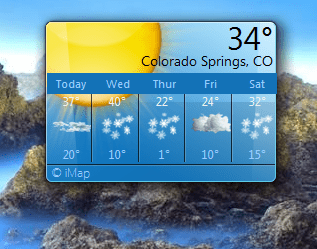
To solve ALL of the "weather gadget" problems, It is from MS, it is CLEAN (no virus/malware) it works 100%, does NOT need to be repaired every couple of days, looks, and functions exactly like the stock one.
I only zipped it to upload here. PLEASE share this, or point others to this thread to solve the problem with the weather gadget. (only the weather gadget) Open zip, double click, install, and go....
This solves it once, and for all. :):):D:D:cool:

Have a great day everybody
 

My Computer

Computer type
Laptop
Computer Manufacturer/Model Number
Dell Latitude E6410
OS
Windows 7 Home Premium (64 bit)
CPU
Intel I5 520m
Memory
8 GB
Graphics Card(s)
Intel integrated
Sound Card
IDT Digital Audio
Monitor(s) Displays
Dell ST2010
Screen Resolution
1600X900
Hard Drives
WD Scorpio Black 750GB
Keyboard
Microsoft Wireless Comfort Keyboard 5000
Mouse
Microsoft Wireless Mouse 5000
Internet Speed
350 mb/s down 12 mb/s up
Antivirus
NIS
Browser
Firefox
Other Info
Repaired trash lappy
Thanks, I have been trialing that MSN Weather gadget in spite of the rendering problems it has:

Capture.PNG

Is anyone else getting this or is it possibly caused by my display chip?
 
I look at it from the consumer and not the legal view. This is a feature that's popular with tens of millions of MS Customers so that they don't dare disable it completely. Yet leaving gadgets in a crippled state is as frustrating and irritating with consumers, who visit threads like this via searches and read widespread speculation that this has to do with the whole failed business plan revamp to an Ipad-type touch OS that was going to rent everything through the Store. That is as plausible as non-existent gadget infection.

@gregrocker:
"Like you read my mind!"

(Potentially off topic)
One of the things that totally burns my biscuits about Windows - and software in general - is that "legally" they have no desire to stand behind their product. AFAIK, every single piece of software I've seen has a clause in its license that goes something like this:
This software comes with no warranty whatsoever. If you bork your system because you installed this piece of unmitigated GAGH!, it just sucks being you.

Even if we advertise it as being the hottest thing since sliced-bread, and it stinks, or is blatantly deceptive, you have zero recourse, and you cannot sue us.

If someone wanted to sell a new car, 'fridge, microwave, or whatever else, with a warranty like that, the state/jurisdiction consumer protection laws would be all over therm like a cheap suit!

Re: Windows 10.
We were able to finally reach MS execs before the Win8 debacle became Saturday Night Live material and they have corrected course nicely with Windows 10 that gives a billion+ desktop customers something to call their own. [emphasis provided by me]

First of all, though I have downloaded the relevant TechNet images, I have not yet had time to play with it. However, I have heard from more than once source that M$ plans to license W10 as a "subscription based" operating system. i.e. You will have to pay an annual fee to continue using it. I don't know if that's actually going to happen, but if it does I predict that there will be a mass exodus to systems like Linux Mint.

I personally spoke with a member of the IE11 team about this issue whose attitude seemed arrogant and anti-consumer.

Ubuntu Linux started out with the paradigm of it being "all about choices", and it attracted a large following because of that user-centered philosophy. Unfortunately they lost track of that concept as Ubuntu became more and more popular, forcing users to accept unilateral decisions absent user input - in fact in direct opposition to user input. As a result, many Ubuntu users bailed and went to Mint - a much more consumer/user-centric distribution.

In the case of Linux, users have this kind of choice. If a particular distribution [censored!!] its user base, there is always another, potentially better, distribution to jump to. And chances are that all the apps and programs used in distribution "A" will work as well, or maybe even better, with distribution "B".

It is unfortunate, but Windows isn't like that. You either put up with M$'s BoooS**t, or you're out of luck.

Maybe I'm still wearing my "rosy tinted glasses", but IMHO, especially if the user base has no other effective choice, it behooves the software company to be particularly sensitive to user input and needs.

Gadgets are a prime example of this. M$ has decided to (in essence), "pull the plug" on Win7 and wants to coerce everyone into using Win8+, like it or not.

(/potentially off topic)
(/rant)

What say ye?

Jim (JR)

 
Last edited:

My Computer

Computer type
PC/Desktop
OS
Two soup cans and some string.
CPU
Multi-Processor - TWO large rubber bands!
Memory
Huh? Wassit?! I don't remember. . .
Monitor(s) Displays
Etch-a-Sketch.
Screen Resolution
To have less glitches this year.
Mouse
Nope. Killed 'em all off last summer.
Other Info
I actually have several machines that all frustrate me. That's why I'm here, not to try and impress people with sordid tales of outrageous hardware.
Off topic

I have heard from more than once source that M$ plans to license W10 as a "subscription based" operating system.
Jharris1993,
Microsoft keeps saying there are not going to do subscription based. A lot of people won't upgrade to windows 10 if it is going to be subscription based from what I read. A lot people including me can't afford an extra bill, I technically shouldn't have internet, I need to keep my mind off of everyday things and problems. The main issue is they have not determined what is the life cycle of a device
 

My Computer

Computer type
PC/Desktop
Computer Manufacturer/Model Number
Dell All in one Inspiron 2020
OS
W10 32 bit, XUbuntu 18.xx 64 bit
CPU
Intel(R) Celeron(R) CPU G1620T @ 2.40GHz, 2400 Mhz
Motherboard
Dell
Memory
4GB
Graphics Card(s)
Intel HD graphics
Sound Card
High Definition Audio Device
Monitor(s) Displays
20 inch Screen
Screen Resolution
W7=1280 x 720 & Linux Mint Xfce=1360 x 768
Hard Drives
500 GB hard drive
Keyboard
Usb
Mouse
Usb
Internet Speed
High-Speed
Antivirus
MSE
Browser
Main Browser Firefox
Other Info
I have done a clean install of Windows 7 using Dell re-installation disk (Dell sent me one). I also use Free Macrium reflect backup and restore.
Thanks, I have been trialing that MSN Weather gadget in spite of the rendering problems it has:

View attachment 350650

Is anyone else getting this or is it possibly caused by my display chip?
I am not getting that. I am currently using Radeon X1950 pro. NO rendering probs......not even on older computers...5-8 years and older......not even on the newest ones either.
Could be display drivers....or possibly need a reboot.
Here are my screenies....
 

Attachments

  • Capture.PNG
    Capture.PNG
    65 KB · Views: 109
  • Capture2.PNG
    Capture2.PNG
    161.3 KB · Views: 110
  • Capture3.PNG
    Capture3.PNG
    133.1 KB · Views: 112

My Computer

Computer type
Laptop
Computer Manufacturer/Model Number
Dell Latitude E6410
OS
Windows 7 Home Premium (64 bit)
CPU
Intel I5 520m
Memory
8 GB
Graphics Card(s)
Intel integrated
Sound Card
IDT Digital Audio
Monitor(s) Displays
Dell ST2010
Screen Resolution
1600X900
Hard Drives
WD Scorpio Black 750GB
Keyboard
Microsoft Wireless Comfort Keyboard 5000
Mouse
Microsoft Wireless Mouse 5000
Internet Speed
350 mb/s down 12 mb/s up
Antivirus
NIS
Browser
Firefox
Other Info
Repaired trash lappy
I believe it's IE11 security enhancements. It went away whenever I rolled back to 10 but it's getting too old to do that safely now.

Not true. At least not in my case.

My Win7-64bit laptop is running IE-9, My wife's system (Also Win7-64bit), is running IE-10, and we both experience the same problem. And we both have the same solution: "touching*" the C:\Users\....\AppData\Local\Microsoft\Windows Live\Services\Cache\Config.xml file.

Maybe there are (ahem!) "security enhancements" that caused this debacle, but they're not specific to IE-11. If I knew what they were, I'd back them out so fast the smoke would still be coming from my hard drive!

If I knew what "service" (or whatever), gets restarted when you touch that file, I'd write a script that would run periodically - say at system startup, or hourly, or whatever - that would give that service a kick up the bum and get it going again if it had stopped.

What say ye?

Jim (JR)

* "Touching" a file:
Doing something to it so that the file is "changed", and therefore the last access time is updated.

There is a Linux/Unix command, "touch", which does exactly that, it changes the last access time to the current system time without actually changing the file itself. If there is a program or service that watches the file to see if it has changed, "touching" the file will trigger it.

A convenient way to do this in Windows is to open the file in notepad, add a space somewhere and then remove it, (which marks the file as "dirty"/"changed"), and then re-save it. I do this because I have noticed that simply opening the file, and then re-saving it, does not always work.
 
Last edited:

My Computer

Computer type
PC/Desktop
OS
Two soup cans and some string.
CPU
Multi-Processor - TWO large rubber bands!
Memory
Huh? Wassit?! I don't remember. . .
Monitor(s) Displays
Etch-a-Sketch.
Screen Resolution
To have less glitches this year.
Mouse
Nope. Killed 'em all off last summer.
Other Info
I actually have several machines that all frustrate me. That's why I'm here, not to try and impress people with sordid tales of outrageous hardware.
View attachment 350640
To solve ALL of the "weather gadget" problems, It is from MS, it is CLEAN (no virus/malware) it works 100%, does NOT need to be repaired every couple of days, looks, and functions exactly like the stock one.
I only zipped it to upload here. PLEASE share this, or point others to this thread to solve the problem with the weather gadget. (only the weather gadget) Open zip, double click, install, and go....
This solves it once, and for all. :):):D:D:cool:

Have a great day everybody

Can someone cite the original source for this file? Maybe I'm paranoid, but I'd like to see the original download site rather than someone's upload. Not that I don't appreciate it, but. . . .

What say ye?

Jim (JR)
 

My Computer

Computer type
PC/Desktop
OS
Two soup cans and some string.
CPU
Multi-Processor - TWO large rubber bands!
Memory
Huh? Wassit?! I don't remember. . .
Monitor(s) Displays
Etch-a-Sketch.
Screen Resolution
To have less glitches this year.
Mouse
Nope. Killed 'em all off last summer.
Other Info
I actually have several machines that all frustrate me. That's why I'm here, not to try and impress people with sordid tales of outrageous hardware.
Back
Top