Weather widget replacement for Windows 7

Jim, the only MS update I've found it necessary to regularly hide is Bing and it is relatively harmless but to me undesirable because it is not (yet) the best Search service.

If there was any worry about MS injecting sneakware, adware, spyware or other into Win7 we would long have known about it. The others like CNET, ImgBurn and now sadly Puran (IMO the best defragger because of it's Boot Time scan with Disk Check) ask us to put up with this since they're giving us something free. It's annoying and IMO completely ruined CNET's reputation which once was built somewhat on trust.

MS is different because you're using a paid product and they are not (yet) trying to sneak anything by you that I've ever seen. Someone will correct me if I'm wrong, I'm sure, which is fine.

I consider Google to be pernicious spyware for any of their installed programs or while remaining signed into any of their sites including YouTube. Yet MS and Firefox protect consumers from this spying by corralling Google into a browser Search box from which they cannot spy. So there you have a significant difference between who habitually spies and who actually protects you from it.

I'm also using the MSN weather widget with no problems so far. Thanks for sharing it.
 
Last edited:
Problem now is that it needs to be re-saved every few days. Stops refreshing itself after a while.
 

My Computer My Computer

Computer type
PC/Desktop
Computer Manufacturer/Model Number
Less is more
OS
Windows 7 Ultimate x64 SP1
CPU
Core i7 2600k (4.6GHz)
Motherboard
ASUS P8Z68 Deluxe (3603)
Memory
16GB G.SKILL Ares 1600MHz
Graphics Card(s)
MSI R6970 Lightning
Sound Card
Asus Xonar Essence ST (UNi drivers 1.41)
Monitor(s) Displays
Samsung P2570, CrossOver 27Q LED-P
Screen Resolution
1920*1080, 2560*1440
Hard Drives
256GB OCZ Vector, 2x Hitachi 4TB (7K4000), Hitachi 3TB (7K3000 & 5K3000)
PSU
Seasonic X750
Case
Lian-Li PC-P80N
Cooling
NZXT HAVIK 140 (2x GELID Wing12PL Push/Pull)
Keyboard
CM Storm Trigger (Brown Switch)
Mouse
Logitech G400
Internet Speed
55Mbps/10Mbps
Other Info
Speakers - Klipsch ProMedia 2.1
Headphones - Sennheiser HD595
Router - ASUS RT-N66U
Webcam - Logitech C910
Problem now is that it needs to be re-saved every few days. Stops refreshing itself after a while.

I know your pain. have THE solution....

http://www.sevenforums.com/gadgets/360129-weather-gadget-not-updating-anymore-4.html
look at post #34 and 35 for verification and screenshots.
this works WITHOUT having to "touch", or otherwise go through all the bs that others are telling us to do.
It is clean(no virus, malware etc) original MSN weather gadget from Microsoft. I just zipped it to upload here.
Download the file, double click the zip, double click the widget, choose install, and use just as you would the original stock one. link here.View attachment MSNWeather.zip

Enjoy :):);):cool:


No offense, or disrespect to JHarris1993, but he is a bit more concerned than most about the file I posted as he can't find the "original site" to verify its validity. That site has been closed many years ago and, is no longer available. I can assure you it works as stated, and is as safe as any widget out there.
 

My Computer My Computer

Computer type
Laptop
Computer Manufacturer/Model Number
Dell Latitude E6410
OS
Windows 7 Home Premium (64 bit)
CPU
Intel I5 520m
Memory
8 GB
Graphics Card(s)
Intel integrated
Sound Card
IDT Digital Audio
Monitor(s) Displays
Dell ST2010
Screen Resolution
1600X900
Hard Drives
WD Scorpio Black 750GB
Keyboard
Microsoft Wireless Comfort Keyboard 5000
Mouse
Microsoft Wireless Mouse 5000
Internet Speed
350 mb/s down 12 mb/s up
Antivirus
NIS
Browser
Firefox
Other Info
Repaired trash lappy
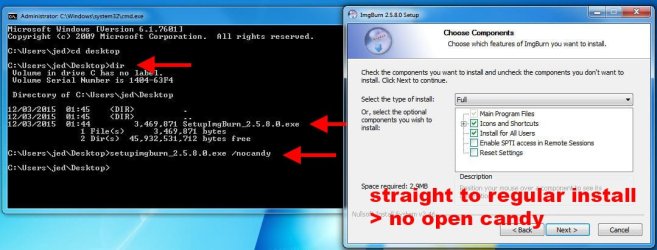
@ gregrocker - re bundled Open Candy cr*p and ImgBurn

if you install from a command line using the switch ' /nocandy' , ImgBurn installs just like it used to - with no special offers. see pic

no_candy.jpg

works with Freemake video converter also
 

My Computer My Computer

Computer type
PC/Desktop
Computer Manufacturer/Model Number
self build
OS
Windows 7 Pro x64 sp1
CPU
i7 4770K
Motherboard
MSI B85M-E45
Memory
8GB Corsair Vengeance 1600MHz
Graphics Card(s)
onboard
Monitor(s) Displays
LG 27MP35
Screen Resolution
1920-1080
Hard Drives
Seagate 2TB
PSU
Cooler Master GX 750
Case
Antec 300
Cooling
Seidon 120V
Internet Speed
60/18
Antivirus
MSE
Browser
Firefox
Oops...Never mind.
 

My Computer My Computer

Computer type
PC/Desktop
OS
Win 7 32
What follows is a bit technical but 100% doable.

Here's link to the solution that works for me:
http://answers.microsoft.com/en-us/windows/forum/windows_7-desktop/weather-gadget-not-working-cannot-connect-to/6707d8b4-1a37-4412-a609-5677c9b99a7a?page=10 (the post by AndersWillhelmsson)

In a nutshell:
1) Close the Weather widget
2) Locate the config.xml file in C:\Users\your_account_name\AppData\Local\Microsoft\Windows Live\Services\Cache (you may want to run the Search File command in the Windows Explorer)
3) Right mouse button click -> Edit
<services refresh="60">change from 60 to 45
<service name="weather">
<operation interval="30"/>change from 30 to 15


----- optional (if you want to revive your stocks and currency widgets, too) -----
<service name="stocks">
<operation interval="15"/>change from 15 to 10
</service>
<service name="currency">
<operation interval="30"/> change from 30 to 15

-------------------------------------------------------------------------------------
4) Save the file.
5) Restart the Weather widget. Wait a couple of minutes. and it should get online.

Read on, read on guys, it's not over yet.

Now, Microsoft in their infinite wisdom will NOT let you get home free. The widget(s) WILL break down again. Yes, even after you edited the config.xml. When it happens:
1) close the wigdet.
2) change the timestamp value of the very same file, config.xml. One of the ways to aciheve this is to open and then save config.xml without changing anything. Or at least don't commit unnecessary changes; just make sure the file has the current day and time attributes.
3) restart the widget.


Nowadays Microsoft mercilessly kills our favorite widgets with almost every new Windows Defender signature DB update, so I'd recommend to place a shortcut to comfig.xml on the desktop. More adventurous souls can even add an appropriate job to the list of tasks that run automatically on each boot-up (follow this link http://stackoverflow.com/questions/13706267/ to see how we geeks do it). And this is the VB script code that I wrote for my system:

Set objShell = CreateObject("Shell.Application")
Set objFolder = objShell.NameSpace("fully_qualified_path_to_config.xml_goes_in_here")
Set objFolderItem = objFolder.ParseName("config.xml")
objFolderItem.ModifyDate = Now()
Set objShell = Nothing
Set objFolder = Nothing
Set objFolderItem = Nothing


How to use this code:
1) Check it for virii, malware or whatchamacallit with someone knowledgeable, like posting it on Stack Overflow to verify its function.
2) Create a plain ASCII file named, for example, i_want_my_weather_gadget_back_please.vbs (the VBS part is the only thing that's actually important here).
3) Copy & paste the above code into this file of yours.
4) Edit the "Set objFolder......" statement accordingly. The "fully qualified path" means the absolute path (in other words, it starts with C:\Users\.....). If you are unsure about your account name on your own system, run a shell session (via cmd.exe). By default, this will land you into your account folder. Or run whoami, and this will show you who you are in the eyes of your machine, so to speak.
5. Finally, add this VBS file to the start-up batch.


That's all there is to it. Hopefully, Microsoft won't change their approach on how to disable the widgets any time soon.
HTH
 

My Computer My Computer

Computer type
Laptop
Computer Manufacturer/Model Number
HP Pavilion dv7
OS
Windows 7 Home Premium 64bit SP1 (Russian lang ver.)
CPU
Intel Core i5-2430M CPU @ 2.40GHz
Memory
8GB
Graphics Card(s)
Radeon HD 6770M
Hard Drives
Model: ST1000LM024 HN-M101MBB
Firmware: 2BA30001
(replaced after the original HDD threw SMART 005 error)
Antivirus
Windows Defender
Browser
IE11
I've now personally put MSNWeather.zip Win7-style weather gadget (but with five day forecast displayed) on about fifty PC's I maintain for friends and family with no problems and total satisfaction.

If WIn7 gadgets stops working for this or any other gadget, simply install 8GadgetPack - Gadgets for Windows 8 / 8.1 which latest version supports WIndows 7 to overwrite existing WIn7 gadgets ruined by IE11 security measures.
 
I've now personally put MSNWeather.zip Win7-style weather gadget (but with five day forecast displayed) on about fifty PC's I maintain for friends and family with no problems and total satisfaction.

If WIn7 gadgets stops working for this or any other gadget, simply install 8GadgetPack - Gadgets for Windows 8 / 8.1 which latest version supports WIndows 7 to overwrite existing WIn7 gadgets ruined by IE11 security measures.
Have you spent any time with the GadgetPack? As I look at it, it says it includes Weather by Microsoft and so I am left to wonder if it includes the selfsame gadget that everyone is having trouble with...?
 

My Computer My Computer

Computer type
Laptop
Computer Manufacturer/Model Number
Dell Latitude E6540 Laptop
OS
Windows 7 Professional 64bit
CPU
Intel Core i7 4600M @ 2.90GHz
Motherboard
Dell Inc. 0CYT5F (SOCKET 0)
Memory
16.0GB Dual-Channel DDR3 @ 797MHz (11-11-11-28)
Graphics Card(s)
Intel HD Graphics 4600 (Dell) 2048MB ATI AMD Radeon HD 8790M
Sound Card
Realtek High Definition Audio
Monitor(s) Displays
HP ZR30w (2560x1600@60Hz)
Hard Drives
256GB LITEONIT LMT-256M6M-41 mm SATA (SSD)
1TB Samsung SSD 860 EVO mSATA SATA (SSD)
2TB USB 3.0 USB Device
115GB SanDisk Ultra Fit USB
Other Info
Multiple Dell E-Port Plus II Port Replicator/Docking Stations 0Y72NH USB 3.0 + 130W AC Adapters
Yes, very similar but use the MSN gadget which will install onto it's Gallery because IME the other one will still mess up. And there are other weather gadgets searchable there whose style might be preferable.
 
Yes, very similar but use the MSN gadget which will install onto it's Gallery because IME the other one will still mess up. And there are other weather gadgets searchable there whose style might be preferable.
Thanks for clarifying.
 

My Computer My Computer

Computer type
Laptop
Computer Manufacturer/Model Number
Dell Latitude E6540 Laptop
OS
Windows 7 Professional 64bit
CPU
Intel Core i7 4600M @ 2.90GHz
Motherboard
Dell Inc. 0CYT5F (SOCKET 0)
Memory
16.0GB Dual-Channel DDR3 @ 797MHz (11-11-11-28)
Graphics Card(s)
Intel HD Graphics 4600 (Dell) 2048MB ATI AMD Radeon HD 8790M
Sound Card
Realtek High Definition Audio
Monitor(s) Displays
HP ZR30w (2560x1600@60Hz)
Hard Drives
256GB LITEONIT LMT-256M6M-41 mm SATA (SSD)
1TB Samsung SSD 860 EVO mSATA SATA (SSD)
2TB USB 3.0 USB Device
115GB SanDisk Ultra Fit USB
Other Info
Multiple Dell E-Port Plus II Port Replicator/Docking Stations 0Y72NH USB 3.0 + 130W AC Adapters
I've now personally put MSNWeather.zip Win7-style weather gadget (but with five day forecast displayed) on about fifty PC's I maintain for friends and family with no problems and total satisfaction.

If WIn7 gadgets stops working for this or any other gadget, simply install 8GadgetPack - Gadgets for Windows 8 / 8.1 which latest version supports WIndows 7 to overwrite existing WIn7 gadgets ruined by IE11 security measures.

These are the gadgets I have been recommending here as well......glad to see others spreading them (or the word) around. Some folks have had a hard time with both of these. In those few cases, I do not know what else to do. Mayhaps you might be able to help troubleshoot those issues when they arise. Like you, I have installed the MSN weather gadget on many, many PC's without issue.....I love this one.
 

My Computer My Computer

Computer type
Laptop
Computer Manufacturer/Model Number
Dell Latitude E6410
OS
Windows 7 Home Premium (64 bit)
CPU
Intel I5 520m
Memory
8 GB
Graphics Card(s)
Intel integrated
Sound Card
IDT Digital Audio
Monitor(s) Displays
Dell ST2010
Screen Resolution
1600X900
Hard Drives
WD Scorpio Black 750GB
Keyboard
Microsoft Wireless Comfort Keyboard 5000
Mouse
Microsoft Wireless Mouse 5000
Internet Speed
350 mb/s down 12 mb/s up
Antivirus
NIS
Browser
Firefox
Other Info
Repaired trash lappy
I like a clean desktop so I use this Skwire Empire » sWeather runs in the tray/notify zone

I thought I read gadgets posed a security threat

pjd
 

My Computer My Computer

Computer type
PC/Desktop
Computer Manufacturer/Model Number
generic - made to spec
OS
Win 7 Professional 64bit
CPU
I5 650 @ 3.2GHz
Motherboard
Gigabyte H55M-UD2H
Memory
6G
Graphics Card(s)
AMD Radeon R7 200 Series
Sound Card
whatever is on mobo
Monitor(s) Displays
1 x 24" Samsung
Screen Resolution
1920x1200
Hard Drives
Internal 1x256GB Toshiba SSD
Internal 1x2TB
External 2 slot USB 3.0 dock (various drives)
External 1 500GB USB 2.0 drive
PSU
850W Antech Modular
Case
Shiny Black Aluminium
Cooling
extra fans - sucker in front, blower at back - noisy & cool
Keyboard
Microsoft USB Dual Receiver Wireless Keyboard
Mouse
Microsoft USB Dual Receiver Wireless Mouse
Internet Speed
20/1Mbps down/up
Antivirus
MSE
Browser
Firefox and Chrome
Other Info
Hitachi USB 3.0 adapter
Cardswallop :shock:
 

My Computer My Computer

Computer type
PC/Desktop
Computer Manufacturer/Model Number
Skylake Special #666
OS
Windows 10 Pro x64
CPU
Intel Core i7 6700K
Motherboard
Asus Sabertooth Z170 Mark 1
Memory
GSkill TridentZ RGB 16GB 3600 16-16-16-36
Graphics Card(s)
EVGA GTX 980 Ti SC x2
Sound Card
Realtek High Definition
Monitor(s) Displays
AOC G2460PG
Screen Resolution
1920 x 1080 144Hz
Hard Drives
Samsung 860 Pro 256GB, Seagate Barracuda 4TB x2
PSU
EVGA 1000 P2, EVGA White Custom Braided Cables
Case
Corsair Vengeance C70 Gunmetal Black
Cooling
Corsair H100i v2, Corsair ML120 x2, Thermal Grizzly Kryonaut
Keyboard
Logitech G910 Orion Spectrum
Mouse
Logitech G700s
Internet Speed
Verizon Fios Quantum Gateway 75/75
Antivirus
Windows Defender, Malwarebytes Free 3.8.3
Browser
Chrome
Other Info
Corsair SP120 x4, LG Blu-ray Drive, Durabrand HT-395 100 Watt Dolby Digital Amp, Corsair H2100 Wireless 7.1 Headset
Hi folks, just to clear up the confusion, here's the manual process for repairing your Config.xml. I just compiled one myself to save you all the hassle.

Open "%userprofile%\AppData\Local\Microsoft\Windows Live\Services\Cache\Config.xml" in Notepad or other plain text editor.

Change the values in these lines at the top of the file:
<services refresh="60"> -- change from 60 to 45
<service name="weather">
<operation interval="30"/> -- change from 30 to 15

and also the values in these lines at the bottom:
<service name="stocks">
<operation interval="15"/> -- change from 15 to 10
</service>
<service name="currency">
<operation interval="30"/> -- change from 30 to 15

Upon restarting your machine or sidebar.exe, all gadgets should function properly.
:geek: This was far easier and faster...
 

My Computer My Computer

Computer type
PC/Desktop
OS
Windows 7 Home Premium 64-bit SP1
Antivirus
avast free
Browser
FF
MSN weather gadget day for today incorrect

I installed the MSN 5 day weather gadget when the original Windows 7 version stopped working. It works, however the day shown as today is incorrect and the next day shown is actually today. I edited the config file but that made no difference.
 

My Computer My Computer

Computer type
PC/Desktop
OS
Windows 7 Home Premium x64
Annoying. I've decided that MS doesn't like gadgets. It's probably in their new business plan to rent them along with the OS and everything else as apps. That's why I suspect gadgets were disabled just before the Windows 8 debacle. If they were an infection vector then how come we never saw a single such infection even though milliions continued to use them?
 
I dont have the config.xml file, can anyone please upload it for me to download ? TIA

And what about the currency gadget?

I have Windows 7 Pro SP1
 

My Computer My Computer

Computer type
Laptop
OS
Windows 7 Pro
Back
Top