Weather widget replacement for Windows 7

The file thefilmreel.tk/Config.xml is the repaired version of Config.xml and there are no problems with it. The instructions provided were so those interested or skeptical about the changes made by the new Config.xml could perform the changes manually.
 

My Computer

Computer type
Laptop
Computer Manufacturer/Model Number
HP Elitebook Moblie Workstation 8760w
OS
Windows 7 Ultimate x64 SP1
CPU
Intel i7-2620m
Motherboard
unk
Memory
CORSAIR Vengeance 16 GB (2x8GB)
Graphics Card(s)
NVIDIA Quadro 3000M
Sound Card
IDT High Definition
Monitor(s) Displays
Laptop Display, HP 2511x
Screen Resolution
1920x1080
Hard Drives
SanDisk SDSSDXP240G (240 GB SSD)
WDC WD7500BPKT-80PK4 (750 GB HDD)
Keyboard
Internal, MS Wireless 3000
Mouse
Synaptics LuxPad, Synaptics TouchStyk, MS Wireless 5000
Antivirus
Microsoft Security Essentials
Browser
Google Chrome
Thanks. This thread will soon find it's way to the top of search results for Win7 gadget fix, so we want to be sure that file continues to work as it has for me on 4 out of 5 PC's here so far on the Win7 weather gadget.

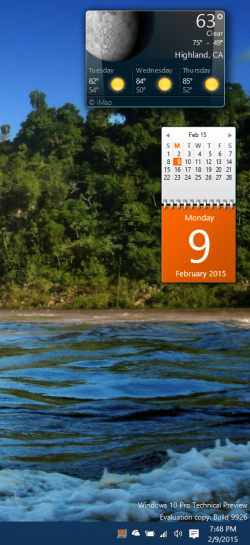
It has also worked to revive that weather gadget on Windows 10 installed as part of 8GadgetPack. Strange that only that weather gadget, originally the stock gadget on Windows 7, got corrupted as the one in Windows 7 did:

Capture.PNG
 
This will work on any OS that is 7+, including 10TP. Glad it worked out for you!
 

My Computer

Computer type
Laptop
Computer Manufacturer/Model Number
HP Elitebook Moblie Workstation 8760w
OS
Windows 7 Ultimate x64 SP1
CPU
Intel i7-2620m
Motherboard
unk
Memory
CORSAIR Vengeance 16 GB (2x8GB)
Graphics Card(s)
NVIDIA Quadro 3000M
Sound Card
IDT High Definition
Monitor(s) Displays
Laptop Display, HP 2511x
Screen Resolution
1920x1080
Hard Drives
SanDisk SDSSDXP240G (240 GB SSD)
WDC WD7500BPKT-80PK4 (750 GB HDD)
Keyboard
Internal, MS Wireless 3000
Mouse
Synaptics LuxPad, Synaptics TouchStyk, MS Wireless 5000
Antivirus
Microsoft Security Essentials
Browser
Google Chrome
bk4him post #20 works

I'll admit it I was skeptical after trying so many other things posted around the Internet. I modified my config file as posted by bk4him in post #20 of this thread. I didn't have to reboot, just gave it a few minutes and it came alive. I needed to change the location back from NY because I had deleted the original, but it is working fine now.

Thank you bk4him!!!
 

My Computer

Computer type
PC/Desktop
Computer Manufacturer/Model Number
Asus
OS
Windows 7 Professional 64bit
I am being honest in saying that I am naive in the ways of compiling and config.xml files, but this is what I see in this last round of conversation; I understand that linux has been mentioned, but I am assuming that we are all using Windows.


q.gif
Quote: Originally Posted by maxseven
What is bizarre to me is that there isn't anything else that is different about the contents of the file; nothing else to suggest why the gadget starts to work again.
There may have been considerations made with the way the config.xml file, with an unsupported gadget and recent Windows Updates interact that a reworking of the config file was necessary, but that is speculation on my part.


q.gif
Quote: Originally Posted by bk4him
Hi folks, just to clear up the confusion, here's the manual process for repairing your Config.xml. I just compiled one myself to save you all the hassle.

Open "%userprofile%\AppData\Local\Microsoft\Windows Live\Services\Cache\Config.xml" in Notepad or other plain text editor.

Change the values in these lines at the top of the file:
<services refresh="60"> -- change from 60 to 45
<service name="weather">
<operation interval="30"/> -- change from 30 to 15

and also the values in these lines at the bottom:
<service name="stocks">
<operation interval="15"/> -- change from 15 to 10
</service>
<service name="currency">
<operation interval="30"/> -- change from 30 to 15

Upon restarting your machine or sidebar.exe, all gadgets should function properly.
bk4, The values you say need changing are already in place on the filmreel link, but you seem to be using them as your own, and you're evading maxseven's question. Can you verify why a reworking of the config file was necessary?


q.gif
Quote: Originally Posted by gregrocker
Is there any problem with this file now as downloaded from http://thefilmreel.tk/Config.xml and if so would you please replace that link in post #15 before it gets any more widely distributed?

Greg I believe you meant post #14


q.gif
Quote: Originally Posted by bk4him
The file thefilmreel.tk/Config.xml is the repaired version of Config.xml and there are no problems with it. The instructions provided were so those interested or skeptical about the changes made by the new Config.xml could perform the changes manually.
I found no instructions at thefilmreel.tk ; when I click on your link:
there appears to be an XML file that does not appear to have any style information associated with it. The document tree is shown below,
and that tree has nothing but service and language elements associated with it.

Can you provide a link to the instructions other than the link in post#14 that you provided?
Replace this Config.xml file with the one located at http://thefilmreel.tk/Config.xml
(right click, save link as or save target as)


q.gif
Quote: Originally Posted by gregrocker
Thanks. This thread will soon find it's way to the top of search results for Win7 gadget fix, so we want to be sure that file continues to work as it has for me on 4 out of 5 PC's here so far on the Win7 weather gadget.
It has also worked to revive that weather gadget on Windows 10 installed as part of 8GadgetPack. Strange that only that weather gadget, originally the stock gadget on Windows 7, got corrupted as the one in Windows 7 did:

Attachment 349266
That maybe due to Windows Updates or an unsupported gadget Greg, again that is speculation on my part.


q.gif
Quote: Originally Posted by bk4him
This will work on any OS that is 7+, including 10TP. Glad it worked out for you!
Not to be brutal bk4, but even after 21546041's validation that your filmreel find works, you are still evading maxseven's question; Don't just say or be happy that what you found works, either corroborate your find with more than saying it has been repaired; Why was it repaired?
 

My Computer

Computer type
PC/Desktop
Computer Manufacturer/Model Number
Gateway DX4831-01e (Mid-Tower Desktop)
OS
Originally Win 7 Hm Prem x64 Ver 6.1.7600 Build 7601-SP1 | Upgraded to Windows 10 December 14, 2019
CPU
Intel i3 530 2.93GHz, 2933MHz 2 Cores 4 Logical Processors
Motherboard
Gateway H57M01 133 megahertz
Memory
6GB of 1,333MHz DDR3 SDRAM
Graphics Card(s)
32MB Intel Graphics Media Accelerator HD IGChip
Sound Card
Realtek High Definition Audio
Monitor(s) Displays
Gateway HX2000 20inch TFT active matrix TN
Screen Resolution
1600 x 900 x 59 hertz
Hard Drives
WDC WD10EADS-00M2B0 [HDD] (1000.20 GB) -- drive 0,
HL-DT-ST DVDRAM GH41N [CD-ROM dr]
Four card readers, and Four USB 2.0
PSU
300watts.
Case
Mid-Tower Desktop
Cooling
Stock from Gateway
Keyboard
Natural Ergonomic Keyboard 4000, see Other Info
Mouse
Orig. Gateway wore out now using Insignia USB wired optical
Internet Speed
Vz FIOS 10ms png 57.64Mbps down 65.53Mbps up Speedtest.org
Antivirus
Zamana Anti-logger with Anti-malware, MSE, Windows Firewall,
Browser
IE11.0.9600.19399-Upd ver11.0.135, Firefox 68.0.1 x64
Other Info
System Specs by Belarc.

BIOS: American Megatrends Inc. P01-A0 11/17/2009

Replaced the MS 'Natural' Standard PS/2 Enhanced 101-102 Keyboard with a new Natural Ergonomic Keyboard 4000 on August 1st 2014.

Canon Pixma MG3222 Printer.

Updated to IE11 on 12102015 | Fios Quantum Router g1100

Additional AV: SpywareBlaster, manual Mbam, SAS
I suspect the reason bk4him's changes worked was not because of the interval times, but rather that the edit & save using Notepad changed the "carriage returns". But my basic question, which is NOT a question for bk4him but for anyone is why suddenly the Weather gadget stopped working for everyone, when clearly none of us touched, or had any reason to touch this simple Config.xml file.

This is no big deal in any case, but I'm happy to be able to observe again my Weather gadget, which says we're climbing to 75F today!

:)
 

My Computer

Computer type
Laptop
Computer Manufacturer/Model Number
Dell Latitude E6540 Laptop
OS
Windows 7 Professional 64bit
CPU
Intel Core i7 4600M @ 2.90GHz
Motherboard
Dell Inc. 0CYT5F (SOCKET 0)
Memory
16.0GB Dual-Channel DDR3 @ 797MHz (11-11-11-28)
Graphics Card(s)
Intel HD Graphics 4600 (Dell) 2048MB ATI AMD Radeon HD 8790M
Sound Card
Realtek High Definition Audio
Monitor(s) Displays
HP ZR30w (2560x1600@60Hz)
Hard Drives
256GB LITEONIT LMT-256M6M-41 mm SATA (SSD)
1TB Samsung SSD 860 EVO mSATA SATA (SSD)
2TB USB 3.0 USB Device
115GB SanDisk Ultra Fit USB
Other Info
Multiple Dell E-Port Plus II Port Replicator/Docking Stations 0Y72NH USB 3.0 + 130W AC Adapters
1. Close the weather gadget.
2. Open the following with your default notepad editor: %userprofile%\AppData\Local\Microsoft\Windows Live\Services\Cache\Config.xml
3. Make no changes and simply click file->save and then exit.
4. Re-open the gadget and it should work.

Did someone forget something over there at Live.com?
 

My Computer

Computer type
PC/Desktop
OS
Win7 x64
Hi again folks, apologies for the confusion.

I am the owner of thefilmreel.tk, and I have created the modified Config.xml file at thefilmreel.tk/Config.xml. The only changes I made were the ones I had previously listed.

I had found the fix at windows 7 weather gadget cannot connect to service - Microsoft Community

As the above forum states, there is no known reason for why the fix works. My best estimation is that MS changed something on their sever end (MSN possibly?). It's equally strange that not all systems were affected.
 

My Computer

Computer type
Laptop
Computer Manufacturer/Model Number
HP Elitebook Moblie Workstation 8760w
OS
Windows 7 Ultimate x64 SP1
CPU
Intel i7-2620m
Motherboard
unk
Memory
CORSAIR Vengeance 16 GB (2x8GB)
Graphics Card(s)
NVIDIA Quadro 3000M
Sound Card
IDT High Definition
Monitor(s) Displays
Laptop Display, HP 2511x
Screen Resolution
1920x1080
Hard Drives
SanDisk SDSSDXP240G (240 GB SSD)
WDC WD7500BPKT-80PK4 (750 GB HDD)
Keyboard
Internal, MS Wireless 3000
Mouse
Synaptics LuxPad, Synaptics TouchStyk, MS Wireless 5000
Antivirus
Microsoft Security Essentials
Browser
Google Chrome

My Computer

Computer type
PC/Desktop
OS
Win7 x64

Too much misinformation, along with very outdated posts. People are assuming that changing values within the config file is correcting the issue when simply modifying the file by clicking "file->save" with 0 changes is enough to solve the issue.

Wow, strangely enough that works. I've verified this fix on 2 systems here.

So the new best way to fix this, as you said is to:

in Run Dialog, at command prompt, or in Start Menu search box, paste,
Code:
 notepad "%userprofile%\AppData\Local\Microsoft\Windows Live\Services\Cache\Config.xml"
and press return.

File > Save or Ctrl+S

Place gadget back on desktop, restart sidebar.exe, or wait for existing gadgets to become operational.
 

My Computer

Computer type
Laptop
Computer Manufacturer/Model Number
HP Elitebook Moblie Workstation 8760w
OS
Windows 7 Ultimate x64 SP1
CPU
Intel i7-2620m
Motherboard
unk
Memory
CORSAIR Vengeance 16 GB (2x8GB)
Graphics Card(s)
NVIDIA Quadro 3000M
Sound Card
IDT High Definition
Monitor(s) Displays
Laptop Display, HP 2511x
Screen Resolution
1920x1080
Hard Drives
SanDisk SDSSDXP240G (240 GB SSD)
WDC WD7500BPKT-80PK4 (750 GB HDD)
Keyboard
Internal, MS Wireless 3000
Mouse
Synaptics LuxPad, Synaptics TouchStyk, MS Wireless 5000
Antivirus
Microsoft Security Essentials
Browser
Google Chrome
Hi again folks, apologies for the confusion.

I am the owner of thefilmreel.tk, and I have created the modified Config.xml file at thefilmreel.tk/Config.xml. The only changes I made were the ones I had previously listed.

I had found the fix at windows 7 weather gadget cannot connect to service - Microsoft Community

As the above forum states, there is no known reason for why the fix works. My best estimation is that MS changed something on their sever end (MSN possibly?). It's equally strange that not all systems were affected.

Thank you.
 

My Computer

Computer type
PC/Desktop
Computer Manufacturer/Model Number
Gateway DX4831-01e (Mid-Tower Desktop)
OS
Originally Win 7 Hm Prem x64 Ver 6.1.7600 Build 7601-SP1 | Upgraded to Windows 10 December 14, 2019
CPU
Intel i3 530 2.93GHz, 2933MHz 2 Cores 4 Logical Processors
Motherboard
Gateway H57M01 133 megahertz
Memory
6GB of 1,333MHz DDR3 SDRAM
Graphics Card(s)
32MB Intel Graphics Media Accelerator HD IGChip
Sound Card
Realtek High Definition Audio
Monitor(s) Displays
Gateway HX2000 20inch TFT active matrix TN
Screen Resolution
1600 x 900 x 59 hertz
Hard Drives
WDC WD10EADS-00M2B0 [HDD] (1000.20 GB) -- drive 0,
HL-DT-ST DVDRAM GH41N [CD-ROM dr]
Four card readers, and Four USB 2.0
PSU
300watts.
Case
Mid-Tower Desktop
Cooling
Stock from Gateway
Keyboard
Natural Ergonomic Keyboard 4000, see Other Info
Mouse
Orig. Gateway wore out now using Insignia USB wired optical
Internet Speed
Vz FIOS 10ms png 57.64Mbps down 65.53Mbps up Speedtest.org
Antivirus
Zamana Anti-logger with Anti-malware, MSE, Windows Firewall,
Browser
IE11.0.9600.19399-Upd ver11.0.135, Firefox 68.0.1 x64
Other Info
System Specs by Belarc.

BIOS: American Megatrends Inc. P01-A0 11/17/2009

Replaced the MS 'Natural' Standard PS/2 Enhanced 101-102 Keyboard with a new Natural Ergonomic Keyboard 4000 on August 1st 2014.

Canon Pixma MG3222 Printer.

Updated to IE11 on 12102015 | Fios Quantum Router g1100

Additional AV: SpywareBlaster, manual Mbam, SAS
Been looking for a solution to this issue for over a week now and I can verify that jewishnigra's solution works.

Close the weather gadget and go to:

%userprofile%\AppData\Local\Microsoft\Windows Live\Services\Cache\Config.xml

Open Config.xml with Notepad then File -> Save/Ctrl+S. Reboot or restart sidebar.exe and wha la!

*edit* - Can someone sticky this thread?
 

My Computer

Computer type
PC/Desktop
Computer Manufacturer/Model Number
Less is more
OS
Windows 7 Ultimate x64 SP1
CPU
Core i7 2600k (4.6GHz)
Motherboard
ASUS P8Z68 Deluxe (3603)
Memory
16GB G.SKILL Ares 1600MHz
Graphics Card(s)
MSI R6970 Lightning
Sound Card
Asus Xonar Essence ST (UNi drivers 1.41)
Monitor(s) Displays
Samsung P2570, CrossOver 27Q LED-P
Screen Resolution
1920*1080, 2560*1440
Hard Drives
256GB OCZ Vector, 2x Hitachi 4TB (7K4000), Hitachi 3TB (7K3000 & 5K3000)
PSU
Seasonic X750
Case
Lian-Li PC-P80N
Cooling
NZXT HAVIK 140 (2x GELID Wing12PL Push/Pull)
Keyboard
CM Storm Trigger (Brown Switch)
Mouse
Logitech G400
Internet Speed
55Mbps/10Mbps
Other Info
Speakers - Klipsch ProMedia 2.1
Headphones - Sennheiser HD595
Router - ASUS RT-N66U
Webcam - Logitech C910
A word of caution if more eyes are going to be seeing this...

Using gadgets provides your machine an easy target for attack. The vast majority of gadgets do not implement secure code so if you do not trust either the route to the server or the server itself that the gadget is connecting to, then don't use gadgets. A "coffee shop pineapple" can see gadget traffic and spoof the update server so he can inject his own code as your "update." And, since there's no security certificate mismatch warning because everything is happening over plain-text, the entire attack can be performed covertly in the background. This was well documented over 2 years ago. Take a look around youtube for some hilarious PoC's. Microsoft didn't want to deal with it because I'm assuming that would mean an entire overhaul of the gadget platform to act more like a traditional browser with anti-XSS protection and the prevention of accessing any ActiveX object or PowerShell script. At that time, they were focused on "Metro" apps anyway. #cringe

It's a shame too because of the usefulness of internet-related gadgets. If you still REALLY want to use gadgets then I would suggest only using "local" gadgets and setup a firewall rule to block all outgoing traffic from sidebar.exe. To me, it's a classic case of too much usability access has resulted in glaring security issues. :orb:
 

My Computer

Computer type
PC/Desktop
OS
Win7 x64
A word of caution if more eyes are going to be seeing this...

Using gadgets provides your machine an easy target for attack. The vast majority of gadgets do not implement secure code so if you do not trust either the route to the server or the server itself that the gadget is connecting to, then don't use gadgets. A "coffee shop pineapple" can see gadget traffic and spoof the update server so he can inject his own code as your "update." And, since there's no security certificate mismatch warning because everything is happening over plain-text, the entire attack can be performed covertly in the background. This was well documented over 2 years ago. Take a look around youtube for some hilarious PoC's. Microsoft didn't want to deal with it because I'm assuming that would mean an entire overhaul of the gadget platform to act more like a traditional browser with anti-XSS protection and the prevention of accessing any ActiveX object or PowerShell script. At that time, they were focused on "Metro" apps anyway. #cringe

It's a shame too because of the usefulness of internet-related gadgets. If you still REALLY want to use gadgets then I would suggest only using "local" gadgets and setup a firewall rule to block all outgoing traffic from sidebar.exe. To me, it's a classic case of too much usability access has resulted in glaring security issues. :orb:

I read some think the security issue is overblown. I don't even have the Config.xml. I installed 8gadgetPack and I am using the weathercenter app without any issues.

What port(s) does sidebar use?
 

My Computer

Computer type
PC/Desktop
Computer Manufacturer/Model Number
Dell All in one Inspiron 2020
OS
W10 32 bit, XUbuntu 18.xx 64 bit
CPU
Intel(R) Celeron(R) CPU G1620T @ 2.40GHz, 2400 Mhz
Motherboard
Dell
Memory
4GB
Graphics Card(s)
Intel HD graphics
Sound Card
High Definition Audio Device
Monitor(s) Displays
20 inch Screen
Screen Resolution
W7=1280 x 720 & Linux Mint Xfce=1360 x 768
Hard Drives
500 GB hard drive
Keyboard
Usb
Mouse
Usb
Internet Speed
High-Speed
Antivirus
MSE
Browser
Main Browser Firefox
Other Info
I have done a clean install of Windows 7 using Dell re-installation disk (Dell sent me one). I also use Free Macrium reflect backup and restore.
What port(s) does sidebar use?

Depending on your IE or proxy configuration settings, 0 to 65535. Sidebar is an IE process.


Using gadgets provides your machine an easy target for attack

https://technet.microsoft.com/library/security/2719662

It doesn't really say "How?"

Jewishnigra you just brought up another security concern for windows 7 users. Since Sidebar is an IE process doesn't that make Internet explorer just as vulnerable?

I still say it is odd Microsoft is not willing to patch the gadget issue. Just my opinion.
 

My Computer

Computer type
PC/Desktop
Computer Manufacturer/Model Number
Dell All in one Inspiron 2020
OS
W10 32 bit, XUbuntu 18.xx 64 bit
CPU
Intel(R) Celeron(R) CPU G1620T @ 2.40GHz, 2400 Mhz
Motherboard
Dell
Memory
4GB
Graphics Card(s)
Intel HD graphics
Sound Card
High Definition Audio Device
Monitor(s) Displays
20 inch Screen
Screen Resolution
W7=1280 x 720 & Linux Mint Xfce=1360 x 768
Hard Drives
500 GB hard drive
Keyboard
Usb
Mouse
Usb
Internet Speed
High-Speed
Antivirus
MSE
Browser
Main Browser Firefox
Other Info
I have done a clean install of Windows 7 using Dell re-installation disk (Dell sent me one). I also use Free Macrium reflect backup and restore.
Wow, strangely enough that works. I've verified this fix on 2 systems here.

So the new best way to fix this, as you said is to:

in Run Dialog, at command prompt, or in Start Menu search box, paste,
Code:
 notepad "%userprofile%\AppData\Local\Microsoft\Windows Live\Services\Cache\Config.xml"
and press return.

File > Save or Ctrl+S

Place gadget back on desktop, restart sidebar.exe, or wait for existing gadgets to become operational.
That is CONFIRMED! It WORKS! Some dude on MS community suggested overwriting this file and a whole load of other folders and files from a Windows 7 system with working gadgets, but that was an overkill and you needed a second system.

A word of caution if more eyes are going to be seeing this...

Using gadgets provides your machine an easy target for attack.
That's fine with me. I don't do online shopping nor do I transfer billions of dollars from my PC (actually I prefer real money in my pocket, even for larger amounts, for obvious reasons). What else can these so called "attacks" do to me?

I think this whole security thing is exaggerated, at least for the home user. The worst that can happen for me is a destructive or annoying virus (using RAM or CPU, deleting files etc.), but those are easily avoided with a good antivirus and even if infected, it still usually takes no more than an hour to disinfect, for those rare cases when I do get infected, and last, but not least, my most important files are just fine on my backup external device, so why this whole "security" craziness?
 

My Computer

Computer type
PC/Desktop
Computer Manufacturer/Model Number
Assembled
OS
Windows 7 Ultimate 64-bit
CPU
E8400
Motherboard
Abit IP 35 PRO
Memory
Mushkin 4GB dual channel kit, 1033 MHz, 5-5-5-15
Graphics Card(s)
nVidia GT 630
Sound Card
Creative Audigy SE
Monitor(s) Displays
BENQ GL2460 - 24" + BENQ GL2450 - 24"
Screen Resolution
3840x1080
Hard Drives
KINGSTON SV300S37A60G 60GB SSD for OS
Seagate ST380815AS 80GB
Seagate ST3500320AS 500GB
WDC WD2500AAJS-00VTA0 250GB
PSU
Spire Rocketeer 600W
Case
Aplus XClio
Cooling
Cool cooling :P
Keyboard
Noname (expensive Logitechs dissolve in tea)
Mouse
HAMA AM 7300
Internet Speed
About 12 MB/s
Antivirus
Este NOD32
Browser
Firefox FTW
This fix works for the Weather gadget, :D but did not fix my currency gadget :confused: .
Anyone figure that one out yet?

Thanks
 

My Computer

Computer type
PC/Desktop
OS
Windows 7 Home Premium x64
Antivirus
Microsoft Security Essentials
Browser
IE 11 / Chrome
Back
Top