
You are using an out of date browser. It may not display this or other websites correctly.
You should upgrade or use an alternative browser.
You should upgrade or use an alternative browser.
ratDVD not working with Windows 7
- Thread starter gkscorpio
- Start date

Hi,
Were you able to play the same DVD in any other Windows computer ?
Were you able to play the same DVD in any other Windows computer ?
My Computer
At a glance
Windows 7 Ultimate x64 SP1Intel Core i34 GB DDR3
- Computer Manufacturer/Model Number
- Dell Inspiron N5010
- OS
- Windows 7 Ultimate x64 SP1
- CPU
- Intel Core i3
- Memory
- 4 GB DDR3
- Screen Resolution
- 1366 X 768
- Hard Drives
- Seagate 500 GB
- Internet Speed
- 4 MBPS
My Computer
At a glance
Windows 7 Ultimate x64 SP1Intel Core i34 GB DDR3
- Computer Manufacturer/Model Number
- Dell Inspiron N5010
- OS
- Windows 7 Ultimate x64 SP1
- CPU
- Intel Core i3
- Memory
- 4 GB DDR3
- Screen Resolution
- 1366 X 768
- Hard Drives
- Seagate 500 GB
- Internet Speed
- 4 MBPS

Microsoft are still testing the compatibility of ratDVD  (Windows 7 Compatibility RatDVD.CA ratDVD version 0)
You can, however, use Windows Media Player Classic to view all your ratDVD files (Download Media Player Classic Home Cinema, Free Video Player Download)
Hopes this helps.
.
(Windows 7 Compatibility RatDVD.CA ratDVD version 0)You can, however, use Windows Media Player Classic to view all your ratDVD files (Download Media Player Classic Home Cinema, Free Video Player Download)
Hopes this helps.
.
My Computer
At a glance
Operating System Microsoft Windows 7 Ultimate...Mobile DualCore Intel Core 2 Duo T5550, 1833 ...2GB (DDR2-667 DDR2 SDRAM)ATI Radeon Xpress 1200 Series (256 MB)
- Computer Manufacturer/Model Number
- Samsung R60 Plus
- OS
- Operating System Microsoft Windows 7 Ultimate Build 7600
- CPU
- Mobile DualCore Intel Core 2 Duo T5550, 1833 MHz (1
- Motherboard
- ATI Radeon Xpress 1100/1250
- Memory
- 2GB (DDR2-667 DDR2 SDRAM)
- Graphics Card(s)
- ATI Radeon Xpress 1200 Series (256 MB)
- Sound Card
- Realtek ALC262 @ ATI SB600 - High Definition
- Monitor(s) Displays
- Samsung LTN154X3-L01 [15.4" LCD]
- Screen Resolution
- 1280x800
- PSU
- na
- Case
- na
- Cooling
- na
- Keyboard
- na
Yes, I used to play ratDVD files just fine in my old XP Pro machine. The link you've posted is not a player, is the encoding software, which I have installed..
I used the media player classic (v6.4.9.1) in my old machine (along with other software) and it worked fine.. In Windows 7 64-bit though, this player hungs with a "Media player classic has stopped working". I tried the above link for the Media Player Classic Home Cinema (64-bit), but when I load the ratDVD file I get a "Failed to query the needed interfaces for DVD playback" message..
I used the media player classic (v6.4.9.1) in my old machine (along with other software) and it worked fine.. In Windows 7 64-bit though, this player hungs with a "Media player classic has stopped working". I tried the above link for the Media Player Classic Home Cinema (64-bit), but when I load the ratDVD file I get a "Failed to query the needed interfaces for DVD playback" message..
My Computer
At a glance
Windows 7 Ultimate 64-bit
- OS
- Windows 7 Ultimate 64-bit
gkscorpio, the only other player that seems compatible with .ratDVD files is KMPlayer.
KMPlayer - Download
It would appear as though development on ratDVD has ceased for the time being.
Hope this helps.
.
KMPlayer - Download
It would appear as though development on ratDVD has ceased for the time being.
Hope this helps.
.
My Computer
At a glance
Operating System Microsoft Windows 7 Ultimate...Mobile DualCore Intel Core 2 Duo T5550, 1833 ...2GB (DDR2-667 DDR2 SDRAM)ATI Radeon Xpress 1200 Series (256 MB)
- Computer Manufacturer/Model Number
- Samsung R60 Plus
- OS
- Operating System Microsoft Windows 7 Ultimate Build 7600
- CPU
- Mobile DualCore Intel Core 2 Duo T5550, 1833 MHz (1
- Motherboard
- ATI Radeon Xpress 1100/1250
- Memory
- 2GB (DDR2-667 DDR2 SDRAM)
- Graphics Card(s)
- ATI Radeon Xpress 1200 Series (256 MB)
- Sound Card
- Realtek ALC262 @ ATI SB600 - High Definition
- Monitor(s) Displays
- Samsung LTN154X3-L01 [15.4" LCD]
- Screen Resolution
- 1280x800
- PSU
- na
- Case
- na
- Cooling
- na
- Keyboard
- na
There was a list of players compatible with ratDVD format ( RatDVD.CA - Play RatDVD ), all of them worked fine in XP. I tried KMPlayer too in 7, I get the same "...has stopped working" crash message when I try to open a ratDVD file. I know that it's a bit of "abandoned" software, but since I have quite a few files I have converted from DVDs, I was wondering if it's a matter of configuration for it to work with 7 as well..
As an alternative, does anybody know any other way for full DVD conversion with menus and controlls and all that works with 7?
As an alternative, does anybody know any other way for full DVD conversion with menus and controlls and all that works with 7?
My Computer
At a glance
Windows 7 Ultimate 64-bit
- OS
- Windows 7 Ultimate 64-bit
Have a look at DVDShrink. You may find that it does what you are looking for.
dvdshrink.org: FREE Backup Solution for your DVD movies!
.
dvdshrink.org: FREE Backup Solution for your DVD movies!
.
My Computer
At a glance
Operating System Microsoft Windows 7 Ultimate...Mobile DualCore Intel Core 2 Duo T5550, 1833 ...2GB (DDR2-667 DDR2 SDRAM)ATI Radeon Xpress 1200 Series (256 MB)
- Computer Manufacturer/Model Number
- Samsung R60 Plus
- OS
- Operating System Microsoft Windows 7 Ultimate Build 7600
- CPU
- Mobile DualCore Intel Core 2 Duo T5550, 1833 MHz (1
- Motherboard
- ATI Radeon Xpress 1100/1250
- Memory
- 2GB (DDR2-667 DDR2 SDRAM)
- Graphics Card(s)
- ATI Radeon Xpress 1200 Series (256 MB)
- Sound Card
- Realtek ALC262 @ ATI SB600 - High Definition
- Monitor(s) Displays
- Samsung LTN154X3-L01 [15.4" LCD]
- Screen Resolution
- 1280x800
- PSU
- na
- Case
- na
- Cooling
- na
- Keyboard
- na
Hmmm.. I know about DVDShrink, I've been using it for a few years.. My only problem, is that I wanted a format with a filename that I could run with some media player instantly, without having to mount to a virtual drive.. Apart from that, DVDshrink produces PAL DVD resolution, in which case if you want to a lower-size backup file would be pixelized..
My Computer
At a glance
Windows 7 Ultimate 64-bit
- OS
- Windows 7 Ultimate 64-bit
How to Rip a DVD to an AVI or MPG File Using DVDx: 9 steps - wikiHow
That is the only other solution I have at the moment I am afraid
.
That is the only other solution I have at the moment I am afraid
.
My Computer
At a glance
Operating System Microsoft Windows 7 Ultimate...Mobile DualCore Intel Core 2 Duo T5550, 1833 ...2GB (DDR2-667 DDR2 SDRAM)ATI Radeon Xpress 1200 Series (256 MB)
- Computer Manufacturer/Model Number
- Samsung R60 Plus
- OS
- Operating System Microsoft Windows 7 Ultimate Build 7600
- CPU
- Mobile DualCore Intel Core 2 Duo T5550, 1833 MHz (1
- Motherboard
- ATI Radeon Xpress 1100/1250
- Memory
- 2GB (DDR2-667 DDR2 SDRAM)
- Graphics Card(s)
- ATI Radeon Xpress 1200 Series (256 MB)
- Sound Card
- Realtek ALC262 @ ATI SB600 - High Definition
- Monitor(s) Displays
- Samsung LTN154X3-L01 [15.4" LCD]
- Screen Resolution
- 1280x800
- PSU
- na
- Case
- na
- Cooling
- na
- Keyboard
- na
witichis43
New member
- Local time
- 2:02 PM
- Messages
- 1
ratdvd on Windows 7
google "virtual-pc" to get to the microsoft page of virtual pc. If you have windows 7 ultimate or professional, you can download and install "windows xp mode" and
"virtual pc". After about 35 minutes of downloading and installing you can re-install ratdvd in xp mode. Done!
google "virtual-pc" to get to the microsoft page of virtual pc. If you have windows 7 ultimate or professional, you can download and install "windows xp mode" and
"virtual pc". After about 35 minutes of downloading and installing you can re-install ratdvd in xp mode. Done!
My Computer
At a glance
windows7 ultimate
- OS
- windows7 ultimate
.. In Windows 7 64-bit though, this player hungs with a "Media player classic has stopped working". I tried the above link for the Media Player Classic Home Cinema (64-bit), but when I load the ratDVD file I get a "Failed to query the needed interfaces for DVD playback" message..
I've got exactly the same probs trying to play a ratDVD-file with Media Player Classic Home Cinema 64-bit, v1.4.2499.0 (released on 07-Sep/2010), downloaded here Download Media Player Classic Home Cinema, Free Video Player Download yesterday. Quite a few month ago I've been searching for a nice player and found SPlayer seemed to be the most versatile open source player around playing ratDVD. I've downloaded the latest stable version 3.5 from the author's website SPlayer_Official Website_The award winning high performance all-in-one player.
This was not working that stable on my 64-bit Windows7 so I decided to uninstall it.
But today I've had a look at the author's website of this player again and found a link there to SPlayer 3.6 Build 1558 beta by 2010-10-12 at VideoHelp.com. This link routes to SPlayer 3.6 Build 1558 beta - VideoHelp.com Downloads where I choosed "download latest beta version here". You can use the link "download beta" instead, the downloaded files are the same (md5sum compared). This version seemes to work fine so far. The downloaded 7z zipped file extracted shows a folder namend splayer wich contains the splayer.exe. Just doubleclick this. It looks like this folder is ment for use as portable version (no installation is required).
Now with this version (SPlayer 3.6 Build 1558 beta) I can play my ratDVD files without any problems on windows 7 home premium 64-bit.
My Computer
At a glance
Windows 7 Home Premium 64bit
- OS
- Windows 7 Home Premium 64bit
Hmm.. That's weird.. I tried with the exact same version, and I still can't read the ratDVD files. SPlayer application runs, but when I try to open a .ratdvd file I get immediately get thrown out to my desktop. Is there any other specific setting you changed? For the application maybe? I tried running as administrator, and with compatibility mode for XP but still doesn't work.
Of course I have Windows 7 Ultimate 64-bit, don't know if this makes any difference..
Of course I have Windows 7 Ultimate 64-bit, don't know if this makes any difference..
My Computer
At a glance
Windows 7 Ultimate 64-bit
- OS
- Windows 7 Ultimate 64-bit

Oh geesh...last time I heard about Ratdvd must have been almost 10 years ago 
Are they still around?
What I do, I have DVDShrink create ISOs which I have linked to VLC.
So a double click on any iso file starts VLC and plays that movie.
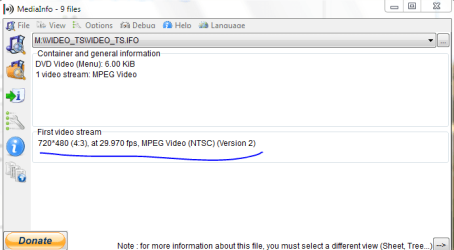
and no, sir DVDShrink orients itself on your source material. My rips are all NTSC
-DG
Are they still around?
Hmmm.. I know about DVDShrink, I've been using it for a few years.. My only problem, is that I wanted a format with a filename that I could run with some media player instantly, without having to mount to a virtual drive.. Apart from that, DVDshrink produces PAL DVD resolution, in which case if you want to a lower-size backup file would be pixelized..
What I do, I have DVDShrink create ISOs which I have linked to VLC.
So a double click on any iso file starts VLC and plays that movie.
and no, sir DVDShrink orients itself on your source material. My rips are all NTSC
-DG
My Computer
At a glance
Windows 7 Ultimate x86DualCore AMD Athlon 64 X2, 2600 MHz 5200+Samsung 2GB DDR2Onboard NVIDIA GeForce 6150SE nForce 430
- Computer Manufacturer/Model Number
- HP m8000n
- OS
- Windows 7 Ultimate x86
- CPU
- DualCore AMD Athlon 64 X2, 2600 MHz 5200+
- Motherboard
- Asus M2N68-LA (Narra)
- Memory
- Samsung 2GB DDR2
- Graphics Card(s)
- Onboard NVIDIA GeForce 6150SE nForce 430
- Sound Card
- Onboard nVIDIA nForce 6100-430 (MCP61P)
- Monitor(s) Displays
- Westinghouse 19" LED
- Screen Resolution
- 1280x1024
- Hard Drives
- SATA II Seagate Barracuda 500GB
USB II WD Elements 500GB
USB II WD My Book 1TB
USB II WD My Book 2TB
- PSU
- Stock (HP)
- Case
- Stock (HP)
- Cooling
- Stock
- Keyboard
- Logitech Classic KB 200
- Mouse
- Standard HP opticle USB mouse
That solution with ISO files that are linked to VLC looks good. My only issue is that for my DVD backups that I keep on my hard drives, I would prefer a smaller filesize. And if I try to compress for example a 4,37GB DVD to a 2GB backup(or even smaller), ratDVD would give me a decent video quality. XviD would do to, BUT I would have to compress each video seperately, which for a music video DVD would result to 10 separate avi files. To make things smoother, AutoGK for example, would lower the resolution to something like 640-480. While ratDVD would create a single file with the menus and all..
If I tried something similar (a 4,37GB DVD to a 2GB backup) with DVD Shrink, even with Deep Analysis on, I believe the result would look a lot worse and much more pixelated, since it lowers the video size keeping the original DVD video resolution..
If I tried something similar (a 4,37GB DVD to a 2GB backup) with DVD Shrink, even with Deep Analysis on, I believe the result would look a lot worse and much more pixelated, since it lowers the video size keeping the original DVD video resolution..
My Computer
At a glance
Windows 7 Ultimate 64-bit
- OS
- Windows 7 Ultimate 64-bit

How about using DVD Shrink and set to no compression on the main movie, so that it rips at 100% quality.
Then use Handbrake and encode it to something like MKV H.264 file on constant quality. It should give you a smaller size like 700-1200MB.
Then use Handbrake and encode it to something like MKV H.264 file on constant quality. It should give you a smaller size like 700-1200MB.
My Computers
-
At a glance
WIN10AMD Ryzen 5 3600 6-Core Processor 3.59 GHz16.0 GB- Computer type
- PC/Desktop
- Computer Manufacturer/Model Number
- PowerSpec G164
- OS
- WIN10
- CPU
- AMD Ryzen 5 3600 6-Core Processor 3.59 GHz
- Memory
- 16.0 GB
- Internet Speed
- VERY FAST>>>!!!
-
- Antivirus
- ESET Security Premium
Yes, but my main concern is to maintain the DVD menus structure. If I just needed the main movie(or each video file on the DVD to a seperate video file) there many solutions.
mkv would also create a single file for each movie which I would have to run seperately.. (unless there's some way to have the DVD menus in a mkv container file that I haven't heard of)..
mkv would also create a single file for each movie which I would have to run seperately.. (unless there's some way to have the DVD menus in a mkv container file that I haven't heard of)..
My Computer
At a glance
Windows 7 Ultimate 64-bit
- OS
- Windows 7 Ultimate 64-bit
I see your dilemma...and no, I don't know of a method to shrink the filesize while maintaining the menu structure.
I know that MagicDisc can create compressed ISOs but I don't believe those are playable without unpacking them first. Re-"creating" the DVD and re-encode the material to SVCD would be the only way to have a menu present but of course only if you'd accept a huge loss in quality.
What I found tho is a Pack called Ratattack. It holds
RATcheck (a tool to check the integrity of a ratDVD)
RAT batch (you guessed it...a simple batch tool to convert multiple DVDs to ratDVD format
Media Player Classic v6.4.8.4 (a special Version that has been altered to support ratDVD but fast forward still crashes it
-DG
I know that MagicDisc can create compressed ISOs but I don't believe those are playable without unpacking them first. Re-"creating" the DVD and re-encode the material to SVCD would be the only way to have a menu present but of course only if you'd accept a huge loss in quality.
What I found tho is a Pack called Ratattack. It holds
RATcheck (a tool to check the integrity of a ratDVD)
RAT batch (you guessed it...a simple batch tool to convert multiple DVDs to ratDVD format
Media Player Classic v6.4.8.4 (a special Version that has been altered to support ratDVD but fast forward still crashes it
-DG
Last edited:
My Computer
At a glance
Windows 7 Ultimate x86DualCore AMD Athlon 64 X2, 2600 MHz 5200+Samsung 2GB DDR2Onboard NVIDIA GeForce 6150SE nForce 430
- Computer Manufacturer/Model Number
- HP m8000n
- OS
- Windows 7 Ultimate x86
- CPU
- DualCore AMD Athlon 64 X2, 2600 MHz 5200+
- Motherboard
- Asus M2N68-LA (Narra)
- Memory
- Samsung 2GB DDR2
- Graphics Card(s)
- Onboard NVIDIA GeForce 6150SE nForce 430
- Sound Card
- Onboard nVIDIA nForce 6100-430 (MCP61P)
- Monitor(s) Displays
- Westinghouse 19" LED
- Screen Resolution
- 1280x1024
- Hard Drives
- SATA II Seagate Barracuda 500GB
USB II WD Elements 500GB
USB II WD My Book 1TB
USB II WD My Book 2TB
- PSU
- Stock (HP)
- Case
- Stock (HP)
- Cooling
- Stock
- Keyboard
- Logitech Classic KB 200
- Mouse
- Standard HP opticle USB mouse
Similar threads


- Replies
- 9
- Views
- 3K

- Replies
- 4
- Views
- 2K

- Replies
- 2
- Views
- 2K