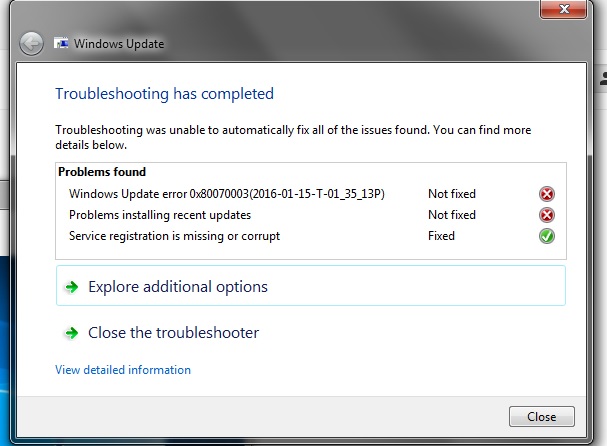
0x80070003

mAReDux

New member
Local time
10:38 PM
Messages
5
atk8dM2.jpg


I think the CBS file was too big so I deleted the CBSpersist zips in the CBS file to be able to upload it. It was like 35 MB before.

I checked the other threads but couldn't find anything specific to mine because I'm pretty sure why I'm getting this problem. I can't install any updates, including Intel Graphics Driver, it just gets stuck at "Checking for updates"

Few weeks ago I got annoyed by the Windows 10 update popups so I Google'd how to get rid of them and did something.

From what I can see from my history is that I only visited this site at that time:

What is the ?Get Windows 10? Tray Item and How Do You Remove It?

I don't remember what I did but I remember not installing the program. I feel like I deleted something though.

Anyways since then I have also gotten multiple GWXUX has stopped working notifications.

I have ran Windows Update Fixer, it finds the problem but says "Not Fixed", I ran Disk Cleanup in safe mode and deleted around 2gb, I ran update reset and I installed the hotfix thing, no idea what that did.

I thought I did the registery change but I couldn't locate the GWX, so I guess I didn't. I also feel like I might have ran a command prompt but there's nothing like that in this one site I looked at.

So this is basically where I'm stuck, any help is much appreciated
 
Last edited:

My Computer

Computer type
PC/Desktop
OS
Windows 7 Ultimate 64bit
Hello mate have a read of this https://support.microsoft.com/en-us/kb/910336 might be worth a try and if you are concerned re that 10 upgrade use the disbale batch file from this
Upgrade to Windows 10 Update - Enable or Disable in Windows 7 or 8.1 - Windows 10 Forums

To get rid of the notification GWX just go to the notification tray button and customise > hide notifications and icon.

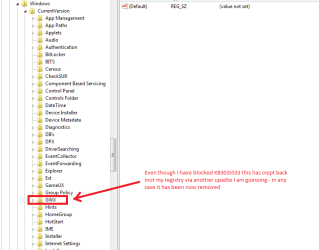
I regularly check too in HKEY_LOCAL_MACHINE and HKEY_CURRENT_USER > Software > Microsoft > Windows ? Current version and check for an entry GWX if I find it because although I hide KB3035533 that GWX seems to creep in somehow - see my pic

PS to remove right clcik the entry and delete;)
 

Attachments

  • GWX.PNG
    GWX.PNG
    12.8 KB · Views: 0

My Computer

Computer type
PC/Desktop
Computer Manufacturer/Model Number
Own build (new) Desk1 / Asus ROG Win 7 / Desk2 1st build
OS
Desk1 7 Home Prem / Desk2 10 Pro / Main lap Asus ROG 10 Pro 2 laptop Toshiba 7 Pro Asus P2520 7 & 10
CPU
Desk1 i5 3750K / Laptop i7 GTX 860M / Desk2 i5 2500
Motherboard
Desk1 Asus P877-V / Desk2 Gigabyte H67 UD3H / Laptop ?
Memory
Desk1 8GB (1866) / Desk2 16GB (1333) / Laptop 8Gb DDR3
Graphics Card(s)
Desk 1& 2NVidia GTX 650 & Laptops on board Intel
Sound Card
Desk 1 & 2 -XONAR DG Realtek High Def audio Laptop
Monitor(s) Displays
Desk 1 Benq HD 2450 / Desk2 Philips 24" / Laptop 17.5"
Screen Resolution
1920x1080 D1 & D2 & Laptop 1
Hard Drives
Desk1 Samsung 120GB 830 SSD
Asus ROG 256GB 850 Pro SSD
Desk2 Samsung 840 256 SSD
Toshiba 120GB EVO
PSU
Desk 1 Corsair HX 1050/ Laptop ? / Desk 2 Corsair HX 650
Case
Desk 1 Cooler HAF XM ? Toshiba laptop / Desk2 Coolermaster
Cooling
Fans on all Desk1 -2 Desk2 - all Coolermasters 5 Laptop ?
Keyboard
Desk 1 MS Sidewinder X6 Desk 2 MS Sidewinder X 4
Mouse
Desk 1&2 - Gigabyte MS 900 gamer - laptop - Logitec wireless
Internet Speed
ADSL2+
Other Info
One other Desktop (tester) and spare Toshba laptop both with SSD's
Running Kaspersky 2016 ISS on all machines config'd identically
Logitec audio stereo systems on each machine (x3)
Canon MG5250MFC
Router/modem TP-Link running WPA2SK
Back
Top