Solved 0x80070570 when installing win 7

baggy

New member
Local time
7:55 PM
Messages
12
Hey guys,

A week ago I started having BSOD issues when I logged into my laptop (even if I wasn't doing anything) which I got round to addressing today. I booted into safe mode and the BSODs stopped. Since my laptops been in use for a while and was getting cluttered, I thought I'd do a fresh install of win 7.

This is where the issue lies. I've tried installing Win 7 ultimate (x86 and x64), win 7 professional(x86) and win 7 home premium (x64), all legit, through either a USB or installation discs which have all worked before. However, everytime I get the 0x80070570 and I have no idea what to do. Occasionally I also get differing BSODs with titles like "bad pool header" or "cache_manager" but these are very rare. More often than not, installation quits due to 0x80070570 error.

I'm beginning to think this may be a hardware fault. It is a Sony Vaio VPCEB44FX.

Any help would be appreciated.

Many thanks,
Baggy
 

My Computer

Computer type
Laptop
Computer Manufacturer/Model Number
Apple
OS
Win 7 x64
CPU
Intel i5-4278U
Memory
8gb RAM
Hard Drives
256GB SSD

My Computer

Computer Manufacturer/Model Number
Custom Built
OS
Windows 7 Ultimate 32-Bit & Windows 7 Ultimate 64-Bit
CPU
Intel Core i7 CPU 950 @ 3.07GHz
Motherboard
ASUS P6T DELUXE V2
Memory
OCZ 6GB (3 x 2GB) 240-Pin DDR3 SDRAM DDR3 1600 OCZ3X1600R2
Graphics Card(s)
ATI Radeon HD 5700 Series
Sound Card
OnBoard
Hard Drives
WD6400AACS-00M3B0 (640GB SATA )
PSU
CORSAIR 850w
Case
NZXT LEXA
Cooling
Intel Stock Heatsink Fan
Keyboard
Microsoft Wireless Laser Keyboard 7000
Mouse
Microsoft Wireless Laser Mouse 7000
Ok thanks, I shall give that a go now.
 

My Computer

Computer type
Laptop
Computer Manufacturer/Model Number
Apple
OS
Win 7 x64
CPU
Intel i5-4278U
Memory
8gb RAM
Hard Drives
256GB SSD

My Computer

Computer Manufacturer/Model Number
Custom Built
OS
Windows 7 Ultimate 32-Bit & Windows 7 Ultimate 64-Bit
CPU
Intel Core i7 CPU 950 @ 3.07GHz
Motherboard
ASUS P6T DELUXE V2
Memory
OCZ 6GB (3 x 2GB) 240-Pin DDR3 SDRAM DDR3 1600 OCZ3X1600R2
Graphics Card(s)
ATI Radeon HD 5700 Series
Sound Card
OnBoard
Hard Drives
WD6400AACS-00M3B0 (640GB SATA )
PSU
CORSAIR 850w
Case
NZXT LEXA
Cooling
Intel Stock Heatsink Fan
Keyboard
Microsoft Wireless Laser Keyboard 7000
Mouse
Microsoft Wireless Laser Mouse 7000
Sorry, please ignore
 

My Computer

Computer type
Laptop
Computer Manufacturer/Model Number
Apple
OS
Win 7 x64
CPU
Intel i5-4278U
Memory
8gb RAM
Hard Drives
256GB SSD

Attachments

  • IMG-20130518-WA0003.jpg
    IMG-20130518-WA0003.jpg
    80.2 KB · Views: 0

My Computer

Computer type
Laptop
Computer Manufacturer/Model Number
Apple
OS
Win 7 x64
CPU
Intel i5-4278U
Memory
8gb RAM
Hard Drives
256GB SSD
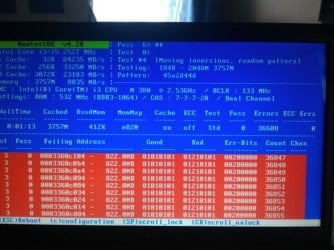
Follow the steps in tutorial to isolate the bad stick or slot. It could be either.

Check the sticks and slots for debris and blow them out with canned air if necessary.

Swap the sticks to see if it makes a difference.

Then once you isolate the stick, replace it.

Follow these steps to Clean Reinstall - Factory OEM Windows 7 which are the same for retail and will yield a perfect install, so long as you stick with the tools and methods given.
 

I'm really sorry about this, but initially I thought my problems were software related and tries to reinstalla clean version of windows. But the main error now is not being able to complete the installation due to error 0x80070570, though this has occasionally been followed up by BSOD. But does the fact that I now have no operating system mean I cannot post dump files?
 

My Computer

Computer type
Laptop
Computer Manufacturer/Model Number
Apple
OS
Win 7 x64
CPU
Intel i5-4278U
Memory
8gb RAM
Hard Drives
256GB SSD
Follow the steps in tutorial to isolate the bad stick or slot. It could be either.

Check the sticks and slots for debris and blow them out with canned air if necessary.

Swap the sticks to see if it makes a difference.

Then once you isolate the stick, replace it.

Follow these steps to Clean Reinstall - Factory OEM Windows 7 which are the same for retail and will yield a perfect install, so long as you stick with the tools and methods given.

Aaagh this means I'll need to open up the laptop :mad:. Thanks for your help though:)

Do I only need to follow that link once I've replaced the RAM? I take it those instructions will fail if I try to do so before replacing the RAM?
 

My Computer

Computer type
Laptop
Computer Manufacturer/Model Number
Apple
OS
Win 7 x64
CPU
Intel i5-4278U
Memory
8gb RAM
Hard Drives
256GB SSD
The tutorial will show you how to isolate the RAM stick or slot by process of elimination.
 
The tutorial will show you how to isolate the RAM stick or slot by process of elimination.

I meant will the clean install only work once I've isolated the bad ram? Also, will I not be able to reinstall windows till I have a matching pair of sticks in or will removing the bad stick suffice for a few days?
 

My Computer

Computer type
Laptop
Computer Manufacturer/Model Number
Apple
OS
Win 7 x64
CPU
Intel i5-4278U
Memory
8gb RAM
Hard Drives
256GB SSD
Yes you can run without the bad stick once you determine which it is. But it will be slower.
 
Thanks for all your help guys! Managed to find the bad stick of ram and reinstall windows!
 

My Computer

Computer type
Laptop
Computer Manufacturer/Model Number
Apple
OS
Win 7 x64
CPU
Intel i5-4278U
Memory
8gb RAM
Hard Drives
256GB SSD
Back
Top