127.0.0.1 loopback problem / file sharing

abecanamar

New member
Local time
8:20 AM
Messages
10
Hello. My network consists of one PC and one laptop, both running Vista HP 32 bit and my laptop running Windows 7 HP 64 bit. We can all see each other on the network. The two vista computers can see each others files and also see my shared files. I, however, am unable to access any of their shared files. I get the following error code:

0x80070035 Check the spelling of the name, otherwise there might be a problem with your network.

Network discovery is on, file sharing is on, workgroup is all the same, etc. I've deleted all stored network passwords and firewall is set up correctly.. I've reinstalled tcp/ip settings, flushed dns, registered dns, release and renew ip settings. On the vista computers, under the adapter details, ipv4 states internet access and "local" under ipv6. On my computer, ipv4 says internet access and "no internet access" under ipv6.

What i found odd was that when I click on start menu, network, my IP address is listed as 127.0.0.1. As far as I can understand, [FONT=verdana, geneva, helvetica]127.0.0.1 is the loopback address in IP, which is a test mechanism of network adapters. Messages sent to 127.0.0.1 do not get delivered to the network. Instead, the adapter intercepts all loopback messages and returns them to the sending application.

Is this what is keeping me from communicating with the other computers on my network? If so, then how do I fix that problem?

Abe
[/FONT]
 

My Computer My Computer

Computer Manufacturer/Model Number
HP dv6 1355 dx Notebook
OS
Windows 7 Home Premium 64-bit
CPU
Intel Core 2 Duo T6600, 2200 MHz (11 x 200)
Motherboard
Hewlett-Packard 3627 18.50
Memory
4 GB
Monitor(s) Displays
Mobile Intel(R) 4 Series Express Chipset Family
Screen Resolution
1366 x 768
Hard Drives
Disk Drive WDC WD5000BEVT-60ZAT1 (465 GB, IDE)
Mouse
Microsoft USB Wireless Mouse (IntelliPoint)
Internet Speed
Download: 5110 (Kbps) Upload 655 (Kbps)
Is the loop-back, 127.0.0.1 address on one computer, or all computers?

I need to know a little more information about your network, Do you have a router, a modem, etc.
Are these computers just on a local network?

The reason I ask, is that if all of these computers are connected to a router then the router should assign IP address automatically to the computers?

What is the IP address, subnet mask, and default gateway for all the computers you are having issues with?

To check, open the start menu :orb: and type cmd (hit enter)
Then on the command prompt type ipconfig
there you will see the IP address, subnet mask, and default gateway.

Ryan
 

My Computer My Computer

Computer Manufacturer/Model Number
HP Pavilion dv5 Notebook PC
OS
Windows Seven x64
CPU
2.2 GHz Dual Core
Motherboard
Quanta 3600
Memory
4GB
Graphics Card(s)
ATI Mobility RADEON HD 3470
Sound Card
ATI
Monitor(s) Displays
Laptop
Hard Drives
ATA Hitachi HTS543215 (5400RPM)
Case
Laptop
Cooling
Fan
Internet Speed
Basic DSL 1.5 up and Down
Hi Ryan,

We are all on a local home network only. We are connected via a Netgear Router with DSL Modem (all in one) model DGN 2200. As far as I can tell, the router does assign IP addresses automatically.

W7
IPV4 192.168.0.2 (preferred)
Subnet Mask 255.255.255.0
Default Gateway 192.168.0.1

VISTA PC
IPV4 192.168.0.3
Subnet Mask 255.255.255.0
Default Gateway 192.168.0.1

Routing Table as shown on Netgear webpage
Destination Mask Gateway Metric Active 69.235.143.254 255.255.255.255 0.0.0.0 0 Yes 192.168.0.0 255.255.255.0 0.0.0.0 0 Yes 0.0.0.0 0.0.0.0 69.235.143.254 0 Yes I did notice that Node type on my computer is Mixed, while the node type on the PC is Hybrid... I really don't know what that means....
 

My Computer My Computer

Computer Manufacturer/Model Number
HP dv6 1355 dx Notebook
OS
Windows 7 Home Premium 64-bit
CPU
Intel Core 2 Duo T6600, 2200 MHz (11 x 200)
Motherboard
Hewlett-Packard 3627 18.50
Memory
4 GB
Monitor(s) Displays
Mobile Intel(R) 4 Series Express Chipset Family
Screen Resolution
1366 x 768
Hard Drives
Disk Drive WDC WD5000BEVT-60ZAT1 (465 GB, IDE)
Mouse
Microsoft USB Wireless Mouse (IntelliPoint)
Internet Speed
Download: 5110 (Kbps) Upload 655 (Kbps)
Ok, the above information looks good..

Try to ping each PC,
To do that click the start button, and type cmd in the search bar
in Command Prompt, type ping and the (name of the other computer) To find the name of the other computer, make sure you are still in command prompt and type ipconfig /all (output shown below is the first 6 lines of ipconfig /all)
Code:
Host Name . . . . . . . . . . . . : Ryan-PC (this is the name you will type in after ping)
   Primary Dns Suffix  . . . . . . . :
   Node Type . . . . . . . . . . . . : Hybrid
   IP Routing Enabled. . . . . . . . : No
   WINS Proxy Enabled. . . . . . . . : No
   DNS Suffix Search List. . . . . . : domain.actdsltmp


(For example if i wanted to ping Ryan-PC I would type:
Code:
ping Ryan-PC
What are the results?


I also would like you to do the same thing again, but instead of the Host name put there IP address.
(For example if the you are trying to reach the PC with an IP address of 192.168.0.3 you would type)
Code:
ping 192.168.0.3
What are the results?

Ryan.
 

My Computer My Computer

Computer Manufacturer/Model Number
HP Pavilion dv5 Notebook PC
OS
Windows Seven x64
CPU
2.2 GHz Dual Core
Motherboard
Quanta 3600
Memory
4GB
Graphics Card(s)
ATI Mobility RADEON HD 3470
Sound Card
ATI
Monitor(s) Displays
Laptop
Hard Drives
ATA Hitachi HTS543215 (5400RPM)
Case
Laptop
Cooling
Fan
Internet Speed
Basic DSL 1.5 up and Down
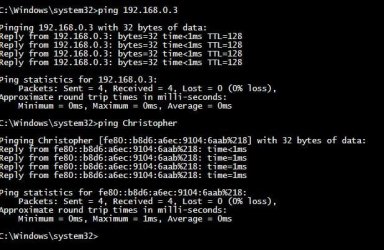
I can ping successfully both by name and by ip address..

moz-screenshot-3.png
PING.JPG

What is the node type? I noticed from your post that yours is set to Hybrid. The two vista computers are also Hybrid, while mine is set to "Mixed". Does this mean anything?
moz-screenshot.png
moz-screenshot-1.png
moz-screenshot-2.png
 

My Computer My Computer

Computer Manufacturer/Model Number
HP dv6 1355 dx Notebook
OS
Windows 7 Home Premium 64-bit
CPU
Intel Core 2 Duo T6600, 2200 MHz (11 x 200)
Motherboard
Hewlett-Packard 3627 18.50
Memory
4 GB
Monitor(s) Displays
Mobile Intel(R) 4 Series Express Chipset Family
Screen Resolution
1366 x 768
Hard Drives
Disk Drive WDC WD5000BEVT-60ZAT1 (465 GB, IDE)
Mouse
Microsoft USB Wireless Mouse (IntelliPoint)
Internet Speed
Download: 5110 (Kbps) Upload 655 (Kbps)
I was getting to that, :)
Node Type is a little confusing, but it uses WINS (Windows Internet Name Service) the host name of a computer is converted to an IP address.. (Like DNS) when I type in google.com in my browser a DNS server (Domain Name System) is required to convert that name to an IP address. (I could just type 74.125.45.147 in my browser and I would still be able to visit google, (but it is much easier remembering a name then a number)

Can you ping google and both computers?
Open cmd by clicking start, and type cmd in the search bar (hit enter)and type
Code:
ping [URL="http://www.google.com"]www.google.com[/URL]
What are the results?

I wanted to see if your computers are able to talk to each other they are, both with an IP address and by host name. I also wanted to know if you can reach the internet on both computers. If you still can not share your files, then let's try changing the node type, to Hybrid.

Before we change the node type, Do you have Homegroup running? (Windows 7 Only) To check click start and type Homegroup then hit enter. If you are presented a setup page for Homegroup, then you have it turned off. If you are in a settings page for Homegroup then disable it (Homegroup only works for Windows 7 PCs and has made issues with sharing between older operating systems)

If homegroup was running and you disabled it, restart your computer and try to share files. Did that resolve your issue? If not continue reading.

The following steps are in the registry I would recommend to backup the registry (Here's a step by step guide by Brink http://www.sevenforums.com/tutorials/4230-registry-backup-restore.html?filter) You could also create a restore point (Step by step guide by Brink http://www.sevenforums.com/tutorials/697-system-restore-point-create.html )

Click start, and in the search bar type regedit (hit enter)

Windows UAC will pop up, click Yes.

Navigate to HKEY_LOCAL_MACHINE\System\CurrentControlSet\Services\NetBT\Parameters\

Look for NodeType in the of registry values. If it is not there do the following steps, If it is there do step number 4.
  1. Then on the Edit menu, point to New, and then click DWORD Value.
  2. Type NodeType, and then press Enter.
  3. Right-click NodeType, and then click Modify
  4. In the Value data box, type 8 (Make sure decimal is selected, instead of Hexadecimal)
You have now changed the Node Type, restart your computer and then try to share your files.
What are the results?
 
Last edited:

My Computer My Computer

Computer Manufacturer/Model Number
HP Pavilion dv5 Notebook PC
OS
Windows Seven x64
CPU
2.2 GHz Dual Core
Motherboard
Quanta 3600
Memory
4GB
Graphics Card(s)
ATI Mobility RADEON HD 3470
Sound Card
ATI
Monitor(s) Displays
Laptop
Hard Drives
ATA Hitachi HTS543215 (5400RPM)
Case
Laptop
Cooling
Fan
Internet Speed
Basic DSL 1.5 up and Down
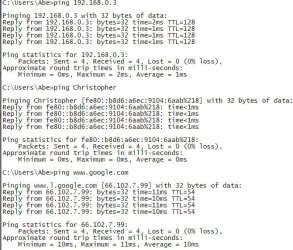
I can ping each computer by name and ip address as well as google, The other computers can also ping me both ways and also ping google.PING 3.JPG

Homegroup is turned off. I even disabled it in SERVICES. Still, no luck.

I successfully changed the Node Type to Hybrid, which by the way was listed as dhcpnodetype (not sure if that matters..but just an observation) Still, no luck. :(

however when I went back in to the registry, the value 8 was in hexidecimal, not decimal, which I did make sure I selected... Does it revert back automatically?
 

My Computer My Computer

Computer Manufacturer/Model Number
HP dv6 1355 dx Notebook
OS
Windows 7 Home Premium 64-bit
CPU
Intel Core 2 Duo T6600, 2200 MHz (11 x 200)
Motherboard
Hewlett-Packard 3627 18.50
Memory
4 GB
Monitor(s) Displays
Mobile Intel(R) 4 Series Express Chipset Family
Screen Resolution
1366 x 768
Hard Drives
Disk Drive WDC WD5000BEVT-60ZAT1 (465 GB, IDE)
Mouse
Microsoft USB Wireless Mouse (IntelliPoint)
Internet Speed
Download: 5110 (Kbps) Upload 655 (Kbps)
however when I went back in to the registry, the value 8 was in hexidecimal, not decimal, which I did make sure I selected... Does it revert back automatically?

Yes it will revert it,
So the computer that had the mixed node type is now hybrid correct? (All of your computers are set to hybrid correct?)

Your network seems to working wonderfully, but you are still unable to share files between your computers.

Are these computers in the same workgroup? To check click start and type workgroup in the search bar. (hit enter) (Step by step tutorial by Brink http://www.sevenforums.com/tutorials/51711-workgroup-name-view-change.html )

You can change the workgroup to whatever, just make sure each computer has the same one..

If there are different then change them, and you will have to restart your computer.

Also what firewall program are you using?
 

My Computer My Computer

Computer Manufacturer/Model Number
HP Pavilion dv5 Notebook PC
OS
Windows Seven x64
CPU
2.2 GHz Dual Core
Motherboard
Quanta 3600
Memory
4GB
Graphics Card(s)
ATI Mobility RADEON HD 3470
Sound Card
ATI
Monitor(s) Displays
Laptop
Hard Drives
ATA Hitachi HTS543215 (5400RPM)
Case
Laptop
Cooling
Fan
Internet Speed
Basic DSL 1.5 up and Down
Yes. The Windows 7 laptop was the one that was mixed, but is now HYBRID.

All computers are now in hybrid mode.

All computers belong to the same workgroup.

All computers can access the internet with no problem.

Both Vista Computers can access each others files with no problem.

Both Vista computers can access the Windows 7 laptop's files with no problem. The Windows 7 laptop (Abe) cannot access either computers files. We are all using Windows Firewall.

NETWORK.JPG
 

My Computer My Computer

Computer Manufacturer/Model Number
HP dv6 1355 dx Notebook
OS
Windows 7 Home Premium 64-bit
CPU
Intel Core 2 Duo T6600, 2200 MHz (11 x 200)
Motherboard
Hewlett-Packard 3627 18.50
Memory
4 GB
Monitor(s) Displays
Mobile Intel(R) 4 Series Express Chipset Family
Screen Resolution
1366 x 768
Hard Drives
Disk Drive WDC WD5000BEVT-60ZAT1 (465 GB, IDE)
Mouse
Microsoft USB Wireless Mouse (IntelliPoint)
Internet Speed
Download: 5110 (Kbps) Upload 655 (Kbps)
Ok, lets just look at (Abe)
Abe's IP address is 192.168.0.2 correct? (It says 127.0.0.1 but I don't think that is correct)

Open Control Panel, and click Network and Internet, then click Network and Sharing Center, (Screenshot this Window)

On the left hand side click Change adapter settings, right-click on the adapter you are using,Click properties (Abe's a laptop so I assuming the wireless adapter)

file share.PNG

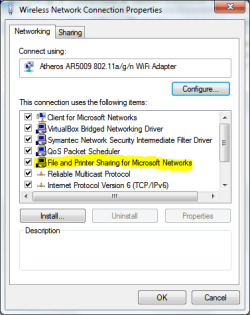
Make sure you have File and Printer Sharing installed on the adapter.
Also tab over to sharing (In the same window) make sure ICS is disabled, (Internet Connection Sharing)

What are the results?

If the above did not help try also these provided links:
http://windows.microsoft.com/en-US/...mputers-running-different-versions-of-Windows
http://windows.microsoft.com/en-us/...d-printers-with-different-versions-of-windows
 
Last edited:

My Computer My Computer

Computer Manufacturer/Model Number
HP Pavilion dv5 Notebook PC
OS
Windows Seven x64
CPU
2.2 GHz Dual Core
Motherboard
Quanta 3600
Memory
4GB
Graphics Card(s)
ATI Mobility RADEON HD 3470
Sound Card
ATI
Monitor(s) Displays
Laptop
Hard Drives
ATA Hitachi HTS543215 (5400RPM)
Case
Laptop
Cooling
Fan
Internet Speed
Basic DSL 1.5 up and Down
Back
Top