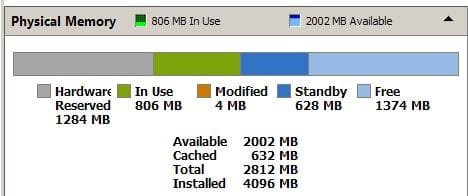
1282MB hardware reserved memory - seems too much to me..

Cheetah64d

New member
Local time
3:19 PM
Messages
20
Well, I've read soooo much about this problem, I'm already got confused.
As the title mention - I think I've got too much of my phisycal memory allocated to hardware by Win 7. (Ultimate 32 bit edition, BTW).
Yes, I know there's many posts with this prbolem - but that part of my problem too...:)
I read some articles, and I thought I understand my problem, and than - I read more, and more, and more... the more that I've read - the less I can determine where the problem come from.
I read this, and this, and this and this so far, and that why I got all confused up.

So, let's start from scratch - I've got a desktop : (specs)
AMD Athlon II X2 245 processor, 2900 Mhz.
MOBO - Gigabyte GA-MA785GM-US2H - Link here.
2 kits of RAM, 2GB each.

When I open System Properties - It shows in the RAM section - 4.00 GB installed - 2.75 Usable.
Why is this?
I've got an onboard video card (ATI Redeon HD 4200), but it takes only 512MB of the memory. Where's the rest of it?

%D7%A6%D7%92%20%D7%94%D7%9E%D7%A9%D7%90%D7%91%D7%99%D7%9D.png


Here is image from Resource Monitor, showing that 1282 MB is hardware reserved memory.

IMPORTANT: I've got into this problem because I've just installed 2GB memory stick, in addition to the 2GB memroy stick I've already got. I've checked with CPU-Z and they match. Installed them as a dual channel, on the blue DIMMs on my MOBO.

I'll be pleased if someone can sort out the mess in my head about all those memory problem..

Thanks in advance.
 

My Computer My Computer

At a glance

Windows 7 Home Premium x64
OS
Windows 7 Home Premium x64
well i see the problem is because of softwares installed in your system.
do these steps:
1) go to msconfig (type it in start menu) then uncheck any unwanted programs that are running in your startup. place the screen shot of that here so i can help you on that.
2) check your drivers and make sure you have the latest and updated ones
3)check your system with an antivirus
 

My Computer My Computer

At a glance

Windows 7 Ultimate x64core i7.
OS
Windows 7 Ultimate x64
CPU
core i7.
I looked at my Resource Monitor and I use 1 meg of hardware reserved memory. I have looked in msconfig and only have my antiviris, razer mouse and keyboard enabled at startup and nothing else, but thats on my comp yours will be different.
Something else I did but don't know if it has any bearing is that I disabled the Superfetch in services and knocked down one of my svchost.exe from 6 figures to just a few thousand K's. In turn I removed all in the prefetch folder so I don't have any of the prefetch programs waiting in the shadows for me to click on one of them maybe using up memory?.

ResourceMonitor_zps77ed553a.jpg
 

My Computer My Computer

At a glance

Microsoft Windows 7 Ultimate 64-bitIntel(R) Pentium(R) CPU G2030 @ 3.00GHz12.00 GB Kingston DIMM 3x4 gig sticksAMD Radeon HD 5450
Computer Manufacturer/Model Number
Custom Build
OS
Microsoft Windows 7 Ultimate 64-bit
CPU
Intel(R) Pentium(R) CPU G2030 @ 3.00GHz
Motherboard
ASUSTeK COMPUTER INC. P8H77-V LE
Memory
12.00 GB Kingston DIMM 3x4 gig sticks
Graphics Card(s)
AMD Radeon HD 5450
Sound Card
AMD High Definition Audio Device
Monitor(s) Displays
Dual displays
Screen Resolution
1280 x 1024 x 4294967296 colors
Hard Drives
ST3500320AS 465.76 GB
WDC WD10EZEX-00BN5A0 931.51 GB
WDC WD10 EARS-00MVWB0 USB Device 931.51 GB
PSU
XION SuperNova 600 watt
Keyboard
Razer Tarantula Gaming Keyboard
Mouse
Razer Imperator Gaming Mouse
Internet Speed
DSL 6 down & 1 up with Netgear R6300 Wireless router
my phisycal memory allocated to hardware by Win 7. (Ultimate 32 bit edition, BTW).
If it's a 32bit system = (approx) 3gb limit, your numbers looks perfectly normal IMO (AlterUrEgo example seems to be 64bit).
Snip from my ultimate 32 4gb laptop, hp\amd\ati.
 

Attachments

  • mem.JPG
    mem.JPG
    20.8 KB · Views: 21

My Computer My Computer

At a glance

W7, W8.1
Computer type
Laptop
Computer Manufacturer/Model Number
Dell \ Lenovo\ HP \ Toshiba
OS
W7, W8.1
Antivirus
MSE, Malwarebytes
Browser
FF
Cheetah64d

What is the model of the RAM that you are using... and how you installed them on your motherboard..
 

My Computer My Computer

At a glance

Windows 7 ultimate x64
Computer Manufacturer/Model Number
Nothing specific....what ever the clients provide for Repair
OS
Windows 7 ultimate x64
well i see the problem is because of softwares installed in your system.
do these steps:
1) go to msconfig (type it in start menu) then uncheck any unwanted programs that are running in your startup. place the screen shot of that here so i can help you on that.
2) check your drivers and make sure you have the latest and updated ones
3)check your system with an antivirus
How do you know it's a software problem, while it's stated in the Resource Manager as Hardware reserved?
Anyway,
1) Did it. no help.
2) drivers of what? I think everyting is up-to-date in my computer.
3) I have Avira AV in my computer, no viruses according to it.

my phisycal memory allocated to hardware by Win 7. (Ultimate 32 bit edition, BTW).
If it's a 32bit system = (approx) 3gb limit, your numbers looks perfectly normal IMO (AlterUrEgo example seems to be 64bit).
Snip from my ultimate 32 4gb laptop, hp\amd\ati.

I don't think that in 32bit there's 3gb limit. more like 3.7 or so. anyway - I will be really glad to find out there's no problem and this is the standart situation. Somehow I got the feeling it's not.. maybe you also have a problem.. start think about that..

Cheetah64d

What is the model of the RAM that you are using... and how you installed them on your motherboard..
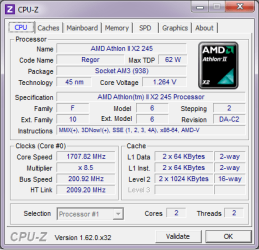
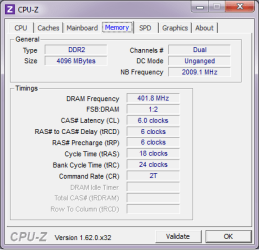
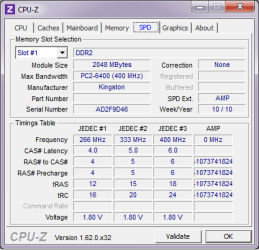
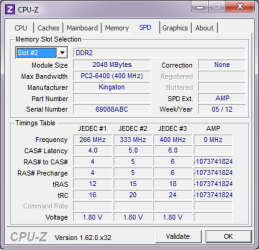
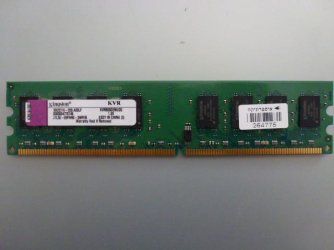
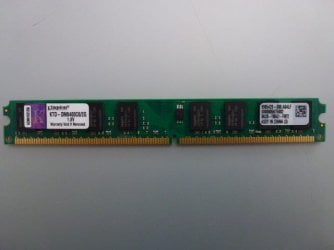
I attached screenshots of CPU-Z so you can find out. One wierd thing - I bought the second RAM according to the CPU-Z data about the first one. However - when it came - I was suprise to find out that its height size is about half of the first. Still, same numbers as the first according to CPU-Z, as you can see for yourself from the attached photos..
 

Attachments

  • CPUZ1.png
    CPUZ1.png
    15.2 KB · Views: 18
  • CPUZ2.png
    CPUZ2.png
    10.9 KB · Views: 16
  • CPUZ3.png
    CPUZ3.png
    12.3 KB · Views: 17
  • CPUZ4.png
    CPUZ4.png
    12.5 KB · Views: 19

My Computer My Computer

At a glance

Windows 7 Home Premium x64
OS
Windows 7 Home Premium x64
okay; these physical memories are being in used with software installed in your system. when your os is on, each one take some space in your RAM, physical memory to load up its environment, even win7 takes some space for its visualization.
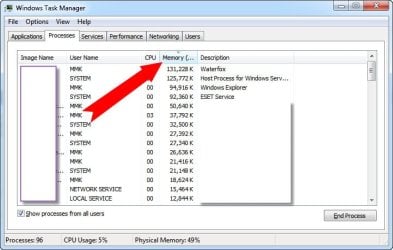
do as follow, run task manager and sort your memory, find out what programs are consuming more memory, and terminate them if they are unnecessary, also please place your msconfig-->startup screen shot and your task manager sorted by memory here, so i can help you better on that..
 

Attachments

  • 1-12-2013 11-15-28 PM.jpg
    1-12-2013 11-15-28 PM.jpg
    46.5 KB · Views: 21

My Computer My Computer

At a glance

Windows 7 Ultimate x64core i7.
OS
Windows 7 Ultimate x64
CPU
core i7.
well i see the problem is because of softwares installed in your system.
do these steps:
1) go to msconfig (type it in start menu) then uncheck any unwanted programs that are running in your startup. place the screen shot of that here so i can help you on that.
2) check your drivers and make sure you have the latest and updated ones
3)check your system with an antivirus
How do you know it's a software problem, while it's stated in the Resource Manager as Hardware reserved?
Anyway,
1) Did it. no help.
2) drivers of what? I think everyting is up-to-date in my computer.
3) I have Avira AV in my computer, no viruses according to it.

If it's a 32bit system = (approx) 3gb limit, your numbers looks perfectly normal IMO (AlterUrEgo example seems to be 64bit).
Snip from my ultimate 32 4gb laptop, hp\amd\ati.

I don't think that in 32bit there's 3gb limit. more like 3.7 or so. anyway - I will be really glad to find out there's no problem and this is the standart situation. Somehow I got the feeling it's not.. maybe you also have a problem.. start think about that..

Cheetah64d

What is the model of the RAM that you are using... and how you installed them on your motherboard..
I attached screenshots of CPU-Z so you can find out. One wierd thing - I bought the second RAM according to the CPU-Z data about the first one. However - when it came - I was suprise to find out that its height size is about half of the first. Still, same numbers as the first according to CPU-Z, as you can see for yourself from the attached photos..


Cheetah64d ...

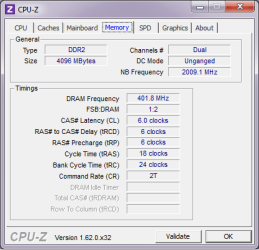
Your RAM's are installed in unganged ie. in single channel mode... and not Dual channel mode as you mentioned in the first post... Check the DC mode under the memory tab of CPU Z...

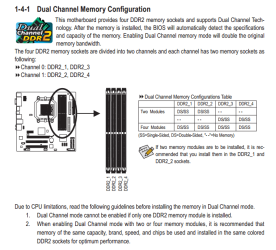
in order to set it to Dual you need to put the RAM's as mentioned below..

Install them in DDR2_1 & DDR2_2

dualmemory1.PNG

once done .. Go to bios and under MB intelligent Tweaker (MIT) > DCTs Mode... set it to ganged

Save and start your system... Check and tell me what you find
 

My Computer My Computer

At a glance

Windows 7 ultimate x64
Computer Manufacturer/Model Number
Nothing specific....what ever the clients provide for Repair
OS
Windows 7 ultimate x64
Cheetah64d ...

Your RAM's are installed in unganged ie. in single channel mode... and not Dual channel mode as you mentioned in the first post...

Well, thank you very much for the effort taking a look at the MOBO papersheet, but I don't think you're right.
Because of this - Wikipedia - Ganged versus unganged and also - take a look at the attached CPU-Z photo here, it's written-down "Dual" at the channel tab. The Ganged/Unganged mode has nothing to do with single/dual channel mode.
TY anyway. (When I'll have some free time, I'll go check it anyway, just out of curiosity what will be in ganged mode..:))
P.S. - BTW - the memories ARE installed right now at DDR2_1 & DDR2_2...
 

Attachments

  • CPUZ2.png
    CPUZ2.png
    10.9 KB · Views: 12
Last edited:

My Computer My Computer

At a glance

Windows 7 Home Premium x64
OS
Windows 7 Home Premium x64
Cheetah64d

Did you change the bios option as i mentioned before ????

Go to bios and under MB intelligent Tweaker (MIT) > DCTs Mode... set it to ganged

And yes i still believe what i said was right... Its not the matter of performance or stability but i think you need to understand what Dual or single channel means or Ganged or Unganged means... and yes they are related..and no people don't make names up just for their happiness ... there is a reason why the channels are colour coded and why they are named that way...

First what AMD says about ganged and unganged mode..

AMD has some excellent documentations that can be download for free. Let's examine some extract of the “BIOS and Kernel Developer’s Guide (BKDG) For AMD Family 10h Processors ”. On section 2.8 we can find some considerations on ganged vs unganged mode. If you are interested in checking the doc, I suggest you to especially read these sections:
2.8 - DRAM Controllers (DCTs)
2.8.5 - Ganged or Unganged Mode Considerations
2.8.8 - DRAM Data Burst Mapping
2.12.2 - DRAM Considerations for ECC

In short, the documentation indicates that:

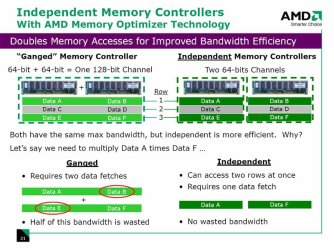
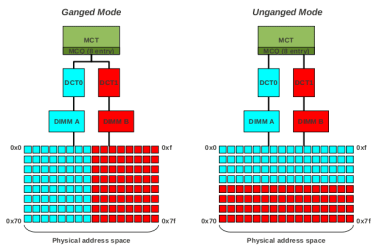
In ganged mode, we have a 128 bit wide logical DIMM that map the first 64 bit on physical DDR channel A and the last 64 bit on DDR channel B. So we can state that a single 128 bit operation is effectively split between two memory channel; on the other hand, the DCTs can not operate independently. In other words, the physical address space is interleaved between the two DIMM in 64 bit steps

In unganged mode, each DCT can act independently and has its own 64 bit wide address space. In this mode the processor can be programmed to interleave the single, physical address space on the two normalized address space associated with the two memory channel; however, the finer possible interleaving unit is the cache line size (64 bytes)

The image below should help explaining the differences between ganged and unganged modes:
address_schema.png

As you can see, in the ganged mode the physical address space is spread between the two memory channel with a 64 bit granularity: this means that two consecutive 64 bit access will read from two different memory channels and, more importantly, that a 128 bit access can utilize both channel.

On the other hand, in the unganged mode a (relatively) large portion of physical address space is bound to a single memory channel. In the graph above this portion is 64 bytes length, but the K10 processors can be programmed to use an even more coarse grained interleaving scheme. However, the normal interleaving unit in unganged mode is 64 byte length (as shown in the graph), as longer unit can cause a tangible performance loss.

From what we see, one should think that neither approach is the ideal one: the usual registers and operands size is 64 bit (8 byte), so it appear that both the ganged and unganged methods will read this 64 bit entity over only a single memory channel, effectively wasting bandwidth. A byte interleaved (or bit interleaved) mode should give as a great performance boost, right? Simply stated: no. The key point to understand here is that processors do not move in and out from memory data chunks of arbitrary length, but use a fixed-sized scheme: they move data from and to main memory only on a cache line base. On Phenom processor the cache line size is 64 byte long, so these processors move data from and to main memory only in 64 bytes chunks. This means that if we try to read a byte at address 0x0, the entire cache line (64 byte) will be fetched by the processor! While this can seems counterproductive, it has its reasons, especially related to space locality and cache design. It is beyond the scope of this article to explain why processors behave in this manner, but in short we can state that this design permit good performance boost (because exploit code and data space locality) and the creation of very dense caches.

As memory operations happens in 64 bytes chunks, it appear that ganged mode will always win: it can spread that 64 bytes operations on the two memory channel, while the unganged mode will only use a single memory channel. The reality, however, is the the unganged mode rarely suffer from this problem, because normally there are many outstanding memory request to be completed, so there are many outstanding cache line to be fetched from or stored to main memory. While the ganged mode will be faster in operating on a single cache line, the unganged mode can theoretically operate on two cache line at a given moment (with some restrictions). This parallelism can be realized because the memory controller incorporate an 8 entry depth memory controller queue (the “MCQ” box in the drawing above), for a total of 8 outstanding cache line requests.

However, simply stating that the unganged mode has the potential to be often on par with the ganged mode is not enough: in this case, we can simply use the ganged mode and forget about the unganged mode. The point is that the unganged mode has potential to be faster that ganged mode. Why? Because we must realize that main memory access don't happen immediately, as the DRAM chip require many ns to be accessed: after this initial access time the data can be transferred quite quickly, but the initial access steps can be very slow (from a processor standpoint). Starting two memory operations at the same time, the memory controller has the possibility to hide at least partially the latency involved in the setup steps of the second operations. Obviously this is not always true, but it is a possibility indeed and, so, this can be an advantage of unganged vs ganged method. Moreover, using the unganged mode the memory controller can theoretically both write to and read from memory at the same time: this should help memory copy routines and multitasking operating system, where many processes can both read from and write to memory at the same time.

Summarizing the whole point, we can state that:
  • the ganged mode has the potential to be faster than unganged mode because it use a more fine grained interleave mode
  • the unganged mode has the potential to be faster than ganged mode because it can start two memory operations at the sime time, effectively hiding at least part of the latency involved in the second operation. Also, this mode permit to both read from and write to memory at the same time, with the intrinsic advantages that this possibility implies.


And this is gigabytes FAQ on why its shows as unganged and dual....

GIGABYTE - Support & Downloads - FAQ

 

My Computer My Computer

At a glance

Windows 7 ultimate x64
Computer Manufacturer/Model Number
Nothing specific....what ever the clients provide for Repair
OS
Windows 7 ultimate x64

My Computer My Computer

At a glance

Win 7 Ultimate x64FX-8350 @ 4.6 GHz so farADATA XPG V1 Series Black 8GB DDR3 1600Sapphire R9 270x Dual-X
Computer type
PC/Desktop
Computer Manufacturer/Model Number
Me
OS
Win 7 Ultimate x64
CPU
FX-8350 @ 4.6 GHz so far
Motherboard
Asus M5A97 EVO
Memory
ADATA XPG V1 Series Black 8GB DDR3 1600
Graphics Card(s)
Sapphire R9 270x Dual-X
Sound Card
Xonar DGX w/ Corsair Vengence 1300
Monitor(s) Displays
Acer S232HL Abid
Screen Resolution
1920x1080
Hard Drives
120 GB OCZ Vertex 3
500 GB Seagate 7200.12
PSU
Antec Earthwatts 650W Green
Case
Antec Three Hundred
Cooling
Cooler Master 212 EVO
Keyboard
Logitech G510
Mouse
Logitech G500s
Internet Speed
35000/3000
Leave it unganged,

View attachment 250024

source, Inside AMD K10 Architecture | Hardware Secrets

Alos double check in the bios that the memory remap option is set to enabled.

Stormy

Thats a K10 architecture you are referring to.... and What we have here is a Phenom !

As i mentioned its not the matter whats better or best.. though AMD does suggest using the unganged mode...

The OP is having an issue here with his Windows 7 showing 1.2 GB as hardware reserved
 

My Computer My Computer

At a glance

Windows 7 ultimate x64
Computer Manufacturer/Model Number
Nothing specific....what ever the clients provide for Repair
OS
Windows 7 ultimate x64
Cheetah64d my advice would be read centaur78 post again and try to understand them. They are very helpful. Most of the time I see someone with a lot of hardware memory it is because of incorrect ram or the ram is installed incorrectly or both. Always install ram as per the motherboards manual. I'm not a AMD person so I can't help you there.
 

My Computer My Computer

At a glance

Windows 10 Pro. 64/ version 1709 Windows 7 Pr...Intel i7-6800K @ 4.3Corsair Platinum 16 gig @2400EVGA GTX 1070 OC
Computer type
PC/Desktop
Computer Manufacturer/Model Number
Home made Desktop
OS
Windows 10 Pro. 64/ version 1709 Windows 7 Pro/64
CPU
Intel i7-6800K @ 4.3
Motherboard
ASUS X-99 Deluxe II
Memory
Corsair Platinum 16 gig @2400
Graphics Card(s)
EVGA GTX 1070 OC
Monitor(s) Displays
Asus 27" LED LCD/VE278Q
Screen Resolution
1920-1080 or 1280-720 HDMI
Hard Drives
INTEL SSD 730-240 Gb Sata 3.0/
PSU
EVGA Platium 1200W
Case
Phanteks Luxe Tempered Glass 8 fans/ one radiator
Cooling
XSPC/ Water Cooled CPU
Keyboard
Das 4 Professional
Mouse
Logitech M705/MX Anywhere 2-S
Internet Speed
100 mbits
Antivirus
Microsoft Security Essentials/ Malwarebytes Premium 3.0/ SAS
Browser
I.E. 11 default/Firefox/ ISP Time Warner Cable/Spectrum
Other Info
LG BluRay Burner/
Sound system-KLipsch-THX/
Icy Dock ssd Hot Swap bays.
Ok, this is wierd..
I tried to select Ganged mode, in BIOS, like centaur78 said.
BIOS.JPG


When I exit (of course after saving..) - I got Unganged again in the main screen.
CMOS.JPG


After windows starts I checked with CPU-Z, and it stated "Ungaged" indeed.
CPUZ-After-Ganged.png


BTW - I checked the Resource Monitor - it's just stay the same - 1282 Hardware Reserve.
What could be the reason my computer refuse to go into "Ganged Mode"? Could it be because I've got Athlon II and not Phenom?
(And yes, I put the kits in DIMM2_1, DIMM2_2..)
 

My Computer My Computer

At a glance

Windows 7 Home Premium x64
OS
Windows 7 Home Premium x64
I can see that you bios version is F7. could you tell what revision is your motherboard.??

motherboard.PNG

Please confirm using the above...

As far i can tell either ver 1.0 or 1.1.. but please confirm and let me know .. so i can advice accordingly
 

My Computer My Computer

At a glance

Windows 7 ultimate x64
Computer Manufacturer/Model Number
Nothing specific....what ever the clients provide for Repair
OS
Windows 7 ultimate x64
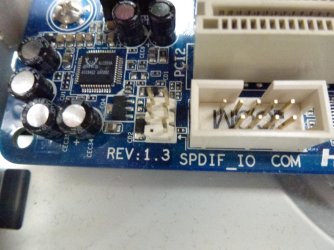
My revision is 1.3, as you can see in the attached photo.
I also attached the memory kits, if it could help a bit..
 

Attachments

  • P1040261.JPG
    P1040261.JPG
    57.5 KB · Views: 8
  • P1040262.JPG
    P1040262.JPG
    50.9 KB · Views: 12
  • P1040270.jpg
    P1040270.jpg
    439 KB · Views: 7

My Computer My Computer

At a glance

Windows 7 Home Premium x64
OS
Windows 7 Home Premium x64
Please update your bios to F12f from the manufacturers site..as there are lots things they have fixed here

One thing odd is if its 1.3... the first release version of bios is F8... and as per you screenshoot its F7...

Well F12f is the latest update to all the motherboard version...

Let me know how that goes..
 

My Computer My Computer

At a glance

Windows 7 ultimate x64
Computer Manufacturer/Model Number
Nothing specific....what ever the clients provide for Repair
OS
Windows 7 ultimate x64
KTD-DM8400C6/2G (small sized ram ) is actually made for Dell Desktops by Kingston

where as KVR800D2N6/2G (larger ram) is the Value RAM from Kingston

As far i can see both are non ECC ram ... working 800 Mhz.. It shouldnot be a problem.. They are good to go...

however.. Its always advisable to buy the sets from the same packs.. with matching RAM's
 

My Computer My Computer

At a glance

Windows 7 ultimate x64
Computer Manufacturer/Model Number
Nothing specific....what ever the clients provide for Repair
OS
Windows 7 ultimate x64
Well F12f is the latest update to all the motherboard version...

Let me know how that goes..

Sorry for the late response, but I just completed updating the BIOS now.
BIOS is F12f now, and the problem - still exist..
I've got "Ganged" mode inside the BIOS, but as soon as I exited - the POST show "Unganged Mode".
Any more ideas?
 

My Computer My Computer

At a glance

Windows 7 Home Premium x64
OS
Windows 7 Home Premium x64
OK

Could you use just 1 ram and tell me how the RAM is used... Post screenshot of resmon....

Then in the same way use the other ram only and post the screenshot
 

My Computer My Computer

At a glance

Windows 7 ultimate x64
Computer Manufacturer/Model Number
Nothing specific....what ever the clients provide for Repair
OS
Windows 7 ultimate x64
Back
Top