15 minute boot time...

Guys - what's happening at the "splash" screen is driver load and PnP enumeration. If most of the time is spent there, then cleaning out startup, gadgets, etc is NOT going to be helpful. Stop bleeding all over a brick wall ;).

I always start with a clean boot - it's how I run. :cool:
 

My Computer

Computer type
PC/Desktop
Computer Manufacturer/Model Number
Custom
OS
Windows 10 Pro x64
CPU
Intel Core i7 4790K @ 4.5GHz
Motherboard
Asus Maximus Hero VII
Memory
32GB DDR3
Graphics Card(s)
Nvidia GeForce GTX970
Sound Card
Realtek HD Audio
Screen Resolution
1920x1200
Hard Drives
1x Samsung 250GB SSD
4x WD RE 2TB (RAIDZ)
PSU
Corsair AX760i
Case
Fractal Design Define R4
Cooling
Noctua NH-D15

Attachments

  • Brys snap ?22 ?July ?2011 18h18m56s 01.png
    Brys snap ?22 ?July ?2011 18h18m56s 01.png
    48.6 KB · Views: 16

My Computer

Computer Manufacturer/Model Number
packard bell IXTREME M5722
OS
Operating System : Windows 7 Home Premium Edition 6.01.7600 SP1 (x64)
CPU
Processor : Intel Core 2 Quad Q8300 @ 2500 MHz
Motherboard
Mainboard : Packard Bell (Acer EG43M )
Memory
Physical Memory :8GB Corsair4x 2GB 800MHz C5 DDR2
Graphics Card(s)
Video Card : XFX 6700 AMD
Monitor(s) Displays
Maestro 234DL - BenQ V2220 - BenQ VW2420H
Screen Resolution
Current Display :1920x1080p pixels at 60 Hz in HD LED
Hard Drives
Hard Disks : WDC (1000 GB)
Drive C: (Hard Disk) : 428 GB available on 491 GB
Drive D: (Hard Disk) : 426 GB available on 492 GB
SAMSUNG spinpoint HD103SJ 1000.2 GB
(X 2) KINGSTON SSD NOW V 30GB
PSU
XFX ProSeries 550W PSU
Case
PACKARD BELL IXTREME
Cooling
System Blower Current: 150mA Air Flow16CFM ;Akasa 90mm rear
Keyboard
Gigabyte Aivia K8100
Mouse
TRUST-Wireless Laser Mouse - Carbon edition MI-7770C
Internet Speed
TP-LINK > TL-WN951N / AV500 Gigabit Powerline Adapters
Browser
chrome dev
Other Info
EXTRA COOLING>(FAN CONTROLLER) PC Bay Cooler 3 x 40mm fans; Akasa AK-HD-BL Blue hard drive cooler 2 x 40 mm fan 4500 rpm 29.7 dBA
Bios> American Megatrends Inc.
Version : P01-A1
Date : 08/31/2009
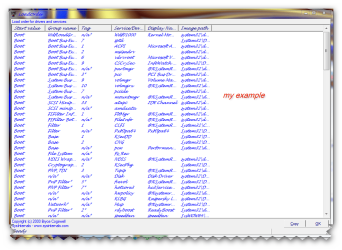
LoadOrd has limitations on Win7/Vista, in that the boot order is no longer mostly static (as it was in XP/2003), and as such it will change almost every boot as most everything in the newer OSes happens in parallel rather than one load item at a time.
 

My Computer

Computer type
PC/Desktop
Computer Manufacturer/Model Number
Custom
OS
Windows 10 Pro x64
CPU
Intel Core i7 4790K @ 4.5GHz
Motherboard
Asus Maximus Hero VII
Memory
32GB DDR3
Graphics Card(s)
Nvidia GeForce GTX970
Sound Card
Realtek HD Audio
Screen Resolution
1920x1200
Hard Drives
1x Samsung 250GB SSD
4x WD RE 2TB (RAIDZ)
PSU
Corsair AX760i
Case
Fractal Design Define R4
Cooling
Noctua NH-D15
i have not noticed that in my system it always seems to be the same. when i had trouble with slow booting i established the culprit through using load order.
 

My Computer

Computer Manufacturer/Model Number
packard bell IXTREME M5722
OS
Operating System : Windows 7 Home Premium Edition 6.01.7600 SP1 (x64)
CPU
Processor : Intel Core 2 Quad Q8300 @ 2500 MHz
Motherboard
Mainboard : Packard Bell (Acer EG43M )
Memory
Physical Memory :8GB Corsair4x 2GB 800MHz C5 DDR2
Graphics Card(s)
Video Card : XFX 6700 AMD
Monitor(s) Displays
Maestro 234DL - BenQ V2220 - BenQ VW2420H
Screen Resolution
Current Display :1920x1080p pixels at 60 Hz in HD LED
Hard Drives
Hard Disks : WDC (1000 GB)
Drive C: (Hard Disk) : 428 GB available on 491 GB
Drive D: (Hard Disk) : 426 GB available on 492 GB
SAMSUNG spinpoint HD103SJ 1000.2 GB
(X 2) KINGSTON SSD NOW V 30GB
PSU
XFX ProSeries 550W PSU
Case
PACKARD BELL IXTREME
Cooling
System Blower Current: 150mA Air Flow16CFM ;Akasa 90mm rear
Keyboard
Gigabyte Aivia K8100
Mouse
TRUST-Wireless Laser Mouse - Carbon edition MI-7770C
Internet Speed
TP-LINK > TL-WN951N / AV500 Gigabit Powerline Adapters
Browser
chrome dev
Other Info
EXTRA COOLING>(FAN CONTROLLER) PC Bay Cooler 3 x 40mm fans; Akasa AK-HD-BL Blue hard drive cooler 2 x 40 mm fan 4500 rpm 29.7 dBA
Bios> American Megatrends Inc.
Version : P01-A1
Date : 08/31/2009
Yes, that can work if you don't mind trial and error. The tools in the tutorial show you a set of graphs of the boot process, and finding a culprit becomes very easy (and it might show you a thing or two you didn't know was happening too, which can be helpful).
 

My Computer

Computer type
PC/Desktop
Computer Manufacturer/Model Number
Custom
OS
Windows 10 Pro x64
CPU
Intel Core i7 4790K @ 4.5GHz
Motherboard
Asus Maximus Hero VII
Memory
32GB DDR3
Graphics Card(s)
Nvidia GeForce GTX970
Sound Card
Realtek HD Audio
Screen Resolution
1920x1200
Hard Drives
1x Samsung 250GB SSD
4x WD RE 2TB (RAIDZ)
PSU
Corsair AX760i
Case
Fractal Design Define R4
Cooling
Noctua NH-D15
try the Performance troubleshooter, which can automatically find and fix problems.

To Open the Performance troubleshooter
Start button
and then clicking Control Panel.
In the search box, type troubleshooter,
and then click Troubleshooting.
Under System and Security, click Check for performance issues.
 

My Computer

Computer Manufacturer/Model Number
packard bell IXTREME M5722
OS
Operating System : Windows 7 Home Premium Edition 6.01.7600 SP1 (x64)
CPU
Processor : Intel Core 2 Quad Q8300 @ 2500 MHz
Motherboard
Mainboard : Packard Bell (Acer EG43M )
Memory
Physical Memory :8GB Corsair4x 2GB 800MHz C5 DDR2
Graphics Card(s)
Video Card : XFX 6700 AMD
Monitor(s) Displays
Maestro 234DL - BenQ V2220 - BenQ VW2420H
Screen Resolution
Current Display :1920x1080p pixels at 60 Hz in HD LED
Hard Drives
Hard Disks : WDC (1000 GB)
Drive C: (Hard Disk) : 428 GB available on 491 GB
Drive D: (Hard Disk) : 426 GB available on 492 GB
SAMSUNG spinpoint HD103SJ 1000.2 GB
(X 2) KINGSTON SSD NOW V 30GB
PSU
XFX ProSeries 550W PSU
Case
PACKARD BELL IXTREME
Cooling
System Blower Current: 150mA Air Flow16CFM ;Akasa 90mm rear
Keyboard
Gigabyte Aivia K8100
Mouse
TRUST-Wireless Laser Mouse - Carbon edition MI-7770C
Internet Speed
TP-LINK > TL-WN951N / AV500 Gigabit Powerline Adapters
Browser
chrome dev
Other Info
EXTRA COOLING>(FAN CONTROLLER) PC Bay Cooler 3 x 40mm fans; Akasa AK-HD-BL Blue hard drive cooler 2 x 40 mm fan 4500 rpm 29.7 dBA
Bios> American Megatrends Inc.
Version : P01-A1
Date : 08/31/2009

Attachments

  • dsdas.PNG
    dsdas.PNG
    10.7 KB · Views: 16

My Computer

Computer Manufacturer/Model Number
Laptop - HP Pavilion dv6
OS
MS Windows 7 Home Premium 64-bit
CPU
Intel Core i7 720QM @ 1.60GH, Clarksfield 45nm Techno
Motherboard
Hewlett-Packard 3659 (CPU)
Memory
4.00 GB Dual-Channel DDR3 @ 665MHz (9-9-9-24)
Graphics Card(s)
Generic PnP Monitor (1366x768@60Hz) NVIDIA GeForce GT 230M
Sound Card
IDT High Definition Audio CODEC
Hard Drives
625GB Western Digital WDC WD6400BEVT-60A0RT0 (SATA)
Other Info
Optical reader - hp DVD RW AD-7586H

Monitor:
Generic PnP Monitor on NVIDIA GeForce GT 230M
Current Resolution 1366x768 pixels
Work Resolution 1366x768 pixels
State enabled, primary
Monitor Width 1366
Monitor Height 768
Monitor BPP 32 bits per pixel
Monitor Frequency 60 Hz
Device \\.\DISPLAY1\Monitor0
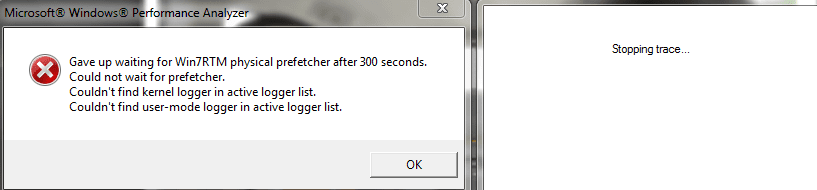
It might be rather large, but if you have the ETL file, try a filesharing site after zipping or RARing it up.
 

My Computer

Computer type
PC/Desktop
Computer Manufacturer/Model Number
Custom
OS
Windows 10 Pro x64
CPU
Intel Core i7 4790K @ 4.5GHz
Motherboard
Asus Maximus Hero VII
Memory
32GB DDR3
Graphics Card(s)
Nvidia GeForce GTX970
Sound Card
Realtek HD Audio
Screen Resolution
1920x1200
Hard Drives
1x Samsung 250GB SSD
4x WD RE 2TB (RAIDZ)
PSU
Corsair AX760i
Case
Fractal Design Define R4
Cooling
Noctua NH-D15

My Computer

Computer Manufacturer/Model Number
Laptop - HP Pavilion dv6
OS
MS Windows 7 Home Premium 64-bit
CPU
Intel Core i7 720QM @ 1.60GH, Clarksfield 45nm Techno
Motherboard
Hewlett-Packard 3659 (CPU)
Memory
4.00 GB Dual-Channel DDR3 @ 665MHz (9-9-9-24)
Graphics Card(s)
Generic PnP Monitor (1366x768@60Hz) NVIDIA GeForce GT 230M
Sound Card
IDT High Definition Audio CODEC
Hard Drives
625GB Western Digital WDC WD6400BEVT-60A0RT0 (SATA)
Other Info
Optical reader - hp DVD RW AD-7586H

Monitor:
Generic PnP Monitor on NVIDIA GeForce GT 230M
Current Resolution 1366x768 pixels
Work Resolution 1366x768 pixels
State enabled, primary
Monitor Width 1366
Monitor Height 768
Monitor BPP 32 bits per pixel
Monitor Frequency 60 Hz
Device \\.\DISPLAY1\Monitor0
Downloading.
 

My Computer

Computer type
PC/Desktop
Computer Manufacturer/Model Number
Custom
OS
Windows 10 Pro x64
CPU
Intel Core i7 4790K @ 4.5GHz
Motherboard
Asus Maximus Hero VII
Memory
32GB DDR3
Graphics Card(s)
Nvidia GeForce GTX970
Sound Card
Realtek HD Audio
Screen Resolution
1920x1200
Hard Drives
1x Samsung 250GB SSD
4x WD RE 2TB (RAIDZ)
PSU
Corsair AX760i
Case
Fractal Design Define R4
Cooling
Noctua NH-D15
Well, I will not have a chance to look deeply at this, but something is triggering an entire disk/filesystem check on boot, and it's taking almost 10 minutes to complete. Have you run a chkdsk /r lately? I'll look later tonight or tomorrow when I get finished with work and life, but this almost appears to be a driver issue (antivirus, antimalware, etc) or it could really be a filesystem or hard disk issue.

The first suggestions would be to update any chipset or RAID software (if any is installed) to the very latest supported versions. Second, remove all antivirus, antimalware, antispyware, firewall, disk defragmentation, and any other 3rd party software which would have a disk filter driver installed. Third, run a chkdsk /r on /C: (will require a reboot), and let the checkdisk finish and fix any issues found. Fourth, use defrag.exe /u /v against C:, and then reboot.

At that point, take another quick measurement of how long it takes to reboot - assuming my initial assumptions are at least headed in the right direction, your system should be MUCH faster.
 

My Computer

Computer type
PC/Desktop
Computer Manufacturer/Model Number
Custom
OS
Windows 10 Pro x64
CPU
Intel Core i7 4790K @ 4.5GHz
Motherboard
Asus Maximus Hero VII
Memory
32GB DDR3
Graphics Card(s)
Nvidia GeForce GTX970
Sound Card
Realtek HD Audio
Screen Resolution
1920x1200
Hard Drives
1x Samsung 250GB SSD
4x WD RE 2TB (RAIDZ)
PSU
Corsair AX760i
Case
Fractal Design Define R4
Cooling
Noctua NH-D15
Well, I will not have a chance to look deeply at this, but something is triggering an entire disk/filesystem check on boot, and it's taking almost 10 minutes to complete. Have you run a chkdsk /r lately? I'll look later tonight or tomorrow when I get finished with work and life, but this almost appears to be a driver issue (antivirus, antimalware, etc) or it could really be a filesystem or hard disk issue.

The first suggestions would be to update any chipset or RAID software (if any is installed) to the very latest supported versions. Second, remove all antivirus, antimalware, antispyware, firewall, disk defragmentation, and any other 3rd party software which would have a disk filter driver installed. Third, run a chkdsk /r on /C: (will require a reboot), and let the checkdisk finish and fix any issues found. Fourth, use defrag.exe /u /v against C:, and then reboot.

At that point, take another quick measurement of how long it takes to reboot - assuming my initial assumptions are at least headed in the right direction, your system should be MUCH faster.

-No updates on my chipsets according to this Intel Site

-Never ran chkdsk /r

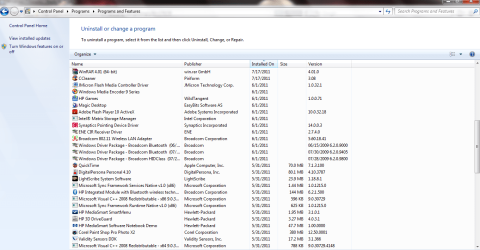
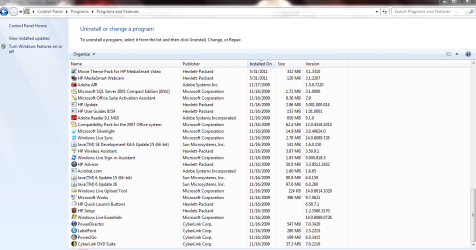
-Which of the 3rd party programs have disk filter driver installed in them? (@attachments)
 

Attachments

  • ddd.PNG
    ddd.PNG
    56.6 KB · Views: 15
  • sss.PNG
    sss.PNG
    61.8 KB · Views: 12
  • aaa.PNG
    aaa.PNG
    60.3 KB · Views: 9

My Computer

Computer Manufacturer/Model Number
Laptop - HP Pavilion dv6
OS
MS Windows 7 Home Premium 64-bit
CPU
Intel Core i7 720QM @ 1.60GH, Clarksfield 45nm Techno
Motherboard
Hewlett-Packard 3659 (CPU)
Memory
4.00 GB Dual-Channel DDR3 @ 665MHz (9-9-9-24)
Graphics Card(s)
Generic PnP Monitor (1366x768@60Hz) NVIDIA GeForce GT 230M
Sound Card
IDT High Definition Audio CODEC
Hard Drives
625GB Western Digital WDC WD6400BEVT-60A0RT0 (SATA)
Other Info
Optical reader - hp DVD RW AD-7586H

Monitor:
Generic PnP Monitor on NVIDIA GeForce GT 230M
Current Resolution 1366x768 pixels
Work Resolution 1366x768 pixels
State enabled, primary
Monitor Width 1366
Monitor Height 768
Monitor BPP 32 bits per pixel
Monitor Frequency 60 Hz
Device \\.\DISPLAY1\Monitor0
Drips,

I'm similar to GregRocker in my approach to these problems.

Let's get a clean startup.

did you try running without any services except for the MS services?

Download, install, run CCleaner which is free (link in my sig)

AFter that please carry out following:
LIST OF STARTUP PROGRAMS USING CCLEANER


CCleaner | Tools icon | Startup tab | click on Save to text file button (bottom right side)

Using the PAPER CLIP icon in the top panel of a Message Reply window, attach the .txt file generated by CCleaner.
======================================

After that,
Control Panel | Programs and Features | uninstall any programs that you are no longer using. Uninstall any Nero programs. Uninstall any MagicIso or CloneDVD programs.

all of those programs can be good. They also can interfere and cause some wierd problems.

I'm not just firing the shotgun hoping that I hit the bird. All of these things I have encountered.
 

My Computer

Computer Manufacturer/Model Number
Toshiba Satellite S875D-S7239 laptop
OS
MS Windows 7 Ultimate SP1 64-bit
CPU
AMD A10-4600M
Motherboard
AMD Pumori (Socket FT1)
Memory
6.00 GB Dual-Channel DDR3 @ 798MHz (11-11-12-28)
Graphics Card(s)
AMD Radeon HD 7660G
Sound Card
High Definition Audio Device
Monitor(s) Displays
Generic PnP Monitor (1600x900@60Hz)
Screen Resolution
1600x900@60Hz
Hard Drives
SSD 119GB Corsair CSSD-V128GB2 ATA Device
Keyboard
Standard PS/2 Keyboard
Mouse
HP Wireless Optical Mobile Mouse Model FHA-3410
Internet Speed
What the local pub, local coffee shop offers.
Other Info
Optical Drive:MATSHITA BD-CMB UJ160B ATA Device


Also have an Asus ha1002xp netbook with Win 7 Ultimate installed.
Drips,

I'm similar to GregRocker in my approach to these problems.

Let's get a clean startup.

did you try running without any services except for the MS services?

Download, install, run CCleaner which is free (link in my sig)

AFter that please carry out following:
LIST OF STARTUP PROGRAMS USING CCLEANER


CCleaner | Tools icon | Startup tab | click on Save to text file button (bottom right side)

Using the PAPER CLIP icon in the top panel of a Message Reply window, attach the .txt file generated by CCleaner.
======================================

After that,
Control Panel | Programs and Features | uninstall any programs that you are no longer using. Uninstall any Nero programs. Uninstall any MagicIso or CloneDVD programs.

all of those programs can be good. They also can interfere and cause some wierd problems.

I'm not just firing the shotgun hoping that I hit the bird. All of these things I have encountered.

-Gonna try disabling anything from MSconfig>services except for the MS services.
-Startup.txt @ attachments
-I fully reinstalled Windows 7 so unwanted programs are already removed.
 

Attachments

My Computer

Computer Manufacturer/Model Number
Laptop - HP Pavilion dv6
OS
MS Windows 7 Home Premium 64-bit
CPU
Intel Core i7 720QM @ 1.60GH, Clarksfield 45nm Techno
Motherboard
Hewlett-Packard 3659 (CPU)
Memory
4.00 GB Dual-Channel DDR3 @ 665MHz (9-9-9-24)
Graphics Card(s)
Generic PnP Monitor (1366x768@60Hz) NVIDIA GeForce GT 230M
Sound Card
IDT High Definition Audio CODEC
Hard Drives
625GB Western Digital WDC WD6400BEVT-60A0RT0 (SATA)
Other Info
Optical reader - hp DVD RW AD-7586H

Monitor:
Generic PnP Monitor on NVIDIA GeForce GT 230M
Current Resolution 1366x768 pixels
Work Resolution 1366x768 pixels
State enabled, primary
Monitor Width 1366
Monitor Height 768
Monitor BPP 32 bits per pixel
Monitor Frequency 60 Hz
Device \\.\DISPLAY1\Monitor0
Of the two still checked, neither will cause the problem you are seeing.

Is this computer connected to a home network and/or to a router?

Pity that you don't have a restore point or a system image from immediately after the fresh install.

Some piece of hardware or some piece of software is really causing problems.

Have you checked for a bios update for your computer?

We can go at this backwards. Any extra exteranl hardware could be removed. Programs that have been installed that are not from Micorsoft could be slowly removed until the quilty party is located.
 

My Computer

Computer Manufacturer/Model Number
Toshiba Satellite S875D-S7239 laptop
OS
MS Windows 7 Ultimate SP1 64-bit
CPU
AMD A10-4600M
Motherboard
AMD Pumori (Socket FT1)
Memory
6.00 GB Dual-Channel DDR3 @ 798MHz (11-11-12-28)
Graphics Card(s)
AMD Radeon HD 7660G
Sound Card
High Definition Audio Device
Monitor(s) Displays
Generic PnP Monitor (1600x900@60Hz)
Screen Resolution
1600x900@60Hz
Hard Drives
SSD 119GB Corsair CSSD-V128GB2 ATA Device
Keyboard
Standard PS/2 Keyboard
Mouse
HP Wireless Optical Mobile Mouse Model FHA-3410
Internet Speed
What the local pub, local coffee shop offers.
Other Info
Optical Drive:MATSHITA BD-CMB UJ160B ATA Device


Also have an Asus ha1002xp netbook with Win 7 Ultimate installed.
A badly fragmented disk can also cause delays. It won't hurt to run Micorosft's Disk Defragmenter.

Another experiment would be to complete disable Eset and see what happens. Eset likes to send/receive an unusual amount of info back and forth.

I forget, did you run MalwareBytes (link in my sig).
 

My Computer

Computer Manufacturer/Model Number
Toshiba Satellite S875D-S7239 laptop
OS
MS Windows 7 Ultimate SP1 64-bit
CPU
AMD A10-4600M
Motherboard
AMD Pumori (Socket FT1)
Memory
6.00 GB Dual-Channel DDR3 @ 798MHz (11-11-12-28)
Graphics Card(s)
AMD Radeon HD 7660G
Sound Card
High Definition Audio Device
Monitor(s) Displays
Generic PnP Monitor (1600x900@60Hz)
Screen Resolution
1600x900@60Hz
Hard Drives
SSD 119GB Corsair CSSD-V128GB2 ATA Device
Keyboard
Standard PS/2 Keyboard
Mouse
HP Wireless Optical Mobile Mouse Model FHA-3410
Internet Speed
What the local pub, local coffee shop offers.
Other Info
Optical Drive:MATSHITA BD-CMB UJ160B ATA Device


Also have an Asus ha1002xp netbook with Win 7 Ultimate installed.
This program has helped others locate the source of their slow bootup. I make no promises. If you use it, then afterwards uninstall as it leaves itself via services still running.

Soluto
 

My Computer

Computer Manufacturer/Model Number
Toshiba Satellite S875D-S7239 laptop
OS
MS Windows 7 Ultimate SP1 64-bit
CPU
AMD A10-4600M
Motherboard
AMD Pumori (Socket FT1)
Memory
6.00 GB Dual-Channel DDR3 @ 798MHz (11-11-12-28)
Graphics Card(s)
AMD Radeon HD 7660G
Sound Card
High Definition Audio Device
Monitor(s) Displays
Generic PnP Monitor (1600x900@60Hz)
Screen Resolution
1600x900@60Hz
Hard Drives
SSD 119GB Corsair CSSD-V128GB2 ATA Device
Keyboard
Standard PS/2 Keyboard
Mouse
HP Wireless Optical Mobile Mouse Model FHA-3410
Internet Speed
What the local pub, local coffee shop offers.
Other Info
Optical Drive:MATSHITA BD-CMB UJ160B ATA Device


Also have an Asus ha1002xp netbook with Win 7 Ultimate installed.
So there are three devices causing delays, according to the trace:
"USB\VID_064E&PID_A127\CN0316-S30C-OV10-VH-R02.01.00" - USB composite device
"USB\VID_064E&PID_A127&MI_00\7&1a444de9&0&0000" - HP WebCam
"Root\volmgr\0000" - Volume Manager mount point on Hard disk 0

I decided to break it down into 3 sections - you have about 33 seconds wasted even before the kernel finishes loading and passes off to smss.exe to begin the rest of the boot process, so that's the first phase. Your machine actually takes a LONG time loading the volsnap (VSS) driver as well, and enumerating volume snapshot mount points takes almost 50% of that time, so that would potentially point to disk or filesystem issues.

Second, it takes smss.exe 308 seconds (this is the splash screen delay you see) to finish getting everything up and running, and 148 seconds of that delay is actually caused by accesses (mostly reads) to the hard disk. From what I see here, it would appear that either the disk is failing, or the NTFS filesystem on it has become in some way screwed up.

The third section is actually the winlogon+explorer+postboot section, which takes 127 seconds. That delay is mostly down to your antivirus hammering the disk (scanning during boot) and the fact that the disk itself is actually quite fragmented and slow. That could also be due to the fact that your disk is a (very) large portion of cause in your boot delay, and given the other sections also show an inordinate time spent on disk, this seems just more evidence of a disk or filesystem issue.

At this point, I would strongly suggest you follow my previous advice (chkdsk c: /r, reboot, uninstall software, defragment, and reboot again), and unless you are able to do so you probably aren't going to make much headway. Also, it seems that your webcam driver has something to do with this, and note that this is NOT the first time I've seen HP's webcam driver cause boot delays! The last piece is it does seem something attached to the USB bus is also at fault, but I don't know for sure if the HP Webcam hangs off of the USB bus internally, but I'd bet it does (the driver is snp2uvc.sys, which is a USB webcam video driver - which is also responsible for the lion's share of disk I/O not related to metadata during boot). So, after careful review, my initial observations on this appear to be confirmed - you have a disk problem, and also a problem with the HP webcam driver.


As to your question about what to remove, I'd recommend the following:
  • Speccy
  • Soluto
  • MalwareBytes
  • ESet
  • Conduit
  • JMicron driver
  • ENE driver
  • LightScribe
  • HP DriveGuard
  • ValiditySensors
  • HP WebCam
  • Cyberlink software (all 4 items)
Those would all be initial culprits in the delays, although Speccy and Soluto are more "just in case" options rather than real problem areas.

 

My Computer

Computer type
PC/Desktop
Computer Manufacturer/Model Number
Custom
OS
Windows 10 Pro x64
CPU
Intel Core i7 4790K @ 4.5GHz
Motherboard
Asus Maximus Hero VII
Memory
32GB DDR3
Graphics Card(s)
Nvidia GeForce GTX970
Sound Card
Realtek HD Audio
Screen Resolution
1920x1200
Hard Drives
1x Samsung 250GB SSD
4x WD RE 2TB (RAIDZ)
PSU
Corsair AX760i
Case
Fractal Design Define R4
Cooling
Noctua NH-D15
Speccy will not influence his startup times. Malwarebytes only if he has it to set at startup time.

The Soluto program will help him find the guilty parties. AFter gleaning info from soluto, then the program should be deleted.

The WebCam software is a likely suspect.
 

My Computer

Computer Manufacturer/Model Number
Toshiba Satellite S875D-S7239 laptop
OS
MS Windows 7 Ultimate SP1 64-bit
CPU
AMD A10-4600M
Motherboard
AMD Pumori (Socket FT1)
Memory
6.00 GB Dual-Channel DDR3 @ 798MHz (11-11-12-28)
Graphics Card(s)
AMD Radeon HD 7660G
Sound Card
High Definition Audio Device
Monitor(s) Displays
Generic PnP Monitor (1600x900@60Hz)
Screen Resolution
1600x900@60Hz
Hard Drives
SSD 119GB Corsair CSSD-V128GB2 ATA Device
Keyboard
Standard PS/2 Keyboard
Mouse
HP Wireless Optical Mobile Mouse Model FHA-3410
Internet Speed
What the local pub, local coffee shop offers.
Other Info
Optical Drive:MATSHITA BD-CMB UJ160B ATA Device


Also have an Asus ha1002xp netbook with Win 7 Ultimate installed.
Back
Top