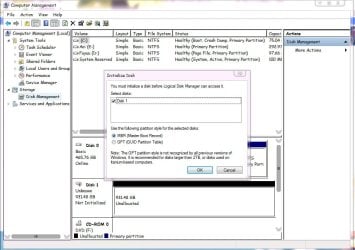
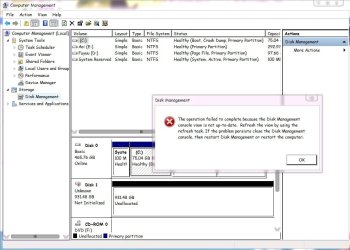
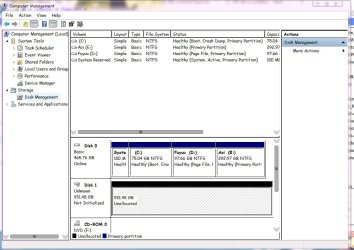
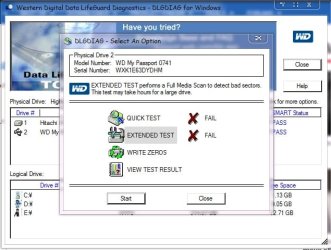
1TWD external hard disk unknown,not initialized,unallocated,i/o error

Do those encrypt even if you don't use that pesky Smartware? Even if one does not password protect?
I have a number of WD My Book Essentials and they apply hardware encryption which you can do nothing about. This has nothing to do with Smartware software or any voluntary password protection. It's built into the WD interface so if this fails you cannot decrypt your data by plugging the internal sata drive into your PC. You need to check that your external HDD does NOT contain a hardware encryption chip.
It adds nothing to the security. If someone steals or you lose your HDD the chip will happily decrypt the data if it's plugged into another PC unless you have applied additional software encryption or password protection you have no security. As I've said if the interface and encryption chip gets fried kiss goodbye to your data.
So I am now using standard sata (WD green 2TB) drives for backup and docking stations. I admit it may be a bit physically untidy. If I want something a bit more portable I will buy a simple usb3 enclosure. Also both options allow a solid usb 3 connector and not the unreliable small USB 3.0 Micro-B plug.

If things have changed then let me know.
 

My Computer My Computer

At a glance

Windows 7x64 Home Premium SP1Intel i7 2600kG.Skill Ripjaws (DDR3-1600) 2x4GBNvidia GeForce GTS 450; Intel HD Graphics 300...
Computer type
PC/Desktop
Computer Manufacturer/Model Number
Own build
OS
Windows 7x64 Home Premium SP1
CPU
Intel i7 2600k
Motherboard
ASUS P8Z68 Deluxe
Memory
G.Skill Ripjaws (DDR3-1600) 2x4GB
Graphics Card(s)
Nvidia GeForce GTS 450; Intel HD Graphics 3000(GT2+)
Monitor(s) Displays
Dell Ultrasharp IPS panel U2311H, Samsung SyncMaster P2350
Screen Resolution
1920x1080
Hard Drives
Samsung 850 Pro SSD 256GB, Samsung SSD 840 120GB, Seagates 1TB Barracuda ST31000528AS x2
PSU
Seasonic M12II 520W
Case
Lian Li Lancool PC-K60
Cooling
Case: 1x120mm, 3x140mm CPU: Hyper 212+
Keyboard
Logitech MK520 (wireless)
Mouse
Logitech MK520
Internet Speed
6-7 Mbps
Antivirus
Norton Security Premium, Malwarebytes on 2 (MSE on 3rd PC)
Browser
FireFox
Other Info
Audio: Logitech Z523 2.1
Thanks, mjf, for the info ( I am still trying to understand it.:) I do not have any WD HDDs save for the ones I have in RAID 0 on my system and I have been keeping away from WD external drives because of the many unsolicited troublesome features they impose on the users.)

Smartware - 1. I have seen many users who forgot the password with no way to get through. 2. Due to some fault in the drive Smartware refuses even the correct password and the users are left in the lurch.

Hardware encryption - Why impose it on the unwary user? Data Recovery impossible when the drive develops a fault and possible only if you send it to the WD authorised data recovery agency who only have the right key to decrypt- Yes, WD provides that key only to that one agency as I understand from various posts on the net.

As far as hardware encryption is concerned, I have just read this in a post." WD emailed me saying using the Firmware Security Encryption is an option, so if you have a newer Passport or Ultra removable USB drive, you can use it for backup safety, without encrypting the data if you configure if that way." (John VanKirk's post dated May 16,2013 here Data recovery on an external encrypted HDD [Solved] - Western Digital - Storage )

Do you have any idea on how to configure it?
 

My Computer My Computer

At a glance

Windows 7 Home Premium 32 bit
OS
Windows 7 Home Premium 32 bit
can u help me please 500 gb :(external hard disk unknown,not initialized,unallocated,i/o error
 

My Computer My Computer

At a glance

Windows 7 Ultimate service pack 1 32bitmemory 6.00 GB RAM 1532 MB Total available gr...AMD Radeon HD 6620G
Computer type
PC/Desktop
Computer Manufacturer/Model Number
Toshiba Satellite p755D
OS
Windows 7 Ultimate service pack 1 32bit
Motherboard
Motherboard resources - it says?
Memory
memory 6.00 GB RAM 1532 MB Total available graphics memory
Graphics Card(s)
AMD Radeon HD 6620G
Hard Drives
Seagate momentum 500Gb 7200.4
Antivirus
Microsoft Security Essentials
Browser
"Opera" & Chrome
If you`ve tried everything else......

I would contact the manufacturer.

If they will not help you, demand they send you a new drive :)
 

My Computer My Computer

At a glance

Windows 10 Pro x64Intel Core i7 6700KGSkill TridentZ RGB 16GB 3600 16-16-16-36EVGA GTX 980 Ti SC x2
Computer type
PC/Desktop
Computer Manufacturer/Model Number
Skylake Special #666
OS
Windows 10 Pro x64
CPU
Intel Core i7 6700K
Motherboard
Asus Sabertooth Z170 Mark 1
Memory
GSkill TridentZ RGB 16GB 3600 16-16-16-36
Graphics Card(s)
EVGA GTX 980 Ti SC x2
Sound Card
Realtek High Definition
Monitor(s) Displays
AOC G2460PG
Screen Resolution
1920 x 1080 144Hz
Hard Drives
Samsung 860 Pro 256GB, Seagate Barracuda 4TB x2
PSU
EVGA 1000 P2, EVGA White Custom Braided Cables
Case
Corsair Vengeance C70 Gunmetal Black
Cooling
Corsair H100i v2, Corsair ML120 x2, Thermal Grizzly Kryonaut
Keyboard
Logitech G910 Orion Spectrum
Mouse
Logitech G700s
Internet Speed
Verizon Fios Quantum Gateway 75/75
Antivirus
Windows Defender, Malwarebytes Free 3.8.3
Browser
Chrome
Other Info
Corsair SP120 x4, LG Blu-ray Drive, Durabrand HT-395 100 Watt Dolby Digital Amp, Corsair H2100 Wireless 7.1 Headset
My 500 gb Seagate momentum 7200.4 is locked/ unallocated/+

[COLOR=[I][/I]"Magenta"][/COLOR]
I have tried everything , HDD,MHDD,EaseUs Particion, Hirens, SeaTools , both programs, comdmnmr, ect i need help please i will try anything... is unallocated/not initialized,i/o err/locked... if i can unlock bios i bet i could fix the rest... so 1st how do i unlock the admin pswd....???

Please please please help me anybody!!:zip::cry::sleepy:(d)(d)(d):haha::axe:
 

My Computer My Computer

At a glance

Windows 7 Ultimate service pack 1 32bitmemory 6.00 GB RAM 1532 MB Total available gr...AMD Radeon HD 6620G
Computer type
PC/Desktop
Computer Manufacturer/Model Number
Toshiba Satellite p755D
OS
Windows 7 Ultimate service pack 1 32bit
Motherboard
Motherboard resources - it says?
Memory
memory 6.00 GB RAM 1532 MB Total available graphics memory
Graphics Card(s)
AMD Radeon HD 6620G
Hard Drives
Seagate momentum 500Gb 7200.4
Antivirus
Microsoft Security Essentials
Browser
"Opera" & Chrome
There`s nothing you can do for the drive in the bios.

Who put the password on the bios ?

Take the drive to an expert, if they can`t fix it for you, chuck it in the trash.
 

My Computer My Computer

At a glance

Windows 10 Pro x64Intel Core i7 6700KGSkill TridentZ RGB 16GB 3600 16-16-16-36EVGA GTX 980 Ti SC x2
Computer type
PC/Desktop
Computer Manufacturer/Model Number
Skylake Special #666
OS
Windows 10 Pro x64
CPU
Intel Core i7 6700K
Motherboard
Asus Sabertooth Z170 Mark 1
Memory
GSkill TridentZ RGB 16GB 3600 16-16-16-36
Graphics Card(s)
EVGA GTX 980 Ti SC x2
Sound Card
Realtek High Definition
Monitor(s) Displays
AOC G2460PG
Screen Resolution
1920 x 1080 144Hz
Hard Drives
Samsung 860 Pro 256GB, Seagate Barracuda 4TB x2
PSU
EVGA 1000 P2, EVGA White Custom Braided Cables
Case
Corsair Vengeance C70 Gunmetal Black
Cooling
Corsair H100i v2, Corsair ML120 x2, Thermal Grizzly Kryonaut
Keyboard
Logitech G910 Orion Spectrum
Mouse
Logitech G700s
Internet Speed
Verizon Fios Quantum Gateway 75/75
Antivirus
Windows Defender, Malwarebytes Free 3.8.3
Browser
Chrome
Other Info
Corsair SP120 x4, LG Blu-ray Drive, Durabrand HT-395 100 Watt Dolby Digital Amp, Corsair H2100 Wireless 7.1 Headset
Hello, i am new here and need some help. i have read some thread about this problem but not working yet and i cannot give conclusion if my hard drive broke or not. sory for my bad english and i appriciate if some one can help me.
 

Attachments

  • HD yaya 0.jpg
    HD yaya 0.jpg
    41.6 KB · Views: 2
  • HD yaya 1.jpg
    HD yaya 1.jpg
    84.3 KB · Views: 2
  • HD yaya 2.jpg
    HD yaya 2.jpg
    81.9 KB · Views: 2
  • HD yaya 3.jpg
    HD yaya 3.jpg
    84.3 KB · Views: 2
  • HD yaya 4.jpg
    HD yaya 4.jpg
    47.8 KB · Views: 21
  • HD yaya 5.jpg
    HD yaya 5.jpg
    54.6 KB · Views: 21
  • HD yaya 6.jpg
    HD yaya 6.jpg
    90.9 KB · Views: 2

My Computer My Computer

At a glance

Windows 7 x64 UltimateIntel Core i5 Dual 3317U (Ivy Bridge) 1.70GHzNVIDIA GeForce GT 635
Computer type
Laptop
Computer Manufacturer/Model Number
ASUS A46C
OS
Windows 7 x64 Ultimate
CPU
Intel Core i5 Dual 3317U (Ivy Bridge) 1.70GHz
Graphics Card(s)
NVIDIA GeForce GT 635
Antivirus
AVIRA
Browser
Mozilla
Welcome to SevenForums.

1. Stop taxing your HDD any further. Remove it safely and keep it aside till you are ready to clone it to another 1.5 TB HDD
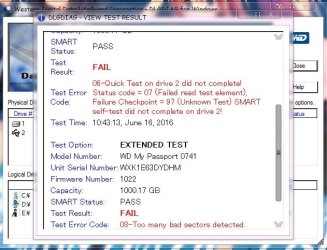
2. Your HDD is already afflicted with too many bad sectors and data in those bad sectors is already lost.If you continue to use it you will only lose more data.
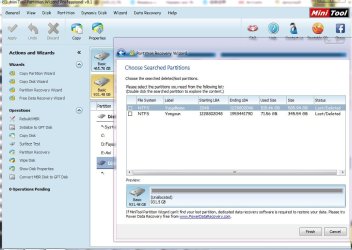
3. Partition Wizard shows your two partitions are lost. That means the most important MBR sector, sector 0 has gone bad. We cannot rejuvenate it in the present condition to recover the partitions.
4. Your only hope now is to clone your HDD to another 1.5TB HDD using ddrescue and perform data recovery operations on the cloned drive.
5. ddrescue will try to read the bad sectors multiple times and extract as much data as possible.
6. Read this http://www.sevenforums.com/general-...d-tool-cloning-failing-hdd-data-recovery.html and prepare yourself.
 
Last edited:

My Computer My Computer

At a glance

Windows 7 Home Premium 32 bit
OS
Windows 7 Home Premium 32 bit
Mr. Jumanji, thanks for your advice.I just take a nap cause to tired. I'll take my time to follow your suggestion.
so by what you mean my HDD is already dead and cannot used again even getting formatted? if i still can use it even by lost my data, what procedure must i follow for getting the best result?
 

My Computer My Computer

At a glance

Windows 7 x64 UltimateIntel Core i5 Dual 3317U (Ivy Bridge) 1.70GHzNVIDIA GeForce GT 635
Computer type
Laptop
Computer Manufacturer/Model Number
ASUS A46C
OS
Windows 7 x64 Ultimate
CPU
Intel Core i5 Dual 3317U (Ivy Bridge) 1.70GHz
Graphics Card(s)
NVIDIA GeForce GT 635
Antivirus
AVIRA
Browser
Mozilla
Yes, bad sectors showing up means your HDD has started failing and it can die any moment now. The more you keep it spinning, the faster it will race to its grave.

Your case is a worst case in which the first sector itself has gone bad. You won't be able to initialise and format it since the MBR code and partition table can no longer be written into that bad sector.( You already got an error message while trying to initialise it. That error message will not go even if you reboot your PC 100 times as ordained by it. :)) That is why I am not going ahead with partition recovery even though Partition Wizard has found the two partition start points - which are still good and has the volume boot sector intact.. It won't be able to write the partition table into the first sector, which in HDD parlance is sector 0. You have to scrap that HDD.

We can do that - Partition Recovery with Partition Wizard - if you are able to successfully clone the drive, wherein the new drive will have good sector 0 into which the MBR code and partition table can be written..

Again ddrescue may take days/weeks/ and even months to completely scan the drive depending upon the number and extent of severity of the bad sectors it has to tackle and may even stop dead if it is overwhelmed.. But that is the only thing you can try now hoping it wouldn't be that worst.

On a positive lookout, there are atleast three members in this forum who have successfully retrieved most of the data using ddrescue. The threads are mentioned in the reference I had given " The best method for cloning......." Fish them out and read those threads also. Also google and read all about using ddrescue. Take your own time. Do not do this in a hurry.But keep your bad drive under rest till you are all set to do this task. (Do not keep it plugged into the system)

Good luck. ( My circadian rhythm also hasn't yet returned normal after my return from Spain and I am also sleeping off at odd times, often missing my lunch by hours. My brain cells still remain confused.:D)

Note: If you want to try the cloning buy a 1.5TB HDD. If you buy a 1TB drive there are chances of cloning failing, if the new HDD has even just one sector short of the total number of sectors in the drive being cloned. Don't take that chance.​
 
Last edited:

My Computer My Computer

At a glance

Windows 7 Home Premium 32 bit
OS
Windows 7 Home Premium 32 bit
Back
Top