
Hi all,
I have a 1TB disk as the third disk on my desktop computer. Disk2 is the OS SSD, Disk0 is the old OS + data disk now used just for data, and Disk1 is a data disk. It used to have just 1 partition using the full disk. This computer is always on, as it is used as a "server".
It was all good but today I restarted it and after the reboot it is freezing, programs crashing... looked in "my computer" and partition H: (the only partition on Disk1) was not there. Checked disk management and found what's on the screenshot below:
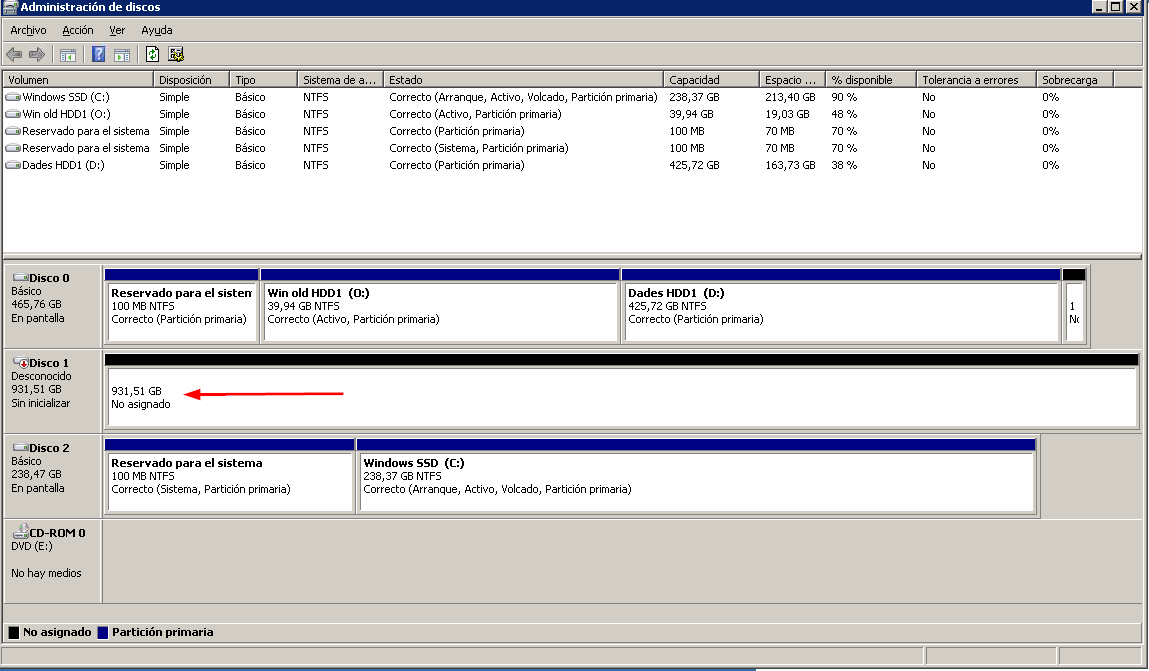
What do you guys suggest to try and get the partition back? Ideally, I would like not to have to format/replace the disk.
Thanks,
I have a 1TB disk as the third disk on my desktop computer. Disk2 is the OS SSD, Disk0 is the old OS + data disk now used just for data, and Disk1 is a data disk. It used to have just 1 partition using the full disk. This computer is always on, as it is used as a "server".
It was all good but today I restarted it and after the reboot it is freezing, programs crashing... looked in "my computer" and partition H: (the only partition on Disk1) was not there. Checked disk management and found what's on the screenshot below:
What do you guys suggest to try and get the partition back? Ideally, I would like not to have to format/replace the disk.
Thanks,
My Computer
At a glance
W7 Home Premium x64
- Computer type
- PC/Desktop
- OS
- W7 Home Premium x64

 )
)
