2.5 TB External Hard Drive Partition

Alex8525

New member
Local time
8:51 AM
Messages
22
Hello,

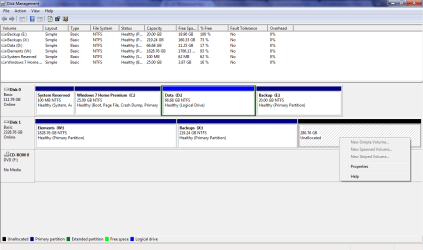
I have windows 7 home premium 32 bit. I got a new WD Elements 2.5 TB external hard drive. The laptop detected it perfectly and it showed about ~2.25 TB space. The problem came when I tried to partition it into two partition, one 1.75 TB and other ~500 GB. I tried windows 7 data management. When I shrunk the volume to make first 1.7 TB partition it made it correctly but it created two ~250 GB un-allocated partitions. Then I created one partition from first un-allocated space and tried to extend it but it is not giving me an option to extend it. Also it is not allowing me to create another partition from remaining ~250 GB partition.

I tried EASEUS partition manager but it shows whole external hard drive as unsupported.

Can anyone help me with it please?

Regards,
Alex
 

My Computer My Computer

Computer Manufacturer/Model Number
HP Compaq Presario V 6218TU
OS
Windows Vista
CPU
Intel Core 2 Duo Processor T5200 (1.6 GHz)
Memory
1 GB
Graphics Card(s)
Intel Graphics Media Accelerator (GMA) 950
Monitor(s) Displays
15.4" WXGA TFT
Hard Drives
120GB HDD SATA

My Computer My Computer

Computer Manufacturer/Model Number
Insane hobo technologies. ;-)
OS
Windows 7 x64
CPU
Intel i7 2600k
Motherboard
Asrock z68 extreme 4 gen 3
Memory
G.skill Ripjaw 16gigs @ 1866
Graphics Card(s)
Nvidia gtx580 (evga)
Sound Card
Integrated HD audio + hdmi
Monitor(s) Displays
24" ASUS widescreen + 42" insignia
Screen Resolution
1080p (1920x1080)
Hard Drives
128 Samsung 830
256 Samsung 840
3 x 1tb storage drive (various)
1 western digital 1tb (eSATA)
1 Seagate 1tb (eSATA)
PSU
1 kilowatt SLI/Crossfire rated Silverstone modular
Case
NZXT Phantom + additional 220 fan
Cooling
Zalmann
Keyboard
Microsoft wireless 3000 (v2)
Mouse
MS - wireless 5000 (bluetrack)
Internet Speed
depends on if you ask me or my provider.
Other Info
The above information is provided as is, and the author assumes no responsibility for issues it may cause with your sanity or fanboyism.
Thanks for reply. But is there any other way? (Free may be?)
 

My Computer My Computer

Computer Manufacturer/Model Number
HP Compaq Presario V 6218TU
OS
Windows Vista
CPU
Intel Core 2 Duo Processor T5200 (1.6 GHz)
Memory
1 GB
Graphics Card(s)
Intel Graphics Media Accelerator (GMA) 950
Monitor(s) Displays
15.4" WXGA TFT
Hard Drives
120GB HDD SATA

My Computer My Computer

Computer type
PC/Desktop
Computer Manufacturer/Model Number
Built them myself, Science Experiments !
OS
Win7 Enterprise, Win7 x86 (Ult 7600), Win7 x64 Ult 7600, TechNet RTM on AMD x64 (2.8Ghz)
CPU
AMD fx8350 4ghz, AMD-32 2400mhz, AMD-64 3200mhz, AMDx64 2.8G
Motherboard
SIS 755, ECS-K8M890M-M (Ult 7600), GigaByte & others
Memory
2gb, 4gb on the Ult 7600, 4gb on Technet RTM, 32gb on FX8350
Graphics Card(s)
Draw my own Graphics, several nVidia cards
Sound Card
on motherboard
Monitor(s) Displays
19" flat scr, 28" I-Inc widescr,22" Emprex Widescr, 23" Acer
Screen Resolution
1280 x 1024, 1440 x 900, 1920 x 1080
Hard Drives
6 pata Ide HD's & 2 Sata HD's
added 80gb external on Ult 7600 computer,
numerous extra 1tb, 2TB, 3Tb SATA HD's
A collection of ext HD Docks w/ HDs
PSU
430w, 550w, 600w, 700, 800, etc
Case
All Generic Full Towers
Cooling
Open Air & a few fans, some w/ colored LEDs
Keyboard
Compaq & Dell recycled from GoodWill
Mouse
Made in China Optical Wired Mouse
Internet Speed
Fast Cable InterNet
Antivirus
AVG Free on 24 different Desktops, NO Problems!
Browser
IE 8 is preferred, but use FireFox sometimes
Other Info
Linksys Routers, switches, & Hubs
Too Many USB Flash Drives to count, Biggest is 64GB !
Eight computers in my home network.
Sixteen computers at my business network.
Linked via TeamViewer !
Lots of old used spare computer parts everywhere!
Hello everyone,

Thanks for your replies. I tried both of them but still not able to use that unallocated space. Is it something that I can not use more than 2Tb in a 32 bit system? (I am just guessing, but i was able to detect ~2.25TB when I used it for the first time.) Is there anything I can do about it? Is it a bad-sector problem?

Regards,
Alex
 

My Computer My Computer

Computer Manufacturer/Model Number
HP Compaq Presario V 6218TU
OS
Windows Vista
CPU
Intel Core 2 Duo Processor T5200 (1.6 GHz)
Memory
1 GB
Graphics Card(s)
Intel Graphics Media Accelerator (GMA) 950
Monitor(s) Displays
15.4" WXGA TFT
Hard Drives
120GB HDD SATA
I just added a screenshot of disk management..
 

Attachments

  • Screenshot.png
    Screenshot.png
    27.6 KB · Views: 330

My Computer My Computer

Computer Manufacturer/Model Number
HP Compaq Presario V 6218TU
OS
Windows Vista
CPU
Intel Core 2 Duo Processor T5200 (1.6 GHz)
Memory
1 GB
Graphics Card(s)
Intel Graphics Media Accelerator (GMA) 950
Monitor(s) Displays
15.4" WXGA TFT
Hard Drives
120GB HDD SATA
Back
Top