
2 TB sata external HD usb broke off

injmalk

New member
Member
Local time
4:09 PM
Messages
25
The usb port got disconnected from the board. Minutes before this the drive was working fine. Took the case off and tried the drive in an external dock, also tried plugging it into the computer using sata cables. Both times the computer said installing new driver software sucessful but the drive never popped up. Any suggestions on how to solve this problem?
 

My Computer My Computer

At a glance

Microsoft Windows 7 Home Premium 64-bit 7601 ...Intel(R) Core(TM) i3-2120 CPU @ 3.30GHz8.00 GBIntel(R) HD Graphics
Computer Manufacturer/Model Number
Lenovo Desktop PC
OS
Microsoft Windows 7 Home Premium 64-bit 7601 Multiprocessor Free Service Pack 1
CPU
Intel(R) Core(TM) i3-2120 CPU @ 3.30GHz
Motherboard
LENOVO MAHOBAY
Memory
8.00 GB
Graphics Card(s)
Intel(R) HD Graphics
Sound Card
(1) Realtek High Definition Audio (2) Intel(R) Display Aud
Hard Drives
(1) ST31000524AS (2) WDC WD20EARS-00MVWB0 (3) HP Photosmart 6510 USB Device
Hello and welcome injmalk just out of interest how was the drive showing up in Computer before the connector broke?

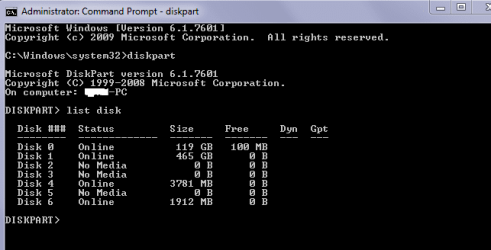
Now you could try to see if it is listed in DISKPART

Go to Strat type in cmd
it will open a window that requires you to Open or run as admin > run as admin > OK
you will get a window that opens in black and white type in diskpart lower case will do > hit OK / Enter
you will end up with a screen that has DISKPART in it > type in list disk > hit Enter and you will end up with a list of the drives you have connected up - see pic.
Grab a snip and let us see what you have .
 

Attachments

  • DISK4.PNG
    DISK4.PNG
    7.8 KB · Views: 19

My Computer My Computer

At a glance

Desk1 7 Home Prem / Desk2 10 Pro / Main lap A...Desk1 i5 3750K / Laptop i7 GTX 860M / Desk2 i...Desk1 8GB (1866) / Desk2 16GB (1333) / Laptop...Desk 1& 2NVidia GTX 650 & Laptops on board Intel
Computer type
PC/Desktop
Computer Manufacturer/Model Number
Own build (new) Desk1 / Asus ROG Win 7 / Desk2 1st build
OS
Desk1 7 Home Prem / Desk2 10 Pro / Main lap Asus ROG 10 Pro 2 laptop Toshiba 7 Pro Asus P2520 7 & 10
CPU
Desk1 i5 3750K / Laptop i7 GTX 860M / Desk2 i5 2500
Motherboard
Desk1 Asus P877-V / Desk2 Gigabyte H67 UD3H / Laptop ?
Memory
Desk1 8GB (1866) / Desk2 16GB (1333) / Laptop 8Gb DDR3
Graphics Card(s)
Desk 1& 2NVidia GTX 650 & Laptops on board Intel
Sound Card
Desk 1 & 2 -XONAR DG Realtek High Def audio Laptop
Monitor(s) Displays
Desk 1 Benq HD 2450 / Desk2 Philips 24" / Laptop 17.5"
Screen Resolution
1920x1080 D1 & D2 & Laptop 1
Hard Drives
Desk1 Samsung 120GB 830 SSD
Asus ROG 256GB 850 Pro SSD
Desk2 Samsung 840 256 SSD
Toshiba 120GB EVO
PSU
Desk 1 Corsair HX 1050/ Laptop ? / Desk 2 Corsair HX 650
Case
Desk 1 Cooler HAF XM ? Toshiba laptop / Desk2 Coolermaster
Cooling
Fans on all Desk1 -2 Desk2 - all Coolermasters 5 Laptop ?
Keyboard
Desk 1 MS Sidewinder X6 Desk 2 MS Sidewinder X 4
Mouse
Desk 1&2 - Gigabyte MS 900 gamer - laptop - Logitec wireless
Internet Speed
ADSL2+
Other Info
One other Desktop (tester) and spare Toshba laptop both with SSD's
Running Kaspersky 2016 ISS on all machines config'd identically
Logitec audio stereo systems on each machine (x3)
Canon MG5250MFC
Router/modem TP-Link running WPA2SK
thx for the quick reply It would be a lifesaver to get these files recovered... The drive was showing up as a normal external hard drive would before the connecter broke. Not sure if that answers your question. I tried looking into it with paragon drive manager but Im afraid anything I will do will format it and delete all the files. I uploaded the photo you requested plus another one when In paragon. It seems to show the drive as all unallocated free space which doesnt make sense to me considering I didnt format or do anything to it.

imgur: the simple image sharer
 

My Computer My Computer

At a glance

Microsoft Windows 7 Home Premium 64-bit 7601 ...Intel(R) Core(TM) i3-2120 CPU @ 3.30GHz8.00 GBIntel(R) HD Graphics
Computer Manufacturer/Model Number
Lenovo Desktop PC
OS
Microsoft Windows 7 Home Premium 64-bit 7601 Multiprocessor Free Service Pack 1
CPU
Intel(R) Core(TM) i3-2120 CPU @ 3.30GHz
Motherboard
LENOVO MAHOBAY
Memory
8.00 GB
Graphics Card(s)
Intel(R) HD Graphics
Sound Card
(1) Realtek High Definition Audio (2) Intel(R) Display Aud
Hard Drives
(1) ST31000524AS (2) WDC WD20EARS-00MVWB0 (3) HP Photosmart 6510 USB Device
Now before we do anything you say you plugged it into a dock - is that a machine dock? or one of those USB connectible devices?

Also there isn't much in the way of machine specs is this a desktop I take it?
 

My Computer My Computer

At a glance

Desk1 7 Home Prem / Desk2 10 Pro / Main lap A...Desk1 i5 3750K / Laptop i7 GTX 860M / Desk2 i...Desk1 8GB (1866) / Desk2 16GB (1333) / Laptop...Desk 1& 2NVidia GTX 650 & Laptops on board Intel
Computer type
PC/Desktop
Computer Manufacturer/Model Number
Own build (new) Desk1 / Asus ROG Win 7 / Desk2 1st build
OS
Desk1 7 Home Prem / Desk2 10 Pro / Main lap Asus ROG 10 Pro 2 laptop Toshiba 7 Pro Asus P2520 7 & 10
CPU
Desk1 i5 3750K / Laptop i7 GTX 860M / Desk2 i5 2500
Motherboard
Desk1 Asus P877-V / Desk2 Gigabyte H67 UD3H / Laptop ?
Memory
Desk1 8GB (1866) / Desk2 16GB (1333) / Laptop 8Gb DDR3
Graphics Card(s)
Desk 1& 2NVidia GTX 650 & Laptops on board Intel
Sound Card
Desk 1 & 2 -XONAR DG Realtek High Def audio Laptop
Monitor(s) Displays
Desk 1 Benq HD 2450 / Desk2 Philips 24" / Laptop 17.5"
Screen Resolution
1920x1080 D1 & D2 & Laptop 1
Hard Drives
Desk1 Samsung 120GB 830 SSD
Asus ROG 256GB 850 Pro SSD
Desk2 Samsung 840 256 SSD
Toshiba 120GB EVO
PSU
Desk 1 Corsair HX 1050/ Laptop ? / Desk 2 Corsair HX 650
Case
Desk 1 Cooler HAF XM ? Toshiba laptop / Desk2 Coolermaster
Cooling
Fans on all Desk1 -2 Desk2 - all Coolermasters 5 Laptop ?
Keyboard
Desk 1 MS Sidewinder X6 Desk 2 MS Sidewinder X 4
Mouse
Desk 1&2 - Gigabyte MS 900 gamer - laptop - Logitec wireless
Internet Speed
ADSL2+
Other Info
One other Desktop (tester) and spare Toshba laptop both with SSD's
Running Kaspersky 2016 ISS on all machines config'd identically
Logitec audio stereo systems on each machine (x3)
Canon MG5250MFC
Router/modem TP-Link running WPA2SK
it was a usb connected dock.. But what I was showing there the drive was hooked up through sata cables to a desktop running windows 7 home
 

My Computer My Computer

At a glance

Microsoft Windows 7 Home Premium 64-bit 7601 ...Intel(R) Core(TM) i3-2120 CPU @ 3.30GHz8.00 GBIntel(R) HD Graphics
Computer Manufacturer/Model Number
Lenovo Desktop PC
OS
Microsoft Windows 7 Home Premium 64-bit 7601 Multiprocessor Free Service Pack 1
CPU
Intel(R) Core(TM) i3-2120 CPU @ 3.30GHz
Motherboard
LENOVO MAHOBAY
Memory
8.00 GB
Graphics Card(s)
Intel(R) HD Graphics
Sound Card
(1) Realtek High Definition Audio (2) Intel(R) Display Aud
Hard Drives
(1) ST31000524AS (2) WDC WD20EARS-00MVWB0 (3) HP Photosmart 6510 USB Device
That was what I was going to suggest next if the dock was an external of some type.

Hum what I don't get is why it is showing up in DISKPART and not in Computer.

Well lest try another tack downoad and install - it's free and alwasy a real handy tool to have Partition Wizard

Best Free Partition Manager Freeware and free partition magic for Windows 7, Windows 8, Windows Vista and Windows XP 32 bit & 64 bit. MiniTool Free Partition Manager Software Home Edition. < download the free version when installed run it and see what we can come up with.

Now to save yourself taking photos may I suggest you use "snip" it is a feature of Windows so no worries there. I always use it - click Start type in snip > it will give you a blue "window" in that column > right click on it > pin to taskbar.

To use it click on the icon the screen will go milky white place your cursor on the top left hand side of the screen snip you want to take and hold down the left click button drag the cursor across to highlight (it becomes a clear view > when done release the button click on File > save as > name it and select the destination ( I usually use desktop easy to find and clear).

Now when you come to post a reply go to Manage Attachments (little blue box below the reply window click on it > Browse > pick desktop if that is where you have saved the snip > click on the snip > then Upload. the reference will clear when done and then you can post the reply and the snip will come through as my DISKPART did. Sounds complicated but us it often enough and it is real easy and saves you having to upload photos.:)
 

My Computer My Computer

At a glance

Desk1 7 Home Prem / Desk2 10 Pro / Main lap A...Desk1 i5 3750K / Laptop i7 GTX 860M / Desk2 i...Desk1 8GB (1866) / Desk2 16GB (1333) / Laptop...Desk 1& 2NVidia GTX 650 & Laptops on board Intel
Computer type
PC/Desktop
Computer Manufacturer/Model Number
Own build (new) Desk1 / Asus ROG Win 7 / Desk2 1st build
OS
Desk1 7 Home Prem / Desk2 10 Pro / Main lap Asus ROG 10 Pro 2 laptop Toshiba 7 Pro Asus P2520 7 & 10
CPU
Desk1 i5 3750K / Laptop i7 GTX 860M / Desk2 i5 2500
Motherboard
Desk1 Asus P877-V / Desk2 Gigabyte H67 UD3H / Laptop ?
Memory
Desk1 8GB (1866) / Desk2 16GB (1333) / Laptop 8Gb DDR3
Graphics Card(s)
Desk 1& 2NVidia GTX 650 & Laptops on board Intel
Sound Card
Desk 1 & 2 -XONAR DG Realtek High Def audio Laptop
Monitor(s) Displays
Desk 1 Benq HD 2450 / Desk2 Philips 24" / Laptop 17.5"
Screen Resolution
1920x1080 D1 & D2 & Laptop 1
Hard Drives
Desk1 Samsung 120GB 830 SSD
Asus ROG 256GB 850 Pro SSD
Desk2 Samsung 840 256 SSD
Toshiba 120GB EVO
PSU
Desk 1 Corsair HX 1050/ Laptop ? / Desk 2 Corsair HX 650
Case
Desk 1 Cooler HAF XM ? Toshiba laptop / Desk2 Coolermaster
Cooling
Fans on all Desk1 -2 Desk2 - all Coolermasters 5 Laptop ?
Keyboard
Desk 1 MS Sidewinder X6 Desk 2 MS Sidewinder X 4
Mouse
Desk 1&2 - Gigabyte MS 900 gamer - laptop - Logitec wireless
Internet Speed
ADSL2+
Other Info
One other Desktop (tester) and spare Toshba laptop both with SSD's
Running Kaspersky 2016 ISS on all machines config'd identically
Logitec audio stereo systems on each machine (x3)
Canon MG5250MFC
Router/modem TP-Link running WPA2SK
injmalk: please update your system specs (use the Easy Specs in my signature or type as much information in by hand) guessing at your system components doesn't help solve the issue on your machine.

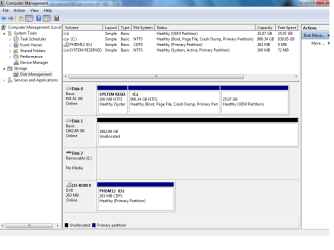
Also please post a screenshot of your disk management (rt click computer -> manage -> Disk Management

John gave you one way to capture a window using the snipping tool. Here's another:
the keyboard combination: alt+-fn+prtsc "prints" an image of the window with focus (the active window) in the clipboard.

Type Paint in the start menu search box and then enter.
Paste (Ctrl+V) the "printed" window image into Paint, save it and attach the image using the paper clip on the post menu bar.

Thanks

John: the diskpart shows the 2GB drive formated as GPT and the other drives with 0 free space. That's why I asked to see the disk management.
 

My Computer My Computer

At a glance

x64 (6.3.9600) Win8.1 Pro & soon dual boot x6...AMD A6-3420M APU with Radeon(tm) HD Graphics6.00 GBAMD Radeon(TM) HD 6520G
Computer type
Laptop
Computer Manufacturer/Model Number
HP Pavilion dv6-6c10us
OS
x64 (6.3.9600) Win8.1 Pro & soon dual boot x64 (6.1.7601) Win7_SP1 HomePrem
CPU
AMD A6-3420M APU with Radeon(tm) HD Graphics
Motherboard
Hewlett-Packard 1805
Memory
6.00 GB
Graphics Card(s)
AMD Radeon(TM) HD 6520G
Sound Card
(1) AMD High Definition Audio Device (2) IDT High Definiti
Monitor(s) Displays
HP W2072a 20" LCD (1600 x 900) @ 60 Hz
Screen Resolution
1366 x 768 x 32 bits (4294967296 colors) @ 60 Hz
Hard Drives
ST640LM0 00 HM641JI SATA Disk Device
Keyboard
Logitech k520 wireless KB
Mouse
Logitech m320 wireless mouse (bundled with KB)
Internet Speed
15/5 | 54 MB Wireless 'n'
Antivirus
Realtime: Defender or Avast | On-demand: Malwarebytes, ESET
Browser
IE 11 on Win8, IE 10 on win 7
Other Info
Media: [Gimp, Audacity, VLC] || Comm: [WEmail 2012, Skype] || Productivity: [OpenOffice,| Textpad] || Utils: [Sysinternals, cCleaner, Speccy, Defraggler]
Ok updated my system specs using easy specs and downloaded the free disc management software. The software I was using before was booted from a cd maybe that is why the info was showing up different. Attached is the disc management screenshot
dsik managment.png
 

My Computer My Computer

At a glance

Microsoft Windows 7 Home Premium 64-bit 7601 ...Intel(R) Core(TM) i3-2120 CPU @ 3.30GHz8.00 GBIntel(R) HD Graphics
Computer Manufacturer/Model Number
Lenovo Desktop PC
OS
Microsoft Windows 7 Home Premium 64-bit 7601 Multiprocessor Free Service Pack 1
CPU
Intel(R) Core(TM) i3-2120 CPU @ 3.30GHz
Motherboard
LENOVO MAHOBAY
Memory
8.00 GB
Graphics Card(s)
Intel(R) HD Graphics
Sound Card
(1) Realtek High Definition Audio (2) Intel(R) Display Aud
Hard Drives
(1) ST31000524AS (2) WDC WD20EARS-00MVWB0 (3) HP Photosmart 6510 USB Device
injmalk: thank you for the information and updating your specs.

John: I think you're on the right track with PartWiz, I only jumped in ask for the DskMgMnt - and that looks "better" than the disk part info (note your disk part also shows zeros for free space - odd. maybe if you select a part?). I wonder if the Gpt format comes into play - I know very little about Gpt. I think you can convert between MBR and Gpt, but you lose data. The 2 Gb shows as unallocated in DiskMgmnt - so try PartWiz or TestDisk.
 

My Computer My Computer

At a glance

x64 (6.3.9600) Win8.1 Pro & soon dual boot x6...AMD A6-3420M APU with Radeon(tm) HD Graphics6.00 GBAMD Radeon(TM) HD 6520G
Computer type
Laptop
Computer Manufacturer/Model Number
HP Pavilion dv6-6c10us
OS
x64 (6.3.9600) Win8.1 Pro & soon dual boot x64 (6.1.7601) Win7_SP1 HomePrem
CPU
AMD A6-3420M APU with Radeon(tm) HD Graphics
Motherboard
Hewlett-Packard 1805
Memory
6.00 GB
Graphics Card(s)
AMD Radeon(TM) HD 6520G
Sound Card
(1) AMD High Definition Audio Device (2) IDT High Definiti
Monitor(s) Displays
HP W2072a 20" LCD (1600 x 900) @ 60 Hz
Screen Resolution
1366 x 768 x 32 bits (4294967296 colors) @ 60 Hz
Hard Drives
ST640LM0 00 HM641JI SATA Disk Device
Keyboard
Logitech k520 wireless KB
Mouse
Logitech m320 wireless mouse (bundled with KB)
Internet Speed
15/5 | 54 MB Wireless 'n'
Antivirus
Realtime: Defender or Avast | On-demand: Malwarebytes, ESET
Browser
IE 11 on Win8, IE 10 on win 7
Other Info
Media: [Gimp, Audacity, VLC] || Comm: [WEmail 2012, Skype] || Productivity: [OpenOffice,| Textpad] || Utils: [Sysinternals, cCleaner, Speccy, Defraggler]
and do what with partwiz? I am currently searching for hidden partitions is there anything else I should be doing?
 

My Computer My Computer

At a glance

Microsoft Windows 7 Home Premium 64-bit 7601 ...Intel(R) Core(TM) i3-2120 CPU @ 3.30GHz8.00 GBIntel(R) HD Graphics
Computer Manufacturer/Model Number
Lenovo Desktop PC
OS
Microsoft Windows 7 Home Premium 64-bit 7601 Multiprocessor Free Service Pack 1
CPU
Intel(R) Core(TM) i3-2120 CPU @ 3.30GHz
Motherboard
LENOVO MAHOBAY
Memory
8.00 GB
Graphics Card(s)
Intel(R) HD Graphics
Sound Card
(1) Realtek High Definition Audio (2) Intel(R) Display Aud
Hard Drives
(1) ST31000524AS (2) WDC WD20EARS-00MVWB0 (3) HP Photosmart 6510 USB Device
injmalk: I'm not familiar with PartWiz.... yet, so John (ICit2lol) is going to have to answer your inquiries. Searching is fine, just don't "commit" anything unless someone says to do that. It's a big drive so it will take some time to search. Sorry, wish I knew the answer.
 

My Computer My Computer

At a glance

x64 (6.3.9600) Win8.1 Pro & soon dual boot x6...AMD A6-3420M APU with Radeon(tm) HD Graphics6.00 GBAMD Radeon(TM) HD 6520G
Computer type
Laptop
Computer Manufacturer/Model Number
HP Pavilion dv6-6c10us
OS
x64 (6.3.9600) Win8.1 Pro & soon dual boot x64 (6.1.7601) Win7_SP1 HomePrem
CPU
AMD A6-3420M APU with Radeon(tm) HD Graphics
Motherboard
Hewlett-Packard 1805
Memory
6.00 GB
Graphics Card(s)
AMD Radeon(TM) HD 6520G
Sound Card
(1) AMD High Definition Audio Device (2) IDT High Definiti
Monitor(s) Displays
HP W2072a 20" LCD (1600 x 900) @ 60 Hz
Screen Resolution
1366 x 768 x 32 bits (4294967296 colors) @ 60 Hz
Hard Drives
ST640LM0 00 HM641JI SATA Disk Device
Keyboard
Logitech k520 wireless KB
Mouse
Logitech m320 wireless mouse (bundled with KB)
Internet Speed
15/5 | 54 MB Wireless 'n'
Antivirus
Realtime: Defender or Avast | On-demand: Malwarebytes, ESET
Browser
IE 11 on Win8, IE 10 on win 7
Other Info
Media: [Gimp, Audacity, VLC] || Comm: [WEmail 2012, Skype] || Productivity: [OpenOffice,| Textpad] || Utils: [Sysinternals, cCleaner, Speccy, Defraggler]
So I searched and all they found was a 128 mb partition? any advice?
 

My Computer My Computer

At a glance

Microsoft Windows 7 Home Premium 64-bit 7601 ...Intel(R) Core(TM) i3-2120 CPU @ 3.30GHz8.00 GBIntel(R) HD Graphics
Computer Manufacturer/Model Number
Lenovo Desktop PC
OS
Microsoft Windows 7 Home Premium 64-bit 7601 Multiprocessor Free Service Pack 1
CPU
Intel(R) Core(TM) i3-2120 CPU @ 3.30GHz
Motherboard
LENOVO MAHOBAY
Memory
8.00 GB
Graphics Card(s)
Intel(R) HD Graphics
Sound Card
(1) Realtek High Definition Audio (2) Intel(R) Display Aud
Hard Drives
(1) ST31000524AS (2) WDC WD20EARS-00MVWB0 (3) HP Photosmart 6510 USB Device
The 2 Gb shows as unallocated in DiskMgmnt

Unallocated and empty. I have a 2 GB that shows the same amount of available space (due to the whole decimal vs binary thing). The drive needs to be set up first before it can be used,

http://www.sevenforums.com/tutorials/2674-partition-volume-create-new.html

Before doing that was there anything on it before? If so you may want to try something like this first,

Recuva - Undelete, Unerase, File and Disk Recovery - Free Download

and see if you can recover what was there.
 

My Computer My Computer

At a glance

Win 7 Ultimate x64FX-8350 @ 4.6 GHz so farADATA XPG V1 Series Black 8GB DDR3 1600Sapphire R9 270x Dual-X
Computer type
PC/Desktop
Computer Manufacturer/Model Number
Me
OS
Win 7 Ultimate x64
CPU
FX-8350 @ 4.6 GHz so far
Motherboard
Asus M5A97 EVO
Memory
ADATA XPG V1 Series Black 8GB DDR3 1600
Graphics Card(s)
Sapphire R9 270x Dual-X
Sound Card
Xonar DGX w/ Corsair Vengence 1300
Monitor(s) Displays
Acer S232HL Abid
Screen Resolution
1920x1080
Hard Drives
120 GB OCZ Vertex 3
500 GB Seagate 7200.12
PSU
Antec Earthwatts 650W Green
Case
Antec Three Hundred
Cooling
Cooler Master 212 EVO
Keyboard
Logitech G510
Mouse
Logitech G500s
Internet Speed
35000/3000
Yeah, I wasn't concerned by the overhead or the decimal/binary thing.

But I should have asked
"Was there data on the disk?" :doh:
And followed up with "Data you need to recover?":doh:

Thanks Stormy.
The 2 Gb shows as unallocated in DiskMgmnt
Unallocated and empty. I have a 2 GB that shows the same amount of available space (due to the whole decimal vs binary thing). The drive needs to be set up first before it can be used,

http://www.sevenforums.com/tutorials/2674-partition-volume-create-new.html

Before doing that was there anything on it before? If so you may want to try something like this first, Recuva, and see if you can recover what was there.
 

My Computer My Computer

At a glance

x64 (6.3.9600) Win8.1 Pro & soon dual boot x6...AMD A6-3420M APU with Radeon(tm) HD Graphics6.00 GBAMD Radeon(TM) HD 6520G
Computer type
Laptop
Computer Manufacturer/Model Number
HP Pavilion dv6-6c10us
OS
x64 (6.3.9600) Win8.1 Pro & soon dual boot x64 (6.1.7601) Win7_SP1 HomePrem
CPU
AMD A6-3420M APU with Radeon(tm) HD Graphics
Motherboard
Hewlett-Packard 1805
Memory
6.00 GB
Graphics Card(s)
AMD Radeon(TM) HD 6520G
Sound Card
(1) AMD High Definition Audio Device (2) IDT High Definiti
Monitor(s) Displays
HP W2072a 20" LCD (1600 x 900) @ 60 Hz
Screen Resolution
1366 x 768 x 32 bits (4294967296 colors) @ 60 Hz
Hard Drives
ST640LM0 00 HM641JI SATA Disk Device
Keyboard
Logitech k520 wireless KB
Mouse
Logitech m320 wireless mouse (bundled with KB)
Internet Speed
15/5 | 54 MB Wireless 'n'
Antivirus
Realtime: Defender or Avast | On-demand: Malwarebytes, ESET
Browser
IE 11 on Win8, IE 10 on win 7
Other Info
Media: [Gimp, Audacity, VLC] || Comm: [WEmail 2012, Skype] || Productivity: [OpenOffice,| Textpad] || Utils: [Sysinternals, cCleaner, Speccy, Defraggler]
yes there was data on the disc.. I searched for the partition using partwiz but they only found a 128 partition.. ill try finding the data using recuva and let you guys know how it goes
 

My Computer My Computer

At a glance

Microsoft Windows 7 Home Premium 64-bit 7601 ...Intel(R) Core(TM) i3-2120 CPU @ 3.30GHz8.00 GBIntel(R) HD Graphics
Computer Manufacturer/Model Number
Lenovo Desktop PC
OS
Microsoft Windows 7 Home Premium 64-bit 7601 Multiprocessor Free Service Pack 1
CPU
Intel(R) Core(TM) i3-2120 CPU @ 3.30GHz
Motherboard
LENOVO MAHOBAY
Memory
8.00 GB
Graphics Card(s)
Intel(R) HD Graphics
Sound Card
(1) Realtek High Definition Audio (2) Intel(R) Display Aud
Hard Drives
(1) ST31000524AS (2) WDC WD20EARS-00MVWB0 (3) HP Photosmart 6510 USB Device
so recuva is asking me where to search for the files and since there is no partition on my HD there is nothing I can pick to search.
 

My Computer My Computer

At a glance

Microsoft Windows 7 Home Premium 64-bit 7601 ...Intel(R) Core(TM) i3-2120 CPU @ 3.30GHz8.00 GBIntel(R) HD Graphics
Computer Manufacturer/Model Number
Lenovo Desktop PC
OS
Microsoft Windows 7 Home Premium 64-bit 7601 Multiprocessor Free Service Pack 1
CPU
Intel(R) Core(TM) i3-2120 CPU @ 3.30GHz
Motherboard
LENOVO MAHOBAY
Memory
8.00 GB
Graphics Card(s)
Intel(R) HD Graphics
Sound Card
(1) Realtek High Definition Audio (2) Intel(R) Display Aud
Hard Drives
(1) ST31000524AS (2) WDC WD20EARS-00MVWB0 (3) HP Photosmart 6510 USB Device
You might try this tutorial: Regain a lost drive using Test Disk - An Illustrated Guide

I have never used the tutorial or the Testdisk utility. In searching for other solutions, Testdisk often comes up and is well regarded. I spoke with the author of the tutorial about a week ago, and he retested the stable version on both a 32 bit and 64 bit machine, so you can ignore the 64 bit WOW strikeout on the Testdisk page.

Just make sure you download the stable 6.13 version, not the beta 6.14 version

When you get to
12.Ninth window: Confirm write partition table by pressing Y
Make sure that the information presented is what you expect it to be, the tutorial images show jumanji's drive so the numbers/size will be different.

Looking back at the Disk Mgmnt screenshot, I would expect you to see 1862.89Gb or 1.8Tb. As I mentioned I haven't run this tool, I'm not sure how the utility will present the drive, it might say 2Tb. If you want to post a screenshot when you get to that point, please do.
 

My Computer My Computer

At a glance

x64 (6.3.9600) Win8.1 Pro & soon dual boot x6...AMD A6-3420M APU with Radeon(tm) HD Graphics6.00 GBAMD Radeon(TM) HD 6520G
Computer type
Laptop
Computer Manufacturer/Model Number
HP Pavilion dv6-6c10us
OS
x64 (6.3.9600) Win8.1 Pro & soon dual boot x64 (6.1.7601) Win7_SP1 HomePrem
CPU
AMD A6-3420M APU with Radeon(tm) HD Graphics
Motherboard
Hewlett-Packard 1805
Memory
6.00 GB
Graphics Card(s)
AMD Radeon(TM) HD 6520G
Sound Card
(1) AMD High Definition Audio Device (2) IDT High Definiti
Monitor(s) Displays
HP W2072a 20" LCD (1600 x 900) @ 60 Hz
Screen Resolution
1366 x 768 x 32 bits (4294967296 colors) @ 60 Hz
Hard Drives
ST640LM0 00 HM641JI SATA Disk Device
Keyboard
Logitech k520 wireless KB
Mouse
Logitech m320 wireless mouse (bundled with KB)
Internet Speed
15/5 | 54 MB Wireless 'n'
Antivirus
Realtime: Defender or Avast | On-demand: Malwarebytes, ESET
Browser
IE 11 on Win8, IE 10 on win 7
Other Info
Media: [Gimp, Audacity, VLC] || Comm: [WEmail 2012, Skype] || Productivity: [OpenOffice,| Textpad] || Utils: [Sysinternals, cCleaner, Speccy, Defraggler]
Thanks for the heads up about testdisk. It seems like a powerful tool however I did not seem to have luck with it. The tutourial was outdated and was asking me to pick options that werent there like analyze and from there everything was different. The testdisk version now tried recovering lost files. All it recovered was 350 gb of .java and .xml,.png, ect. The only files that were anything seemed like the WD files that come with the drive. Any suggestions on what I should do next?
 

My Computer My Computer

At a glance

Microsoft Windows 7 Home Premium 64-bit 7601 ...Intel(R) Core(TM) i3-2120 CPU @ 3.30GHz8.00 GBIntel(R) HD Graphics
Computer Manufacturer/Model Number
Lenovo Desktop PC
OS
Microsoft Windows 7 Home Premium 64-bit 7601 Multiprocessor Free Service Pack 1
CPU
Intel(R) Core(TM) i3-2120 CPU @ 3.30GHz
Motherboard
LENOVO MAHOBAY
Memory
8.00 GB
Graphics Card(s)
Intel(R) HD Graphics
Sound Card
(1) Realtek High Definition Audio (2) Intel(R) Display Aud
Hard Drives
(1) ST31000524AS (2) WDC WD20EARS-00MVWB0 (3) HP Photosmart 6510 USB Device
Please post a current Device Manager screen shot.

Hmmm, I just ran Testdisk and the tutorial tracked the program step-by-step.

It sounds as though you might have launched photorec_win since you mention the recovered files. Testdisk works on the geometry level of the disk, not the file system level.

Try Testdisk again, making sure that you right click Testdisk_win and run as administrator. Please select Create (new log) instead of No Log in step 4.

Please post a screen shot of each step - Alt+Prtsc will capture the active window, open paint, paste the capture, save, then attach the captured window image to your post on SF (paper clip on post menu)

I guess I should also ask: You downloaded Testdisk 6.13, correct?
 

My Computer My Computer

At a glance

x64 (6.3.9600) Win8.1 Pro & soon dual boot x6...AMD A6-3420M APU with Radeon(tm) HD Graphics6.00 GBAMD Radeon(TM) HD 6520G
Computer type
Laptop
Computer Manufacturer/Model Number
HP Pavilion dv6-6c10us
OS
x64 (6.3.9600) Win8.1 Pro & soon dual boot x64 (6.1.7601) Win7_SP1 HomePrem
CPU
AMD A6-3420M APU with Radeon(tm) HD Graphics
Motherboard
Hewlett-Packard 1805
Memory
6.00 GB
Graphics Card(s)
AMD Radeon(TM) HD 6520G
Sound Card
(1) AMD High Definition Audio Device (2) IDT High Definiti
Monitor(s) Displays
HP W2072a 20" LCD (1600 x 900) @ 60 Hz
Screen Resolution
1366 x 768 x 32 bits (4294967296 colors) @ 60 Hz
Hard Drives
ST640LM0 00 HM641JI SATA Disk Device
Keyboard
Logitech k520 wireless KB
Mouse
Logitech m320 wireless mouse (bundled with KB)
Internet Speed
15/5 | 54 MB Wireless 'n'
Antivirus
Realtime: Defender or Avast | On-demand: Malwarebytes, ESET
Browser
IE 11 on Win8, IE 10 on win 7
Other Info
Media: [Gimp, Audacity, VLC] || Comm: [WEmail 2012, Skype] || Productivity: [OpenOffice,| Textpad] || Utils: [Sysinternals, cCleaner, Speccy, Defraggler]
injmalk: thank you for the information and updating your specs.

John: I think you're on the right track with PartWiz, I only jumped in ask for the DskMgMnt - and that looks "better" than the disk part info (note your disk part also shows zeros for free space - odd. maybe if you select a part?). I wonder if the Gpt format comes into play - I know very little about Gpt. I think you can convert between MBR and Gpt, but you lose data. The 2 Gb shows as unallocated in DiskMgmnt - so try PartWiz or TestDisk.
No probs Bill I am no expert as you know and am always willing to let you take anything on board as it is a learning curve for me too:)

Just as a matter of interest I just did a PW on my back up data drive > right click on the drive > explore > it then shows up as in the pics > click on the crosses and it opens those out as per noraml. Whether this will do it in an unallocated disk..... Worth a try:huh:
 

Attachments

  • AA.PNG
    AA.PNG
    47.7 KB · Views: 5
  • AA1.PNG
    AA1.PNG
    61.6 KB · Views: 5

My Computer My Computer

At a glance

Desk1 7 Home Prem / Desk2 10 Pro / Main lap A...Desk1 i5 3750K / Laptop i7 GTX 860M / Desk2 i...Desk1 8GB (1866) / Desk2 16GB (1333) / Laptop...Desk 1& 2NVidia GTX 650 & Laptops on board Intel
Computer type
PC/Desktop
Computer Manufacturer/Model Number
Own build (new) Desk1 / Asus ROG Win 7 / Desk2 1st build
OS
Desk1 7 Home Prem / Desk2 10 Pro / Main lap Asus ROG 10 Pro 2 laptop Toshiba 7 Pro Asus P2520 7 & 10
CPU
Desk1 i5 3750K / Laptop i7 GTX 860M / Desk2 i5 2500
Motherboard
Desk1 Asus P877-V / Desk2 Gigabyte H67 UD3H / Laptop ?
Memory
Desk1 8GB (1866) / Desk2 16GB (1333) / Laptop 8Gb DDR3
Graphics Card(s)
Desk 1& 2NVidia GTX 650 & Laptops on board Intel
Sound Card
Desk 1 & 2 -XONAR DG Realtek High Def audio Laptop
Monitor(s) Displays
Desk 1 Benq HD 2450 / Desk2 Philips 24" / Laptop 17.5"
Screen Resolution
1920x1080 D1 & D2 & Laptop 1
Hard Drives
Desk1 Samsung 120GB 830 SSD
Asus ROG 256GB 850 Pro SSD
Desk2 Samsung 840 256 SSD
Toshiba 120GB EVO
PSU
Desk 1 Corsair HX 1050/ Laptop ? / Desk 2 Corsair HX 650
Case
Desk 1 Cooler HAF XM ? Toshiba laptop / Desk2 Coolermaster
Cooling
Fans on all Desk1 -2 Desk2 - all Coolermasters 5 Laptop ?
Keyboard
Desk 1 MS Sidewinder X6 Desk 2 MS Sidewinder X 4
Mouse
Desk 1&2 - Gigabyte MS 900 gamer - laptop - Logitec wireless
Internet Speed
ADSL2+
Other Info
One other Desktop (tester) and spare Toshba laptop both with SSD's
Running Kaspersky 2016 ISS on all machines config'd identically
Logitec audio stereo systems on each machine (x3)
Canon MG5250MFC
Router/modem TP-Link running WPA2SK
Back
Top