2 Windows, both showing C drive??

giantman

New member
Local time
2:24 AM
Messages
9
I've installed Windows 7 on two different partitions, both are on the same drive. When I boot into each version of windows they both show C:\ as the partition. Each one has a different login password, so I know that I'm logging into two different windows on two different partitions.

When on Windows(1) another installation of windows is shown on D:\
When on Windows(2) another second installation of windows is also shown on D:\

But I've installed each Windows on two different partitions.

Why are they both displaying that they're installed on C:\ on both windows 1 and windows 2? Crazy.
 

My Computer

OS
Windows 7 x64
I believe Windows 7 will show the system volume as C for each OS, even if that partition/drive is different.

I have to ask, because there is always a better way...but why on Earth would you burn an extra license installing the same OS on the same computer twice?
 

My Computer

OS
Windows 7 Ultimate x64 SP1
CPU
Intel Core i7-2600
Motherboard
Gigabyte GA-P67A-UD3P-B3
Memory
12 GB Patriot Extreme DDR3-1333
Graphics Card(s)
Nvidia GTX 470
Monitor(s) Displays
Dell UltraSharp 2209WA
Hard Drives
OCZ Agility3 240 GB, WD5001AALS, WD7501AALS
PSU
OCZ ModStream 700W
Case
CoolerMaster HAF 912 Advanced
Cooling
CoolerMaster Hyper 212 Plus
I think that is normal. I have Win7 and Vista on 2 different harddrives on the same PC. And there it is the same. When I am in Win7, it occupies C and Vista is E. When I am in Vista, it is the other way around.
 

My Computer

Computer Manufacturer/Model Number
HP, Dell, Gateway, Toshiba - 4 laptops and 2 desktops
OS
Vista, Windows7, Mint Mate, Zorin, Windows 8
CPU
from 1.6GHz Duo to i7
Monitor(s) Displays
2x HP w2207
Hard Drives
5x HDD, 7x SSD, 12x Externals
Keyboard
with trackball - no mices
Mouse
Trackball mice
Internet Speed
DSL 6000
Are you sure?

Before I posted this I was getting ready for war with bootable CD's, bootkit detection utility's, security analyzers, vulnerability patchers, scripts, firewalls...

lol...sure it's normal?
 

My Computer

OS
Windows 7 x64
Doesn't sound normal.

What if I WANT it to display as D:\....why would a partition display as C when the name of the partition is D.

You guys must be in on it.
 

My Computer

OS
Windows 7 x64
Because the os alway takes C: when your logged on
 

My Computer

Computer Manufacturer/Model Number
Dell XPS 730
OS
Windows 7 Home Premium 64 bit
CPU
Intel Core 2 quad Extreme Q9770 @ 3.2 GHz
Memory
4x2 GB Muskin 1600 MHz ram
Graphics Card(s)
NVidia GTX 250
Sound Card
Soundblaster X-Fi Fatality Champion
Monitor(s) Displays
2 Dell 2007WFP Ultrascans
Screen Resolution
3360 x 1050
Hard Drives
WD Black 1TB sata, 2-WD Black 500 sata, 2-Seagate 500 Go external
PSU
1000 Watt
Cooling
air
Keyboard
MS Natrual Keyboard Pro
Mouse
Logitech Wireless Trackball
Internet Speed
DSL Elite
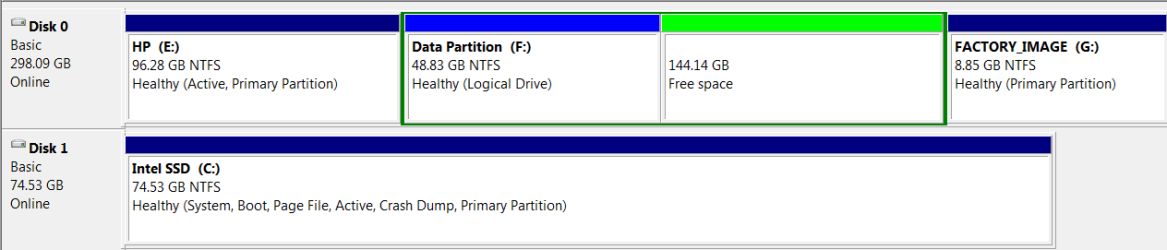
Have a look at my Disk Management. E is Vista, C is Win7 where I currently am.
 

Attachments

  • 2010-12-14_162434.png
    2010-12-14_162434.png
    8.7 KB · Views: 26

My Computer

Computer Manufacturer/Model Number
HP, Dell, Gateway, Toshiba - 4 laptops and 2 desktops
OS
Vista, Windows7, Mint Mate, Zorin, Windows 8
CPU
from 1.6GHz Duo to i7
Monitor(s) Displays
2x HP w2207
Hard Drives
5x HDD, 7x SSD, 12x Externals
Keyboard
with trackball - no mices
Mouse
Trackball mice
Internet Speed
DSL 6000
Drive letters are dependent on the OS itself, so yes, what you are seeing is normal. Just to clarify, the OS drive does not HAVE to be C:, but it will be in most cases.
 

My Computer

Computer Manufacturer/Model Number
Custom
OS
Windows 7 Ultimate RTM (Technet)
CPU
3.00 gigahertz Intel Core2 Duo E8400
Motherboard
ASUSTeK Computer INC. P5K/EPU Rev 1.xx
Memory
4GB
Graphics Card(s)
ATI Radeon X1950 Pro
Sound Card
Built in HD Audio
Monitor(s) Displays
22" Gateway LCD
Screen Resolution
1920 x 1200
Hard Drives
ST3160023A [Hard drive] (160.04 GB) -- drive 0, rev 8.01, ST3500630AS [Hard drive] (500.11 GB) -- drive 2, rev 3.AAK
ST3500630AS [Hard drive] (500.11 GB) -- drive 1, rev 3.AAK
Keyboard
Logitech G11
Mouse
Microsoft Wireless Laser Mouse 5000
Internet Speed
13.44 Mbps
Windows will always see itself as C:\ regardless. The Drive letters are OS dependant not Drive dependant. In reality the letters don't really exist they are just friendly names so we can identify them easily.

To answer your question, if you want it to be D then you can change it using Disk Management (Start>Right click Computer>Manage>Storage>Disk management) but there is no real reason to do this, and in fact quite a good reason not to.

When you install a program, by default, it will try and install itself to C:\ (in 99% of cases) unless you want to go through changing the default path every time, then every program will end up dumping itself on the "C" drive regardless of which OS it's installed on. Organisational nightmare. not to mention the fact that if you have the same program installed on both OS's then you will get a file conflict because it will just overwrite the program that was there before (or fail to install, varies by program)

In short: If it aint broke, don't fix it.
 

My Computer

Computer type
PC/Desktop
Computer Manufacturer/Model Number
Medion Erazer (note to self: insert model number) - with custom additions
OS
Windows 10 Pro x64
CPU
Intel Core i5 7400 @ 3.00GHz
Motherboard
OEM supllied with PC
Memory
8GB 2133Mhz DDR4 (OEM supplied)
Graphics Card(s)
Gygabyte Windforce GTX 1050Ti (Factory Overclocked)
Sound Card
Realtek
Monitor(s) Displays
Acer Al1980 + HKC
Screen Resolution
1360*768(HKC) / 1280*1024(Acer)
Hard Drives
1TB Toshiba
1TB WD Caviar Green
120GB Samsung Evo 840
PSU
OEM supplied (no power rating on case)
Case
OEM Supplied
Cooling
Stock
Keyboard
Logitech Wireless
Mouse
Logitect Wireless
Internet Speed
40Mb/s Down 10Mb/s Up
Antivirus
Defender
Browser
Firefox
Do not attempt to change your drive letter using any method unless it loses it during reimaging or repair (then use Paragon Rescue CD). It will brick your OS.

The only way to install Win7 so that it doesn't conveniently always see itself as C is if you install it from another runnning OS which is lettered C.

Booting the installer to install will always result in Win7 being C when you are in it.
 
Hello giantman, welcome to Seven Forums!


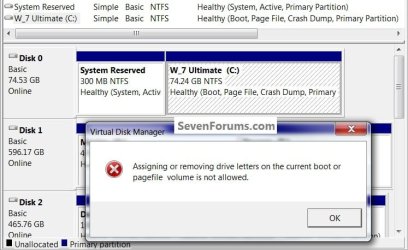
That's normal though Windows will not allow the boot partition drive letter to be changed or removed.

click to enlarge
4321.jpg
 

My Computer

Computer Manufacturer/Model Number
* BFK Customs *
OS
W 7 64-bit Ultimate
CPU
Intel Q9550 Yorkfield
Motherboard
ASUS P5Q Pro
Memory
8GB Dominator 8500C5D
Graphics Card(s)
ATI : XFX 5870
Sound Card
Realtek HD Audio 7-1
Monitor(s) Displays
1x 47" LCD HDMI & 3x 26" LCD HDMI
Screen Resolution
1920x1080P & 1920x1200
Hard Drives
1x 80GB Intel X25-M G2 SSD : 1x 500GB & 1x 640GB WD Caviar Black(s)
PSU
Corsair 620HX
Case
Cooler Master RC-690
Cooling
Tuniq Tower 120, 2x 140mm and 3x 120mm case fans
Keyboard
Microsoft 500
Mouse
Razer Diamondback 3G
Internet Speed
14 Mb/s
Other Info
1x Koutech 3Gb/s SATA HDD Hot Swap Rack
Back
Top