2nd Hard drive disappeared after Windows Update

loyalrogue

New member
Local time
9:05 AM
Messages
6
This morning I had a Windows 7 update waiting.
I shut down to let it do the update and went to work.
When I came home and started it back up it stayed hung-up on the startup screen for 15 minutes before I hard rebooted.
When it came back up, the second drive disappeared from My Computer.

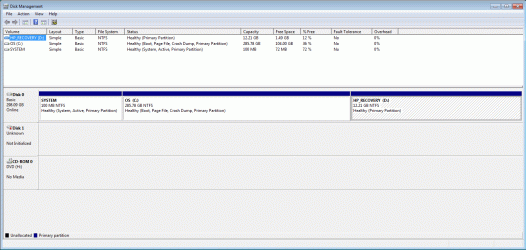
I looked in Disk Management and it says the disk is not initialized.
I had 3 partions of data on that drive and want to know how to get the drive back active without losing the data.
Can anyone offer any suggestions?

Thanks.
 

My Computer My Computer

Computer Manufacturer/Model Number
HP Pro 3130
OS
Windows 7 Professional 64bit
CPU
Intel i5 650
Motherboard
HP stock
Memory
12 GB
Graphics Card(s)
HP Stock
Sound Card
HP Stock
Monitor(s) Displays
ViewSonic LED 22" and 24"
Screen Resolution
1920x1080
Hard Drives
WDC WD3200AAJS-60M0A1
Hitachi HDS723020BLA642
PSU
HP Stock
Case
HP Stock
Cooling
HP Stock
Keyboard
HP Stock
Mouse
HP Stock
Internet Speed
20Mbps
Can you please post a screenshot from DISKMGMT.MSC. Be sure it's full-screen, and please spread the columns so that all text in the cells is visible.

As far as recovery, if the drive and partitions on it have not actually been genuinely corrupted or destroyed, you might well be able to recover them intact using the "partition recovery wizard" function of Partition Wizard. Download and install the free version 7 "home edition" which is fine for just about everything you could want to do. Also download and burn the ISO image for standalone boot CD, which is used for functions involving work on the C-partition when Windows cannot be running, and also if you just want to feel more comfortable. All functions are available with either version, but the standalone boot CD version obviously will not show Windows drive letters like using the installed version under Win7 will.

If this problem drive is not your primary drive on which the Windows C partition lives (and I'm guessing it's not) you could use the installed version under Win7 to see if that drive can be recovered using the "partition recovery wizard" functionality. Or, you can do the same thing with the standalone boot CD.

Note that Partition Wizard also has an "explore partition" function, which will actually look at that partition's file system if possible, even though Win7 says "needs to be initialized".

But before you do anything let's see that DISKMGMT screenshot.
 

My Computer My Computer

Computer type
PC/Desktop
Computer Manufacturer/Model Number
Home-built, two systems (1) and (2)
OS
Windows 7 Pro x64 (1), Win7 Pro X64 (2)
CPU
i5-3350p 3.1Ghz/6MB-cache (1); E8400 3.0Ghz/6MB-cache (2)
Motherboard
ASUS P8Z77-V Pro (1); ASUS P5Q3 (2)
Memory
8GB PC3-12800 DDR3 (1); 4GB PC3-10600 DDR3 (2)
Graphics Card(s)
ATI HD7750 (1), (see TV cards); ATI R7 250 (2)
Sound Card
Realtek ALC892 HD Audio (1); Realtek ALC1200 HD Audio (2)
Monitor(s) Displays
Eizo HD2441W LCD, Eizo S2433W (1); Eizo 24" S2433W (2)
Screen Resolution
1920x1200, 1920x1200 (1); 1920x1200 (2)
Hard Drives
(1) 1TB SATA-II (7200RPM), 2x2TB SATA-III (7200RPM), 250GB SATA-III (10000RPM) for OS; 2x2TB external USB 3.0

(2) 320GB SATA-II (7200RPM), 750GB SATA-II (7200RPM), 150GB SATA-II (10000RPM) for OS; 2TB external USB 3.0
PSU
Nesteq ECS-6001 600W (1); Nesteq ECS-5001 500W (2)
Case
Acousti-Case 360 (1) and (2)
Cooling
Noctua NH-U12P SE2 for CPU, 2x120mm case fans (1) and (2)
Keyboard
IBM PS/2 (1) and (2)
Mouse
Logitech MX Revolution wireless (1); Microsoft wired (2)
Internet Speed
100mbps down / 10mbps up
Antivirus
Microsoft Security Essentials; Malwarebyte Anti-Malware Pro
Browser
Firefox
Other Info
Ceton InfiniTV 4-tuner cablecard-enabled TV card as well as Hauppauge HVR-2250 OTA/ATSC 2-tuner TV card in (1), running under Win7 WMC
Hi dsperber,

Thank you for the assist.

Here is the screenshot. Hope it's what you needed to see.

diskmgmt.gif
 

My Computer My Computer

Computer Manufacturer/Model Number
HP Pro 3130
OS
Windows 7 Professional 64bit
CPU
Intel i5 650
Motherboard
HP stock
Memory
12 GB
Graphics Card(s)
HP Stock
Sound Card
HP Stock
Monitor(s) Displays
ViewSonic LED 22" and 24"
Screen Resolution
1920x1080
Hard Drives
WDC WD3200AAJS-60M0A1
Hitachi HDS723020BLA642
PSU
HP Stock
Case
HP Stock
Cooling
HP Stock
Keyboard
HP Stock
Mouse
HP Stock
Internet Speed
20Mbps
If I'm not mistaken, you should be able to right-click the drive, in this case Disk 1, and initialize should be an option you can click. Some people do not realize you can click the drives, not just the space shown.
 

My Computer My Computer

Computer type
Laptop
Computer Manufacturer/Model Number
Toshiba P775-S7100
OS
Windows 7 Professional SP1 64-bit
CPU
Intel Core i5-2450M @2.5 GHz
Memory
6 GB DDR3 1333MHz
Graphics Card(s)
Intel HD 3000
Monitor(s) Displays
Built-in 17.3" LED; 22" Insignia NS-L22Q-10A
Screen Resolution
1600x900; 1360x768
Hard Drives
750 GB Hitachi
1TB Seagate FreeAgent External
Internet Speed
Verizon DSL Speed(Down/Up): 3360 Kbps / 800 Kbps
Antivirus
MSE and MBAM Pro
Browser
IE10
Yes, I saw that option when I right-clicked, but didn't know if it would affect any data on the drive if I did.
It's a 2TB drive that was originally setup with 3 partitions, and I don't remember what the sizes were.
 

My Computer My Computer

Computer Manufacturer/Model Number
HP Pro 3130
OS
Windows 7 Professional 64bit
CPU
Intel i5 650
Motherboard
HP stock
Memory
12 GB
Graphics Card(s)
HP Stock
Sound Card
HP Stock
Monitor(s) Displays
ViewSonic LED 22" and 24"
Screen Resolution
1920x1080
Hard Drives
WDC WD3200AAJS-60M0A1
Hitachi HDS723020BLA642
PSU
HP Stock
Case
HP Stock
Cooling
HP Stock
Keyboard
HP Stock
Mouse
HP Stock
Internet Speed
20Mbps
Hi,

I'm not 100% sure here, but if you do initialise the drive, I think all the data on it may be lost.

Perhaps there is another solution?

Regards,
Golden
 

My Computer My Computer

Computer type
PC/Desktop
Computer Manufacturer/Model Number
Golden Mk. I.4
OS
Windows 10 Pro x64 ; Xubuntu x64
CPU
Intel i7 860 @ 2.80 GHz O/C'ed to 4.0GHz
Motherboard
Gigabyte P55A-UD3R Rev.1. Award BIOS F13
Memory
16GB Corsair Vengance DDR3 @ 661 MHz Dual Channel (9-9-9-24)
Graphics Card(s)
EVGA NVidia GTX 560 1024MB
Sound Card
Realtek Integrated
Monitor(s) Displays
Dual Samsung SyncMaster 2494HS
Screen Resolution
1920*1080 and 1920*1080
Hard Drives
1*Samsung 840 EVO 120GB SSD;
1*OCZ Vertex 2 60GB SSD;
2*Samsung F3 SpinPoint 1TB in RAID0;
1*Samsung F1 SpinPoint 1TB;
2*Western Digital 1TB External USB 3.0
1*Western Digital 500GB External USB 3.0
1*Seagate 500GB External USB 2.0
PSU
Thermaltake ToughPower QFan 750W
Case
Thermaltake Element S VK60001W2Z
Cooling
Corsair H60 Water Cooling, 2*230mm and 2*80mm case fans
Keyboard
Logitech G110
Mouse
Logitech MX518
I wouldn't "initialize". That sounds pretty extreme, and I can't imagine it's equivalent to "recover all previously existing partitions".

Ok... that second drive is not showing "offline" (as it might if for some reason there was a disk signature "collision" which is easy to fix). But it might be as simple as repairing the MBR, which is exactly the type of thing that Partition Wizard's "partition recovery wizard" is designed to do... among other recovery techniques.

So, as I mentioned earlier (if you haven't already downloaded, installed, and burned the ISO) I would suggest that you get Partition Wizard. Then run the program (you can use the installed version under Win7, since this is not your Disk0) and see what PW can make of the drive's contents.

Then, you can certainly at least START the "partition recovery wizard" function for that second drive, and see what PW can figure out about it. You don't have to actually push the APPLY button until you're convinced that PW has figured it all out and claims to be able to recover your partitions.

Since you'll be using PW under Win7, you can also take screenshots during the wizard dialog and post here if you have questions.

My sympathies here for your dilemma, and let's hope you can recover the three partitions and their data. But reality requests that you be prepared for a true worst-case disaster, and the possible loss of the data on those three partitions... if you're forced to re-initialize and re-partition that drive to zero. Hopefully you have some form of backup from which you can recover some/all of this data (especially if it's "critical or valuable data"), or else I'm sure there will be much crying.
 

My Computer My Computer

Computer type
PC/Desktop
Computer Manufacturer/Model Number
Home-built, two systems (1) and (2)
OS
Windows 7 Pro x64 (1), Win7 Pro X64 (2)
CPU
i5-3350p 3.1Ghz/6MB-cache (1); E8400 3.0Ghz/6MB-cache (2)
Motherboard
ASUS P8Z77-V Pro (1); ASUS P5Q3 (2)
Memory
8GB PC3-12800 DDR3 (1); 4GB PC3-10600 DDR3 (2)
Graphics Card(s)
ATI HD7750 (1), (see TV cards); ATI R7 250 (2)
Sound Card
Realtek ALC892 HD Audio (1); Realtek ALC1200 HD Audio (2)
Monitor(s) Displays
Eizo HD2441W LCD, Eizo S2433W (1); Eizo 24" S2433W (2)
Screen Resolution
1920x1200, 1920x1200 (1); 1920x1200 (2)
Hard Drives
(1) 1TB SATA-II (7200RPM), 2x2TB SATA-III (7200RPM), 250GB SATA-III (10000RPM) for OS; 2x2TB external USB 3.0

(2) 320GB SATA-II (7200RPM), 750GB SATA-II (7200RPM), 150GB SATA-II (10000RPM) for OS; 2TB external USB 3.0
PSU
Nesteq ECS-6001 600W (1); Nesteq ECS-5001 500W (2)
Case
Acousti-Case 360 (1) and (2)
Cooling
Noctua NH-U12P SE2 for CPU, 2x120mm case fans (1) and (2)
Keyboard
IBM PS/2 (1) and (2)
Mouse
Logitech MX Revolution wireless (1); Microsoft wired (2)
Internet Speed
100mbps down / 10mbps up
Antivirus
Microsoft Security Essentials; Malwarebyte Anti-Malware Pro
Browser
Firefox
Other Info
Ceton InfiniTV 4-tuner cablecard-enabled TV card as well as Hauppauge HVR-2250 OTA/ATSC 2-tuner TV card in (1), running under Win7 WMC
^ I agree - try Partition Wizrd to see if you can interrogate the partitons. If may be just a case of nominating them as logical disks......?

Regards,
Golden
 

My Computer My Computer

Computer type
PC/Desktop
Computer Manufacturer/Model Number
Golden Mk. I.4
OS
Windows 10 Pro x64 ; Xubuntu x64
CPU
Intel i7 860 @ 2.80 GHz O/C'ed to 4.0GHz
Motherboard
Gigabyte P55A-UD3R Rev.1. Award BIOS F13
Memory
16GB Corsair Vengance DDR3 @ 661 MHz Dual Channel (9-9-9-24)
Graphics Card(s)
EVGA NVidia GTX 560 1024MB
Sound Card
Realtek Integrated
Monitor(s) Displays
Dual Samsung SyncMaster 2494HS
Screen Resolution
1920*1080 and 1920*1080
Hard Drives
1*Samsung 840 EVO 120GB SSD;
1*OCZ Vertex 2 60GB SSD;
2*Samsung F3 SpinPoint 1TB in RAID0;
1*Samsung F1 SpinPoint 1TB;
2*Western Digital 1TB External USB 3.0
1*Western Digital 500GB External USB 3.0
1*Seagate 500GB External USB 2.0
PSU
Thermaltake ToughPower QFan 750W
Case
Thermaltake Element S VK60001W2Z
Cooling
Corsair H60 Water Cooling, 2*230mm and 2*80mm case fans
Keyboard
Logitech G110
Mouse
Logitech MX518
I'm actually not sure on this one, as I have not done it myself before. The data will certainly not be wiped. Initializing is not the same as formatting, but it might not restore your partitions and you may need to use a recovery tool to excess your data. However, I did read one thread where the problem seemed to be that the hard drive was not getting enough power. You may want to disconnect and reconnect the hard drive and see what happens. You have a desktop, correct? Turn the computer off, disconnect all cables going to the hard drive, reconnect them, and then restart the computer.
 

My Computer My Computer

Computer type
Laptop
Computer Manufacturer/Model Number
Toshiba P775-S7100
OS
Windows 7 Professional SP1 64-bit
CPU
Intel Core i5-2450M @2.5 GHz
Memory
6 GB DDR3 1333MHz
Graphics Card(s)
Intel HD 3000
Monitor(s) Displays
Built-in 17.3" LED; 22" Insignia NS-L22Q-10A
Screen Resolution
1600x900; 1360x768
Hard Drives
750 GB Hitachi
1TB Seagate FreeAgent External
Internet Speed
Verizon DSL Speed(Down/Up): 3360 Kbps / 800 Kbps
Antivirus
MSE and MBAM Pro
Browser
IE10
Thanks for all the advice.

Already downloaded and installed PW, but it throws an appcrash when run.
I'm burning the ISO now to try and run it off a bootable CD.

Will try the unplugging and plugging trick when I shutdown after burning, before trying to recover the partitions.

Most of the data is backed-up externally, but the most recent projects will be lost, and I will definitely be crying.
 

My Computer My Computer

Computer Manufacturer/Model Number
HP Pro 3130
OS
Windows 7 Professional 64bit
CPU
Intel i5 650
Motherboard
HP stock
Memory
12 GB
Graphics Card(s)
HP Stock
Sound Card
HP Stock
Monitor(s) Displays
ViewSonic LED 22" and 24"
Screen Resolution
1920x1080
Hard Drives
WDC WD3200AAJS-60M0A1
Hitachi HDS723020BLA642
PSU
HP Stock
Case
HP Stock
Cooling
HP Stock
Keyboard
HP Stock
Mouse
HP Stock
Internet Speed
20Mbps

My Computer My Computer

Computer type
Laptop
Computer Manufacturer/Model Number
Toshiba P775-S7100
OS
Windows 7 Professional SP1 64-bit
CPU
Intel Core i5-2450M @2.5 GHz
Memory
6 GB DDR3 1333MHz
Graphics Card(s)
Intel HD 3000
Monitor(s) Displays
Built-in 17.3" LED; 22" Insignia NS-L22Q-10A
Screen Resolution
1600x900; 1360x768
Hard Drives
750 GB Hitachi
1TB Seagate FreeAgent External
Internet Speed
Verizon DSL Speed(Down/Up): 3360 Kbps / 800 Kbps
Antivirus
MSE and MBAM Pro
Browser
IE10
I think Initialize will destroy your data, at least it did on a USB drive which got corrupted when Windows said it had to be when I plugged it in.
 

My Computer My Computer

Computer type
PC/Desktop
Computer Manufacturer/Model Number
Home Built Desktop By DataTech
OS
Windows 7 Ultimate X64 SP1
CPU
Intel i5-2550K, Differing ~4.4-4.8GHz No built in GPU
Motherboard
ASUS P8Z68-V PRO/GEN3
Memory
16GB G.Skill Sniper 1866MHz @ 2133MHz 2x8GB
Graphics Card(s)
ASUS GTX650TIB-DC2OC-2GD5, (650TI Boost)
Sound Card
Onboard Realtek 5-1
Monitor(s) Displays
Samsung P2570HD
Screen Resolution
1920x1080
Hard Drives
Samsung 840 Pro 256GB SSD for OS, 500GB Seagate Constellation (Enterprise drive) for Data
PSU
Corsair HX650W
Case
Inwin Dragon Rider
Cooling
Hyper 212 EVO w/two Noctua fans, push-pull, @1300 RPM
Keyboard
E-Z Eyes, bright yellow keys with large characters
Mouse
steelseries SENSEI Laser Pro Gaming
Internet Speed
48-51Mbs Mbs down, 11 Mbs up Xfinity Cable
Antivirus
Norton Internet Security 2013
Browser
IE 10, Opera, Pale Moon if needed
Other Info
4 case fans, LG BluRay-RE, ASUS DVD-RW, Mr. Fusion power supply, 1.21 gigawatts.
UPDATE: Success!

None of the above options worked.
The drive was only visible in disk management, and not recoverable by any data recovery tools.

Partition Wizard only reported "Bad Disk" on scanning, and Power Data Recovery couldn't scan or detect any data on the disk at all.

I tried unplugging/replugging with no luck.
Tried moving to an external enclosure with no luck.
Moved back to the PC and tried several free tools for repairing/recovering partions and partition tables with no luck.

At this point I realized that all of the files for the new business I started last month were on this drive. A few files were on jump drives, but EVERYTHING was on this drive.
I was ready to shoot myself.

As a last resort I was ready to try to initialize or reformat the drive in the hopes that if it was recognizable in some form I might be able to finally recover some data.
I went into Disk Mgmt again to initialize, but now the disk had changed status to "Errors" and initialize wasn't an option anymore.
Now I was really ready to shoot myself.
Instead, I did some reading on the errors staus which lead me to other solutions for "Offline" and "Missing" statuses.

On a fluke I decided to change the drive to "Offline" and back to "Online".
Hallelujah!, One of the partitions was recognized and back with drive letter and volume name, and the other was reporting as healthy but with no drive letter.
(I was mistaken earlier. I thought it had 3 partitions, but it only has 2)
I assigned a letter and path to the unknown healthy partition and bingo, it was back with the original volume name and accessible again.

I've already backed-up the latest files that were only on this drive, and am now backing-up all the rest of the files again just in case this drive is on the way out.

Normally I have an automatic backup drive plugged into one of the USB ports on this box, but a couple of months ago I needed to use both ports for another drive and a tablet, and never plugged it back in.
I can only hope that I've learned my lesson...
Sheesh, what a night.

Thanks to all who helped with suggestions and advice.

Cheers!

Reps spread around for all the help and solid advice.
 

My Computer My Computer

Computer Manufacturer/Model Number
HP Pro 3130
OS
Windows 7 Professional 64bit
CPU
Intel i5 650
Motherboard
HP stock
Memory
12 GB
Graphics Card(s)
HP Stock
Sound Card
HP Stock
Monitor(s) Displays
ViewSonic LED 22" and 24"
Screen Resolution
1920x1080
Hard Drives
WDC WD3200AAJS-60M0A1
Hitachi HDS723020BLA642
PSU
HP Stock
Case
HP Stock
Cooling
HP Stock
Keyboard
HP Stock
Mouse
HP Stock
Internet Speed
20Mbps
Glad to hear that you were able to get all the data off of the drive successfully. It does indeed sound like your hard drive might be about to die, which is sad because hard drive prices are sky-rocketing. I recommend downloading the hard drive diagnostic tool for your brand hard drive and run all the test that it offers to be sure.
 

My Computer My Computer

Computer type
Laptop
Computer Manufacturer/Model Number
Toshiba P775-S7100
OS
Windows 7 Professional SP1 64-bit
CPU
Intel Core i5-2450M @2.5 GHz
Memory
6 GB DDR3 1333MHz
Graphics Card(s)
Intel HD 3000
Monitor(s) Displays
Built-in 17.3" LED; 22" Insignia NS-L22Q-10A
Screen Resolution
1600x900; 1360x768
Hard Drives
750 GB Hitachi
1TB Seagate FreeAgent External
Internet Speed
Verizon DSL Speed(Down/Up): 3360 Kbps / 800 Kbps
Antivirus
MSE and MBAM Pro
Browser
IE10

My Computer My Computer

Computer type
PC/Desktop
Computer Manufacturer/Model Number
Golden Mk. I.4
OS
Windows 10 Pro x64 ; Xubuntu x64
CPU
Intel i7 860 @ 2.80 GHz O/C'ed to 4.0GHz
Motherboard
Gigabyte P55A-UD3R Rev.1. Award BIOS F13
Memory
16GB Corsair Vengance DDR3 @ 661 MHz Dual Channel (9-9-9-24)
Graphics Card(s)
EVGA NVidia GTX 560 1024MB
Sound Card
Realtek Integrated
Monitor(s) Displays
Dual Samsung SyncMaster 2494HS
Screen Resolution
1920*1080 and 1920*1080
Hard Drives
1*Samsung 840 EVO 120GB SSD;
1*OCZ Vertex 2 60GB SSD;
2*Samsung F3 SpinPoint 1TB in RAID0;
1*Samsung F1 SpinPoint 1TB;
2*Western Digital 1TB External USB 3.0
1*Western Digital 500GB External USB 3.0
1*Seagate 500GB External USB 2.0
PSU
Thermaltake ToughPower QFan 750W
Case
Thermaltake Element S VK60001W2Z
Cooling
Corsair H60 Water Cooling, 2*230mm and 2*80mm case fans
Keyboard
Logitech G110
Mouse
Logitech MX518

My Computer My Computer

Computer type
PC/Desktop
Computer Manufacturer/Model Number
Home Built Desktop By DataTech
OS
Windows 7 Ultimate X64 SP1
CPU
Intel i5-2550K, Differing ~4.4-4.8GHz No built in GPU
Motherboard
ASUS P8Z68-V PRO/GEN3
Memory
16GB G.Skill Sniper 1866MHz @ 2133MHz 2x8GB
Graphics Card(s)
ASUS GTX650TIB-DC2OC-2GD5, (650TI Boost)
Sound Card
Onboard Realtek 5-1
Monitor(s) Displays
Samsung P2570HD
Screen Resolution
1920x1080
Hard Drives
Samsung 840 Pro 256GB SSD for OS, 500GB Seagate Constellation (Enterprise drive) for Data
PSU
Corsair HX650W
Case
Inwin Dragon Rider
Cooling
Hyper 212 EVO w/two Noctua fans, push-pull, @1300 RPM
Keyboard
E-Z Eyes, bright yellow keys with large characters
Mouse
steelseries SENSEI Laser Pro Gaming
Internet Speed
48-51Mbs Mbs down, 11 Mbs up Xfinity Cable
Antivirus
Norton Internet Security 2013
Browser
IE 10, Opera, Pale Moon if needed
Other Info
4 case fans, LG BluRay-RE, ASUS DVD-RW, Mr. Fusion power supply, 1.21 gigawatts.
Back
Top