2ndary HDD

CJW

New member
Power User
VIP
Local time
4:46 AM
Messages
439
My sister gave me a comfuser she hasn't used in a few years & no longer wants. I tested it & the mobo has gone bad, so I took out the HDD & put it in my comfuser as a 2ndary HDD. The drive shows up as 2 drive letters (System Reserved D & Local Disk E).

My questions:
1. Why 2 drive letters?
2. Which letter do I format to a blank state?
3. Can I do this while in my 7 machine or should I take out my primary drive 1st?
 

My Computer

Computer type
PC/Desktop
Computer Manufacturer/Model Number
Self built comfuser
OS
10 Pro. 64Bit
CPU
AMD FX 4100, 4-Core Black Edition. Socket AM3+ ~ 3.60GHz
Motherboard
ASUS M5A97 LE R2.0
Memory
2x 4GB Kingston HyperX DDR3-1866 (PC3-14900) - 8GB Total
Graphics Card(s)
ASUS Radeon HD 6670-2GD3
Sound Card
Onboard High Definition Audio Device
Monitor(s) Displays
HP 2009m LCD
Screen Resolution
1600x900, True Color (32bit), 60Hertz
Hard Drives
WD Blue - 1TB, 3D NAND - SATA SSD
PSU
XFX Pro 450W Core Edition - Fully Wired
Case
Antec Super Lanboy
Cooling
Stock CPU fan + 2 (1 front, 1 back) 120mm Antec fans
Keyboard
Logitech MK700/MK710
Mouse
Logitech M705
Internet Speed
Frontier FiOS 50/50
Antivirus
Windows Security
Browser
Vivaldi
Other Info
1x ASUS DRW-24B1ST Multi-DVD Rewriter
1x RocketFish AIO Media Card Reader
1x WD 1TB Passport USB External Drive
comfuser ?

Delete the entire drive to unallocated space, then create a single partition for storage.

1) That`s normal for a windows 7 install (don`t worry about it)
(System Reserved D & Local Disk E) you answered your own question.
2) Delete both partitions down to unallocated space.
3) Yes, do it form your Windows 7 machine.

If it`s just going to be a storage drive, then you can make it a Logical partition, instead of a Primary.

This can all be done with Disk Management or you can install and use Partition Wizard, which I recommend. (for a novice)

Free Partition Manager for Window PC | MiniTool Partition Wizard Free Edition
 

My Computer

Computer type
PC/Desktop
Computer Manufacturer/Model Number
Skylake Special #666
OS
Windows 10 Pro x64
CPU
Intel Core i7 6700K
Motherboard
Asus Sabertooth Z170 Mark 1
Memory
GSkill TridentZ RGB 16GB 3600 16-16-16-36
Graphics Card(s)
EVGA GTX 980 Ti SC x2
Sound Card
Realtek High Definition
Monitor(s) Displays
AOC G2460PG
Screen Resolution
1920 x 1080 144Hz
Hard Drives
Samsung 860 Pro 256GB, Seagate Barracuda 4TB x2
PSU
EVGA 1000 P2, EVGA White Custom Braided Cables
Case
Corsair Vengeance C70 Gunmetal Black
Cooling
Corsair H100i v2, Corsair ML120 x2, Thermal Grizzly Kryonaut
Keyboard
Logitech G910 Orion Spectrum
Mouse
Logitech G700s
Internet Speed
Verizon Fios Quantum Gateway 75/75
Antivirus
Windows Defender, Malwarebytes Free 3.8.3
Browser
Chrome
Other Info
Corsair SP120 x4, LG Blu-ray Drive, Durabrand HT-395 100 Watt Dolby Digital Amp, Corsair H2100 Wireless 7.1 Headset
:ditto:
delete entire partion to unallocated space and create new as you need...
unallocated space
 

My Computer

Computer type
PC/Desktop
OS
Windows 7 Ultimate 64 bit
CPU
Intel pentium 3
Motherboard
MSI
Memory
2GB RAM DDR 3
Graphics Card(s)
Intel HD Graphics
Sound Card
Realtek Audio
Monitor(s) Displays
zenware
Screen Resolution
1680x1050
Hard Drives
80 GB
Case
i-Max
Cooling
Cooler Master
Keyboard
A4TECH
Mouse
edvan
Antivirus
Avast Anti virus 2015
Browser
Google chrome
Whoops!

1. I opened Computer Management
2. Clicked Disk Management & deleted both D: & E:
3. Drive completely disappeared & I had to shutdown, unplug & reseat connectors a few times before drive showed back up.

I just want to format the drive to the point that all space is available & I can use it as a 2ndary storage drive. Can I just format the D:?
 

My Computer

Computer type
PC/Desktop
Computer Manufacturer/Model Number
Self built comfuser
OS
10 Pro. 64Bit
CPU
AMD FX 4100, 4-Core Black Edition. Socket AM3+ ~ 3.60GHz
Motherboard
ASUS M5A97 LE R2.0
Memory
2x 4GB Kingston HyperX DDR3-1866 (PC3-14900) - 8GB Total
Graphics Card(s)
ASUS Radeon HD 6670-2GD3
Sound Card
Onboard High Definition Audio Device
Monitor(s) Displays
HP 2009m LCD
Screen Resolution
1600x900, True Color (32bit), 60Hertz
Hard Drives
WD Blue - 1TB, 3D NAND - SATA SSD
PSU
XFX Pro 450W Core Edition - Fully Wired
Case
Antec Super Lanboy
Cooling
Stock CPU fan + 2 (1 front, 1 back) 120mm Antec fans
Keyboard
Logitech MK700/MK710
Mouse
Logitech M705
Internet Speed
Frontier FiOS 50/50
Antivirus
Windows Security
Browser
Vivaldi
Other Info
1x ASUS DRW-24B1ST Multi-DVD Rewriter
1x RocketFish AIO Media Card Reader
1x WD 1TB Passport USB External Drive
Hello CJW!

If you've successfully erased the D and E partitions you should see now one black stripe of Unallocated space, which you need to Initialize, Partition and Format, which could all be done through Disk Management.

Then you will have all of the drive's space for storage purposes or what ever you'd like.

CK_WD
 

My Computer

Computer type
PC/Desktop
OS
Windows 7 Home Premium x64
I told you how to do it in reply #2

You did not have to take the computer apart.
 

My Computer

Computer type
PC/Desktop
Computer Manufacturer/Model Number
Skylake Special #666
OS
Windows 10 Pro x64
CPU
Intel Core i7 6700K
Motherboard
Asus Sabertooth Z170 Mark 1
Memory
GSkill TridentZ RGB 16GB 3600 16-16-16-36
Graphics Card(s)
EVGA GTX 980 Ti SC x2
Sound Card
Realtek High Definition
Monitor(s) Displays
AOC G2460PG
Screen Resolution
1920 x 1080 144Hz
Hard Drives
Samsung 860 Pro 256GB, Seagate Barracuda 4TB x2
PSU
EVGA 1000 P2, EVGA White Custom Braided Cables
Case
Corsair Vengeance C70 Gunmetal Black
Cooling
Corsair H100i v2, Corsair ML120 x2, Thermal Grizzly Kryonaut
Keyboard
Logitech G910 Orion Spectrum
Mouse
Logitech G700s
Internet Speed
Verizon Fios Quantum Gateway 75/75
Antivirus
Windows Defender, Malwarebytes Free 3.8.3
Browser
Chrome
Other Info
Corsair SP120 x4, LG Blu-ray Drive, Durabrand HT-395 100 Watt Dolby Digital Amp, Corsair H2100 Wireless 7.1 Headset
CKWD:

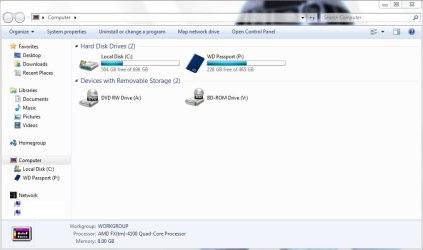
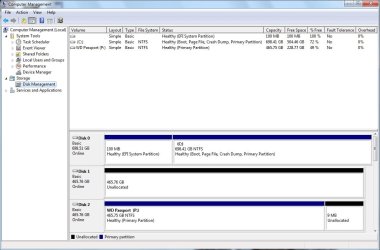
Below is what I now see under Computer & Computer Management.
For some reason, the D: & E: will not combine. Any ideas as to why?
 

Attachments

  • Computer~1.jpg
    Computer~1.jpg
    53.3 KB · Views: 1
  • Computer~2.jpg
    Computer~2.jpg
    86.2 KB · Views: 3

My Computer

Computer type
PC/Desktop
Computer Manufacturer/Model Number
Self built comfuser
OS
10 Pro. 64Bit
CPU
AMD FX 4100, 4-Core Black Edition. Socket AM3+ ~ 3.60GHz
Motherboard
ASUS M5A97 LE R2.0
Memory
2x 4GB Kingston HyperX DDR3-1866 (PC3-14900) - 8GB Total
Graphics Card(s)
ASUS Radeon HD 6670-2GD3
Sound Card
Onboard High Definition Audio Device
Monitor(s) Displays
HP 2009m LCD
Screen Resolution
1600x900, True Color (32bit), 60Hertz
Hard Drives
WD Blue - 1TB, 3D NAND - SATA SSD
PSU
XFX Pro 450W Core Edition - Fully Wired
Case
Antec Super Lanboy
Cooling
Stock CPU fan + 2 (1 front, 1 back) 120mm Antec fans
Keyboard
Logitech MK700/MK710
Mouse
Logitech M705
Internet Speed
Frontier FiOS 50/50
Antivirus
Windows Security
Browser
Vivaldi
Other Info
1x ASUS DRW-24B1ST Multi-DVD Rewriter
1x RocketFish AIO Media Card Reader
1x WD 1TB Passport USB External Drive
Your D: and E: partitions aren't erased – they have a file system, unlike the other 98% of the drive which shows as Unallocated. Obviously, you haven't managed to delete them like you say in Post #4, but that's ok.

Just right click on each of the D: and E: partitions and select Delete volume. This should turn them into Unallocated space.

Though, the D: partition is marked as Active, meaning it has bootable files on it and OS.

So, after you right click on both volumes and Delete them, you should have the whole drive look like a black stripe saying Unallocated with the capacity written on it. This should do it.

If by any chance this doesn't work, research for a third party software to use and delete the volumes on that drive or better yet – write zeros on it.

Post a screenshot afterwards to check. :)

CK_WD
 

My Computer

Computer type
PC/Desktop
OS
Windows 7 Home Premium x64
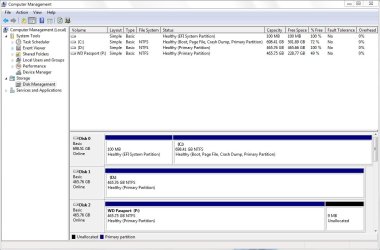
It worked this time, not sure why it didn't work last time since I did the same steps before.
I can now format the Unallocated space, correct?
 

Attachments

  • Computer~1.jpg
    Computer~1.jpg
    45.2 KB · Views: 0
  • Computer~2.jpg
    Computer~2.jpg
    76.4 KB · Views: 0

My Computer

Computer type
PC/Desktop
Computer Manufacturer/Model Number
Self built comfuser
OS
10 Pro. 64Bit
CPU
AMD FX 4100, 4-Core Black Edition. Socket AM3+ ~ 3.60GHz
Motherboard
ASUS M5A97 LE R2.0
Memory
2x 4GB Kingston HyperX DDR3-1866 (PC3-14900) - 8GB Total
Graphics Card(s)
ASUS Radeon HD 6670-2GD3
Sound Card
Onboard High Definition Audio Device
Monitor(s) Displays
HP 2009m LCD
Screen Resolution
1600x900, True Color (32bit), 60Hertz
Hard Drives
WD Blue - 1TB, 3D NAND - SATA SSD
PSU
XFX Pro 450W Core Edition - Fully Wired
Case
Antec Super Lanboy
Cooling
Stock CPU fan + 2 (1 front, 1 back) 120mm Antec fans
Keyboard
Logitech MK700/MK710
Mouse
Logitech M705
Internet Speed
Frontier FiOS 50/50
Antivirus
Windows Security
Browser
Vivaldi
Other Info
1x ASUS DRW-24B1ST Multi-DVD Rewriter
1x RocketFish AIO Media Card Reader
1x WD 1TB Passport USB External Drive
A disk showing as Unallocated needs to have a Partition created on it first followed by formatting. All HDDs need at least one partition. After creating a partition Disk Management usually starts, or prompts to start, the formatting.
 

My Computer

Computer type
PC/Desktop
Computer Manufacturer/Model Number
Customs, Dell, Gateway, HP, Toshiba, Acer, ASUS
OS
Windows 7 Ultimate 64-bit, Windows 8.1 64-bit, Mac OS X 10.10, Linux Mint 17, Windows 10 Pro TP
Keyboard
Microsoft
Mouse
Microsoft
I formatted the drive & all went smoothly, no partitioning needed.
 

Attachments

  • Computer~1.jpg
    Computer~1.jpg
    50.7 KB · Views: 0
  • Computer~2.jpg
    Computer~2.jpg
    78.7 KB · Views: 0

My Computer

Computer type
PC/Desktop
Computer Manufacturer/Model Number
Self built comfuser
OS
10 Pro. 64Bit
CPU
AMD FX 4100, 4-Core Black Edition. Socket AM3+ ~ 3.60GHz
Motherboard
ASUS M5A97 LE R2.0
Memory
2x 4GB Kingston HyperX DDR3-1866 (PC3-14900) - 8GB Total
Graphics Card(s)
ASUS Radeon HD 6670-2GD3
Sound Card
Onboard High Definition Audio Device
Monitor(s) Displays
HP 2009m LCD
Screen Resolution
1600x900, True Color (32bit), 60Hertz
Hard Drives
WD Blue - 1TB, 3D NAND - SATA SSD
PSU
XFX Pro 450W Core Edition - Fully Wired
Case
Antec Super Lanboy
Cooling
Stock CPU fan + 2 (1 front, 1 back) 120mm Antec fans
Keyboard
Logitech MK700/MK710
Mouse
Logitech M705
Internet Speed
Frontier FiOS 50/50
Antivirus
Windows Security
Browser
Vivaldi
Other Info
1x ASUS DRW-24B1ST Multi-DVD Rewriter
1x RocketFish AIO Media Card Reader
1x WD 1TB Passport USB External Drive
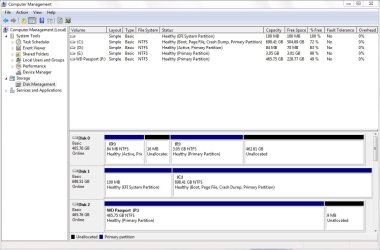
Of course you have a partition - it is D.
 

My Computer

Computer Manufacturer/Model Number
HP, Dell, Gateway, Toshiba - 4 laptops and 2 desktops
OS
Vista, Windows7, Mint Mate, Zorin, Windows 8
CPU
from 1.6GHz Duo to i7
Monitor(s) Displays
2x HP w2207
Hard Drives
5x HDD, 7x SSD, 12x Externals
Keyboard
with trackball - no mices
Mouse
Trackball mice
Internet Speed
DSL 6000
When you clicked New Simple Volume it automatically created the whole drive as one partition, which you've formatted, successfully, obviously, and assigned a drive letter – D. :)

Check your drive regularly for errors to keep it healthy and prolong its life.

Cheers! :)

CK_WD
 

My Computer

Computer type
PC/Desktop
OS
Windows 7 Home Premium x64
Back
Top