3 GB lost after latest Windows update.

ImRocketMan

New member
Member
Local time
7:12 AM
Messages
43
Location
Italy
I had 11/12 GB free, then yesterday Windows downloaded a little more than 1GB of updates, and now I have 8 GB free.
Any chance to recover some space? CCLeaner says I can just delete files for 800mb.
 

My Computer My Computer

OS
Windows 7 Home Premium x64
CPU
i5 3570k
Motherboard
AsRock Z77 Extreme4
Memory
8 Gb DDR3 Corsair Vengeance
Graphics Card(s)
GTX 670 AMP
Screen Resolution
1920x1200
Reboot TWICE then run the CCleaner Temp files and Recycle bin clean-ups - do not clear log files!

THEN use the DiskClean Utility and clear everything except log files.
Then run the utility again and this time do the Advanced cleanup to remove backup files.

You then need to go back to Windows Update and reinstall any updates which the cleanup utility may have removed (last time I looked there were around 3 affected by this)
 

My Computer My Computer

Computer type
Laptop
Computer Manufacturer/Model Number
Asus K52F or Lenovo B51-80
OS
Win 7 x64 Home Premium (and x86 VirtualBox VM)/Win10
CPU
i3 370M/i7 6500U
Motherboard
Asus/Lenovo
Memory
8GB - finally :)/8GB
Graphics Card(s)
it's an i3, dude!/dual Intel&nVidia
Sound Card
onboard
Monitor(s) Displays
15.6" built-in
Screen Resolution
1366x768/1920x1080
Hard Drives
750GB Seagate internal
Sundry external drives attached to other computers on the local network
1TB SSD on the Lenovo
PSU
n/a
Internet Speed
as much as I can get - usually on a dongle/phone, so <1MB/s
Antivirus
MSE/Defender
Browser
IE11/12/Edge/Chrome/FF(if I must)
Reboot TWICE then run the CCleaner Temp files and Recycle bin clean-ups - do not clear log files!

THEN use the DiskClean Utility and clear everything except log files.
Then run the utility again and this time do the Advanced cleanup to remove backup files.

You then need to go back to Windows Update and reinstall any updates which the cleanup utility may have removed (last time I looked there were around 3 affected by this)

How can I make Advanced cleanup with DiskClean? :sarc:

EDIT: Ok, I found it. Thanks.
 

My Computer My Computer

OS
Windows 7 Home Premium x64
CPU
i5 3570k
Motherboard
AsRock Z77 Extreme4
Memory
8 Gb DDR3 Corsair Vengeance
Graphics Card(s)
GTX 670 AMP
Screen Resolution
1920x1200
I can't find backup files in Advanced Disk Clean. There is only one thing about Service pack backup files, but it's empty
 

My Computer My Computer

OS
Windows 7 Home Premium x64
CPU
i5 3570k
Motherboard
AsRock Z77 Extreme4
Memory
8 Gb DDR3 Corsair Vengeance
Graphics Card(s)
GTX 670 AMP
Screen Resolution
1920x1200
MS call it Windows Update Cleanup?
 

My Computer My Computer

Computer type
Laptop
Computer Manufacturer/Model Number
Asus K52F or Lenovo B51-80
OS
Win 7 x64 Home Premium (and x86 VirtualBox VM)/Win10
CPU
i3 370M/i7 6500U
Motherboard
Asus/Lenovo
Memory
8GB - finally :)/8GB
Graphics Card(s)
it's an i3, dude!/dual Intel&nVidia
Sound Card
onboard
Monitor(s) Displays
15.6" built-in
Screen Resolution
1366x768/1920x1080
Hard Drives
750GB Seagate internal
Sundry external drives attached to other computers on the local network
1TB SSD on the Lenovo
PSU
n/a
Internet Speed
as much as I can get - usually on a dongle/phone, so <1MB/s
Antivirus
MSE/Defender
Browser
IE11/12/Edge/Chrome/FF(if I must)

My Computer My Computer

OS
Windows 7 Home Premium x64
CPU
i5 3570k
Motherboard
AsRock Z77 Extreme4
Memory
8 Gb DDR3 Corsair Vengeance
Graphics Card(s)
GTX 670 AMP
Screen Resolution
1920x1200
Great - how big is your hard drive?
Windows likes to have about 15% free space, to be able to defrag easily, and for headroom for the various temp files.
 

My Computer My Computer

Computer type
Laptop
Computer Manufacturer/Model Number
Asus K52F or Lenovo B51-80
OS
Win 7 x64 Home Premium (and x86 VirtualBox VM)/Win10
CPU
i3 370M/i7 6500U
Motherboard
Asus/Lenovo
Memory
8GB - finally :)/8GB
Graphics Card(s)
it's an i3, dude!/dual Intel&nVidia
Sound Card
onboard
Monitor(s) Displays
15.6" built-in
Screen Resolution
1366x768/1920x1080
Hard Drives
750GB Seagate internal
Sundry external drives attached to other computers on the local network
1TB SSD on the Lenovo
PSU
n/a
Internet Speed
as much as I can get - usually on a dongle/phone, so <1MB/s
Antivirus
MSE/Defender
Browser
IE11/12/Edge/Chrome/FF(if I must)
Great - how big is your hard drive?
Windows likes to have about 15% free space, to be able to defrag easily, and for headroom for the various temp files.

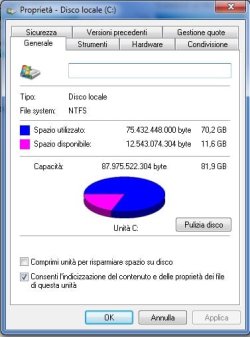
My primary partition(C) is 81,9 GB (SSD). I also have Virtual Memory on C, managed by system.
 

My Computer My Computer

OS
Windows 7 Home Premium x64
CPU
i5 3570k
Motherboard
AsRock Z77 Extreme4
Memory
8 Gb DDR3 Corsair Vengeance
Graphics Card(s)
GTX 670 AMP
Screen Resolution
1920x1200

My Computer My Computer

Computer type
PC/Desktop
Computer Manufacturer/Model Number
Home made Desktop
OS
Windows 10 Pro. 64/ version 1709 Windows 7 Pro/64
CPU
Intel i7-6800K @ 4.3
Motherboard
ASUS X-99 Deluxe II
Memory
Corsair Platinum 16 gig @2400
Graphics Card(s)
EVGA GTX 1070 OC
Monitor(s) Displays
Asus 27" LED LCD/VE278Q
Screen Resolution
1920-1080 or 1280-720 HDMI
Hard Drives
INTEL SSD 730-240 Gb Sata 3.0/
PSU
EVGA Platium 1200W
Case
Phanteks Luxe Tempered Glass 8 fans/ one radiator
Cooling
XSPC/ Water Cooled CPU
Keyboard
Das 4 Professional
Mouse
Logitech M705/MX Anywhere 2-S
Internet Speed
100 mbits
Antivirus
Microsoft Security Essentials/ Malwarebytes Premium 3.0/ SAS
Browser
I.E. 11 default/Firefox/ ISP Time Warner Cable/Spectrum
Other Info
LG BluRay Burner/
Sound system-KLipsch-THX/
Icy Dock ssd Hot Swap bays.
here it is
 

Attachments

  • cdisk.jpg
    cdisk.jpg
    30 KB · Views: 9

My Computer My Computer

OS
Windows 7 Home Premium x64
CPU
i5 3570k
Motherboard
AsRock Z77 Extreme4
Memory
8 Gb DDR3 Corsair Vengeance
Graphics Card(s)
GTX 670 AMP
Screen Resolution
1920x1200
82GB is definitely rather small for a Windows 7 system - partly because of the number of updates installed since 'new'.
A minimal install of Win7 requires 16GB free space - but by the times this id fully updated, I personally don't like the idea of anything less than a 100GB partition.
It can be done with less, by moving various files into another partition/drive - but with the main active partition as an SSD, you will lose a lot of the benefits of the SSD (rapid swapping, etc.)
I would recommend moving to a 120GB drive (or larger, if you can spring for it!)
 

My Computer My Computer

Computer type
Laptop
Computer Manufacturer/Model Number
Asus K52F or Lenovo B51-80
OS
Win 7 x64 Home Premium (and x86 VirtualBox VM)/Win10
CPU
i3 370M/i7 6500U
Motherboard
Asus/Lenovo
Memory
8GB - finally :)/8GB
Graphics Card(s)
it's an i3, dude!/dual Intel&nVidia
Sound Card
onboard
Monitor(s) Displays
15.6" built-in
Screen Resolution
1366x768/1920x1080
Hard Drives
750GB Seagate internal
Sundry external drives attached to other computers on the local network
1TB SSD on the Lenovo
PSU
n/a
Internet Speed
as much as I can get - usually on a dongle/phone, so <1MB/s
Antivirus
MSE/Defender
Browser
IE11/12/Edge/Chrome/FF(if I must)
Remember what ever SSD you get Windows 7 needs 10% or more free space. 15% would be great. I call it wiggle room. This allow Windows 7 to do the things it needs to do.

Prices have dropped on many 250 gb SSD's.

Thank you for the picture, it does help us understand things better.
 

My Computer My Computer

Computer type
PC/Desktop
Computer Manufacturer/Model Number
Home made Desktop
OS
Windows 10 Pro. 64/ version 1709 Windows 7 Pro/64
CPU
Intel i7-6800K @ 4.3
Motherboard
ASUS X-99 Deluxe II
Memory
Corsair Platinum 16 gig @2400
Graphics Card(s)
EVGA GTX 1070 OC
Monitor(s) Displays
Asus 27" LED LCD/VE278Q
Screen Resolution
1920-1080 or 1280-720 HDMI
Hard Drives
INTEL SSD 730-240 Gb Sata 3.0/
PSU
EVGA Platium 1200W
Case
Phanteks Luxe Tempered Glass 8 fans/ one radiator
Cooling
XSPC/ Water Cooled CPU
Keyboard
Das 4 Professional
Mouse
Logitech M705/MX Anywhere 2-S
Internet Speed
100 mbits
Antivirus
Microsoft Security Essentials/ Malwarebytes Premium 3.0/ SAS
Browser
I.E. 11 default/Firefox/ ISP Time Warner Cable/Spectrum
Other Info
LG BluRay Burner/
Sound system-KLipsch-THX/
Icy Dock ssd Hot Swap bays.
Back
Top