
You are using an out of date browser. It may not display this or other websites correctly.
You should upgrade or use an alternative browser.
You should upgrade or use an alternative browser.
3 GB Memory Usage
- Thread starter TomTomz64
- Start date


- Local time
- 6:10 AM
- Messages
- 627
7 x86 can only use i think it's 3.5 gb of the ran you have installed. to use all 8 gb you need to run 64 bit.
scrooge
scrooge
My Computer
- Computer Manufacturer/Model Number
- home build
- OS
- win 7 ( 64 bit)
- CPU
- Intel Core i7-870 Lynnfield 2.93GHz 8MB L3 Cache LGA 1156 95
- Motherboard
- ASUS P7P55 LX LGA 1156
- Memory
- G.SKILL Sniper Series 16GB (4 x 4GB) 240-Pin DDR3 SDRAM
- Graphics Card(s)
- ATI Radeon HD6800 Series
- Sound Card
- hdmi
- Monitor(s) Displays
- 42" lg 3d tv
- Screen Resolution
- 1920 x 1080
- Hard Drives
- 1 ssd pci-e revodrive
4 seagate 1.5 tb
- PSU
- Rosewill BRONZE Series RBR1000-M 1000W Continuous@40°C, 80Pl
- Case
- CoolMaster 922
- Cooling
- CORSAIR CWCH60 Hydro Series H60 High Performance Liquid CPU
- Keyboard
- logtech
- Mouse
- logitect
- Internet Speed
- 5 mbit

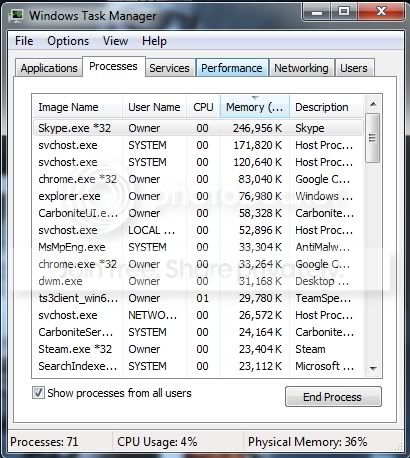
I have Windows 7 x86 with 8 GB of RAM
No you don't. You have Windows 7 x64 with 8 GB of ram. The only way you see anything running process in Task Manager with a *32 after it is when the program in question is 32 bit, but running on 64 bit Windows.
As for the memory usage, looks perfectly normal for 64 bit Windows with 8 GB or ram.
My Computer
- Computer type
- PC/Desktop
- Computer Manufacturer/Model Number
- Me
- OS
- Win 7 Ultimate x64
- CPU
- FX-8350 @ 4.6 GHz so far
- Motherboard
- Asus M5A97 EVO
- Memory
- ADATA XPG V1 Series Black 8GB DDR3 1600
- Graphics Card(s)
- Sapphire R9 270x Dual-X
- Sound Card
- Xonar DGX w/ Corsair Vengence 1300
- Monitor(s) Displays
- Acer S232HL Abid
- Screen Resolution
- 1920x1080
- Hard Drives
- 120 GB OCZ Vertex 3
500 GB Seagate 7200.12
- PSU
- Antec Earthwatts 650W Green
- Case
- Antec Three Hundred
- Cooling
- Cooler Master 212 EVO
- Keyboard
- Logitech G510
- Mouse
- Logitech G500s
- Internet Speed
- 35000/3000
- Local time
- 6:10 AM
- Messages
- 627
71 processes seems like alot . my processes uses like 39 to 45. i'd look into that and see whats running that you
may not need to be running.
scrooge
may not need to be running.
scrooge
My Computer
- Computer Manufacturer/Model Number
- home build
- OS
- win 7 ( 64 bit)
- CPU
- Intel Core i7-870 Lynnfield 2.93GHz 8MB L3 Cache LGA 1156 95
- Motherboard
- ASUS P7P55 LX LGA 1156
- Memory
- G.SKILL Sniper Series 16GB (4 x 4GB) 240-Pin DDR3 SDRAM
- Graphics Card(s)
- ATI Radeon HD6800 Series
- Sound Card
- hdmi
- Monitor(s) Displays
- 42" lg 3d tv
- Screen Resolution
- 1920 x 1080
- Hard Drives
- 1 ssd pci-e revodrive
4 seagate 1.5 tb
- PSU
- Rosewill BRONZE Series RBR1000-M 1000W Continuous@40°C, 80Pl
- Case
- CoolMaster 922
- Cooling
- CORSAIR CWCH60 Hydro Series H60 High Performance Liquid CPU
- Keyboard
- logtech
- Mouse
- logitect
- Internet Speed
- 5 mbit


My god...seriously you have a ---- load of RAM, just let the fricken computer use it. Why else did you pay for it. I was I had that much RAM, seriously you people are driving me insane. Oh my computer/application/whatever is using all this RAM!!!!!!111eleven. If you do not want to use all the RAM remove from the computer...
Performance is enhanced when applications/OS use your RAM not the other way around. If they do not use RAM they are using the Hard Drive. You should be proud you are using as much RAM as you are. You have 8 fricken gigabytes of RAM, its not in short supply. So, stop watching/monitoring your RAM usage.
[swearing omitted with great reluctance]
Performance is enhanced when applications/OS use your RAM not the other way around. If they do not use RAM they are using the Hard Drive. You should be proud you are using as much RAM as you are. You have 8 fricken gigabytes of RAM, its not in short supply. So, stop watching/monitoring your RAM usage.
[swearing omitted with great reluctance]
My Computer
- Computer type
- PC/Desktop
- Computer Manufacturer/Model Number
- Alienware Aurora ALX R4
- OS
- Windows 10 Pro (x64)
- CPU
- Intel Core i7-3930K (3.2GHz - 4.5GHz)
- Motherboard
- Alienware Aurora-R4 x79
- Memory
- 4x Samsung 4GB PC3-12800 DDR3 (16GB 1600MHz)
- Graphics Card(s)
- Nvidia Geforce GTX 690
- Sound Card
- SteelSeries Siberia Elite
- Monitor(s) Displays
- Dell UltraSharp U3011
- Screen Resolution
- 2560x1600
- Hard Drives
- Samsung 850 Pro 256 GB, Seagate 1TB Desktop Hybrid HDD, 2x Western Digital 4TB Green HDD
- PSU
- 875W Some Dell PSU <.<
- Case
- Alienware Aurora ALX
- Cooling
- Custom Liquid Cooling (EK CPU & GPU blocks) dual EK 480RAD
- Keyboard
- Logitech G710+ Mechanical
- Mouse
- Logitech G700s
- Internet Speed
- Verizon Fios (50 mbps average)
- Other Info
- Server: Intel NUC D54250WYK: i5-4250U, 16GB, 256 GB mSATA, Windows Server 2012 R2

logicearth called it. 
With Windows 7, Microsoft made a conscious effort to put your RAM to work. What is actually happening is that it is pre-caching in RAM the programs you open frequently, rather than depend on your poor HD to try and keep up. With the improved memory management in Win7 the RAM will become instantly available should a non-cached program need it.
This is not a commercial for Microsoft, just what I've found to be true from my own use (and a little research). I recently upgraded to 12GB of RAM (sorry, logicearth!) to take further advantage of this feature.
With Windows 7, Microsoft made a conscious effort to put your RAM to work. What is actually happening is that it is pre-caching in RAM the programs you open frequently, rather than depend on your poor HD to try and keep up. With the improved memory management in Win7 the RAM will become instantly available should a non-cached program need it.
This is not a commercial for Microsoft, just what I've found to be true from my own use (and a little research). I recently upgraded to 12GB of RAM (sorry, logicearth!) to take further advantage of this feature.
My Computer
- Computer Manufacturer/Model Number
- Self
- OS
- Main - Windows 7 Pro SP1 64-Bit; 2nd - Windows Server 2008 R2
- CPU
- Main - Core i7 2600K; 2nd - Core i7 920
- Motherboard
- Main - Asus P8Z68-V Pro/Gen3; 2nd - Gigabyte GA-EX58-UDR3
- Memory
- Main - 16GB Corsair Vengeance; 2nd - 12GB Corsair Vengeance
- Graphics Card(s)
- Main - XFX Radeon 6870 1GB; 2nd - XFX Radeon 4870 1GB
- Sound Card
- Both: Onboard Realtek Azalia
- Monitor(s) Displays
- Main - Hann 25" + I-INC 25" + Acer 23"; 2nd - Upgrading Soon
- Screen Resolution
- Main - 1920x1080 (All Three Monitors); 2nd - Upgrading Soon
- Hard Drives
- Main - (1) Crucial M4 128GB (Boot)
Main - (1) Seagate 2TB 64MB Cache (Data)
Main - (1) Seagate 2TB 64MB Cache (Data Backup)
2nd - (1) Intel X25-M SSD 80GB (Boot)
2nd - (3) Seagate 1TB 32MB Cache (Data Backup)
2nd - (1) Seagate 320GB (Because)
- PSU
- Main - OCZ 600W Modular; 2nd - OCZ 600W
- Case
- Main - Thermaltake Element G; 2nd - NZXT something or other
- Cooling
- Main - Corsair H80; 2nd - Prolimatech Megahalems
- Keyboard
- Main - Razer Reclusa; 2nd - Old MS Keyboard
- Mouse
- Main - Logitech MX Revolution; 2nd - Old MS Mouse
- Internet Speed
- 20Mbps Time-Warner Cable

I have upgraded the memory from 6 GB to 8 GB and added a 16 GB SDHC card for Readyboost. Now the system has become snappy.
With due respect to Logicearth, I suggest he may add a memory card or USB flash (>4GB) which is cheaper nowadays as Readyboost to increase his system's performance.
With due respect to Logicearth, I suggest he may add a memory card or USB flash (>4GB) which is cheaper nowadays as Readyboost to increase his system's performance.
My Computer
- Computer Manufacturer/Model Number
- Toshiba Satellite P775-S7232
- OS
- MS Windows 7 Ultimate 64-bit SP1
- CPU
- i5-2410M 2.3GHz (2.9GHz Turbo-Boost) Sandy Bridge 32nm
- Motherboard
- Toshiba PHRAA ver. PSBY1U-00F003
- Memory
- 4GB+4GB Samsung DDR3 PC3-10700 (1333 MHz)
- Graphics Card(s)
- Video Intel(R) HD Graphics Family, 1696MB available memory
- Sound Card
- Realtek High Definition Audio version=6.0.1.6323
- Monitor(s) Displays
- 17.3 " Trubrite TFT LCD, LED Backlit
- Screen Resolution
- 1600x900 32 bit, Native support for 720P content
- Hard Drives
- TOSHIBA MK6476GSXN
580.614 [GB] partitioned C: 80GB and D: 500GB with hidden recovery partitons.
Spare bay for 2nd HDD but no SATA connector :-(
- PSU
- Toshiba AC/DC Adapter
- Case
- Notebook
- Cooling
- Built-in Fan
- Keyboard
- Premium Raised Tile keyboard
- Mouse
- Logitech M215 wireless mouse
- Internet Speed
- Not fast enough
- Other Info
- Built-in Harman Kardon speakers with Dolby Advanced Audio, Waves MaxxAudio® 3. HDMI, 1xUSB3+3xUSB2 ports, WebCam, Battery life 4hrs 11mins, 4GB Readyboost SDHC card, WD My Book Essential Ext HDDs 2 TB, 2x1TB, My Passport SE 1TB and WDTV 1st Gen for Multimedia playing on a Sony Wega 32" LCD.
Recent addition to my toys are Asus Transformer Pad TF300T with 32GB onboard sd card + 32GB microsd card.
If he is having performance issues with 8 GBs of RAM then, RAM is not the cause of his issues. I only have 2 GB, let me repeat that 2 Gigabytes worth of RAM, not once has it cause any significant issue having it constantly at 50%. If you are having performance issues...then something is terribly wrong with your computer.
My Computer
- Computer type
- PC/Desktop
- Computer Manufacturer/Model Number
- Alienware Aurora ALX R4
- OS
- Windows 10 Pro (x64)
- CPU
- Intel Core i7-3930K (3.2GHz - 4.5GHz)
- Motherboard
- Alienware Aurora-R4 x79
- Memory
- 4x Samsung 4GB PC3-12800 DDR3 (16GB 1600MHz)
- Graphics Card(s)
- Nvidia Geforce GTX 690
- Sound Card
- SteelSeries Siberia Elite
- Monitor(s) Displays
- Dell UltraSharp U3011
- Screen Resolution
- 2560x1600
- Hard Drives
- Samsung 850 Pro 256 GB, Seagate 1TB Desktop Hybrid HDD, 2x Western Digital 4TB Green HDD
- PSU
- 875W Some Dell PSU <.<
- Case
- Alienware Aurora ALX
- Cooling
- Custom Liquid Cooling (EK CPU & GPU blocks) dual EK 480RAD
- Keyboard
- Logitech G710+ Mechanical
- Mouse
- Logitech G700s
- Internet Speed
- Verizon Fios (50 mbps average)
- Other Info
- Server: Intel NUC D54250WYK: i5-4250U, 16GB, 256 GB mSATA, Windows Server 2012 R2
I don't think he's having performance issues (he didn't mention them, anyway), just an overall concern that the usage was high. Only the thread starter can say for sure, of course.
My Computer
- Computer Manufacturer/Model Number
- Self
- OS
- Main - Windows 7 Pro SP1 64-Bit; 2nd - Windows Server 2008 R2
- CPU
- Main - Core i7 2600K; 2nd - Core i7 920
- Motherboard
- Main - Asus P8Z68-V Pro/Gen3; 2nd - Gigabyte GA-EX58-UDR3
- Memory
- Main - 16GB Corsair Vengeance; 2nd - 12GB Corsair Vengeance
- Graphics Card(s)
- Main - XFX Radeon 6870 1GB; 2nd - XFX Radeon 4870 1GB
- Sound Card
- Both: Onboard Realtek Azalia
- Monitor(s) Displays
- Main - Hann 25" + I-INC 25" + Acer 23"; 2nd - Upgrading Soon
- Screen Resolution
- Main - 1920x1080 (All Three Monitors); 2nd - Upgrading Soon
- Hard Drives
- Main - (1) Crucial M4 128GB (Boot)
Main - (1) Seagate 2TB 64MB Cache (Data)
Main - (1) Seagate 2TB 64MB Cache (Data Backup)
2nd - (1) Intel X25-M SSD 80GB (Boot)
2nd - (3) Seagate 1TB 32MB Cache (Data Backup)
2nd - (1) Seagate 320GB (Because)
- PSU
- Main - OCZ 600W Modular; 2nd - OCZ 600W
- Case
- Main - Thermaltake Element G; 2nd - NZXT something or other
- Cooling
- Main - Corsair H80; 2nd - Prolimatech Megahalems
- Keyboard
- Main - Razer Reclusa; 2nd - Old MS Keyboard
- Mouse
- Main - Logitech MX Revolution; 2nd - Old MS Mouse
- Internet Speed
- 20Mbps Time-Warner Cable
Similar threads

- Replies
- 6
- Views
- 17K
- Replies
- 11
- Views
- 3K

- Replies
- 2
- Views
- 2K