310 chipset question

My Computers

System One System Two

  • Computer type
    PC/Desktop
    OS
    7 X64
    CPU
    i5 8400
    Motherboard
    gigabyte b365m ds3h
    Memory
    2x8gb 3200mhz
    Hard Drives
    various
    PSU
    pure power 11 400w cm
    Case
    Coolermaster
    Cooling
    cryorig m9i
  • Computer type
    PC/Desktop
    OS
    7x64
    CPU
    g5400
    Motherboard
    ga b365m ds3h
    Memory
    8gb ddr4 2400
    PSU
    xfx pro 450w
The link doesn't work for me.

Siw2,
When I click on the link It doesn't open a download option, it opens a browser page with a lot of characters. Never saw this before.
But if I right click and select "save link as" it will save as win7_8th_i3_i5_Driver_2.0.rar file.
 

My Computers

System One System Two

  • Computer type
    PC/Desktop
    Computer Manufacturer/Model Number
    custom build
    OS
    Windows 7 HP 64
    CPU
    i5 6600K - 800MHz to 4200MHz
    Motherboard
    GA-Z170-HD3P
    Memory
    4+4G GSkill DDR4 3000
    Graphics Card(s)
    IG - Intel 530
    Monitor(s) Displays
    Samsung 226BW
    Screen Resolution
    1680x1050
    Hard Drives
    (1) -1 SM951 – 128GB M.2 AHCI PCIe SSD drive for Windows 7 and Lubuntu
    (2) -1 WD SATA 3 - 1T for Data
    (3) -1 WD SATA 3 - 1T for backup
    PSU
    Thermaltake 450W TR2 gold
    Keyboard
    Old and good Chicony mechanical keyboard
    Mouse
    Logitech mX performance - 9 buttons (had to disable some)
    Internet Speed
    500Mb/s
    Browser
    Firefox 64
    Other Info
    TinyWall firewall
  • Computer type
    Laptop
    System Manufacturer/Model Number
    Asus Q550LF
    OS
    Windows 7 Pro
    CPU
    i7-4500U 800MHz to 3.0GHz
    Motherboard
    Asus Q550LF
    Memory
    (4+4)G DDR3 1600
    Graphics Card(s)
    IG intel 4400 + NVIDIA GeForce GT 745M
    Sound Card
    Realtek
    Monitor(s) Displays
    LG Display LP156WF4-SPH1
    Screen Resolution
    1920 x 1080
    Hard Drives
    BX500 120G SSD for Windows and programs +
    1T HDD for data
    Internet Speed
    500 Mb/s
    Browser
    Firefox
    Other Info
    TinyWall firewall
Siw2,
When I click on the link It doesn't open a download option, it opens a browser page with a lot of characters. Never saw this before.
But if I right click and select "save link as" it will save as win7_8th_i3_i5_Driver_2.0.rar file.

Yes, same for me.
 

My Computers

System One System Two

  • Computer type
    PC/Desktop
    OS
    7 X64
    CPU
    i5 8400
    Motherboard
    gigabyte b365m ds3h
    Memory
    2x8gb 3200mhz
    Hard Drives
    various
    PSU
    pure power 11 400w cm
    Case
    Coolermaster
    Cooling
    cryorig m9i
  • Computer type
    PC/Desktop
    OS
    7x64
    CPU
    g5400
    Motherboard
    ga b365m ds3h
    Memory
    8gb ddr4 2400
    PSU
    xfx pro 450w
So yes, the chipset matters a lot if you want win7 to run without jumping through some hoops.

That's why this biostar tool may be so important - if it indeed... it makes win7 available on the latest hardware without requiring technical expertise, which is a huge win for those wanting to use win7 on 2019 hardware.

They seem to have several win7 drivers https://download.biostar.com.tw/upload/Driver/Chipset/Intel/Infinst/H310C/SetupChipset.zip

Best motherboard manufacturers. Biostar provides various high quality motherboard gaming series, including am4 motherboa
 

My Computers

System One System Two

  • Computer type
    PC/Desktop
    OS
    7 X64
    CPU
    i5 8400
    Motherboard
    gigabyte b365m ds3h
    Memory
    2x8gb 3200mhz
    Hard Drives
    various
    PSU
    pure power 11 400w cm
    Case
    Coolermaster
    Cooling
    cryorig m9i
  • Computer type
    PC/Desktop
    OS
    7x64
    CPU
    g5400
    Motherboard
    ga b365m ds3h
    Memory
    8gb ddr4 2400
    PSU
    xfx pro 450w

My Computer

Computer type
PC/Desktop
Computer Manufacturer/Model Number
My build
OS
Win7 Ultimate SP1
CPU
Intel Core i5 9400 Coffee Lake 14nm
Motherboard
Asus Prime H310M-E R2.0 (LGA1151)
Memory
16G DDR4
Graphics Card(s)
NVidia GeForce GTX 960
Sound Card
Realtek High Definition Audio (mobo)
Monitor(s) Displays
Asus PA248 24" 16:10 format
Screen Resolution
1920x1200@59Hz
Hard Drives
1863GB Seagate ST2000DM
3726GB Seagate ST4000DM
1863GB Seagate ST2000DM
6TB Seagate
465GB NVMe Samsung SSD 970
PSU
750G2
Case
Tower
Cooling
Standard
Keyboard
USB
Mouse
USB
Internet Speed
920Mbs/480Mbs
Antivirus
Malwarebytes
Browser
Firefox
If I were in your shoes, I would first follow the steps in this link to turn your win10 install into a win7-look-a-like
Making Win10 look and act like Win7

Then I would remove that boot disk and put in a different disk and load win7 on it using the biostar tool. Though it is specific for 310 I would bet it would work fine for 370 too. Plus we need someone to be the guinea pig to see if it actually works on coffee lake.
Windows tool


JohnHo: I assume you mean to complete the "W10 tweaking" on the existing HDD (actually a 970 M2) then replace that HDD with another and try the new 'Biostar' method of installing W7 on that?

If so, yep, I can do that, I'll just have to buy in another M2, which'll take a few days, owing to our location.
 

My Computer

Computer type
PC/Desktop
Computer Manufacturer/Model Number
My build
OS
Win7 Ultimate SP1
CPU
Intel Core i5 9400 Coffee Lake 14nm
Motherboard
Asus Prime H310M-E R2.0 (LGA1151)
Memory
16G DDR4
Graphics Card(s)
NVidia GeForce GTX 960
Sound Card
Realtek High Definition Audio (mobo)
Monitor(s) Displays
Asus PA248 24" 16:10 format
Screen Resolution
1920x1200@59Hz
Hard Drives
1863GB Seagate ST2000DM
3726GB Seagate ST4000DM
1863GB Seagate ST2000DM
6TB Seagate
465GB NVMe Samsung SSD 970
PSU
750G2
Case
Tower
Cooling
Standard
Keyboard
USB
Mouse
USB
Internet Speed
920Mbs/480Mbs
Antivirus
Malwarebytes
Browser
Firefox

My Computers

System One System Two

  • Computer type
    PC/Desktop
    OS
    7 X64
    CPU
    i5 8400
    Motherboard
    gigabyte b365m ds3h
    Memory
    2x8gb 3200mhz
    Hard Drives
    various
    PSU
    pure power 11 400w cm
    Case
    Coolermaster
    Cooling
    cryorig m9i
  • Computer type
    PC/Desktop
    OS
    7x64
    CPU
    g5400
    Motherboard
    ga b365m ds3h
    Memory
    8gb ddr4 2400
    PSU
    xfx pro 450w

My Computer

Computer type
Laptop
Computer Manufacturer/Model Number
Fujitsu LIFEBOOK
OS
Win 7 HP SP1 64-bit Vista HB SP2 32-bit Linux Mint 18.3
CPU
Intel(R) Pentium(R) CPU P6200 @ 2.13GHz
Motherboard
FUJITSU FJNBB06
Memory
4.00 GB
Graphics Card(s)
Intel(R) Graphics Media Accelerator HD
Sound Card
[1] Realtek High Definition Audio [2] Intel(R) Display Audio
Screen Resolution
1366 x 768 x 32 bits (4294967296 colors) @ 59 Hz
Hard Drives
TOSHIBA MK5076GSX
Antivirus
AVG FREE
JohnHo: I assume you mean to complete the "W10 tweaking" on the existing HDD (actually a 970 M2) then replace that HDD with another and try the new 'Biostar' method of installing W7 on that? If so, yep, I can do that, I'll just have to buy in another M2, which'll take a few days, owing to our location.
Any hard drive you have laying around will work, does not need to be M2. Btw the guy in this thread may have validated that the biostar tool works already.

https://www.sevenforums.com/drivers/414172-need-driver-intel-uhd620-2.html#post3438792
 

My Computer

Computer type
PC/Desktop
Computer Manufacturer/Model Number
diy
OS
Win7 pro x64
CPU
stock i7 7700k
Motherboard
Gigabyte Z270N-WIFI mini-ITX
Memory
Corsair Vengeance LPX 16GB (2x8GB) DDR4 @ 3200MHz
Graphics Card(s)
integrated Intel HD 630
Sound Card
onboard Realtek ALC1220
Monitor(s) Displays
two vertically mounted samsung 55" 4k un55mu8000
Screen Resolution
1920x1280
Hard Drives
256GB Samsung EVO 960 M.2 pci-e NVMe SSD
PSU
SilverStone Nightjar ST45NF 450Watt Fanless
Case
No case. Motherboard is mounted directly onto power supply
Cooling
Evercool low profile 815EP with Panaflow 12L fan at 7v
Keyboard
Ortek MCK-86 mini
Mouse
Belkin 5-button USB
Internet Speed
spectrum 400mbps
We have a success with the biostar modded graphics driver :-)

need driver for intel uhd620
That is excellent to see!

The only fly in the ointment is that because that user has a whiskey lake cpu he had to add its Hardware ID to the inf setup file. Hopefully someone somewhere will maintain that biostar tool so that it has all the newer Hardware IDs in it so that users do not have to manually add them.

Does anyone know of a page that lists the Hardware Device IDs of the cpu IGP for all sky/kaby/coffee/whiskey lake cpus? I'm able to find pages that list Hardware Device IDs, but it does NOT list the corresponding cpu model number.

For instance if you google

PCI\VEN_8086&DEV_3EA0

You can find that that is a whiskey lake cpu, I can't find a site that tells what cpu model number it is
 

My Computer

Computer type
PC/Desktop
Computer Manufacturer/Model Number
diy
OS
Win7 pro x64
CPU
stock i7 7700k
Motherboard
Gigabyte Z270N-WIFI mini-ITX
Memory
Corsair Vengeance LPX 16GB (2x8GB) DDR4 @ 3200MHz
Graphics Card(s)
integrated Intel HD 630
Sound Card
onboard Realtek ALC1220
Monitor(s) Displays
two vertically mounted samsung 55" 4k un55mu8000
Screen Resolution
1920x1280
Hard Drives
256GB Samsung EVO 960 M.2 pci-e NVMe SSD
PSU
SilverStone Nightjar ST45NF 450Watt Fanless
Case
No case. Motherboard is mounted directly onto power supply
Cooling
Evercool low profile 815EP with Panaflow 12L fan at 7v
Keyboard
Ortek MCK-86 mini
Mouse
Belkin 5-button USB
Internet Speed
spectrum 400mbps

My Computers

System One System Two

  • Computer type
    PC/Desktop
    OS
    7 X64
    CPU
    i5 8400
    Motherboard
    gigabyte b365m ds3h
    Memory
    2x8gb 3200mhz
    Hard Drives
    various
    PSU
    pure power 11 400w cm
    Case
    Coolermaster
    Cooling
    cryorig m9i
  • Computer type
    PC/Desktop
    OS
    7x64
    CPU
    g5400
    Motherboard
    ga b365m ds3h
    Memory
    8gb ddr4 2400
    PSU
    xfx pro 450w
OK, a belated heads-up. You might recall I bought a BIOSTAR H310MHC2 motherboard because I was frustrated trying to find W7 drivers for an Asus H370M board and thought that the BIOSTAR might be easier because the manufacturer says it works with W7.

However, I was never happy with this option because the BIOSTAR board is very basic, plus it's not a big name brand in NZ (I bought it from UK) so I kept looking for something else.

Finally I ended up buying yet another board - an Asus H310M-E_R.2 - which came from a reputable local supplier and has a few more features and which definitely states on its webpage that it has W7 drivers. Which I've downloaded.

So, my problem now is: How to inject the Asus W7 drivers into my W7 ISO? Asus doesn't seem to have any specific info online, so I've mailed them but haven't had a response yet. Any ideas, anyone?

By the way, someone mentioned earlier an Anandtech page that detailed a similar W7 fix, but which they could no longer locate. I'm wondering if that page is actually this one, which has a very detailed explanation about loading W7 onto an Asus Z370 board:
How to install Windows 7 on Coffee Lake PC (Z370 chipset MB - Asus Maximus X Hero) - Overclock.net - An Overclocking Community
 
Last edited:

My Computer

Computer type
PC/Desktop
Computer Manufacturer/Model Number
My build
OS
Win7 Ultimate SP1
CPU
Intel Core i5 9400 Coffee Lake 14nm
Motherboard
Asus Prime H310M-E R2.0 (LGA1151)
Memory
16G DDR4
Graphics Card(s)
NVidia GeForce GTX 960
Sound Card
Realtek High Definition Audio (mobo)
Monitor(s) Displays
Asus PA248 24" 16:10 format
Screen Resolution
1920x1200@59Hz
Hard Drives
1863GB Seagate ST2000DM
3726GB Seagate ST4000DM
1863GB Seagate ST2000DM
6TB Seagate
465GB NVMe Samsung SSD 970
PSU
750G2
Case
Tower
Cooling
Standard
Keyboard
USB
Mouse
USB
Internet Speed
920Mbs/480Mbs
Antivirus
Malwarebytes
Browser
Firefox

My Computers

System One System Two

  • Computer type
    PC/Desktop
    OS
    7 X64
    CPU
    i5 8400
    Motherboard
    gigabyte b365m ds3h
    Memory
    2x8gb 3200mhz
    Hard Drives
    various
    PSU
    pure power 11 400w cm
    Case
    Coolermaster
    Cooling
    cryorig m9i
  • Computer type
    PC/Desktop
    OS
    7x64
    CPU
    g5400
    Motherboard
    ga b365m ds3h
    Memory
    8gb ddr4 2400
    PSU
    xfx pro 450w
A basic win7 install will get you to the desktop so that is not an issue, but the usb and intel gpu drivers (basic svga will load instead) may not be present, which is an issue. But in your case it does not matter because your new motherboard has ps2 mouse and keyboard ports, so as long as you have either a ps2 mouse or ps2 keyboard, you will be able to install your new drivers after you get to the desktop even without injecting the asus drivers into your installation media.

PRIME H310M-E R2.0 | Motherboards | ASUS USA

That was me who mentioned the anandtech link and yes the link you posted is the right one.
 

My Computer

Computer type
PC/Desktop
Computer Manufacturer/Model Number
diy
OS
Win7 pro x64
CPU
stock i7 7700k
Motherboard
Gigabyte Z270N-WIFI mini-ITX
Memory
Corsair Vengeance LPX 16GB (2x8GB) DDR4 @ 3200MHz
Graphics Card(s)
integrated Intel HD 630
Sound Card
onboard Realtek ALC1220
Monitor(s) Displays
two vertically mounted samsung 55" 4k un55mu8000
Screen Resolution
1920x1280
Hard Drives
256GB Samsung EVO 960 M.2 pci-e NVMe SSD
PSU
SilverStone Nightjar ST45NF 450Watt Fanless
Case
No case. Motherboard is mounted directly onto power supply
Cooling
Evercool low profile 815EP with Panaflow 12L fan at 7v
Keyboard
Ortek MCK-86 mini
Mouse
Belkin 5-button USB
Internet Speed
spectrum 400mbps
SIW2: Thanks, I'll check out your link shortly. Is the Simplix pack yours or someone else's? I've seen it on my travels but never used it. Does it contain all updates since 2012? Like, would it update an original 2012 W7 ISO? I don't have one, just curious :-)

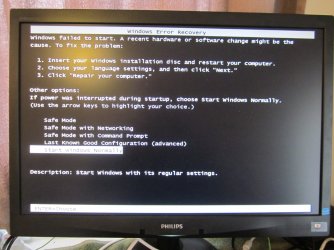
Johnhoh: Thanks. Actually, I don't get taken to the desk top after the install, just to the pictured message.
And while I'm not sure about my USB mouse, the USB keyboard is operational - I can select different options with the keyboard arrows.

However, none of the selections work. Sure, I can do a reinstall, as the first part of the message suggests, but that'll just bring me back to the same place.


Ooops: Forgot to mention that this was a Rufus 3.6\ UEFI install done from a USB 3.1 stick in a 3.1 socket.
 

Attachments

  • IMG_3445.JPG
    IMG_3445.JPG
    518.5 KB · Views: 3
  • IMG_3446.JPG
    IMG_3446.JPG
    495.6 KB · Views: 0
Last edited:

My Computer

Computer type
PC/Desktop
Computer Manufacturer/Model Number
My build
OS
Win7 Ultimate SP1
CPU
Intel Core i5 9400 Coffee Lake 14nm
Motherboard
Asus Prime H310M-E R2.0 (LGA1151)
Memory
16G DDR4
Graphics Card(s)
NVidia GeForce GTX 960
Sound Card
Realtek High Definition Audio (mobo)
Monitor(s) Displays
Asus PA248 24" 16:10 format
Screen Resolution
1920x1200@59Hz
Hard Drives
1863GB Seagate ST2000DM
3726GB Seagate ST4000DM
1863GB Seagate ST2000DM
6TB Seagate
465GB NVMe Samsung SSD 970
PSU
750G2
Case
Tower
Cooling
Standard
Keyboard
USB
Mouse
USB
Internet Speed
920Mbs/480Mbs
Antivirus
Malwarebytes
Browser
Firefox
Is the Simplix pack yours or someone else's?

It is not mine

would it update an original 2012 W7 ISO?

Yes, that is the point of it.

It can update the current running system, or integrate updates into the installation media. Suitable for any edition of Windows 7 and Server 2008 R2, any bit depth and any language. Includes updates for all versions of Internet Explorer (optional), all critical, recommended, and security updates. Telemetry is disabled.

simplix info
 

My Computers

System One System Two

  • Computer type
    PC/Desktop
    OS
    7 X64
    CPU
    i5 8400
    Motherboard
    gigabyte b365m ds3h
    Memory
    2x8gb 3200mhz
    Hard Drives
    various
    PSU
    pure power 11 400w cm
    Case
    Coolermaster
    Cooling
    cryorig m9i
  • Computer type
    PC/Desktop
    OS
    7x64
    CPU
    g5400
    Motherboard
    ga b365m ds3h
    Memory
    8gb ddr4 2400
    PSU
    xfx pro 450w
Okay, thanks.
It's just occurred to me that the Driver installation disc that came with the Asus PRIME H310M-E R2.0 motherboard might only contain Windows 10 drivers. There are drivers for W7 on their website and I've downloaded all of them, but I guess I should be trying to prepare a driver installation USB stick (no attached optical drive) that's built around the W7 stuff.
Is there any way of telling which drivers are on the Asus installation disc?
 

My Computer

Computer type
PC/Desktop
Computer Manufacturer/Model Number
My build
OS
Win7 Ultimate SP1
CPU
Intel Core i5 9400 Coffee Lake 14nm
Motherboard
Asus Prime H310M-E R2.0 (LGA1151)
Memory
16G DDR4
Graphics Card(s)
NVidia GeForce GTX 960
Sound Card
Realtek High Definition Audio (mobo)
Monitor(s) Displays
Asus PA248 24" 16:10 format
Screen Resolution
1920x1200@59Hz
Hard Drives
1863GB Seagate ST2000DM
3726GB Seagate ST4000DM
1863GB Seagate ST2000DM
6TB Seagate
465GB NVMe Samsung SSD 970
PSU
750G2
Case
Tower
Cooling
Standard
Keyboard
USB
Mouse
USB
Internet Speed
920Mbs/480Mbs
Antivirus
Malwarebytes
Browser
Firefox
Is there any way of telling which drivers are on the Asus installation disc?

not unless you put the disc in a drive and have a look at the inf files.

What have you done with the biostar mobo? Hardly worth returning half way across the world.
 

My Computers

System One System Two

  • Computer type
    PC/Desktop
    OS
    7 X64
    CPU
    i5 8400
    Motherboard
    gigabyte b365m ds3h
    Memory
    2x8gb 3200mhz
    Hard Drives
    various
    PSU
    pure power 11 400w cm
    Case
    Coolermaster
    Cooling
    cryorig m9i
  • Computer type
    PC/Desktop
    OS
    7x64
    CPU
    g5400
    Motherboard
    ga b365m ds3h
    Memory
    8gb ddr4 2400
    PSU
    xfx pro 450w
That's what I meant. What should I be looking for?

EDIT: Okay, just opened the CD - there's 103 .inf files there.
However, there's also a separate folder marked 'W7_64bit_drivers' so that answers my question.

EDIT again: Just saw your question about the BIOSTAR mobo. I haven't decided what to do with it. Keep it and build another system with it, most likely.

EDIT yet again: I installed W10 on the H370, with the Coffee Lake CPU and 2x 8gb DDR4 ram
I intend to run that alongside my main W7 system (on the H310, if I ever get it finished), and maybe run some VMs there, like one for XP, one for 8.1, etc. I bought another Coffee Lake for the new H310. Question about VM on the H370: Would the VMs run better with 16gb or 32gb ram? Or would the difference only be slight?
 
Last edited:

My Computer

Computer type
PC/Desktop
Computer Manufacturer/Model Number
My build
OS
Win7 Ultimate SP1
CPU
Intel Core i5 9400 Coffee Lake 14nm
Motherboard
Asus Prime H310M-E R2.0 (LGA1151)
Memory
16G DDR4
Graphics Card(s)
NVidia GeForce GTX 960
Sound Card
Realtek High Definition Audio (mobo)
Monitor(s) Displays
Asus PA248 24" 16:10 format
Screen Resolution
1920x1200@59Hz
Hard Drives
1863GB Seagate ST2000DM
3726GB Seagate ST4000DM
1863GB Seagate ST2000DM
6TB Seagate
465GB NVMe Samsung SSD 970
PSU
750G2
Case
Tower
Cooling
Standard
Keyboard
USB
Mouse
USB
Internet Speed
920Mbs/480Mbs
Antivirus
Malwarebytes
Browser
Firefox
Just re-read the above and it confuses even me, so to clarify my situation:
Current system: W7U64x on Asus Z170M-PLUS mobo with Skylake i5 6500 3.2Ghz and 2x 8gb GSkill ram. This unit will go to my wife.
Building:
1) Asus H370M-PLUS mobo with Coffee Lake i5 8400 2.8Ghz and 2x DDR4 2666 - W10 E-N installed. This will be a secondary system on which I intend to install several VMs, like XP, 8.1 or whatever.
2) Asus H310M-E R.2.0 with Coffee Lake i5 9400 2.9Ghz and 2x DDR4 2666 - currently battling with W7 install. If finished :-) this will be my main system.
3)MSI Biostar H310MHC2: No immediate plans, but may build a W7 system as a spare.

And no, I'm not a wealthy guy, just a near-octogenarian who is probably building his last system <gr>.
 

My Computer

Computer type
PC/Desktop
Computer Manufacturer/Model Number
My build
OS
Win7 Ultimate SP1
CPU
Intel Core i5 9400 Coffee Lake 14nm
Motherboard
Asus Prime H310M-E R2.0 (LGA1151)
Memory
16G DDR4
Graphics Card(s)
NVidia GeForce GTX 960
Sound Card
Realtek High Definition Audio (mobo)
Monitor(s) Displays
Asus PA248 24" 16:10 format
Screen Resolution
1920x1200@59Hz
Hard Drives
1863GB Seagate ST2000DM
3726GB Seagate ST4000DM
1863GB Seagate ST2000DM
6TB Seagate
465GB NVMe Samsung SSD 970
PSU
750G2
Case
Tower
Cooling
Standard
Keyboard
USB
Mouse
USB
Internet Speed
920Mbs/480Mbs
Antivirus
Malwarebytes
Browser
Firefox
Back
Top