Solved 32 bit --> 64 bit

My Computer My Computer

At a glance

ME/XP/Vista/Win7
OS
ME/XP/Vista/Win7
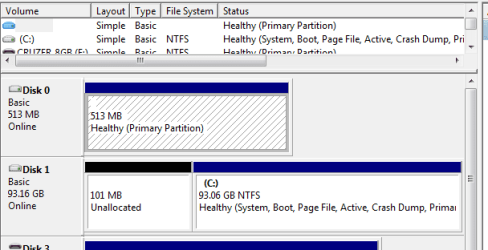
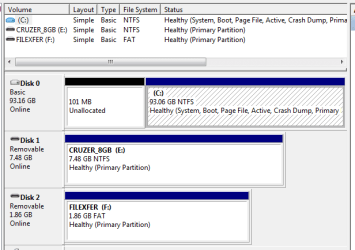
I may have some additional information regarding the 513Mb disk 0. The image that I had posted previously was from the OS' manager.

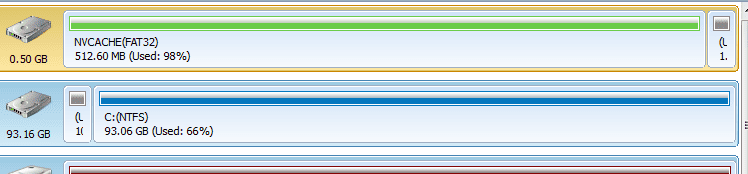
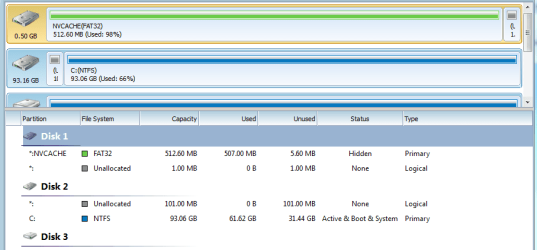
The image currently posted is from the MiniTool Partition Wizard. It shows that space to be occupied by NVCACHE(FAT32).

When I view the drive using Acronis' Disk Manager, it doesn't even show a disk0 or the 513Mb space.

I googled NVCACHE and found only users reporting an increase in performance when disabling this MS feature--particularly with 4GB of RAM as is now my case.

Agree?
 

Attachments

  • Disk.PNG
    Disk.PNG
    6.4 KB · Views: 5

My Computer My Computer

At a glance

Windows 7 & Windows 10
Computer type
PC/Desktop
OS
Windows 7 & Windows 10
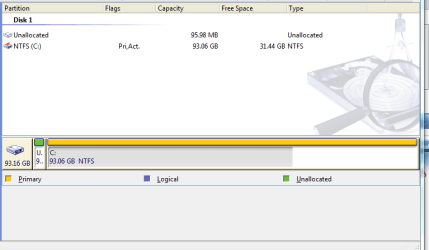
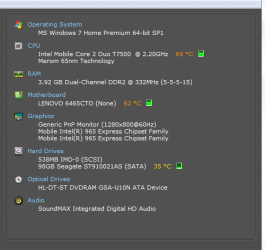
Okay--I'm posting all 3 images + a Speecy report
 

Attachments

  • Acronis.PNG
    Acronis.PNG
    17.6 KB · Views: 4
  • MS.PNG
    MS.PNG
    8.6 KB · Views: 4
  • MiniTool.PNG
    MiniTool.PNG
    15.1 KB · Views: 5
  • Speecy.PNG
    Speecy.PNG
    12 KB · Views: 2

My Computer My Computer

At a glance

Windows 7 & Windows 10
Computer type
PC/Desktop
OS
Windows 7 & Windows 10
What 500mb drive is plugged into DISK1 slot on the mobo?

NVCache sounds like ReadyBoost, perhaps left over from factory preinstall.

Is the drive per chance a USB flash stick which is labeled incorrectly on map?
 
I had ordered this Lenovo laptop with some kind of solid state turbo thing that was hyped to be the best performance thing since sliced bread. Since the same was said of Vista that shipped with the machine--doubt is well placed. I thought the solid state hardware was 1GB that was supposed to buffer the HD--it was an Intel thing.

There are only two sticks plugged to the machine; an 8GB and 2GB cruzer and both are correctly identified on at least two of the drive pictures. I cut off that part of the listing since I recognized their correctness.

Here's a web forum snippet I just snagged: "

"If anyone is curious what that NVCACHE partition is doing on your hard drive setup, so was I. It's part of the infamous Intel Turbo Memory gimmick (also known as Robson).

Just as a reference point: My 1GB chip has a screwy 513MB partition associated with it."
 

My Computer My Computer

At a glance

Windows 7 & Windows 10
Computer type
PC/Desktop
OS
Windows 7 & Windows 10
What is plugged into DISK1 on mobo? Check to make sure.

There may not be a way to remove it if it is actually embedded in RAM chip, short of replacing the RAM. I would research how much RAM that model will take and it's availability.

But it seems strange it would establish a paging file listed as Disk1.

Researching it more in depth will probably net how to remove it, perhaps getting a needed RAM upgrade in the process.
 
Just prior to upgrading 32-->64 bit I increased RAM from 2GB-->4GB.

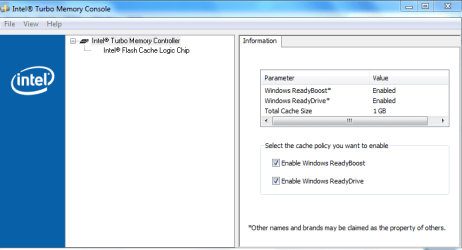
I'm fairly certain you can turn off this Intel hardware through Intel provided software on the machine. I'll give a whirl and report back.
 

My Computer My Computer

At a glance

Windows 7 & Windows 10
Computer type
PC/Desktop
OS
Windows 7 & Windows 10
As I thought, the 513Mb device was the Intel turbo thing. I'm attaching a shot of the Intel screen that I disabled and a shot of the drive after booting.
 

Attachments

  • Disk.PNG
    Disk.PNG
    10.7 KB · Views: 7
  • Intel.PNG
    Intel.PNG
    14.3 KB · Views: 9

My Computer My Computer

At a glance

Windows 7 & Windows 10
Computer type
PC/Desktop
OS
Windows 7 & Windows 10

My Computer My Computer

At a glance

W 7 64-bit UltimateIntel Q9550 Yorkfield8GB Dominator 8500C5DATI : XFX 5870
Computer Manufacturer/Model Number
* BFK Customs *
OS
W 7 64-bit Ultimate
CPU
Intel Q9550 Yorkfield
Motherboard
ASUS P5Q Pro
Memory
8GB Dominator 8500C5D
Graphics Card(s)
ATI : XFX 5870
Sound Card
Realtek HD Audio 7-1
Monitor(s) Displays
1x 47" LCD HDMI & 3x 26" LCD HDMI
Screen Resolution
1920x1080P & 1920x1200
Hard Drives
1x 80GB Intel X25-M G2 SSD : 1x 500GB & 1x 640GB WD Caviar Black(s)
PSU
Corsair 620HX
Case
Cooler Master RC-690
Cooling
Tuniq Tower 120, 2x 140mm and 3x 120mm case fans
Keyboard
Microsoft 500
Mouse
Razer Diamondback 3G
Internet Speed
14 Mb/s
Other Info
1x Koutech 3Gb/s SATA HDD Hot Swap Rack
If you clean reinstalled only Win7, how did the Intel Software get on there?

Did it show up as a missing driver in Device Manager? Which one?

I would uninstall the Software and only allow software on your computer that you intend to use.

Even after Uninstall, check CCleaner Startup List or Msconfig>Startup to make sure it's not still listed, then after several restarts check msconfig>Services, tick Hide all MS Services, uncheck everything that you didn't start yourself and make sure it doesnt' come back to freeload on your resources.
 
Last edited:
I can only guess that the driver arrived most probably during the update process after I installed the OS _or_ possibly after I downloaded the Lenovo Thinkvantage module 'Update system and drivers.'

I routinely run CC and have scheduled runs of Spybot and N360 so this is and has always been a clean machine.

I'm not so sure I want to delete the Intel driver. With the thing off it's not hurting anything and, to the contrary, I might screw up something deleting the driver.

I took a look at the instructions for merging the 101Mb partition with the main partition and said to myself, 'not today!' :-). Speaking of which, why couldn't I just use Acronis' Disk Director and 'slide' the bar dividing the two partitions or select Merge?
 

My Computer My Computer

At a glance

Windows 7 & Windows 10
Computer type
PC/Desktop
OS
Windows 7 & Windows 10
We use free Partition Wizard bootable CD for hundreds of complicated partitioning operations we help with here without a single failure. Use another at your own risk.

I was under the impression you have clean reinstalled just the OS to avoid the factory bloatware and useless utilities which have better versions built into Win7, similar to the process outlined here: Reinstalling Windows 7

It sounds like you reimported Lenovo software into the machine which still has some grip and perhaps throttle on Win7. But if these were drivers which were missing in Device Manager after install and optional Updates, then it's exactly what I would have done based on thousands of clean reinstalls.
 
I downloaded and installed the Partition Wizard bootable CD and will use it going forward.
 

My Computer My Computer

At a glance

Windows 7 & Windows 10
Computer type
PC/Desktop
OS
Windows 7 & Windows 10
This may just be semantics but the PW boot CD doesn't get "installed" did you actually get the PW bootable ISO version and burn that to CD or did you download the installable version, there's a huge difference.
 

My Computer My Computer

At a glance

W 7 64-bit UltimateIntel Q9550 Yorkfield8GB Dominator 8500C5DATI : XFX 5870
Computer Manufacturer/Model Number
* BFK Customs *
OS
W 7 64-bit Ultimate
CPU
Intel Q9550 Yorkfield
Motherboard
ASUS P5Q Pro
Memory
8GB Dominator 8500C5D
Graphics Card(s)
ATI : XFX 5870
Sound Card
Realtek HD Audio 7-1
Monitor(s) Displays
1x 47" LCD HDMI & 3x 26" LCD HDMI
Screen Resolution
1920x1080P & 1920x1200
Hard Drives
1x 80GB Intel X25-M G2 SSD : 1x 500GB & 1x 640GB WD Caviar Black(s)
PSU
Corsair 620HX
Case
Cooler Master RC-690
Cooling
Tuniq Tower 120, 2x 140mm and 3x 120mm case fans
Keyboard
Microsoft 500
Mouse
Razer Diamondback 3G
Internet Speed
14 Mb/s
Other Info
1x Koutech 3Gb/s SATA HDD Hot Swap Rack
Thanks for checking--semantic it was. I had read here of the importance of not installing to the HD and I did download the ISO file and burn (using ImgBurn from here) to a CD (not DVD).

Mark
 

My Computer My Computer

At a glance

Windows 7 & Windows 10
Computer type
PC/Desktop
OS
Windows 7 & Windows 10
.;)
 

My Computer My Computer

At a glance

W 7 64-bit UltimateIntel Q9550 Yorkfield8GB Dominator 8500C5DATI : XFX 5870
Computer Manufacturer/Model Number
* BFK Customs *
OS
W 7 64-bit Ultimate
CPU
Intel Q9550 Yorkfield
Motherboard
ASUS P5Q Pro
Memory
8GB Dominator 8500C5D
Graphics Card(s)
ATI : XFX 5870
Sound Card
Realtek HD Audio 7-1
Monitor(s) Displays
1x 47" LCD HDMI & 3x 26" LCD HDMI
Screen Resolution
1920x1080P & 1920x1200
Hard Drives
1x 80GB Intel X25-M G2 SSD : 1x 500GB & 1x 640GB WD Caviar Black(s)
PSU
Corsair 620HX
Case
Cooler Master RC-690
Cooling
Tuniq Tower 120, 2x 140mm and 3x 120mm case fans
Keyboard
Microsoft 500
Mouse
Razer Diamondback 3G
Internet Speed
14 Mb/s
Other Info
1x Koutech 3Gb/s SATA HDD Hot Swap Rack
I know I closed out this thread but I needed to come back and thank you guys again. With your patient help on the > RAM and 32 bit > 64 bit this machine flies :-)!

Mark
 

My Computer My Computer

At a glance

Windows 7 & Windows 10
Computer type
PC/Desktop
OS
Windows 7 & Windows 10
Hello again Mark.


You're welcome and don't be a stranger.
 

My Computer My Computer

At a glance

W 7 64-bit UltimateIntel Q9550 Yorkfield8GB Dominator 8500C5DATI : XFX 5870
Computer Manufacturer/Model Number
* BFK Customs *
OS
W 7 64-bit Ultimate
CPU
Intel Q9550 Yorkfield
Motherboard
ASUS P5Q Pro
Memory
8GB Dominator 8500C5D
Graphics Card(s)
ATI : XFX 5870
Sound Card
Realtek HD Audio 7-1
Monitor(s) Displays
1x 47" LCD HDMI & 3x 26" LCD HDMI
Screen Resolution
1920x1080P & 1920x1200
Hard Drives
1x 80GB Intel X25-M G2 SSD : 1x 500GB & 1x 640GB WD Caviar Black(s)
PSU
Corsair 620HX
Case
Cooler Master RC-690
Cooling
Tuniq Tower 120, 2x 140mm and 3x 120mm case fans
Keyboard
Microsoft 500
Mouse
Razer Diamondback 3G
Internet Speed
14 Mb/s
Other Info
1x Koutech 3Gb/s SATA HDD Hot Swap Rack
Back
Top