32 bit vs 64 bit Comparison

Very informative and without a doubt useful info here
I have a Asus CM5470 still factory and do not have a bunch
on the hard drive, no music saved or downloaded; I have approx 600photos
saved and it seems that sometimes the system just gets bogged down with
things to do and I have checked most places to find if this is the reason
and yet when I first hook it up last year the speed just scared the sh_t out of me
and now a year later I am wishing I would have waited for the I series from Intel and
see if they work better than a quad core with 6gb of memory, most of my problems
come from youtube and some other video access sites and when I go to Dailymotion
the video's are clear and without buffering problems like on youtube; is this because
of bandwidth or just my system? Anyway I may take another look at I series processors
from Intel and a new video card from nvidia and its competent rival and see if things need to
be tweak a bit, I am Running Win7 64bit and its great offline and just so slow when I go
to certain sites and would like to know should I consider overclocking or find the reason for
decrease speed while online?
Welcome to the forums.

Overclocking a laptop is ALWAYS a bad idea, and I do not recommend that you do.

Your speed problem is definitely caused by something else. I recommend you start a new thread with your problem, and we can help you out there.

~Lordbob
 

My Computer My Computer

Computer Manufacturer/Model Number
Hera
OS
Windows 7 Ultimate x64, Mint 9
CPU
Intel i5-2500k
Motherboard
ASUS P8P67 Pro
Memory
2x 4Gb Corsair VENGEANCE DDR3-1600
Graphics Card(s)
NVidia GeForce N260GTX Twin Frozr
Sound Card
Realtek HD OnBoard Audio
Monitor(s) Displays
ASUS 24" Monitor
Screen Resolution
1920x1080
Hard Drives
G.SKILL Phoenix Series 60GB SATA II MLC Internal Solid State Drive (SSD)
SAMSUNG Spinpoint F3R 1TB 7200 RPM 32MB Cache SATA II
PSU
Cooler Master Real Power Pro 750W
Case
Cooler Master Haf 932
Cooling
Fans
Keyboard
Razer Tarantula
Mouse
Razer Lachesis
Internet Speed
not fast enough
Thank you Lordbob75, very nice and very clear. It should help many make the choice between the two. I chose 64 bit.
 

My Computer My Computer

Computer type
PC/Desktop
Computer Manufacturer/Model Number
Home made Desktop
OS
Windows 10 Pro. 64/ version 1709 Windows 7 Pro/64
CPU
Intel i7-6800K @ 4.3
Motherboard
ASUS X-99 Deluxe II
Memory
Corsair Platinum 16 gig @2400
Graphics Card(s)
EVGA GTX 1070 OC
Monitor(s) Displays
Asus 27" LED LCD/VE278Q
Screen Resolution
1920-1080 or 1280-720 HDMI
Hard Drives
INTEL SSD 730-240 Gb Sata 3.0/
PSU
EVGA Platium 1200W
Case
Phanteks Luxe Tempered Glass 8 fans/ one radiator
Cooling
XSPC/ Water Cooled CPU
Keyboard
Das 4 Professional
Mouse
Logitech M705/MX Anywhere 2-S
Internet Speed
100 mbits
Antivirus
Microsoft Security Essentials/ Malwarebytes Premium 3.0/ SAS
Browser
I.E. 11 default/Firefox/ ISP Time Warner Cable/Spectrum
Other Info
LG BluRay Burner/
Sound system-KLipsch-THX/
Icy Dock ssd Hot Swap bays.

My Computer My Computer

Computer Manufacturer/Model Number
Hera
OS
Windows 7 Ultimate x64, Mint 9
CPU
Intel i5-2500k
Motherboard
ASUS P8P67 Pro
Memory
2x 4Gb Corsair VENGEANCE DDR3-1600
Graphics Card(s)
NVidia GeForce N260GTX Twin Frozr
Sound Card
Realtek HD OnBoard Audio
Monitor(s) Displays
ASUS 24" Monitor
Screen Resolution
1920x1080
Hard Drives
G.SKILL Phoenix Series 60GB SATA II MLC Internal Solid State Drive (SSD)
SAMSUNG Spinpoint F3R 1TB 7200 RPM 32MB Cache SATA II
PSU
Cooler Master Real Power Pro 750W
Case
Cooler Master Haf 932
Cooling
Fans
Keyboard
Razer Tarantula
Mouse
Razer Lachesis
Internet Speed
not fast enough
I hope it hasn't been mentioned before but 64bit software support can be a bit slack also. Take for example Adobe - a company you think would have been STRAIGHT onto the 64bit bandwagon!

While we have had 64bit Photoshop (and 64bit Photoshop extentions, which I think showed up for PS CS2? Or was it later) for YEARS, we still do not have a 64bit Flash browser plug-in. As pathetic as it sounds, because of Adobe, I need a 32bit browser installer, so I can order pizza over the net or use a few shopping sites that use flash! We've been told for YEARS that a 64bit browser plug-in is being developed and still nothing besides a x64 Prelease last month!

While on the topic of FireFox, hey look, NO 64Bit version (except for an independant? x64 port that is always a few months behind the 'official' releases) and none planned until at least FF4.0!

Then we look at the REST of the Adobe Creative Suite (of which I am a regular user); as of CS5 (which many larger organisations haven't rolled out yet; I'm still on CS4 even though i have a CS5 box sitting on my shelves) only Photoshop Extended, Lightroom, After Effects and Premiere Pro (including Media Encoder) are 64bit apps - essentially only the video production tools. Everything else, like Illustrator, Dreamweaver, Fireworks, Acrobat Pro, etc are still 32bit apps - while these are the apps that typically don't need as much GRUNT as the aforementioned, I am disappointed that Adobe continues to roll out 32bit software.

Still, the big issue is Flash!
 

My Computer My Computer

OS
Windows 7 Pro 64 bit
I hope it hasn't been mentioned before but 64bit software support can be a bit slack also. Take for example Adobe - a company you think would have been STRAIGHT onto the 64bit bandwagon!

While we have had 64bit Photoshop (and 64bit Photoshop extentions, which I think showed up for PS CS2? Or was it later) for YEARS, we still do not have a 64bit Flash browser plug-in. As pathetic as it sounds, because of Adobe, I need a 32bit browser installer, so I can order pizza over the net or use a few shopping sites that use flash! We've been told for YEARS that a 64bit browser plug-in is being developed and still nothing besides a x64 Prelease last month!

While on the topic of FireFox, hey look, NO 64Bit version (except for an independant? x64 port that is always a few months behind the 'official' releases) and none planned until at least FF4.0!

Then we look at the REST of the Adobe Creative Suite (of which I am a regular user); as of CS5 (which many larger organisations haven't rolled out yet; I'm still on CS4 even though i have a CS5 box sitting on my shelves) only Photoshop Extended, Lightroom, After Effects and Premiere Pro (including Media Encoder) are 64bit apps - essentially only the video production tools. Everything else, like Illustrator, Dreamweaver, Fireworks, Acrobat Pro, etc are still 32bit apps - while these are the apps that typically don't need as much GRUNT as the aforementioned, I am disappointed that Adobe continues to roll out 32bit software.

Still, the big issue is Flash!
Zaggy, Adobe will NEVER make x64 flash, and I think we need to give up on it (I hate flash as is).

Secondly, remember that only recently are x64 OSes gaining in popularity. So no need to make everything x64, as most stuff is x32 and its compatible regardless.
Also, FF doesn't use enough memory to NEED a x64 version (yet).

~Lordbob
 

My Computer My Computer

Computer Manufacturer/Model Number
Hera
OS
Windows 7 Ultimate x64, Mint 9
CPU
Intel i5-2500k
Motherboard
ASUS P8P67 Pro
Memory
2x 4Gb Corsair VENGEANCE DDR3-1600
Graphics Card(s)
NVidia GeForce N260GTX Twin Frozr
Sound Card
Realtek HD OnBoard Audio
Monitor(s) Displays
ASUS 24" Monitor
Screen Resolution
1920x1080
Hard Drives
G.SKILL Phoenix Series 60GB SATA II MLC Internal Solid State Drive (SSD)
SAMSUNG Spinpoint F3R 1TB 7200 RPM 32MB Cache SATA II
PSU
Cooler Master Real Power Pro 750W
Case
Cooler Master Haf 932
Cooling
Fans
Keyboard
Razer Tarantula
Mouse
Razer Lachesis
Internet Speed
not fast enough
That just about says it all - clear and succinct.

Thank you!!

I would love to move to 64 bit, but had problems with mine though. It installed on my system okay but it would still only see 3 megs of RAM even though I have 4 installed.

Oh well...
 

My Computer My Computer

OS
W7 Ultimate 32bit
Thanks a lot for this post, it helped. :D
 

My Computer My Computer

Computer Manufacturer/Model Number
Dell
OS
Windows 7
Memory
4GB RAM
Graphics Card(s)
ATI Raedon HD5740

My Computer My Computer

Computer Manufacturer/Model Number
Hera
OS
Windows 7 Ultimate x64, Mint 9
CPU
Intel i5-2500k
Motherboard
ASUS P8P67 Pro
Memory
2x 4Gb Corsair VENGEANCE DDR3-1600
Graphics Card(s)
NVidia GeForce N260GTX Twin Frozr
Sound Card
Realtek HD OnBoard Audio
Monitor(s) Displays
ASUS 24" Monitor
Screen Resolution
1920x1080
Hard Drives
G.SKILL Phoenix Series 60GB SATA II MLC Internal Solid State Drive (SSD)
SAMSUNG Spinpoint F3R 1TB 7200 RPM 32MB Cache SATA II
PSU
Cooler Master Real Power Pro 750W
Case
Cooler Master Haf 932
Cooling
Fans
Keyboard
Razer Tarantula
Mouse
Razer Lachesis
Internet Speed
not fast enough
Oh man, this horse has been beaten to death, so much so that it's not even recognizable anymore! You can choose to read long posts after posts by noobs and sages but it really does boil down to very simple facts which is nearly foolish to even contradict these days. To sum all of it up - there's not one single valid reason to stick with 32 bit when building a new system. None at all! But there are many reasons, some extremely practical, some a little more obscure, to go with 64 bits. The most obvious - your CPU was designed to shine on a 64 bit OS, and W7 was meant to shine on systems with lots of RAM. By lots, I mean, minimum 4 gigs; ideally more. With a 32 bit OS, you are capped at 4 gigs, and typically even with that much in your system, only about 75% of your ram is even accessible to the OS.

The argument against 64 bit shouldn't ever be about technological benefits, but rather consumer needs and perceptions. The idea that a PC used for nothing more than messenger, facebook and XXX sites rarely needs that much horsepower, but that's really just silly. All those people who say this, are the first ones to complain about slow PC performance, and they are typically the type to panic and rush over to Bestbuy and have qeeksquad "diagnose" their systems. With the cost of that 'diagnostic', they could have easily gotten the extra RAM, to take full advantage of a x64 bit system and not have to complain about the slow performance of their system a month after they buy their computers. I know this sounds a little subjective, but anyone who builds systems, or works in retail selling PCs knows exactly what I'm talking about.
 

My Computer My Computer

OS
Windows 7 Professional x64
CPU
AMD Phenom II 940BE @3.6
Motherboard
Gigabyte GA-MA770-UD3 (Rev 2.1)
Memory
4x2GB G.Skill PC2-8000
Graphics Card(s)
Gigabyte GTX 460 1gb (GV-N460OC-1GI)
Sound Card
x-Fi XtremeGamer
Monitor(s) Displays
Samsung T240
Screen Resolution
1920x1200 (native)
Hard Drives
G.SKILL Phoenix Pro 60GB SSD
Samsung & Western Digital 5Tb total
PSU
Corsair 650TX
Case
Antec Three Hundred
Cooling
Air cooling all the way!
Internet Speed
Teksavvy (DSL)
Omnimodis, the only problem is that some people use software that is totally or partially 16-bit, even ones made within the past 5 years. No 16-bit software can run on a 64-bit system. Also, some older hardware only have 32-bit drivers, and 32-bit drivers only work on 32-bit systems. Yes, when building a new computer, with all relative new hardware, including peripheral devices, like printers, mice, webcams, etc., and only newer software and games, you are right. If their is even one exception, you will either have to buy the hardware/software you didn't intend to buy, or live without.
 

My Computer My Computer

Computer type
Laptop
Computer Manufacturer/Model Number
Toshiba P775-S7100
OS
Windows 7 Professional SP1 64-bit
CPU
Intel Core i5-2450M @2.5 GHz
Memory
6 GB DDR3 1333MHz
Graphics Card(s)
Intel HD 3000
Monitor(s) Displays
Built-in 17.3" LED; 22" Insignia NS-L22Q-10A
Screen Resolution
1600x900; 1360x768
Hard Drives
750 GB Hitachi
1TB Seagate FreeAgent External
Internet Speed
Verizon DSL Speed(Down/Up): 3360 Kbps / 800 Kbps
Antivirus
MSE and MBAM Pro
Browser
IE10
Omnimodis, the only problem is that some people use software that is totally or partially 16-bit, even ones made within the past 5 years. No 16-bit software can run on a 64-bit system. Also, some older hardware only have 32-bit drivers, and 32-bit drivers only work on 32-bit systems. Yes, when building a new computer, with all relative new hardware, including peripheral devices, like printers, mice, webcams, etc., and only newer software and games, you are right. If their is even one exception, you will either have to buy the hardware/software you didn't intend to buy, or live without.
Ah, listen, anyone who is running a 16-bit program has no reason whatsoever to upgrade to Windows 7! You and I both know that this issue is so remote and so 'particular' that it's almost a non-issue. As for drivers, well, I challenge you or anyone reading this to find a device and say "I connected it to Windows 7 x64 and it can't be used due to driver issues" - please don't do so if your device is from 1995. That does not count. It's the same issue as saying that your 1992 RCA TV can't take advantage of HD digital broadcasts so it doesn't make sense to buy a new LCD TV - you see it even sounds strange. Technology has advanced and it's hardly valid to cater to the lowest common denominator in this case.

The benefits of 64-bit computing will probably not directly translate to real-world performance improvements for the majority of users, but, why not go for something current, and certainly 64-bit OS makes perfect sense even for the average PC user. Anyways, to sum it up - if you're actually concerned about a 16-bit application, then forget upgrading, since your problems probably supersede the need to even upgrade... :confused:
 

My Computer My Computer

OS
Windows 7 Professional x64
CPU
AMD Phenom II 940BE @3.6
Motherboard
Gigabyte GA-MA770-UD3 (Rev 2.1)
Memory
4x2GB G.Skill PC2-8000
Graphics Card(s)
Gigabyte GTX 460 1gb (GV-N460OC-1GI)
Sound Card
x-Fi XtremeGamer
Monitor(s) Displays
Samsung T240
Screen Resolution
1920x1200 (native)
Hard Drives
G.SKILL Phoenix Pro 60GB SSD
Samsung & Western Digital 5Tb total
PSU
Corsair 650TX
Case
Antec Three Hundred
Cooling
Air cooling all the way!
Internet Speed
Teksavvy (DSL)

My Computer My Computer

Computer type
Laptop
Computer Manufacturer/Model Number
Toshiba P775-S7100
OS
Windows 7 Professional SP1 64-bit
CPU
Intel Core i5-2450M @2.5 GHz
Memory
6 GB DDR3 1333MHz
Graphics Card(s)
Intel HD 3000
Monitor(s) Displays
Built-in 17.3" LED; 22" Insignia NS-L22Q-10A
Screen Resolution
1600x900; 1360x768
Hard Drives
750 GB Hitachi
1TB Seagate FreeAgent External
Internet Speed
Verizon DSL Speed(Down/Up): 3360 Kbps / 800 Kbps
Antivirus
MSE and MBAM Pro
Browser
IE10
Omnimodis, the only problem is that some people use software that is totally or partially 16-bit, even ones made within the past 5 years. No 16-bit software can run on a 64-bit system. Also, some older hardware only have 32-bit drivers, and 32-bit drivers only work on 32-bit systems. Yes, when building a new computer, with all relative new hardware, including peripheral devices, like printers, mice, webcams, etc., and only newer software and games, you are right. If their is even one exception, you will either have to buy the hardware/software you didn't intend to buy, or live without.
Ah, listen, anyone who is running a 16-bit program has no reason whatsoever to upgrade to Windows 7! You and I both know that this issue is so remote and so 'particular' that it's almost a non-issue. As for drivers, well, I challenge you or anyone reading this to find a device and say "I connected it to Windows 7 x64 and it can't be used due to driver issues" - please don't do so if your device is from 1995. That does not count. It's the same issue as saying that your 1992 RCA TV can't take advantage of HD digital broadcasts so it doesn't make sense to buy a new LCD TV - you see it even sounds strange. Technology has advanced and it's hardly valid to cater to the lowest common denominator in this case.

The benefits of 64-bit computing will probably not directly translate to real-world performance improvements for the majority of users, but, why not go for something current, and certainly 64-bit OS makes perfect sense even for the average PC user. Anyways, to sum it up - if you're actually concerned about a 16-bit application, then forget upgrading, since your problems probably supersede the need to even upgrade... :confused:

If you care to search through the BSOD's, you can find plenty of examples where keyboards, mice, network cards, graphics cards, and sound cards have had to be upgraded because there were no current drivers. This seems to be particularly true of Razer gaming devices.
 
Last edited:

My Computer My Computer

Computer Manufacturer/Model Number
Home built
OS
Windows 7 Ultimate 32 bit
CPU
Intel(R) Pentium(R) 4 CPU 3.00GHz
Motherboard
ASUS P4P800-VM Motherboard Chipset: Intel 865G + ICH5
Memory
2.50 GB RAM
Graphics Card(s)
NVIDIA GeForce 7600 GS
Sound Card
SoundMax Integrated Digital Audio (Chip)
Monitor(s) Displays
ViewSonic VX 1962 wm
Screen Resolution
1680 X 1050
Hard Drives
Seagate Barracuda 7200.10 80 GB
ST380215A ATA Device 18.6 GB
Western Digital "My Book" external hard drive 750 GB
Cooling
Fan based
Keyboard
Microsoft Comfort Curve Keyboard 2000 v10 USB
Mouse
Logitec optic USB
Internet Speed
3.01 Mb/s download 0.64 Mb/s upload
Top article. Very in-depth. Kudos
 

My Computer My Computer

Computer Manufacturer/Model Number
HomeBuilt
OS
Windows 7 Ultimate 64 Bit
CPU
AMD Athlon II X2 3.00Ghz
Motherboard
Gigabyte GA-MA78LMT-S2, AMD 760G
Memory
4GB Corsair DDR3 1333
Graphics Card(s)
512MB Asus HD 4670, PCI-E 2.0 (x16)
Monitor(s) Displays
Samsung 21" SyncMaster 2333HD
Screen Resolution
1680x1050
Hard Drives
1TB Samsung HD103SJ Spinpoint F3
PSU
500W Antec Basiq Power PSU, 80mm
Case
Antec VSK-2000, Black, Mid Tower Case
Cooling
Lolll
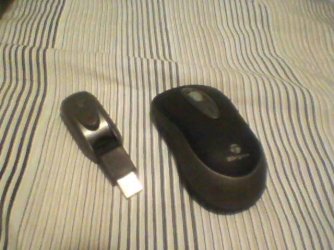
This mouse, purchased in 2008 from Bestbuy, worked great with XP and 7 32-bit. I never got it to work with 7 64-bit. I got the newest drivers from Targus and tried installing in compatibility mode.
View attachment 92666

Even MS more or less tells you it is not compatible with 64-bit: Windows 7 Compatibility for Targus 3Button Wireless Laser Stow-N-Go Laptop Mice: Targus. Drivers, Updates, Downloads

I had to buy a new wireless mouse, which worked as soon as I plugged it in.

Any more arguments?
No arguments at all, but I really respect the fact that you took the time to give a specific example, instead of the typical "plenty of examples where keyboards, mice, network cards, graphics cards, and sound cards have had to be upgraded because there were no current drivers". :sleepy: I like how you operate Petey7!!! But, to keep in tune with the subject, yeah, it does happen where this or that particular device doesn't support a 64-bit environment. That's not the OS's fault, but the company who sold you a device with incomplete or outdated drivers. Yes, this doesn't change the fact that some stuff will not work, but I hope you agree that this is, now, a rare exception which is not indicative of a big problem with upgrading to a 64-bit platform. I remember trying XP-64, but it was such a headache to use that it made no sense to integrate it in everyday usage. I reverted to the 32-bit edition within a month or so. Now, considering Vista, and certainly Windows 7, it's really unlikely that the same issues will be experienced under normal conditions. That's all I'm saying really.
 

My Computer My Computer

OS
Windows 7 Professional x64
CPU
AMD Phenom II 940BE @3.6
Motherboard
Gigabyte GA-MA770-UD3 (Rev 2.1)
Memory
4x2GB G.Skill PC2-8000
Graphics Card(s)
Gigabyte GTX 460 1gb (GV-N460OC-1GI)
Sound Card
x-Fi XtremeGamer
Monitor(s) Displays
Samsung T240
Screen Resolution
1920x1200 (native)
Hard Drives
G.SKILL Phoenix Pro 60GB SSD
Samsung & Western Digital 5Tb total
PSU
Corsair 650TX
Case
Antec Three Hundred
Cooling
Air cooling all the way!
Internet Speed
Teksavvy (DSL)
This mouse, purchased in 2008 from Bestbuy, worked great with XP and 7 32-bit. I never got it to work with 7 64-bit. I got the newest drivers from Targus and tried installing in compatibility mode.
View attachment 92666

Even MS more or less tells you it is not compatible with 64-bit: Windows 7 Compatibility for Targus 3Button Wireless Laser Stow-N-Go Laptop Mice: Targus. Drivers, Updates, Downloads

I had to buy a new wireless mouse, which worked as soon as I plugged it in.

Any more arguments?
No arguments at all, but I really respect the fact that you took the time to give a specific example, instead of the typical "plenty of examples where keyboards, mice, network cards, graphics cards, and sound cards have had to be upgraded because there were no current drivers". :sleepy: I like how you operate Petey7!!! But, to keep in tune with the subject, yeah, it does happen where this or that particular device doesn't support a 64-bit environment. That's not the OS's fault, but the company who sold you a device with incomplete or outdated drivers. Yes, this doesn't change the fact that some stuff will not work, but I hope you agree that this is, now, a rare exception which is not indicative of a big problem with upgrading to a 64-bit platform. :)

I quite agree that it is not the fault of the OS. The manufactures had ample time to update their products and drivers. Some chose not to as part of planned obsolescence. They make more money selling new hardware. Unless one has a specific peice of hardware needed for specific purposes (as some business do), it does not make since to not upgrade to 64 bit because of a keyboard, a mouse, or some peripheral.

By the way, I did give you a specific examples of Razer mice and keyboards ;) I simply cannot remember each BSOD I have worked or read where obsolete drivers came into play for which there are no updates. And I was not going to research it. :)
 

My Computer My Computer

Computer Manufacturer/Model Number
Home built
OS
Windows 7 Ultimate 32 bit
CPU
Intel(R) Pentium(R) 4 CPU 3.00GHz
Motherboard
ASUS P4P800-VM Motherboard Chipset: Intel 865G + ICH5
Memory
2.50 GB RAM
Graphics Card(s)
NVIDIA GeForce 7600 GS
Sound Card
SoundMax Integrated Digital Audio (Chip)
Monitor(s) Displays
ViewSonic VX 1962 wm
Screen Resolution
1680 X 1050
Hard Drives
Seagate Barracuda 7200.10 80 GB
ST380215A ATA Device 18.6 GB
Western Digital "My Book" external hard drive 750 GB
Cooling
Fan based
Keyboard
Microsoft Comfort Curve Keyboard 2000 v10 USB
Mouse
Logitec optic USB
Internet Speed
3.01 Mb/s download 0.64 Mb/s upload
Omnimodis, the only problem is that some people use software that is totally or partially 16-bit, even ones made within the past 5 years. No 16-bit software can run on a 64-bit system. Also, some older hardware only have 32-bit drivers, and 32-bit drivers only work on 32-bit systems. Yes, when building a new computer, with all relative new hardware, including peripheral devices, like printers, mice, webcams, etc., and only newer software and games, you are right. If their is even one exception, you will either have to buy the hardware/software you didn't intend to buy, or live without.
Ah, listen, anyone who is running a 16-bit program has no reason whatsoever to upgrade to Windows 7! You and I both know that this issue is so remote and so 'particular' that it's almost a non-issue. As for drivers, well, I challenge you or anyone reading this to find a device and say "I connected it to Windows 7 x64 and it can't be used due to driver issues" - please don't do so if your device is from 1995. That does not count. It's the same issue as saying that your 1992 RCA TV can't take advantage of HD digital broadcasts so it doesn't make sense to buy a new LCD TV - you see it even sounds strange. Technology has advanced and it's hardly valid to cater to the lowest common denominator in this case.


Running 16-bit software is not near as remote as you think. You would be suprised how much 16-bit software still runs in the enterprise. There are countless little apps, scrapped together 10 or 15 years ago, that have become requirements on certain enterprise infrastructures. I know of two firms, that have about 6000 seats each that have not moved to Server 2008 R2, because it is 64-bit only and they have at least one critical app, that is over a decade old, that has 16-bit elements.

It was coded by someone no longer working there. The source code is long gone, and a re-write would be $10,000's if you include all the time for testing. Right now is not the time to bite that bullet. And this is only 2 that I know of and my experience is actually pretty small in the industry.

For the average home user, yea, jump on 64-bit when you can. Chances are anything you need can be run on 64-bit today. But still, make sure you do a little bit of research before commiting.
 

My Computer My Computer

Computer Manufacturer/Model Number
MPC Transport T2500 Laptop
OS
Windows 7 x64 (RTM via MSDN)
CPU
Intel Core 2 Duo T9300 (2.5 GHz)
Motherboard
MPC
Memory
4 GB SODIMMS (System Max)
Graphics Card(s)
nVidia 8600M GS 256MB
Sound Card
Realtek On-Board
Monitor(s) Displays
15.4" LCD with a Dell 2005FPW 20" attached
Screen Resolution
1680x1050 (15.4") and 1680x1050 (20")
Hard Drives
Toshiba 2.5" 320 GB 7200 RPM
So wait is 64bit faster then 32bit?
 

My Computer My Computer

Computer Manufacturer/Model Number
HP Pavillion P7-1054
OS
Windows 7 Home Premium 64bit
CPU
AMD Athlon 645 II Quad Core 3.2MHz
Motherboard
Foxconn 2AB1
Memory
6GB DDR3 1333MHz
Graphics Card(s)
Radeon HD 4200
Sound Card
Realtek HD Audio
Monitor(s) Displays
HP S2031 20'
Screen Resolution
1600 x 900
Hard Drives
1TB
Internet Speed
18mb/s Down 2mb/s Up
So wait is 64bit faster then 32bit?
Depends who you ask and who replies, and then the variables come into play which pretty much result in a very very long answer. To sum it up, basically, there are specific and inherent benefits to a 64bit system, but there are also facts which some of us using 64bit conveniently ignore or 'forget'. Firstly, the specific benefits are that you can run 64bit programs, which more and more software developers are putting out. Even some games now come with a 64bit version. In most cases you'll notice an improvement, but with some it's so minute that it's only faster on charts and benchmarks. But, the inherent benefits are that if you want to run 64bit, then you will also probably be running it on a more capable hardware. The sum of it all is that you'll have a more 'efficient' system. But, there's also a darker side to this. Isolated driver issues (rare, but happens). Also, if you run a 32bit application on a 64bit OS, then the OS actually has to emulate a 32bit environment for your applications - which, sometimes actually can translate to operational inefficiencies! Of course, the question remains: which one offers overall benefits. My answer is that a 64bits system is better than a 32bit system. I would not have written this 4 years ago, but today, it is a valid thing to say (though, as I'm sure you gather from previous posts, not 100% popular).
 

My Computer My Computer

OS
Windows 7 Professional x64
CPU
AMD Phenom II 940BE @3.6
Motherboard
Gigabyte GA-MA770-UD3 (Rev 2.1)
Memory
4x2GB G.Skill PC2-8000
Graphics Card(s)
Gigabyte GTX 460 1gb (GV-N460OC-1GI)
Sound Card
x-Fi XtremeGamer
Monitor(s) Displays
Samsung T240
Screen Resolution
1920x1200 (native)
Hard Drives
G.SKILL Phoenix Pro 60GB SSD
Samsung & Western Digital 5Tb total
PSU
Corsair 650TX
Case
Antec Three Hundred
Cooling
Air cooling all the way!
Internet Speed
Teksavvy (DSL)
As for drivers, well, I challenge you or anyone reading this to find a device and say "I connected it to Windows 7 x64 and it can't be used due to driver issues"

Dlink DIR-253 Wireless Adaptor 32 bit drivers only (admittedly this one was from 2005 ish, just after Vista came out)

Belkin F5D8053 N wirless adapter, less than a year old when Win 7 came out, didn't work on Win 7 because Belkin decided to give out 32 bit only drivers for it despite claiming they had 32 and 64 bit in the installation files.

Vodafone 775 Mobile phone (and 3G Modem) only came with Vista drivers which Windows 7 didn't like. Windows 7 had been out for 6 months at this point.
 
Last edited:

My Computer My Computer

Computer type
PC/Desktop
Computer Manufacturer/Model Number
Medion Erazer (note to self: insert model number) - with custom additions
OS
Windows 10 Pro x64
CPU
Intel Core i5 7400 @ 3.00GHz
Motherboard
OEM supllied with PC
Memory
8GB 2133Mhz DDR4 (OEM supplied)
Graphics Card(s)
Gygabyte Windforce GTX 1050Ti (Factory Overclocked)
Sound Card
Realtek
Monitor(s) Displays
Acer Al1980 + HKC
Screen Resolution
1360*768(HKC) / 1280*1024(Acer)
Hard Drives
1TB Toshiba
1TB WD Caviar Green
120GB Samsung Evo 840
PSU
OEM supplied (no power rating on case)
Case
OEM Supplied
Cooling
Stock
Keyboard
Logitech Wireless
Mouse
Logitect Wireless
Internet Speed
40Mb/s Down 10Mb/s Up
Antivirus
Defender
Browser
Firefox
Back
Top