34 optional updates available

oldad

New member
Local time
10:44 PM
Messages
6
Win 7 Ultimate.English

Always in Update: 34 optional updates available

Is there any to delete that from updates?

I am tired of the need to have that showin up every time I go to Windows Update .

Thanks in advance
oldad
 

My Computer

Computer Manufacturer/Model Number
Dell Studio XPS
OS
Win 7 ultimate
Nobody forces you to install any updates. It is up to you what you want to install. I sometimes "hide" updates because I do not use the program to which they pertain. In Vista I have hidden all of SP2 on one system because it gave me problems on another system and it is smooth sailing since then. So as I said, it's up to you.
 

My Computer

Computer Manufacturer/Model Number
HP, Dell, Gateway, Toshiba - 4 laptops and 2 desktops
OS
Vista, Windows7, Mint Mate, Zorin, Windows 8
CPU
from 1.6GHz Duo to i7
Monitor(s) Displays
2x HP w2207
Hard Drives
5x HDD, 7x SSD, 12x Externals
Keyboard
with trackball - no mices
Mouse
Trackball mice
Internet Speed
DSL 6000
Hello Oldad, welcome to the Seven Forums.

Windows Update has 35 language packs available to those with Ultimate or Enterprise edition, to completely change to language of the OS.

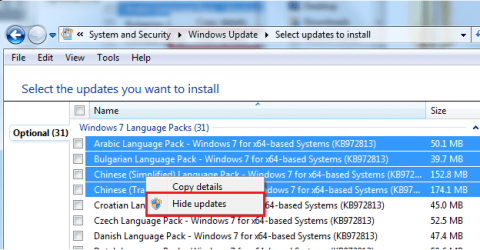
Your Ultimate is in English, the rest 34 languages are thus shown as optional updates in case you needed one or more. The only way not to see those language pack updates is to hide them. Just choose updates you want to hide, right click and choose Hide Updates.

Windows Update - Hide or Restore Hidden Updates

Kari
 

Attachments

  • Hide_Updates.png
    Hide_Updates.png
    22.7 KB · Views: 33
Last edited by a moderator:

My Computer

Computer type
Laptop
Computer Manufacturer/Model Number
HP ENVY 17-1150eg
OS
Windows 10 Pro x64 EN-GB
CPU
1.6 GHz Intel Core i7-720QM Processor
Memory
6 GB
Graphics Card(s)
ATI Mobility Radeon HD 5850 Graphics
Sound Card
Beats sound system with integrated subwoofer
Monitor(s) Displays
17" laptop display, 22" LED and 32" Full HD TV through HDMI
Screen Resolution
1600*900 (1), 1920*1080 (2&3)
Hard Drives
Internal: 2 x 500 GB SATA Hard Disk Drive 7200 rpm
External: 2TB for backups, 3TB USB3 network drive for media
Cooling
As Envy runs a bit warm, I have it on a Cooler Master pad
Keyboard
Logitech diNovo Media Desktop Laser (bluetooth)
Mouse
Logitech Performance Mouse MX
Internet Speed
50/10 Mbps VDSL
Antivirus
Windows Defender 4.3.9431.0
Browser
Maxthon 3.5.2., IE11
Thanks WHS and Kari for the example.

I sure didn't realize it could be done the same as Win XP.
I never had the advantage the Vista training for Win 7, since all I have ever used Win 95 through XP Pro

Regards to you both.

oldad
 

My Computer

Computer Manufacturer/Model Number
Dell Studio XPS
OS
Win 7 ultimate
Back
Top