4gb memory patch for 32 bit software

Atom

New member
Member
Local time
12:09 AM
Messages
81
I'm looking for informed opinions on whether or not this memory patch is safe and effective.

NTCore's Homepage
 

My Computer

OS
win7 64 Home Premium
Why would you do this...?
You should've thought of getting more RAM before, no offence intended.

I'm not sure whether or not this is safe and/or effective, but if I were you I wouldn't run this. I'd much rather spend some money and buy some decent RAM sticks than gamble on a program that "patches" the RAM. HOWEVER, this is probably me being biased (YET AGAIN) so take the risk if you want to :)
 

My Computer

Computer Manufacturer/Model Number
Dell - Vostro 430
OS
Windows 7 Professional x64 SP1
CPU
Intel Core i7 860 @2.80GHz
Motherboard
Dell 054KM3
Memory
6144MB DDR3-SDRAM (3 x 2048 DDR3)
Graphics Card(s)
nVidia GeForce 310
Sound Card
Realtek High Definition Audio ALC662
Monitor(s) Displays
Dell Computer DELL E2311H
Screen Resolution
1920 x 1080
Hard Drives
Seagate Barracuda ST3750528AS (750 GB)
PSU
J515T 350W
Case
14.58inH x 6.69inW x 17.43inD
Cooling
Fan from the Box heehee
Keyboard
Rapoo Wireless Keyboard
Mouse
Rapoo Wireless Mouse
Internet Speed
1 byte every 2.6 hours
Other Info
Dreaming of building a new PC :D

Cant wait :)
Why would you do this...?
You should've thought of getting more RAM before, no offence intended.

I'm not sure whether or not this is safe and/or effective, but if I were you I wouldn't run this. I'd much rather spend some money and buy some decent RAM sticks than gamble on a program that "patches" the RAM. HOWEVER, this is probably me being biased (YET AGAIN) so take the risk if you want to :)

I have lots of physical memory, more than 4gb. The question is whether virtual memory use can be increased from 2 to 4 gb for 32 bit software running on 64 bit windows?
 

My Computer

OS
win7 64 Home Premium
If the application is not programmed with large addresses aware, forcing it can break it. There is also no guarantee it would take advantage of it.
 

My Computer

Computer type
PC/Desktop
Computer Manufacturer/Model Number
Alienware Aurora ALX R4
OS
Windows 10 Pro (x64)
CPU
Intel Core i7-3930K (3.2GHz - 4.5GHz)
Motherboard
Alienware Aurora-R4 x79
Memory
4x Samsung 4GB PC3-12800 DDR3 (16GB 1600MHz)
Graphics Card(s)
Nvidia Geforce GTX 690
Sound Card
SteelSeries Siberia Elite
Monitor(s) Displays
Dell UltraSharp U3011
Screen Resolution
2560x1600
Hard Drives
Samsung 850 Pro 256 GB, Seagate 1TB Desktop Hybrid HDD, 2x Western Digital 4TB Green HDD
PSU
875W Some Dell PSU <.<
Case
Alienware Aurora ALX
Cooling
Custom Liquid Cooling (EK CPU & GPU blocks) dual EK 480RAD
Keyboard
Logitech G710+ Mechanical
Mouse
Logitech G700s
Internet Speed
Verizon Fios (50 mbps average)
Other Info
Server: Intel NUC D54250WYK: i5-4250U, 16GB, 256 GB mSATA, Windows Server 2012 R2
As far as I know the only safe way to use more ram is installing Windows 7/64.
 

My Computer

Computer type
PC/Desktop
Computer Manufacturer/Model Number
Home made Desktop
OS
Windows 10 Pro. 64/ version 1709 Windows 7 Pro/64
CPU
Intel i7-6800K @ 4.3
Motherboard
ASUS X-99 Deluxe II
Memory
Corsair Platinum 16 gig @2400
Graphics Card(s)
EVGA GTX 1070 OC
Monitor(s) Displays
Asus 27" LED LCD/VE278Q
Screen Resolution
1920-1080 or 1280-720 HDMI
Hard Drives
INTEL SSD 730-240 Gb Sata 3.0/
PSU
EVGA Platium 1200W
Case
Phanteks Luxe Tempered Glass 8 fans/ one radiator
Cooling
XSPC/ Water Cooled CPU
Keyboard
Das 4 Professional
Mouse
Logitech M705/MX Anywhere 2-S
Internet Speed
100 mbits
Antivirus
Microsoft Security Essentials/ Malwarebytes Premium 3.0/ SAS
Browser
I.E. 11 default/Firefox/ ISP Time Warner Cable/Spectrum
Other Info
LG BluRay Burner/
Sound system-KLipsch-THX/
Icy Dock ssd Hot Swap bays.
Why would you do this...?
You should've thought of getting more RAM before, no offence intended.

I'm not sure whether or not this is safe and/or effective, but if I were you I wouldn't run this. I'd much rather spend some money and buy some decent RAM sticks than gamble on a program that "patches" the RAM. HOWEVER, this is probably me being biased (YET AGAIN) so take the risk if you want to :)

I have lots of physical memory, more than 4gb. The question is whether virtual memory use can be increased from 2 to 4 gb for 32 bit software running on 64 bit windows?

"32 bit software running on 64 bit windows" - makes no sense :/
32/64 bit is how the computer accesses the memory - you can't have "32bit on 64bit".
As all the previous posters said, forcing the RAM to expand on it's own (which in this case is called "patching") could do irrpearable harm to the system.
 

My Computer

Computer Manufacturer/Model Number
Dell - Vostro 430
OS
Windows 7 Professional x64 SP1
CPU
Intel Core i7 860 @2.80GHz
Motherboard
Dell 054KM3
Memory
6144MB DDR3-SDRAM (3 x 2048 DDR3)
Graphics Card(s)
nVidia GeForce 310
Sound Card
Realtek High Definition Audio ALC662
Monitor(s) Displays
Dell Computer DELL E2311H
Screen Resolution
1920 x 1080
Hard Drives
Seagate Barracuda ST3750528AS (750 GB)
PSU
J515T 350W
Case
14.58inH x 6.69inW x 17.43inD
Cooling
Fan from the Box heehee
Keyboard
Rapoo Wireless Keyboard
Mouse
Rapoo Wireless Mouse
Internet Speed
1 byte every 2.6 hours
Other Info
Dreaming of building a new PC :D

Cant wait :)
As far as I know the only safe way to use more ram is installing Windows 7/64.
The OP already has 64bit installed. I think he is talking about virtual RAM for 32bit applications running on a 64bit platform!
 

My Computer

Computer type
PC/Desktop
OS
Microsoft Windows 7 Home Premium 64-bit 7601 Multiprocessor Free Service Pack 1
CPU
Intel(R) Core(TM) i7-3770 CPU @ 3.40GHz
Motherboard
ASUSTeK COMPUTER INC. P8H77-M
Memory
8.00 GB
Graphics Card(s)
Intel(R) HD Graphics 4000
Sound Card
On Board
Monitor(s) Displays
Dell 24"
Screen Resolution
1920 x 1080
Hard Drives
(1) INTEL SSDSC2CT180A3 ATA Device (2) ST500DM002-1BD142 ATA Device (3) WDC WD3200AAKS-75L9A0 ATA Device (4) Generic- Compact Flash USB Device (5) Generic- MS/MS-Pro USB Device (6) Generic- SD/MMC USB Device (7) Generic- SM/xD-Picture USB
PSU
500w Corsair
Case
Cooler Master
Cooling
3 Fans
Keyboard
Logitech MK300
Mouse
Logitech WOM
Internet Speed
75Mb
Antivirus
Norton 360
Browser
Firefox, Opera, IE

My Computer

Computer Manufacturer/Model Number
Dell - Vostro 430
OS
Windows 7 Professional x64 SP1
CPU
Intel Core i7 860 @2.80GHz
Motherboard
Dell 054KM3
Memory
6144MB DDR3-SDRAM (3 x 2048 DDR3)
Graphics Card(s)
nVidia GeForce 310
Sound Card
Realtek High Definition Audio ALC662
Monitor(s) Displays
Dell Computer DELL E2311H
Screen Resolution
1920 x 1080
Hard Drives
Seagate Barracuda ST3750528AS (750 GB)
PSU
J515T 350W
Case
14.58inH x 6.69inW x 17.43inD
Cooling
Fan from the Box heehee
Keyboard
Rapoo Wireless Keyboard
Mouse
Rapoo Wireless Mouse
Internet Speed
1 byte every 2.6 hours
Other Info
Dreaming of building a new PC :D

Cant wait :)
If the application is not programmed with large addresses aware, forcing it can break it. There is also no guarantee it would take advantage of it.
Ok. Let's assume we want to test whether it works or not. How would you go about that?
 

My Computer

OS
win7 64 Home Premium
If the application is not programmed with large addresses aware, forcing it can break it. There is also no guarantee it would take advantage of it.
Ok. Let's assume we want to test whether it works or not. How would you go about that?

Download the program and run it
 

My Computer

Computer Manufacturer/Model Number
Dell - Vostro 430
OS
Windows 7 Professional x64 SP1
CPU
Intel Core i7 860 @2.80GHz
Motherboard
Dell 054KM3
Memory
6144MB DDR3-SDRAM (3 x 2048 DDR3)
Graphics Card(s)
nVidia GeForce 310
Sound Card
Realtek High Definition Audio ALC662
Monitor(s) Displays
Dell Computer DELL E2311H
Screen Resolution
1920 x 1080
Hard Drives
Seagate Barracuda ST3750528AS (750 GB)
PSU
J515T 350W
Case
14.58inH x 6.69inW x 17.43inD
Cooling
Fan from the Box heehee
Keyboard
Rapoo Wireless Keyboard
Mouse
Rapoo Wireless Mouse
Internet Speed
1 byte every 2.6 hours
Other Info
Dreaming of building a new PC :D

Cant wait :)
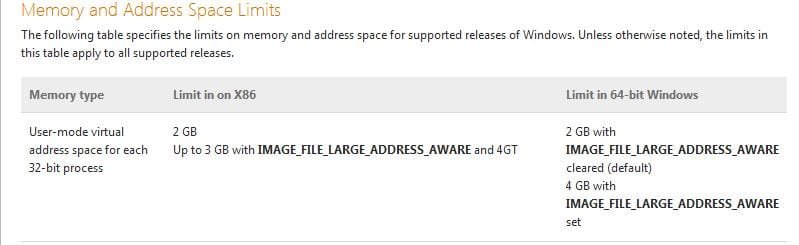
Some information.
 

Attachments

  • MemoryLimits.JPG
    MemoryLimits.JPG
    28 KB · Views: 43

My Computer

OS
win7 64 Home Premium
So....
Does it work?
Is the RAM increased?
 

My Computer

Computer Manufacturer/Model Number
Dell - Vostro 430
OS
Windows 7 Professional x64 SP1
CPU
Intel Core i7 860 @2.80GHz
Motherboard
Dell 054KM3
Memory
6144MB DDR3-SDRAM (3 x 2048 DDR3)
Graphics Card(s)
nVidia GeForce 310
Sound Card
Realtek High Definition Audio ALC662
Monitor(s) Displays
Dell Computer DELL E2311H
Screen Resolution
1920 x 1080
Hard Drives
Seagate Barracuda ST3750528AS (750 GB)
PSU
J515T 350W
Case
14.58inH x 6.69inW x 17.43inD
Cooling
Fan from the Box heehee
Keyboard
Rapoo Wireless Keyboard
Mouse
Rapoo Wireless Mouse
Internet Speed
1 byte every 2.6 hours
Other Info
Dreaming of building a new PC :D

Cant wait :)
So....
Does it work?
Is the RAM increased?

It only has to do with the capability of applications to address virtual memory above 2 gb. Nothing to do with RAM.

I am in the process of trying to determine if a particular application is natively set to use large address aware when installed on 64 bit Windows. I'm not exactly clear on how to determine this and what the benefits are of making it LAA if it's not already.
 

My Computer

OS
win7 64 Home Premium
Probably not...
 

My Computer

Computer Manufacturer/Model Number
Dell - Vostro 430
OS
Windows 7 Professional x64 SP1
CPU
Intel Core i7 860 @2.80GHz
Motherboard
Dell 054KM3
Memory
6144MB DDR3-SDRAM (3 x 2048 DDR3)
Graphics Card(s)
nVidia GeForce 310
Sound Card
Realtek High Definition Audio ALC662
Monitor(s) Displays
Dell Computer DELL E2311H
Screen Resolution
1920 x 1080
Hard Drives
Seagate Barracuda ST3750528AS (750 GB)
PSU
J515T 350W
Case
14.58inH x 6.69inW x 17.43inD
Cooling
Fan from the Box heehee
Keyboard
Rapoo Wireless Keyboard
Mouse
Rapoo Wireless Mouse
Internet Speed
1 byte every 2.6 hours
Other Info
Dreaming of building a new PC :D

Cant wait :)
OP post #13
It only has to do with the capability of applications to address virtual memory above 2 gb. Nothing to do with RAM.
Now I understand what you are trying to do. I don't know of any way of doing that, sorry.
 

My Computer

Computer type
PC/Desktop
Computer Manufacturer/Model Number
Home made Desktop
OS
Windows 10 Pro. 64/ version 1709 Windows 7 Pro/64
CPU
Intel i7-6800K @ 4.3
Motherboard
ASUS X-99 Deluxe II
Memory
Corsair Platinum 16 gig @2400
Graphics Card(s)
EVGA GTX 1070 OC
Monitor(s) Displays
Asus 27" LED LCD/VE278Q
Screen Resolution
1920-1080 or 1280-720 HDMI
Hard Drives
INTEL SSD 730-240 Gb Sata 3.0/
PSU
EVGA Platium 1200W
Case
Phanteks Luxe Tempered Glass 8 fans/ one radiator
Cooling
XSPC/ Water Cooled CPU
Keyboard
Das 4 Professional
Mouse
Logitech M705/MX Anywhere 2-S
Internet Speed
100 mbits
Antivirus
Microsoft Security Essentials/ Malwarebytes Premium 3.0/ SAS
Browser
I.E. 11 default/Firefox/ ISP Time Warner Cable/Spectrum
Other Info
LG BluRay Burner/
Sound system-KLipsch-THX/
Icy Dock ssd Hot Swap bays.
OP post #13
It only has to do with the capability of applications to address virtual memory above 2 gb. Nothing to do with RAM.
Now I understand what you are trying to do. I don't know of any way of doing that, sorry.

In my searching, I ran across this discussion.

Large Address Aware - techPowerUp! Forums

If you go there you will find a download for LAA.exe, which will detect whether apps are LAA or not, and allow you to turn LAA on or off. I have run it and it seems to work, although I have not used it to turn LAA on or off, just to detect their LAA status.
 

My Computer

OS
win7 64 Home Premium
Back
Top
