4gb ram 3 gb usable

anchit

New member
Member
Local time
10:03 AM
Messages
11
i have win pro 64 bit with 4gb ram it says only 3063 usable. i think that my graphics card is using the rest as hardware reserved memory how to reclaim that 1 gb of memory??
 

My Computer My Computer

Computer Manufacturer/Model Number
dell inspiron 580s
OS
windows 7
Your startups as well as the background services in Windows are simply taking the first 1gb as well as some possible mapping out. Presently here I see 1.34gb taken off likely having a few things for that difference running the 64bit Ultimate.

If you were seeing a large drop when looking in the task manager>performance tab there you would then have to consider a problem was present. The first thing however would be looking at the startup items seen in the msconfig utility and simply uncheck anything you can disable without worry being able to manually start it up when needed; 3rd party mainly rather then anything video or sound related.

The fewer items to start with the less ram will be occupied.
 

My Computers My Computers

System One System Two

  • Computer type
    PC/Desktop
    Computer Manufacturer/Model Number
    Custom builds = 2
    OS
    W7 Ultimate x64/W10 Pro x64/W11 Pro Triple Boot - Main PC W7 Remote PC Micro ATX W7 Pro x64/W11 Pro
    CPU
    AMD Phenom II X4 975 Deneb 3.6ghz - 965 2nd remote pc
    Motherboard
    Gigabyte GA-790XTA-UD4-Gigabyte GA-880GM-D2H remote pc
    Memory
    Kingston Hyper X DDR3 1600 1.5v 16gb - Hyper X Fury 8gb 2nd
    Graphics Card(s)
    MSI HD Radeon 5750 1gb - MSI HD Radeon 6450 on mini tower
    Sound Card
    Creative Labs X-Fi Xtreme Audio P - Realtek onooard 2nd case
    Monitor(s) Displays
    ASUS VW199T-P 19" HP 2082a Main-HP 2082a 20" remote pc
    Screen Resolution
    Asus 1440x900 - HP 1600x900
    Hard Drives
    WD Black 1TB HD per OS W7, W10, and pending W11 presently on 500gb OS Drive - Pending Triple 1TB HDs for Spanned Storage/backup volume
    Single 2TB external USB enclosure, single 1TB System 7 Host/Boot drive, Pending 8TB external HD for system image b
    PSU
    Corsair 750TX - primary / Corsair CX600 - second
    Case
    Antec 900-2 - SSD compatible / NZXT Vulcan mini tower
    Cooling
    Zalman CNPS9900A
    Keyboard
    AZIO L70 Backlit Letters Gaming - ONN Cordless/USB
    Mouse
    MSI DS200 Programmable, Logitech Cordless
    Internet Speed
    30mbps upgrade - primary hard wired - mini tower usb WiFi
    Antivirus
    GFI VIPRE Internet Security 2014 on W7 2016 beta on W10,
    Browser
    Cyberfox, WaterFox 64bit FF variants, FireFox x64, Pale Moon
    Other Info
    Accomdata fan cooled usb 2.0 PIDE/Sata II, III external enclosure.
    Sambient usb/eSata PATA/Sata II, III external enclosure.
  • Computer type
    PC/Desktop
    System Manufacturer/Model Number
    CUSTOM ASSEMBLY
    OS
    W7 Pro x64/W11 Pro
    CPU
    AMD Deneb 3.6ghz - 965
    Motherboard
    Gigabyte GA-880GM-D2H remote pc
    Memory
    Kingston Hyper X Fury 8gb
    Graphics Card(s)
    MSI HD Radeon 6450 DVI Output
    Sound Card
    Realtek onooard Creative or Other separate PENDING
    Monitor(s) Displays
    VIZIO 32" LCD TV Separate LCD Pending
    Screen Resolution
    1600x1080
    Hard Drives
    WD 500GB OS Host/Boot WD Green 1TB Storage/Backup
    PSU
    Corsair 600W - THERMALTAKE 600W spare case
    Case
    NZXT Vulcan mini tower
    Cooling
    Twin 120mm Top Fans - 240mm Side Cover
    Keyboard
    ONN Cordless/USB Logitech Cordless
    Mouse
    ONN USB/Cordless - Logitech Cordless
    Internet Speed
    DSL 5G
    Browser
    MS Edge, FireFox, WaterFox x64, FireFox Nightly
    Other Info
    OS Testing-Remote Access to Main TeamViewer
It's normal. The rest of the RAM is being used by your graphics card.
 

My Computer My Computer

Computer Manufacturer/Model Number
Samsung NP530U4B-S02IN
OS
Windows® 8 Pro (64-bit)
CPU
Intel® Core™ i5 Processor 2467M (1.60GHz, 3MB L3 Cache)
Motherboard
Samsung Electronics
Memory
6GB DDR3 System Memory at 1,333MHz (on BD 4GB + 2GB x 1)
Graphics Card(s)
AMD Radeon™ HD7550M 1GB DDR3 (Ext. Graphic)
Sound Card
Realtek High Definition Audio
Monitor(s) Displays
35.56cm (14.0) SuperBright 300nit HD LED Display
Screen Resolution
1366x768
Hard Drives
1TB S-ATA II Hard Drive (5400RPM) with ExpressCache 16GB SSD
Internet Speed
sucks
Antivirus
Microsoft Security Essentials
Browser
Google Chrome (Sync enabled)
What is your graphics? If it is an on-board chipset, then it possibly uses that RAM. If it is a dedicated graphics card with its own memory, then there is another problem.
 

My Computer My Computer

Computer Manufacturer/Model Number
HP, Dell, Gateway, Toshiba - 4 laptops and 2 desktops
OS
Vista, Windows7, Mint Mate, Zorin, Windows 8
CPU
from 1.6GHz Duo to i7
Monitor(s) Displays
2x HP w2207
Hard Drives
5x HDD, 7x SSD, 12x Externals
Keyboard
with trackball - no mices
Mouse
Trackball mice
Internet Speed
DSL 6000
if your graphics is on board then it must be using it but if not its another problem
 

My Computer My Computer

OS
Windows 7 Ultimate (Build 7600)
Dinesh was correct there even with onboard video rather then a separate expansion in how shared system memory is allocated. If you have 256mb for the onboard Windows will likely match that by mapping another 256mb bringing the total to 512mb used.

Another factor not to forget is the fact that the 64bit Windows will place more data in the active ram seeing far less data swapping out to the drive where the 32bit relies on the paging file for supplimenting with the virtual memory. If a default 32bit 7 install runs at 400mb the 64bit equivalent uses about 300mb more to bring that to 700mb.
 

My Computers My Computers

System One System Two

  • Computer type
    PC/Desktop
    Computer Manufacturer/Model Number
    Custom builds = 2
    OS
    W7 Ultimate x64/W10 Pro x64/W11 Pro Triple Boot - Main PC W7 Remote PC Micro ATX W7 Pro x64/W11 Pro
    CPU
    AMD Phenom II X4 975 Deneb 3.6ghz - 965 2nd remote pc
    Motherboard
    Gigabyte GA-790XTA-UD4-Gigabyte GA-880GM-D2H remote pc
    Memory
    Kingston Hyper X DDR3 1600 1.5v 16gb - Hyper X Fury 8gb 2nd
    Graphics Card(s)
    MSI HD Radeon 5750 1gb - MSI HD Radeon 6450 on mini tower
    Sound Card
    Creative Labs X-Fi Xtreme Audio P - Realtek onooard 2nd case
    Monitor(s) Displays
    ASUS VW199T-P 19" HP 2082a Main-HP 2082a 20" remote pc
    Screen Resolution
    Asus 1440x900 - HP 1600x900
    Hard Drives
    WD Black 1TB HD per OS W7, W10, and pending W11 presently on 500gb OS Drive - Pending Triple 1TB HDs for Spanned Storage/backup volume
    Single 2TB external USB enclosure, single 1TB System 7 Host/Boot drive, Pending 8TB external HD for system image b
    PSU
    Corsair 750TX - primary / Corsair CX600 - second
    Case
    Antec 900-2 - SSD compatible / NZXT Vulcan mini tower
    Cooling
    Zalman CNPS9900A
    Keyboard
    AZIO L70 Backlit Letters Gaming - ONN Cordless/USB
    Mouse
    MSI DS200 Programmable, Logitech Cordless
    Internet Speed
    30mbps upgrade - primary hard wired - mini tower usb WiFi
    Antivirus
    GFI VIPRE Internet Security 2014 on W7 2016 beta on W10,
    Browser
    Cyberfox, WaterFox 64bit FF variants, FireFox x64, Pale Moon
    Other Info
    Accomdata fan cooled usb 2.0 PIDE/Sata II, III external enclosure.
    Sambient usb/eSata PATA/Sata II, III external enclosure.
  • Computer type
    PC/Desktop
    System Manufacturer/Model Number
    CUSTOM ASSEMBLY
    OS
    W7 Pro x64/W11 Pro
    CPU
    AMD Deneb 3.6ghz - 965
    Motherboard
    Gigabyte GA-880GM-D2H remote pc
    Memory
    Kingston Hyper X Fury 8gb
    Graphics Card(s)
    MSI HD Radeon 6450 DVI Output
    Sound Card
    Realtek onooard Creative or Other separate PENDING
    Monitor(s) Displays
    VIZIO 32" LCD TV Separate LCD Pending
    Screen Resolution
    1600x1080
    Hard Drives
    WD 500GB OS Host/Boot WD Green 1TB Storage/Backup
    PSU
    Corsair 600W - THERMALTAKE 600W spare case
    Case
    NZXT Vulcan mini tower
    Cooling
    Twin 120mm Top Fans - 240mm Side Cover
    Keyboard
    ONN Cordless/USB Logitech Cordless
    Mouse
    ONN USB/Cordless - Logitech Cordless
    Internet Speed
    DSL 5G
    Browser
    MS Edge, FireFox, WaterFox x64, FireFox Nightly
    Other Info
    OS Testing-Remote Access to Main TeamViewer
Last edited:

My Computer My Computer

Computer type
PC/Desktop
OS
Windows 8.1 Pro
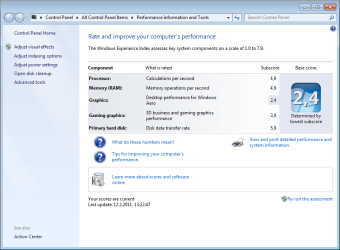
I would start by going here. This neat little MSFT tool will give you some good basic information on the weak link(s) in your system's performance which of course is the ultimate goal of freeing up more physical memory.:)

While the article talks about Vista the tool is available in Windows 7 and I believe can be accessed and run in W7 as indicated in the article for Vista.

Windows Experience Index

Understand and improve your computer's performance in Windows Vista

By Stephanie Krieger
When presenting at a user group meeting last week, someone asked me if a low Windows Experience Index (WEI) score of 1 or 2 means that he should not use Windows Vista on that computer. The answer is "not at all."
One of my favorite capabilities of Windows Vista is that it scales itself to fit your computer to help give you the best possible performance. For example, if your computer doesn't have the graphics capability to effectively display the new Windows Aerovisual effects, Windows Vista won't enable those effects on your computer.
In this article, I'll show you where to find your computer's WEI base score and subscores, as well as how to interpret them. I'll also show you how you can use these scores to help know what to look for when buying a new computer, upgrading your existing computer, or troubleshooting performance issues.
Finding your scores

Here's how to find your computer's WEI scores:

  1. Open Performance Information and Tools by clicking the Start button
    4f6cbd09-148c-4dd8-b1f2-48f232a2fd33.png
    , clicking Control Panel, clicking System and Maintenance, and then clicking Performance Information and Tools.
  2. View the Windows Experience Index base score and subscores for your computer. If you have recently upgraded your hardware and want to find out if your score has changed, click Update my score. If you don't see subscores and a base score, click Score this computer.


This image shows the WEI scores for the computer I used to write this column:

cont on link
 

My Computer My Computer

Computer Manufacturer/Model Number
Dell 570MT
OS
Windows 7 Home Premium 64bit
CPU
Athlon XII
Motherboard
?
Memory
4GB
Graphics Card(s)
ATI Radeon 4200
Sound Card
?
Monitor(s) Displays
Asus and Dell
Hard Drives
Unknown
PSU
unknown
Case
unknown
Cooling
unknown
i have the same problem.
I had 1x2GB 800mhz (kingmax) ddr2 , and then i bought one stick more
now i have 2x2gb of same memory, but my windows 7 x64 says it is only 3,0 of 4Gb

And that is all you're going to get with that motherboard unless it has the memory re-mapping option in the bios, which I doubt it does with that old SiS chipset (SiS 671/ 968) in it that only supports up to 4 GB of ram,

Universal abit > Motherboard, Digital Speakers, iDome, AirPace, Multimedia

Your problem is a hardware limitation, and nothing to do with Windows,

The system memory that is reported in the System Information dialog box in Windows Vista is less than you expect if 4 GB of RAM is installed

scroll down to the Workaround section and change the 8 to a 4 here,

Note When the physical RAM that is installed on a computer equals the address space that is supported by the chipset, the total system memory that is available to the operating system is always less than the physical RAM that is installed. For example, consider a computer that has an Intel 975X chipset that supports 8 GB of address space. If you install 8 GB of RAM, the system memory that is available to the operating system will be reduced by the PCI configuration requirements. In this scenario, PCI configuration requirements reduce the memory that is available to the operating system by an amount that is between approximately 200 MB and approximately 1 GB. The reduction depends on the configuration.
and it explains why you're not getting the full 4 GB.

Basically without the memory re-map option in a situation like yours and as described in that link, you will have the same amount of memory available whether you run 32 bit or 64 bit Windows.
 

My Computer My Computer

Computer type
PC/Desktop
Computer Manufacturer/Model Number
Me
OS
Win 7 Ultimate x64
CPU
FX-8350 @ 4.6 GHz so far
Motherboard
Asus M5A97 EVO
Memory
ADATA XPG V1 Series Black 8GB DDR3 1600
Graphics Card(s)
Sapphire R9 270x Dual-X
Sound Card
Xonar DGX w/ Corsair Vengence 1300
Monitor(s) Displays
Acer S232HL Abid
Screen Resolution
1920x1080
Hard Drives
120 GB OCZ Vertex 3
500 GB Seagate 7200.12
PSU
Antec Earthwatts 650W Green
Case
Antec Three Hundred
Cooling
Cooler Master 212 EVO
Keyboard
Logitech G510
Mouse
Logitech G500s
Internet Speed
35000/3000
so I need to change some advanced options in bios, do I need maybe update it to newer version and what is the safer way to do it ?

my bios version is:
ami 080014
06/08/2007
512 KB
 

Attachments

  • system.png
    system.png
    39.1 KB · Views: 338

My Computer My Computer

Computer type
PC/Desktop
OS
Windows 8.1 Pro
i have win pro 64 bit with 4gb ram it says only 3063 usable. i think that my graphics card is using the rest as hardware reserved memory how to reclaim that 1 gb of memory??

A 64 bit system should be able to see all 4 GB if your MB and BIOS support remapping. Why don;'t you fill in your system spec. We could then help you better. Gene
 

My Computer My Computer

Computer type
PC/Desktop
Computer Manufacturer/Model Number
Home built (GeneO industries)/Model 4
OS
Windows 10 Pro. EFI boot partition, full EFI boot
CPU
i7 4770k 4.4GHz (44-44-43-43 turbo) @ 1.248V
Motherboard
ASUS Maximus VI Hero
Memory
16GB (8GBx2) @2200 MHz G.skill Sniper 10-11-10-30-1, 1.6V
Graphics Card(s)
MSI GTX 970 Gaming 4G
Sound Card
Onboard SupremeFX Audio
Monitor(s) Displays
NEC Spectraview 2490WUXi-SV
Screen Resolution
1920 x 1200
Hard Drives
Samsung 850 Pro 256GB (OS), Samsung 2x 128GB 840 Pro SSD in RAID0, 3x WD Blue 6Gb/s 1TB RAID0, WD 2TB Black external USB 3.0, 2TB WD20EARS Green external USB 3.0, 2x 500GB Seagate and 1 750 GB external USB, 1x 350GB external USB3
PSU
Seasonic X-850 (2012 KM3 model)
Case
Fractal Design Define R4
Cooling
NH-D14, NF-F12, NF-A15; NF-P14, NF-P12,NF-A14, S12A PWM
Keyboard
Cooler Master Storm Quickfire Rapid - Brown
Mouse
Logitech G602
Internet Speed
126.4 Mb/s down, 24.3 Mb/s up
Other Info
USB 3.0 x8 , SATA III x8, eSATA, USB 2.0 x6. Samsung DVD R/W drive.

WEI: CPU 7.8, Memory 7.9, Graphics 7.9, Disk 7.9
how?
I don't understand you :) can you step-by-step me
 

My Computer My Computer

Computer type
PC/Desktop
OS
Windows 8.1 Pro
There is nothing to change as the chipset on your motherboard only supports up to 4 GB of memory,

PC Chipsets > Desktop PC Chipsets > Intel Core 2 Duo Chipsets > SiS671

Single Channel Memory Controller
- Supports DDR2-667/533/400
- Supports two DIMMs
- Up to 2GB per DIMM with maximum memory size up to 4GB
And unless it is an undocumented addition a bios update won't help because all the last one for it did is add support for a few more CPU's over the original bios,

Universal abit > Motherboard, Digital Speakers, iDome, AirPace, Multimedia
 

My Computer My Computer

Computer type
PC/Desktop
Computer Manufacturer/Model Number
Me
OS
Win 7 Ultimate x64
CPU
FX-8350 @ 4.6 GHz so far
Motherboard
Asus M5A97 EVO
Memory
ADATA XPG V1 Series Black 8GB DDR3 1600
Graphics Card(s)
Sapphire R9 270x Dual-X
Sound Card
Xonar DGX w/ Corsair Vengence 1300
Monitor(s) Displays
Acer S232HL Abid
Screen Resolution
1920x1080
Hard Drives
120 GB OCZ Vertex 3
500 GB Seagate 7200.12
PSU
Antec Earthwatts 650W Green
Case
Antec Three Hundred
Cooling
Cooler Master 212 EVO
Keyboard
Logitech G510
Mouse
Logitech G500s
Internet Speed
35000/3000
so there is no way to use full 2x2gb's memory :( or ..
 

My Computer My Computer

Computer type
PC/Desktop
OS
Windows 8.1 Pro
Short of a motherboard that does support more than 4 GB or ram, no.
 

My Computer My Computer

Computer type
PC/Desktop
Computer Manufacturer/Model Number
Me
OS
Win 7 Ultimate x64
CPU
FX-8350 @ 4.6 GHz so far
Motherboard
Asus M5A97 EVO
Memory
ADATA XPG V1 Series Black 8GB DDR3 1600
Graphics Card(s)
Sapphire R9 270x Dual-X
Sound Card
Xonar DGX w/ Corsair Vengence 1300
Monitor(s) Displays
Acer S232HL Abid
Screen Resolution
1920x1080
Hard Drives
120 GB OCZ Vertex 3
500 GB Seagate 7200.12
PSU
Antec Earthwatts 650W Green
Case
Antec Three Hundred
Cooling
Cooler Master 212 EVO
Keyboard
Logitech G510
Mouse
Logitech G500s
Internet Speed
35000/3000
There is nothing to change as the chipset on your motherboard only supports up to 4 GB of memory,

PC Chipsets > Desktop PC Chipsets > Intel Core 2 Duo Chipsets > SiS671

Single Channel Memory Controller
- Supports DDR2-667/533/400
- Supports two DIMMs
- Up to 2GB per DIMM with maximum memory size up to 4GB
And unless it is an undocumented addition a bios update won't help because all the last one for it did is add support for a few more CPU's over the original bios,

Universal abit > Motherboard, Digital Speakers, iDome, AirPace, Multimedia

Ah, for some reason I couldn't see his system spec. Must be the beta Firefox :confused: Your chipset/MB needs to be able to support at least 8GB of memory for remapping. Sorry, you are out of luck - your graphics device is using some of your 4GB space and you can't do any better with the chipset/MB you have.
 

My Computer My Computer

Computer type
PC/Desktop
Computer Manufacturer/Model Number
Home built (GeneO industries)/Model 4
OS
Windows 10 Pro. EFI boot partition, full EFI boot
CPU
i7 4770k 4.4GHz (44-44-43-43 turbo) @ 1.248V
Motherboard
ASUS Maximus VI Hero
Memory
16GB (8GBx2) @2200 MHz G.skill Sniper 10-11-10-30-1, 1.6V
Graphics Card(s)
MSI GTX 970 Gaming 4G
Sound Card
Onboard SupremeFX Audio
Monitor(s) Displays
NEC Spectraview 2490WUXi-SV
Screen Resolution
1920 x 1200
Hard Drives
Samsung 850 Pro 256GB (OS), Samsung 2x 128GB 840 Pro SSD in RAID0, 3x WD Blue 6Gb/s 1TB RAID0, WD 2TB Black external USB 3.0, 2TB WD20EARS Green external USB 3.0, 2x 500GB Seagate and 1 750 GB external USB, 1x 350GB external USB3
PSU
Seasonic X-850 (2012 KM3 model)
Case
Fractal Design Define R4
Cooling
NH-D14, NF-F12, NF-A15; NF-P14, NF-P12,NF-A14, S12A PWM
Keyboard
Cooler Master Storm Quickfire Rapid - Brown
Mouse
Logitech G602
Internet Speed
126.4 Mb/s down, 24.3 Mb/s up
Other Info
USB 3.0 x8 , SATA III x8, eSATA, USB 2.0 x6. Samsung DVD R/W drive.

WEI: CPU 7.8, Memory 7.9, Graphics 7.9, Disk 7.9
but what if I buy external 128mb graphic card
 

My Computer My Computer

Computer type
PC/Desktop
OS
Windows 8.1 Pro
It will make it better but might still not see 4 gig what's the psu in the tower
 

My Computer My Computer

Computer Manufacturer/Model Number
acer aspire x3950
OS
windows 7 home prem 64 bit
CPU
i3 530
Memory
4 gig ddr 3
Graphics Card(s)
onboard i only play game using onlive cloud gaming
Sound Card
onboard
Monitor(s) Displays
i-inc 19 wide screen
Hard Drives
640 gig
PSU
250
Case
small form
Cooling
fan
Keyboard
logitech
Mouse
motor mouse
Internet Speed
50 meg
Other Info
Firefox nightly 64bit
it is bad :) noname 400w
 

My Computer My Computer

Computer type
PC/Desktop
OS
Windows 8.1 Pro
The psu is ok for a small graphics card and it would free up some memory
 

My Computer My Computer

Computer Manufacturer/Model Number
acer aspire x3950
OS
windows 7 home prem 64 bit
CPU
i3 530
Memory
4 gig ddr 3
Graphics Card(s)
onboard i only play game using onlive cloud gaming
Sound Card
onboard
Monitor(s) Displays
i-inc 19 wide screen
Hard Drives
640 gig
PSU
250
Case
small form
Cooling
fan
Keyboard
logitech
Mouse
motor mouse
Internet Speed
50 meg
Other Info
Firefox nightly 64bit
Back
Top