pshock13
New member
- Local time
- 2:06 AM
- Messages
- 20
I run my OS on a SSD while my 'user' folder for the OS is on a separate 4TB HDD (Along with everything else including game and program installs, music, pics, movies, etc.)
After copying a few pics from my GoPro's SD card to a folder within the 4TB HDD, the folder said it was corrupted and inaccessible. I decided to use Recuva to get this pics back. Well recuva had an update and when I selected the 4TB/user/pshock/downloads folder...it too said it was corrupted.
Figuring my computer has been running too long, I decided to reboot. Once started, my desktop (Rainmeter gauges cause I have icons hidden) wasnt loaded, no programs (Steam, Media player, photoshop, etc.) will boot. Looking at my file explorer shows the 4TB HDD but not its capacity.

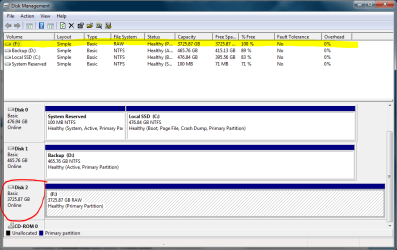
Taking a look at Drive manager shows the drive has a 'full' 4TB of space
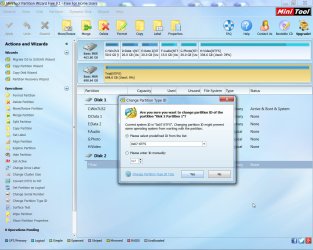
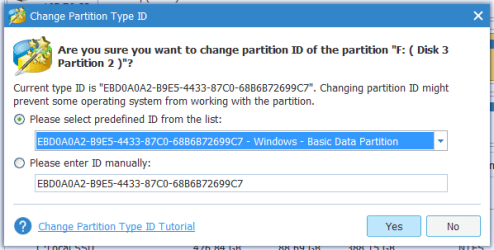
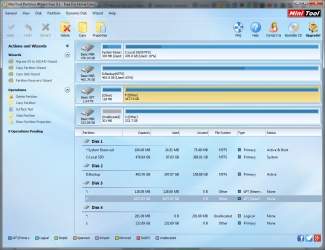
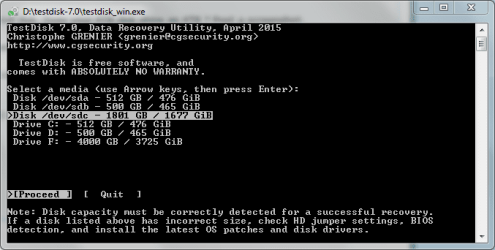
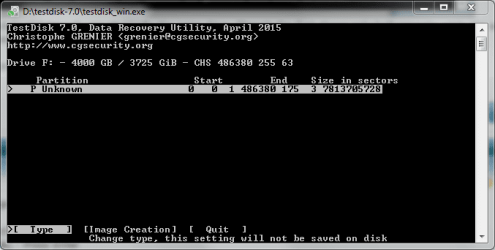
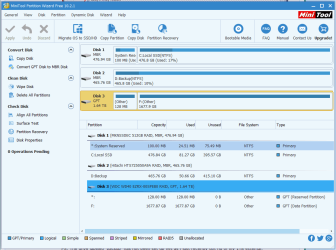
However, upon using MiniTool Partition to do a scan (as well as in TestDisk console tool) They only show about 1.64 TB max space.
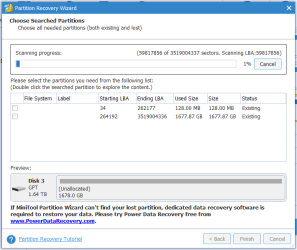
Note: The drive is GPT rather than MBR. Even MiniTools detects that much, yet still only shows a 2TB partition.
I don't have another 4TB drive to dump everything into should I get everything recovered. But recovery of most of these things is crucial as they are pics and works of my own that are only on this drive.
PS. The drive labeled "backup" has not been set up yet as i just recently got rid of my 1TB external.
UPDATE: I've been able to verify using GetDataBack that my files are still intact
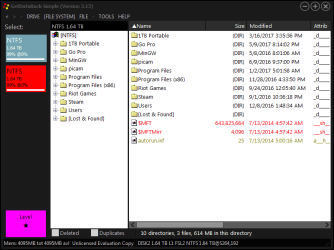
That's just the 'first partition' (the drive was never actually partitioned before this happened)
The second 'partition' doesnt really have anything on it...at least nothing I would deem important.
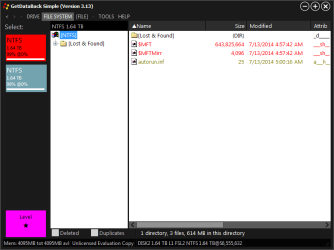
Now how to go about recovering this data?
After copying a few pics from my GoPro's SD card to a folder within the 4TB HDD, the folder said it was corrupted and inaccessible. I decided to use Recuva to get this pics back. Well recuva had an update and when I selected the 4TB/user/pshock/downloads folder...it too said it was corrupted.
Figuring my computer has been running too long, I decided to reboot. Once started, my desktop (Rainmeter gauges cause I have icons hidden) wasnt loaded, no programs (Steam, Media player, photoshop, etc.) will boot. Looking at my file explorer shows the 4TB HDD but not its capacity.
Taking a look at Drive manager shows the drive has a 'full' 4TB of space
However, upon using MiniTool Partition to do a scan (as well as in TestDisk console tool) They only show about 1.64 TB max space.
Note: The drive is GPT rather than MBR. Even MiniTools detects that much, yet still only shows a 2TB partition.
I don't have another 4TB drive to dump everything into should I get everything recovered. But recovery of most of these things is crucial as they are pics and works of my own that are only on this drive.
PS. The drive labeled "backup" has not been set up yet as i just recently got rid of my 1TB external.
UPDATE: I've been able to verify using GetDataBack that my files are still intact
That's just the 'first partition' (the drive was never actually partitioned before this happened)
The second 'partition' doesnt really have anything on it...at least nothing I would deem important.
Now how to go about recovering this data?
Last edited:
My Computer
At a glance
Win 7 Ultimate 64-bitIntel i716GB Corsair VengenceGigabyte
- Computer type
- PC/Desktop
- Computer Manufacturer/Model Number
- Custom
- OS
- Win 7 Ultimate 64-bit
- CPU
- Intel i7
- Motherboard
- MSI MPower
- Memory
- 16GB Corsair Vengence
- Graphics Card(s)
- Gigabyte


 ) can be quite different. How is that?