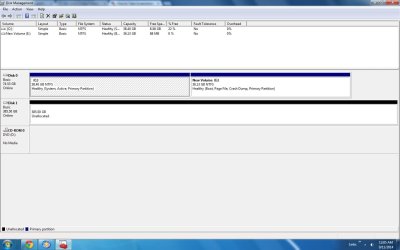
This is an external hard drive 500GB that shows up as 385GB
This was showing as a 500GB. I went to format to fat32 and did something wrong. I used EaseUS
Hello mvp and welcome. To be blunt most drives do not have the available space they advertise or state they have but your does seem to have more unavailable than I would have expected.
The other thing I am curious to is why format it FAT 32 and not NTFS??
The only thing I can think of is that there is an inordinate amount of drive manufacturer software on it - much the same as you get with some USB sticks. In that instance I just wipe the drive with diskpart feature or using the Partition Wizard wipe function - but the choice is up to you as to what you do with the drive.
One other Desktop (tester) and spare Toshba laptop both with SSD's
Running Kaspersky 2016 ISS on all machines config'd identically
Logitec audio stereo systems on each machine (x3)
Canon MG5250MFC
Router/modem TP-Link running WPA2SK
( Click on the picture to download guiformat.exe (76KB))
Note: Your 500GB drive would have never shown as 500GB anywhere, anytime - not in Windows. Don't take us for a ride .
For HDD manufacturers it is decimal. 1000MB = 1GB. For Windows it will be binary. 1024MB=1GB 9likewise for KBs and MBs. So for a 500GB drive you can expect it to be shown as around 465 GB.
Please give details of your 500GB hard drive Make/Model.
Did you buy it?
or did you pull it from an OEM machine? (OEMs can hide space in the HDD which the OS cannot see and will not touch as will most partitioning software..)
One other Desktop (tester) and spare Toshba laptop both with SSD's
Running Kaspersky 2016 ISS on all machines config'd identically
Logitec audio stereo systems on each machine (x3)
Canon MG5250MFC
Router/modem TP-Link running WPA2SK



 .
. 


