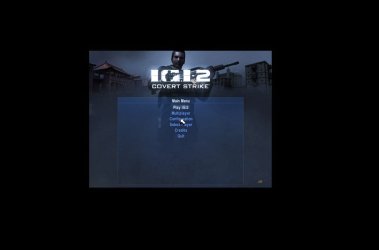
640x280 game resolution problem

HexMan

New member
Local time
4:47 PM
Messages
5
My all 3d games are now viewing in 640x280 screen resolution, it wasn't like that before. I'm using Intel(R) HD Graphics Family graphics card that came inbuilt in my Notebook PC, My games run fine but now all Full-Screen 3d games are viewing in 640x280 screen resolution. Everything is fine with my PC but the games are viewing like that. :(
It all happened when I downloaded a game made for windows 3.x- windows 95, it viewed in 640x280 screen, I executed it on my machine and it freezed for a moment and started lagging, I closed it and lo! My screen became small with 640x280 screen resolution, I corrected it using the resolutions menu and it came back to normal, but when I run my games, all of them viewed in 640x280 screen, it wasn't like that before I run that old game. My games are stuck in that resolution and I can't change the resolution from the games'-settings. I think there's a problem in my windows screen-resolution settings, I don't know how I can change these settings but will you please explain all the possible solutions. I've attached the images, before and after that problem.
 

Attachments

  • before.JPG
    before.JPG
    17.8 KB · Views: 6
  • after.jpg
    after.jpg
    16.1 KB · Views: 4

My Computer

Computer type
Laptop
Computer Manufacturer/Model Number
Lenovo
OS
Windows 7 Ultimate 32bit
CPU
Dual Core 2.00 GHz
Memory
500 GB
Graphics Card(s)
Intel(R) HD Graphics Family
Hard Drives
C
D
E
F
Antivirus
AVG Free
Browser
Google Chrome; IE8; Mozilla Firefox
Have you tried a system restore to a point before that one game was installed that changed the resolution?
 

My Computer

Computer type
PC/Desktop
Computer Manufacturer/Model Number
custom build
OS
Windows 10 64bit
CPU
AMD Phenom II X4 925 (Deneb)(2.8GHz) OC 3.4GHz
Motherboard
M5A78L-MLX Plus
Memory
Corsair Vengeance DDR3 4GBX2 (8192MB)
Graphics Card(s)
XFX HD 6870 1GB (OC)- 940MHz core, mem 1150MHz
Monitor(s) Displays
Vizio 26' 1920x1080 / Acer 1336x768
Screen Resolution
1920x1080 60Hz /1336x768
Hard Drives
Kingston Digital 60GB SSDNow V300/500gb HDD Western Digital 7200rpm (/WD 160GB HDD 7200rpm
PSU
CORSAIR CX600 600w
Case
AZZA Orion 202 EVO
Cooling
cooler master hyper TX3 cpu cooler
Keyboard
Razer DeathStalker
Mouse
Logitech Optical Gaming Mouse G400
Antivirus
Defualt on win 10
Browser
Firefox
Other Info
cpu is overclocked in bios
No, I recently found out that the System Restore was turned off on my computer, is there any other solution?
 

My Computer

Computer type
Laptop
Computer Manufacturer/Model Number
Lenovo
OS
Windows 7 Ultimate 32bit
CPU
Dual Core 2.00 GHz
Memory
500 GB
Graphics Card(s)
Intel(R) HD Graphics Family
Hard Drives
C
D
E
F
Antivirus
AVG Free
Browser
Google Chrome; IE8; Mozilla Firefox
Have you tried going to Screen Resolution by Right Clicking on your desktop to see if it allows you to change back to native resolution?

That or uninstall the drivers and install a new set.
 

My Computer

Computer type
PC/Desktop
Computer Manufacturer/Model Number
Custom Built... Intel/Nvidia/ASRock
OS
Windows 7 x64 (Ultimate)
CPU
Intel i5-4670K
Motherboard
ASRock Z87 Extreme 6
Memory
8GBs Ripjaws 2133Mhz
Graphics Card(s)
Asus GTX660 (2GBs)
Sound Card
Onboard Realtek HD
Monitor(s) Displays
Acer AL2216W
Screen Resolution
1680 x 1050
Hard Drives
Samsung 840 SSD 120GBs
Samsung 750GB 32MB cache
1.5 TB
PSU
PC Cooling 750w Silencer
Case
Thermaltake Spedo Advance
Cooling
Std Cooler
Keyboard
Logitech G15
Mouse
Logitech G9
Internet Speed
Comcast 20Mbit
Antivirus
Avast
Browser
Firefox
Have you tried going to Screen Resolution by Right Clicking on your desktop to see if it allows you to change back to native resolution?

That or uninstall the drivers and install a new set.

No, when I close the game, the resolution comes back to normal. I can uninstall the drivers but, from where I'll install them?
 

My Computer

Computer type
Laptop
Computer Manufacturer/Model Number
Lenovo
OS
Windows 7 Ultimate 32bit
CPU
Dual Core 2.00 GHz
Memory
500 GB
Graphics Card(s)
Intel(R) HD Graphics Family
Hard Drives
C
D
E
F
Antivirus
AVG Free
Browser
Google Chrome; IE8; Mozilla Firefox
Isn't there any other solution? This problem is not for a particular game but all the full-screen games have become like this.
 

My Computer

Computer type
Laptop
Computer Manufacturer/Model Number
Lenovo
OS
Windows 7 Ultimate 32bit
CPU
Dual Core 2.00 GHz
Memory
500 GB
Graphics Card(s)
Intel(R) HD Graphics Family
Hard Drives
C
D
E
F
Antivirus
AVG Free
Browser
Google Chrome; IE8; Mozilla Firefox
You guys just don't help at all!
 

My Computer

Computer type
Laptop
Computer Manufacturer/Model Number
Lenovo
OS
Windows 7 Ultimate 32bit
CPU
Dual Core 2.00 GHz
Memory
500 GB
Graphics Card(s)
Intel(R) HD Graphics Family
Hard Drives
C
D
E
F
Antivirus
AVG Free
Browser
Google Chrome; IE8; Mozilla Firefox
Hi there .... Do you have IntelR Graphics and Media in the Control Panel ... Double click on that and change the settings
 

My Computer

Computer Manufacturer/Model Number
W530-3630QM1
OS
windows 7 home 64bit
CPU
INTEL-CORE I7
Memory
16GB
Hard Drives
750GB
Browser
Chrome
Back
Top