64bit Windows won't use all my memory

mrentropy

New member
Local time
9:50 AM
Messages
1
The title about sums it up, but to avoid answers that don't answer the question, let me offer a few specifics.

I have 4gb installed but only 2.75 is usable.

I have a total of 1gb of video ram on my two video cards.

I am running 64bit Windows.

My board recognizes up to 8gb of ram (though i wonder if they ever sold 2gb strips of ddr that weren't buffered . . . they don't now at any rate)

The Max Memory button on msconfig is not clicked.

My motherboard doesn't seem to have any memory options available.

I know similar posts have been made, but nothing i've read seemed to match my specific problem. Any help would be greatly appreciated.

Thanks.
 

My Computer

OS
Windows 7 64bit
CPU
AMD Athlon X2 64 4400 (2.2GHz)
Motherboard
Asus A8N32-SLI Deluxe
Memory
4gb (2.75 usable)
Graphics Card(s)
2 Geforce 8800 GT
Sound Card
HTOmega Striker 7.1
Monitor(s) Displays
32" Samsung LCD
check to see if your board has the latest bios flash update available. you may also want to use Memtest86.com - Memory Diagnostic to make sure your ram is okay.
 

My Computer

Computer Manufacturer/Model Number
Custom
OS
Windows 7 Ultimate Signature Edition
CPU
Intel Core i7 Extreme 3.33GHz
Motherboard
EVGA X-58 SLI Classified
Memory
12GB DDR3
Graphics Card(s)
2x EVGA 285 2GB in SLI
Sound Card
Creative Labs X-Fi ExtremeGamer
Monitor(s) Displays
30" Viewsonic
Hard Drives
2x1TB Western Digital 7200RPM in RAID 0/1TB WD My Book External HDD
PSU
Thermaltake 1000w supporting quad SLI
Case
Thermaltake Armor Full Tower
Cooling
Thermaltake V1 CPU+DIY Liquid cooling
mrentropy, welcome to the forums.

My motherboard doesn't seem to have any memory options available.
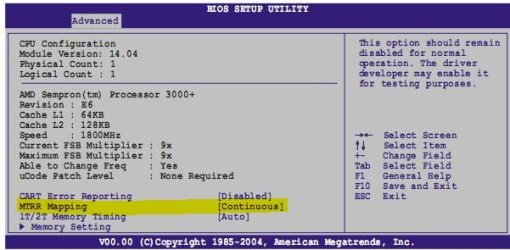
Actually it does, two of them according to this I found,

Overclockers Forums - View Single Post - 4 gigs ram issue with Vista x64

And to save you hunting for where they are,

mtrr.JPG
memhole.JPG

The second one needs to be set to enabled. Haven't been able to determine whether the MTRR needs to be set to contiguous or discrete. Make the change to the second one and boot to Windows, if it still doesn't show the full 4 GB reboot and set it to discrete.
 

My Computer

Computer type
PC/Desktop
Computer Manufacturer/Model Number
Me
OS
Win 7 Ultimate x64
CPU
FX-8350 @ 4.6 GHz so far
Motherboard
Asus M5A97 EVO
Memory
ADATA XPG V1 Series Black 8GB DDR3 1600
Graphics Card(s)
Sapphire R9 270x Dual-X
Sound Card
Xonar DGX w/ Corsair Vengence 1300
Monitor(s) Displays
Acer S232HL Abid
Screen Resolution
1920x1080
Hard Drives
120 GB OCZ Vertex 3
500 GB Seagate 7200.12
PSU
Antec Earthwatts 650W Green
Case
Antec Three Hundred
Cooling
Cooler Master 212 EVO
Keyboard
Logitech G510
Mouse
Logitech G500s
Internet Speed
35000/3000
does it say 4gb installed 2.75 usable and by the look of it the video cards are pci not pci express 2.0 and i would bet if that is the case then they dont have onboard ram it will steel ram from the system and that is why u get this if possible take one card out and see if that helps
 

My Computer

Computer Manufacturer/Model Number
home built
OS
windows 7 64 bit
CPU
i5 750 quad core
Motherboard
boistar tp55
Memory
CORSAIR ddr3 1666 8 gigs
Graphics Card(s)
XFX ATI RADEON 5750
Sound Card
on board
PSU
corsair tx650w
The method that solved my problem ...

First Of all i have a dual boot system..first I installed the chip-set driver in x64 win7 as it was not installed.. then i booted up my x86 win7 & >>start menu>>msconfig>>in the boot tab>>advanced settings/options>> uncheck the maximum memory option..
and then rebooted to my x64 win7.. and wallah..
 

My Computer

OS
Windows 7 ultimate x86
Memory Hole needs to be enabled
 

My Computer

Computer type
PC/Desktop
Computer Manufacturer/Model Number
Self Build
OS
MS Windows 7 Professional 64-bit SP1
CPU
AMD FX(tm)-6100 Six-Core Processor Socket AM3+ (942)
Motherboard
ASUSTeK COMPUTER INC. SABERTOOTH 990FX (AM3r2)
Memory
8.00 GB Dual-Channel DDR3 @ 802MHz (11-11-11-36) 1.5Volts
Graphics Card(s)
NVIDIA GeForce GTX 560 Ti
Sound Card
Onboard Realtek HD
Monitor(s) Displays
shimian (1920x1080@60Hz)
Screen Resolution
1920*1080
Hard Drives
OCZ-AGIL ITY3 SATA Disk Device 120GB
PSU
Corsair TX 750
Case
Corsair
Cooling
WaterCooled
Keyboard
Microsoft Wired
Mouse
Logitech USB Optical TiltWheel Mouse
Internet Speed
Realtek PCIe GBE Family Controller 20MB*1MB
Antivirus
Avast
Browser
Firefox
Other Info
150GB Internal Hard Drive for Backing Up Important Files -
Hauppauge Nova-DT Dual DVB-T Tuner Device (+IR) -
USB PC Camera with Mic (SN9C105)
Yep ^This

Page 4-26 of your manual
 

My Computer

Computer type
PC/Desktop
Computer Manufacturer/Model Number
Home built (GeneO industries)/Model 4
OS
Windows 10 Pro. EFI boot partition, full EFI boot
CPU
i7 4770k 4.4GHz (44-44-43-43 turbo) @ 1.248V
Motherboard
ASUS Maximus VI Hero
Memory
16GB (8GBx2) @2200 MHz G.skill Sniper 10-11-10-30-1, 1.6V
Graphics Card(s)
MSI GTX 970 Gaming 4G
Sound Card
Onboard SupremeFX Audio
Monitor(s) Displays
NEC Spectraview 2490WUXi-SV
Screen Resolution
1920 x 1200
Hard Drives
Samsung 850 Pro 256GB (OS), Samsung 2x 128GB 840 Pro SSD in RAID0, 3x WD Blue 6Gb/s 1TB RAID0, WD 2TB Black external USB 3.0, 2TB WD20EARS Green external USB 3.0, 2x 500GB Seagate and 1 750 GB external USB, 1x 350GB external USB3
PSU
Seasonic X-850 (2012 KM3 model)
Case
Fractal Design Define R4
Cooling
NH-D14, NF-F12, NF-A15; NF-P14, NF-P12,NF-A14, S12A PWM
Keyboard
Cooler Master Storm Quickfire Rapid - Brown
Mouse
Logitech G602
Internet Speed
126.4 Mb/s down, 24.3 Mb/s up
Other Info
USB 3.0 x8 , SATA III x8, eSATA, USB 2.0 x6. Samsung DVD R/W drive.

WEI: CPU 7.8, Memory 7.9, Graphics 7.9, Disk 7.9
Back
Top