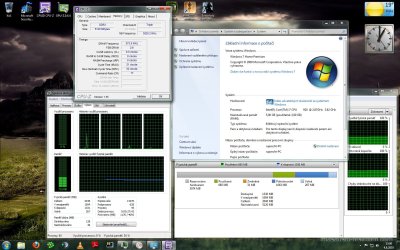
6GB DDR3 Ram Installed BUT only 2.75 USABLE?!

As everyone else has said, you are using a 32 bit operating system, which means that you will NEVER see more than 3.5 gigs.

~Lordbob

actualy no, that majorly depends on amount of memory your graphic card is having :) this "myth" started when more people started to get 4gb of ram in days when graphic cards had 384-512MB of ram.

32bit system can address maximium 4gb of memory, before you can figure out how much memory you have maximum usable, you need to take in to account all graphic card memory, soundcard memory(xram for example) and everything else that system needs to have access to. So in 32bit system:

phsyical memory usable = 4GB - graphic card memory - all the other things

since he have gtx280 that means graphic card already is having 1GB of memory system needs to address, so 4gb - 1gb = 3gb, other 0.25GB is probably used on random stuff he also have in his computer and as far as i know windows is rounding this in computer screen down in steps of 0.25GB.

but ye only real solution for you is go to 64bit system.
 

My Computer My Computer

At a glance

Windows 7 SP1 x64 build 7601.21701Intel Q9450 @3608mhz (8x451)6GB - 2x Corsair CM2X1024-8500C5D and 2x CM2X...Zotac nVidia GTX295
Computer Manufacturer/Model Number
Custom
OS
Windows 7 SP1 x64 build 7601.21701
CPU
Intel Q9450 @3608mhz (8x451)
Motherboard
Asus Rampage Formula
Memory
6GB - 2x Corsair CM2X1024-8500C5D and 2x CM2X2048-8500C5D
Graphics Card(s)
Zotac nVidia GTX295
Sound Card
SoundMAX ADI1988B (X-FI MB)
Monitor(s) Displays
LG L227WTP & Samsung LE26R71B LCD TV
Screen Resolution
1680x1050 & 1360x768
Hard Drives
2x Seagate ST3500630NS in RAID0
PSU
Thermaltake Toughpower 750W
Case
Thermaltake
Cooling
Thermalright Ultra-120 Extreme and couple of fans
Keyboard
Logitech G15 v2
Mouse
Razer DeathAdder
Internet Speed
FTTH 50/50 (dualstack IPv4 & native IPv6)
Installing a x64 bit version of Windows 7 is the only way I'm afraid. Other ways of getting 6GB of RAM to work on a 32bit OS will solve on problem and create two more.
 

My Computer My Computer

At a glance

Windows 7 Professional x64Intel i5-2500k @ 3.3Ghz4GB DDR3Nvidia GTS250 1GB
Computer Manufacturer/Model Number
Desktop
OS
Windows 7 Professional x64
CPU
Intel i5-2500k @ 3.3Ghz
Motherboard
Gigabyte GA-Z77X-UD5H
Memory
4GB DDR3
Graphics Card(s)
Nvidia GTS250 1GB
Monitor(s) Displays
Sony SDM S95A
Screen Resolution
1280x1024
Hard Drives
1x 1TB, 2x 250GB HDDs
PSU
Corsair HX850W
Case
Cooler Master 690 II
Cooling
Thermalright True Spirit 140mm & 3x 120mm & 3x 140mm Fans
Keyboard
Logitech Media Keyboard
Mouse
Microsoft Intellimouse
Internet Speed
8MB
I am noob at this tech stuff but i can see at least several totally out-off-mind posts here :)

My advice, don't use nay kind of hack/non MS patch.
Backup > fresh install x64 > everybody happy


Enabling PAE can and likely will cause far greater issues with your system's drivers and stability. It really isn't a hard concept for people to understand, but there's no software trick to break the memory limit that exists in 32 bit OSes. This topic has literally been beaten to death on several other forum boards, and it is sad that there are still some who won't accept the findings. If you want to use 4 GB or more memory, you run an x64 OS. That's the only way.

PAE is meant for server OSes to enable 36 bit usage in some cases. It is not meant for a desktop, client PC, and likely will cause serious issues. if you want to use all your memory, do it the right way.

Can you point me to that discussion or sum it in really simple - noob words, what problems comes after enabling PAE?
I am curious :)

Why PAE don't cause problems on servers and it does on desktop PC? One more question...if Microsoft wants, can they enable 32-bit W7 to use +4GB memory (without PAE) ?
 

My Computer My Computer

At a glance

Windows 7 Ultimate 6.1.7600 Build 7600 64-bitIntel(R) Core(TM)2 Duo CPU E8400 @ 3.00GHz4X DDR2 1GB PC6400 (800MHz), KingmaxGigabyte ATI 3870 512 DDR3
OS
Windows 7 Ultimate 6.1.7600 Build 7600 64-bit
CPU
Intel(R) Core(TM)2 Duo CPU E8400 @ 3.00GHz
Motherboard
Gigabyte GA EP35-DS3
Memory
4X DDR2 1GB PC6400 (800MHz), Kingmax
Graphics Card(s)
Gigabyte ATI 3870 512 DDR3
Sound Card
Realtek ALC889A + ATI High Definition Audio Device
Monitor(s) Displays
Sony 40" 40W4000
Screen Resolution
1920x1080
Hard Drives
Samsung HD321KJ 320GB
PSU
Antec 380W 80+
Case
Antec NSK4480B
Cooling
1 x 120mm @low
Keyboard
Logitech Cordless Desktop S510
Mouse
Logitech Cordless Desktop S510
Internet Speed
2Mbit DSL Flatrate
Can you point me to that discussion or sum it in really simple - noob words, what problems comes after enabling PAE?
I am curious :)

most likely none, however PAE is just sort of "emulation", system can access all memory but applications cant, except if system does it for application.

if Microsoft wants, can they enable 32-bit W7 to use +4GB memory (without PAE) ?

no they cant, this is limited by CPU arhitecture and not OS it self.

if anyone wants any technical stuff, check wikipedia or something.
 

My Computer My Computer

At a glance

Windows 7 SP1 x64 build 7601.21701Intel Q9450 @3608mhz (8x451)6GB - 2x Corsair CM2X1024-8500C5D and 2x CM2X...Zotac nVidia GTX295
Computer Manufacturer/Model Number
Custom
OS
Windows 7 SP1 x64 build 7601.21701
CPU
Intel Q9450 @3608mhz (8x451)
Motherboard
Asus Rampage Formula
Memory
6GB - 2x Corsair CM2X1024-8500C5D and 2x CM2X2048-8500C5D
Graphics Card(s)
Zotac nVidia GTX295
Sound Card
SoundMAX ADI1988B (X-FI MB)
Monitor(s) Displays
LG L227WTP & Samsung LE26R71B LCD TV
Screen Resolution
1680x1050 & 1360x768
Hard Drives
2x Seagate ST3500630NS in RAID0
PSU
Thermaltake Toughpower 750W
Case
Thermaltake
Cooling
Thermalright Ultra-120 Extreme and couple of fans
Keyboard
Logitech G15 v2
Mouse
Razer DeathAdder
Internet Speed
FTTH 50/50 (dualstack IPv4 & native IPv6)
Can you point me to that discussion or sum it in really simple - noob words, what problems comes after enabling PAE?
I am curious :)
The main thing that's always mentioned, is that many drivers can or will have compability issues with it. I've also seen quite a few people mention that some of their major apps have issues running stable as well. As SoLoR mentioned, a quick trip to google will turn up more info than any one person would have have time to read through. If it was me, I wouldn't bother, because it isn't a supported option, so if I knew enough not to use it, I'd leave it at that.
 

My Computer My Computer

At a glance

Windows 7 Ultimate x64 SP1Intel Core i7-260012 GB Patriot Extreme DDR3-1333Nvidia GTX 470
OS
Windows 7 Ultimate x64 SP1
CPU
Intel Core i7-2600
Motherboard
Gigabyte GA-P67A-UD3P-B3
Memory
12 GB Patriot Extreme DDR3-1333
Graphics Card(s)
Nvidia GTX 470
Monitor(s) Displays
Dell UltraSharp 2209WA
Hard Drives
OCZ Agility3 240 GB, WD5001AALS, WD7501AALS
PSU
OCZ ModStream 700W
Case
CoolerMaster HAF 912 Advanced
Cooling
CoolerMaster Hyper 212 Plus
PAE is on regardless, as long as hardware DEP is activated PAE is on. But the problems with PAE is not to do with it, but to do with going over 4GB. That is why even with PAE the client versions of Windows are limited to 4GB. On servers, drivers are made to a higher standard.

FYI, I'm referring to x86-64 processors running in the legacy x86 mode.
 

My Computer My Computer

At a glance

Windows 10 Pro (x64)Intel Core i7-3930K (3.2GHz - 4.5GHz)4x Samsung 4GB PC3-12800 DDR3 (16GB 1600MHz)Nvidia Geforce GTX 690
Computer type
PC/Desktop
Computer Manufacturer/Model Number
Alienware Aurora ALX R4
OS
Windows 10 Pro (x64)
CPU
Intel Core i7-3930K (3.2GHz - 4.5GHz)
Motherboard
Alienware Aurora-R4 x79
Memory
4x Samsung 4GB PC3-12800 DDR3 (16GB 1600MHz)
Graphics Card(s)
Nvidia Geforce GTX 690
Sound Card
SteelSeries Siberia Elite
Monitor(s) Displays
Dell UltraSharp U3011
Screen Resolution
2560x1600
Hard Drives
Samsung 850 Pro 256 GB, Seagate 1TB Desktop Hybrid HDD, 2x Western Digital 4TB Green HDD
PSU
875W Some Dell PSU <.<
Case
Alienware Aurora ALX
Cooling
Custom Liquid Cooling (EK CPU & GPU blocks) dual EK 480RAD
Keyboard
Logitech G710+ Mechanical
Mouse
Logitech G700s
Internet Speed
Verizon Fios (50 mbps average)
Other Info
Server: Intel NUC D54250WYK: i5-4250U, 16GB, 256 GB mSATA, Windows Server 2012 R2
I can put it pretty simply.
A 32bit operating system can use its 32 bits ( i.e. binary numbers 0/1 in a set of 32) to refer to memory locations that are also addressed in 32 bits. All the memory on your system, ram or video, has to be mapped to that.
It's like counting on your fingers. A 32 bit system can address 2^32 locations, about 3Gb.
A 64 bit operating system 2^64 locations. Which is a very big number indeed.
 

My Computer My Computer

At a glance

Win 7Intel core 2 duo4 gig
Computer Manufacturer/Model Number
Mesh PC
OS
Win 7
CPU
Intel core 2 duo
Memory
4 gig
Hard Drives
1 x250 gig
1 x 500 gig
Mouse
MS lasermouse 5000 -'cos it scrolls smoothly, no wheel click
Internet Speed
10mb - cable
Other Info
The mouse took most research. I hate that click on the wheel, this one has the old fashioned smooth wheel. There aren't many about.
I really don't want to reinstall Windows 7 x64bit version because i have soo much data that i need to back up in order to do that.
That's why you do the proper planning and research ahead of time. The memory limits of x86 OSes have been considered common knowledge in the computing field for about 5 years now, since the debate was raging on between XP and XP x64. I'm surprised someone would know enough to build a nice, top end system, and not understand they'd need an x64 OS to handle it all.....which acts as a segway to...

The fact is, if you want to use all of your memory, you need to run a 64 bit OS. Backing up your data, reinstalling the OS, and restoring your data is a very simple straightforward process that is FAR less painful than people make it out to be. Besides...wouldn't it be worth it, to be able to take full advantage of your system?

Your current setup is akin to put skateboard wheels on a new BMW M3. It's capable of so much more, but one simple incorrect decision is holding back the entire system.
+1 and +rep.

I can put it pretty simply.
A 32bit operating system can use its 32 bits ( i.e. binary numbers 0/1 in a set of 32) to refer to memory locations that are also addressed in 32 bits. All the memory on your system, ram or video, has to be mapped to that.
It's like counting on your fingers. A 32 bit system can address 2^32 locations, about 3Gb.
A 64 bit operating system 2^64 locations. Which is a very big number indeed.

Very well said, that helped me understand how it works as well. Thanks. +rep

I will back up what everyone else has said: Just back up your computer and install x64. There is no other way. Or you can choose to keep it as is with you <4gigs.

~Lordbob
 

My Computer My Computer

At a glance

Windows 7 Ultimate x64, Mint 9Intel i5-2500k2x 4Gb Corsair VENGEANCE DDR3-1600NVidia GeForce N260GTX Twin Frozr
Computer Manufacturer/Model Number
Hera
OS
Windows 7 Ultimate x64, Mint 9
CPU
Intel i5-2500k
Motherboard
ASUS P8P67 Pro
Memory
2x 4Gb Corsair VENGEANCE DDR3-1600
Graphics Card(s)
NVidia GeForce N260GTX Twin Frozr
Sound Card
Realtek HD OnBoard Audio
Monitor(s) Displays
ASUS 24" Monitor
Screen Resolution
1920x1080
Hard Drives
G.SKILL Phoenix Series 60GB SATA II MLC Internal Solid State Drive (SSD)
SAMSUNG Spinpoint F3R 1TB 7200 RPM 32MB Cache SATA II
PSU
Cooler Master Real Power Pro 750W
Case
Cooler Master Haf 932
Cooling
Fans
Keyboard
Razer Tarantula
Mouse
Razer Lachesis
Internet Speed
not fast enough
Windows has to map memory spaces for all installed hardware - graphics included. WIth x64, the limit on Windows processes is removed, although your graphics hardware is still mapped.
 

My Computer My Computer

At a glance

Windows 7 Ultimate x86-64[email protected] 1066MHz FSB6GB DDR3 1066MHz9300M GS 256MB Dedicated (Speed) + Intel4500M...
Computer Manufacturer/Model Number
Sony Vaio Z46GDU
OS
Windows 7 Ultimate x86-64
CPU
[email protected] 1066MHz FSB
Motherboard
Sony branded
Memory
6GB DDR3 1066MHz
Graphics Card(s)
9300M GS 256MB Dedicated (Speed) + Intel4500MHD (Stamina)
Sound Card
Realtek HD Audio
Monitor(s) Displays
13.1' WXGA
Screen Resolution
1600x900
Hard Drives
320GB 7200RPM w/ 16MB cache
Internet Speed
1MB/s
Hi all
I have almost the same problem.
I used Windows 7 64bit
No memory remap in bios
 

Attachments

  • ramss.jpg
    ramss.jpg
    258.3 KB · Views: 332

My Computer My Computer

At a glance

Windows 7 home premium 64biti7 920 @ 4GHz @ 1.296v D0zeppelin 3x2GB DDR3 1600MHzASUS GTX470
OS
Windows 7 home premium 64bit
CPU
i7 920 @ 4GHz @ 1.296v D0
Motherboard
gigabyte X58A-UD3R rev2.
Memory
zeppelin 3x2GB DDR3 1600MHz
Graphics Card(s)
ASUS GTX470
Sound Card
Realtek
Monitor(s) Displays
LG 22"
Screen Resolution
1680x1050
Hard Drives
Kingston 64GB SSD/
WD 320GB
PSU
Seasonic 750W
Case
Antec Three hundred
Cooling
Noctuas

My Computer My Computer

At a glance

Windows 8.1 Pro RTM x64Intel Core-i5-3570K 4-core @ 3.4GHz (Ivy Brid...4 x 4GB DDR3-1600 Corsair Vengeance CMZ8GX3M2...MSI GeForce GTX770 Gaming OC 2GB
Computer type
PC/Desktop
Computer Manufacturer/Model Number
Dwarf Dwf/11/2012 r09/2013
OS
Windows 8.1 Pro RTM x64
CPU
Intel Core-i5-3570K 4-core @ 3.4GHz (Ivy Bridge) (OC 4.4GHz)
Motherboard
ASRock Z77 Extreme4-M
Memory
4 x 4GB DDR3-1600 Corsair Vengeance CMZ8GX3M2A1600C9B (16GB)
Graphics Card(s)
MSI GeForce GTX770 Gaming OC 2GB
Sound Card
Realtek High Definition on board solution (ALC 898)
Monitor(s) Displays
ViewSonic VA1912w Widescreen (VGA)
Screen Resolution
1440x900
Hard Drives
OCZ Agility 3 SSD 120GB SATA III x2 (RAID 0)
Samsung HD501LJ 500GB SATA II x2
Hitachi HDS721010CLA332 1TB SATA II
Iomega 1.5TB Ext USB 2.0
WD 2.0TB Ext USB 3.0
PSU
XFX Pro Series 850W Semi-Modular
Case
Gigabyte IF233
Cooling
1 x 120mm Front Inlet 1 x 120mm Rear Exhaust
Keyboard
Microsoft Comfort Curve Keyboard 3000 (USB)
Mouse
Microsoft Comfort Mouse 3000 for Business (USB)
Internet Speed
NetGear DG834Gv3 ADSL Modem/Router (Ethernet) ~4.0 Mb/s (O2)
Antivirus
Avast! 8.0.1497
Browser
IE 11
Other Info
Optical Drive: HL-DT-ST BD-RE BH10LS30 SATA Bluray
Lexmark S305 Printer/Scanner/Copier (USB)
WEI Score: 8.1/8.1/8.5/8.5/8.25
Asus Eee PC 1011PX Netbook (Windows 7 x86 Starter)
yop , i try
there was 0
so i put max i can 5120,then ok, i check that again, and there is only 1024
 

My Computer My Computer

At a glance

Windows 7 home premium 64biti7 920 @ 4GHz @ 1.296v D0zeppelin 3x2GB DDR3 1600MHzASUS GTX470
OS
Windows 7 home premium 64bit
CPU
i7 920 @ 4GHz @ 1.296v D0
Motherboard
gigabyte X58A-UD3R rev2.
Memory
zeppelin 3x2GB DDR3 1600MHz
Graphics Card(s)
ASUS GTX470
Sound Card
Realtek
Monitor(s) Displays
LG 22"
Screen Resolution
1680x1050
Hard Drives
Kingston 64GB SSD/
WD 320GB
PSU
Seasonic 750W
Case
Antec Three hundred
Cooling
Noctuas
NO, I think you've got confused. What I meant was to check my post and ensure that the option in msconfig was unchecked. Unchecking this option should allow your system to use all of the available memory. Checking this option will restrict your system to the amount of memory listed below the box.
 

My Computer My Computer

At a glance

Windows 8.1 Pro RTM x64Intel Core-i5-3570K 4-core @ 3.4GHz (Ivy Brid...4 x 4GB DDR3-1600 Corsair Vengeance CMZ8GX3M2...MSI GeForce GTX770 Gaming OC 2GB
Computer type
PC/Desktop
Computer Manufacturer/Model Number
Dwarf Dwf/11/2012 r09/2013
OS
Windows 8.1 Pro RTM x64
CPU
Intel Core-i5-3570K 4-core @ 3.4GHz (Ivy Bridge) (OC 4.4GHz)
Motherboard
ASRock Z77 Extreme4-M
Memory
4 x 4GB DDR3-1600 Corsair Vengeance CMZ8GX3M2A1600C9B (16GB)
Graphics Card(s)
MSI GeForce GTX770 Gaming OC 2GB
Sound Card
Realtek High Definition on board solution (ALC 898)
Monitor(s) Displays
ViewSonic VA1912w Widescreen (VGA)
Screen Resolution
1440x900
Hard Drives
OCZ Agility 3 SSD 120GB SATA III x2 (RAID 0)
Samsung HD501LJ 500GB SATA II x2
Hitachi HDS721010CLA332 1TB SATA II
Iomega 1.5TB Ext USB 2.0
WD 2.0TB Ext USB 3.0
PSU
XFX Pro Series 850W Semi-Modular
Case
Gigabyte IF233
Cooling
1 x 120mm Front Inlet 1 x 120mm Rear Exhaust
Keyboard
Microsoft Comfort Curve Keyboard 3000 (USB)
Mouse
Microsoft Comfort Mouse 3000 for Business (USB)
Internet Speed
NetGear DG834Gv3 ADSL Modem/Router (Ethernet) ~4.0 Mb/s (O2)
Antivirus
Avast! 8.0.1497
Browser
IE 11
Other Info
Optical Drive: HL-DT-ST BD-RE BH10LS30 SATA Bluray
Lexmark S305 Printer/Scanner/Copier (USB)
WEI Score: 8.1/8.1/8.5/8.5/8.25
Asus Eee PC 1011PX Netbook (Windows 7 x86 Starter)
I understand what you mean, i try both.
Unchecked-restart=nothing change
Check-5120-restart= nothing change
:(
 

My Computer My Computer

At a glance

Windows 7 home premium 64biti7 920 @ 4GHz @ 1.296v D0zeppelin 3x2GB DDR3 1600MHzASUS GTX470
OS
Windows 7 home premium 64bit
CPU
i7 920 @ 4GHz @ 1.296v D0
Motherboard
gigabyte X58A-UD3R rev2.
Memory
zeppelin 3x2GB DDR3 1600MHz
Graphics Card(s)
ASUS GTX470
Sound Card
Realtek
Monitor(s) Displays
LG 22"
Screen Resolution
1680x1050
Hard Drives
Kingston 64GB SSD/
WD 320GB
PSU
Seasonic 750W
Case
Antec Three hundred
Cooling
Noctuas
BCDEdit /set PAE forceenable


this may work to see all the ram
 

My Computer My Computer

At a glance

windows 7 professional & ultimate 64bit laptops2.27 boost to 2.53 & 2.53 boost to 2.804GBIntel® Graphics Media Accelerator HD
Computer Manufacturer/Model Number
Gateway/NV7923u & NV79C52u Laptops
OS
windows 7 professional & ultimate 64bit laptops
CPU
2.27 boost to 2.53 & 2.53 boost to 2.80
Motherboard
Mobile Intel® HM55 Express Chipset ???
Memory
4GB
Graphics Card(s)
Intel® Graphics Media Accelerator HD
Sound Card
realtek High-definition audio support
Monitor(s) Displays
17.3 " HD 1600 x 900
Hard Drives
hatachi Travelstar 5400 500GB & west digital 500GB
Internet Speed
35MB fios
Nothing happend, just some window pop up and i can even read it, its too fast
 

My Computer My Computer

At a glance

Windows 7 home premium 64biti7 920 @ 4GHz @ 1.296v D0zeppelin 3x2GB DDR3 1600MHzASUS GTX470
OS
Windows 7 home premium 64bit
CPU
i7 920 @ 4GHz @ 1.296v D0
Motherboard
gigabyte X58A-UD3R rev2.
Memory
zeppelin 3x2GB DDR3 1600MHz
Graphics Card(s)
ASUS GTX470
Sound Card
Realtek
Monitor(s) Displays
LG 22"
Screen Resolution
1680x1050
Hard Drives
Kingston 64GB SSD/
WD 320GB
PSU
Seasonic 750W
Case
Antec Three hundred
Cooling
Noctuas
Back
Top