Solved 7 GB ram ( 4 usable ) ? Help, please

stereo

New member
Member
VIP
Local time
2:02 PM
Messages
541
I changed from Windows 7 Ultimate x86 to x64 and i upgraded my ram memory from 3 GB to 7 GB.
But in Control Panel i have this : 7 GB ( 4 GB usable )
Can you tell me,please, why only 4 GB, when i have 7 in total ?
Thanks in advance
 

Attachments

  • ram memory.jpg
    ram memory.jpg
    3.7 KB · Views: 264

My Computer

Computer type
PC/Desktop
OS
Windows 7 Ultimate x64
CPU
Intel7 4790K
Motherboard
Gigabyte GA-Z97X UD5H
Memory
8 GB DDR3
Graphics Card(s)
GTX 980Ti G1
Sound Card
SoundBlaster X-FI XtremeGamer
Monitor(s) Displays
Samsung UE40JU6550 UHD
Screen Resolution
3840 X 2160
Hard Drives
1 SSD Intel 330
2 x Western Digital 6400 AAKS
1 x Western Digital 3200 AAKS
PSU
Corsair 750W
Case
Cooler Master HAF 922
Its quite strange as far as I know 64 bit versions support RAM upto 192 GB.
 

My Computer

Computer Manufacturer/Model Number
HP Compaq 6710b
OS
Microsoft Windows 7 Ultimate 32-bit 7601 Multiprocessor Free
CPU
Intel(R) Core(TM)2 Duo CPU T7500 @ 2.20GHz
Motherboard
Hewlett-Packard 30C0
Memory
2.00 GB
Graphics Card(s)
(1) Mobile Intel(R) 965 Express Chipset Family (2) Mobile
Sound Card
High Definition Audio Device
Monitor(s) Displays
1
Screen Resolution
1280X800
Hard Drives
TOSHIBA MK1237GSX ATA Device
Size:- 111.79 GB
Mouse
Integrated Laptop Mouse
Internet Speed
3.1 MBps
Yes, i know. Thats why i wonder.
I use to have 3 GB DDR3 in triple channel ( 3 x 1 GB ) and i added soon 2 x 2 GB DDR3
Maybe the order they are in the RAM slots on the mobo is not okay?
Could that be the reason ?
My mobo is Gigabyte GA EX58 UD5
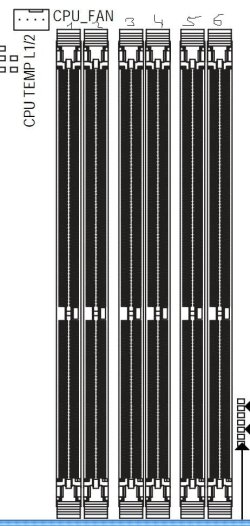
I have 3 x 1 GB DDR3 in 2 / 4 /6 slots and the other 2 x 2 gb are in slots 5 and 3
 

Attachments

  • motherboard ram.jpg
    motherboard ram.jpg
    63.2 KB · Views: 1

My Computer

Computer type
PC/Desktop
OS
Windows 7 Ultimate x64
CPU
Intel7 4790K
Motherboard
Gigabyte GA-Z97X UD5H
Memory
8 GB DDR3
Graphics Card(s)
GTX 980Ti G1
Sound Card
SoundBlaster X-FI XtremeGamer
Monitor(s) Displays
Samsung UE40JU6550 UHD
Screen Resolution
3840 X 2160
Hard Drives
1 SSD Intel 330
2 x Western Digital 6400 AAKS
1 x Western Digital 3200 AAKS
PSU
Corsair 750W
Case
Cooler Master HAF 922
Yes, i know. Thats why i wonder.
I use to have 3 GB DDR3 in triple channel ( 3 x 1 GB ) and i added soon 2 x 2 GB DDR3
Maybe the order they are in the RAM slots on the mobo is not okay?
Could that be the reason ?
My mobo is Gigabyte GA EX58 UD5
I have 3 x 1 GB DDR3 in 2 / 4 /6 slots and the other 2 x 2 gb are in slots 5 and 3
I'm not positive, but I think the sticks may all need to be the same size. I could be wrong though.
 

My Computer

Computer type
PC/Desktop
Computer Manufacturer/Model Number
Gigabyte Technology Co., Ltd.
OS
Win 7 Ultimate 64-bit SP1 (desktop)
CPU
Intel Core 2 Duo E8400
Motherboard
Gigabyte GA-EP35-DS3R
Memory
2x 2GB OCZ DDR II SDRAM PC2-6400
Graphics Card(s)
NVIDIA GeForce 9400GT
Monitor(s) Displays
HP 2009m(primary), Acer P191W
Screen Resolution
1600x900, 1440x900
Hard Drives
Internal:WD Caviar Black 640GB 32MB cache 7200RPM
External:Samsung Story Station 1TB HDD desktop drive
500GB Toshiba portable drive
PSU
Antec Earthwatts EA500D
Case
Antec Sonata III
Cooling
4 fans
Keyboard
Logitech Wave
Mouse
Logitech M-SBF90
Internet Speed
Slow due to home Wireless-G router
Antivirus
MSE, Hitman Pro, Malwarebytes
Browser
Chrome and Palemoon
Other Info
Laptop....Acer 5750Z-4835
15.6" HD Widescreen CineCrystal™ LED-backlit LCD Display: (1366x768 resolution, 16:9 aspect ratio)
Intel® Pentium® Processor B940 (2.0GHz, 2MB L3 cache)
Windows® 7 Home Premium,500GB Hard Drive,4GB DDR3 RAM, Intel® HD Graphics,8X DVD-Super Multi Double-Layer Drive
Multi-in-1 Digital Media Card Reader,802.11b/g/n Wi-Fi
Chrome and Palemoon, MSE, Hitman Pro
I changed from Windows 7 Ultimate x86 to x64 and i upgraded my ram memory from 3 GB to 7 GB.
But in Control Panel i have this : 7 GB ( 4 GB usable )
Can you tell me,please, why only 4 GB, when i have 7 in total ?
Thanks in advance


Go to start>type msconfig>goto max cpu and max ram and make sure they are both unticked.
 

My Computer

Computer Manufacturer/Model Number
HP Pavillion dv-7 1005 Tx
OS
Win 8 Release candidate 8400
CPU
[email protected]
Memory
4 gigs
Graphics Card(s)
Nvidia 9600M
Sound Card
HD built-in
Monitor(s) Displays
17" Wxga
Screen Resolution
1440x900
Cooling
none
Internet Speed
45Mb down 5Mb up

My Computer

Computer type
PC/Desktop
Computer Manufacturer/Model Number
Me
OS
Win 7 Ultimate x64
CPU
FX-8350 @ 4.6 GHz so far
Motherboard
Asus M5A97 EVO
Memory
ADATA XPG V1 Series Black 8GB DDR3 1600
Graphics Card(s)
Sapphire R9 270x Dual-X
Sound Card
Xonar DGX w/ Corsair Vengence 1300
Monitor(s) Displays
Acer S232HL Abid
Screen Resolution
1920x1080
Hard Drives
120 GB OCZ Vertex 3
500 GB Seagate 7200.12
PSU
Antec Earthwatts 650W Green
Case
Antec Three Hundred
Cooling
Cooler Master 212 EVO
Keyboard
Logitech G510
Mouse
Logitech G500s
Internet Speed
35000/3000

My Computer

Computer type
PC/Desktop
OS
Windows 7 Ultimate x64
CPU
Intel7 4790K
Motherboard
Gigabyte GA-Z97X UD5H
Memory
8 GB DDR3
Graphics Card(s)
GTX 980Ti G1
Sound Card
SoundBlaster X-FI XtremeGamer
Monitor(s) Displays
Samsung UE40JU6550 UHD
Screen Resolution
3840 X 2160
Hard Drives
1 SSD Intel 330
2 x Western Digital 6400 AAKS
1 x Western Digital 3200 AAKS
PSU
Corsair 750W
Case
Cooler Master HAF 922
Should i try to change the memory slots ?
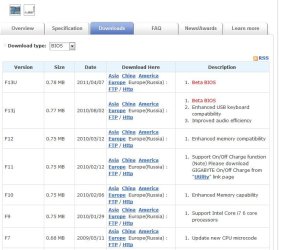
Or maybe an BIOS update ? I have now the BIOS version F9 and, as you can see in the image, BIOS vers. F10 and F12 have ENHANCED MEMORY COMPATIBILITY.
What do you think ?
Thanks a million.
 

Attachments

  • bios.jpg
    bios.jpg
    62.3 KB · Views: 15

My Computer

Computer type
PC/Desktop
OS
Windows 7 Ultimate x64
CPU
Intel7 4790K
Motherboard
Gigabyte GA-Z97X UD5H
Memory
8 GB DDR3
Graphics Card(s)
GTX 980Ti G1
Sound Card
SoundBlaster X-FI XtremeGamer
Monitor(s) Displays
Samsung UE40JU6550 UHD
Screen Resolution
3840 X 2160
Hard Drives
1 SSD Intel 330
2 x Western Digital 6400 AAKS
1 x Western Digital 3200 AAKS
PSU
Corsair 750W
Case
Cooler Master HAF 922
While matching sticks is not essential it is highly recommended.

Some ram just acts up when pared with non identical moduals.

Also its not uncommon for a issues to occure if all 4 ram slots are used. But its sometimes only mobo specific.

Sent from my BlackBerry 9900 using Tapatalk
 

My Computer

Computer type
PC/Desktop
Computer Manufacturer/Model Number
Built by badgers!!!
OS
Windows 7 Ultimate x64, & Mac OS X 10.9.2
CPU
Intel Core i5 2500k
Motherboard
Asus P8z68 LE
Memory
Corsair Vengence 8gb 1866mhz
Graphics Card(s)
Nvidia GTX 770 OC
Monitor(s) Displays
2x ASUS LED 22" IPS
Screen Resolution
3840x1080
Hard Drives
240GB Crucial M500 SSD
120gb Corsair Force 3 SSD
1TB Western Digital
PSU
Corsair HX650w Modular
Case
Corsair Air 540
Cooling
Corsair H60 Push/Pull
Keyboard
Corsair K70/ Logitech G27 wheel
Mouse
Saitek R.A.T 9
Internet Speed
Too slow!
Other Info
AMD fusion E350N Home server-Windows Home Server 2011 (also made by badgers!)
2011 Macbook 2.4ghz Core2Duo, 4gb ddr3, 120gb Ocz Vertex SSD
While matching sticks is not essential it is highly recommended.

Some ram just acts up when pared with non identical moduals.

Also its not uncommon for a issues to occure if all 4 ram slots are used. But its sometimes only mobo specific.

Sent from my BlackBerry 9900 using Tapatalk
So, what would you suggest ? Should i try to change the slots ?
Here is my motherboars memory slots. How should i put them ?
What would be the best way ?
I have now 3 x 1 GB in slots 1, 3 and 5
And the 2 x 2 GB are in 4 and 6
Thanks again
 

Attachments

  • memory slots mobo.jpg
    memory slots mobo.jpg
    19.3 KB · Views: 5

My Computer

Computer type
PC/Desktop
OS
Windows 7 Ultimate x64
CPU
Intel7 4790K
Motherboard
Gigabyte GA-Z97X UD5H
Memory
8 GB DDR3
Graphics Card(s)
GTX 980Ti G1
Sound Card
SoundBlaster X-FI XtremeGamer
Monitor(s) Displays
Samsung UE40JU6550 UHD
Screen Resolution
3840 X 2160
Hard Drives
1 SSD Intel 330
2 x Western Digital 6400 AAKS
1 x Western Digital 3200 AAKS
PSU
Corsair 750W
Case
Cooler Master HAF 922
Well personally I'd go out and buy 2 4gb sticks as ram is soo cheap at the moment.

What I would do is the suggested above to see if th "MAX" box is ticked.

And then I'd take out all bar the 2x 2gb sticks, if windows then says its running 4gb then you can heads your bets its a compatibility issue

Sent from my BlackBerry 9900 using Tapatalk
 

My Computer

Computer type
PC/Desktop
Computer Manufacturer/Model Number
Built by badgers!!!
OS
Windows 7 Ultimate x64, & Mac OS X 10.9.2
CPU
Intel Core i5 2500k
Motherboard
Asus P8z68 LE
Memory
Corsair Vengence 8gb 1866mhz
Graphics Card(s)
Nvidia GTX 770 OC
Monitor(s) Displays
2x ASUS LED 22" IPS
Screen Resolution
3840x1080
Hard Drives
240GB Crucial M500 SSD
120gb Corsair Force 3 SSD
1TB Western Digital
PSU
Corsair HX650w Modular
Case
Corsair Air 540
Cooling
Corsair H60 Push/Pull
Keyboard
Corsair K70/ Logitech G27 wheel
Mouse
Saitek R.A.T 9
Internet Speed
Too slow!
Other Info
AMD fusion E350N Home server-Windows Home Server 2011 (also made by badgers!)
2011 Macbook 2.4ghz Core2Duo, 4gb ddr3, 120gb Ocz Vertex SSD
What do you think about the BIOS update ? Could that solve my problem ?
 

My Computer

Computer type
PC/Desktop
OS
Windows 7 Ultimate x64
CPU
Intel7 4790K
Motherboard
Gigabyte GA-Z97X UD5H
Memory
8 GB DDR3
Graphics Card(s)
GTX 980Ti G1
Sound Card
SoundBlaster X-FI XtremeGamer
Monitor(s) Displays
Samsung UE40JU6550 UHD
Screen Resolution
3840 X 2160
Hard Drives
1 SSD Intel 330
2 x Western Digital 6400 AAKS
1 x Western Digital 3200 AAKS
PSU
Corsair 750W
Case
Cooler Master HAF 922
Well you could look at what the bios update fixes.. But I can't see a modern mobo not supporting more than 4gb ram..

Its almost recommended to have at least 4gb for windows 7.

I'm going to say I'm fairly sure its a mixed compatibility issue.
Try the 2x 2gb and then 1 1gb, in different combinations.

Your bios will tell you if all 7gb is detected also so check that out.

Sent from my BlackBerry 9900 using Tapatalk
 

My Computer

Computer type
PC/Desktop
Computer Manufacturer/Model Number
Built by badgers!!!
OS
Windows 7 Ultimate x64, & Mac OS X 10.9.2
CPU
Intel Core i5 2500k
Motherboard
Asus P8z68 LE
Memory
Corsair Vengence 8gb 1866mhz
Graphics Card(s)
Nvidia GTX 770 OC
Monitor(s) Displays
2x ASUS LED 22" IPS
Screen Resolution
3840x1080
Hard Drives
240GB Crucial M500 SSD
120gb Corsair Force 3 SSD
1TB Western Digital
PSU
Corsair HX650w Modular
Case
Corsair Air 540
Cooling
Corsair H60 Push/Pull
Keyboard
Corsair K70/ Logitech G27 wheel
Mouse
Saitek R.A.T 9
Internet Speed
Too slow!
Other Info
AMD fusion E350N Home server-Windows Home Server 2011 (also made by badgers!)
2011 Macbook 2.4ghz Core2Duo, 4gb ddr3, 120gb Ocz Vertex SSD
Hi
I believe your memory configuration is not allowable by the Motherboard.
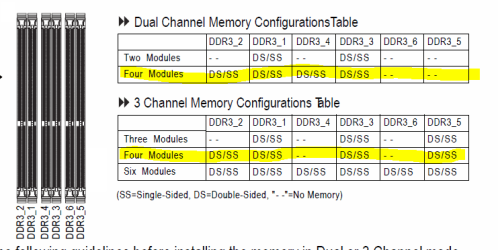
After reading the Manual -> The memory can only be in either dual or triple channel mode. From reading, it seems your dual channel memory is being detected and used but not the tri channel 3 x 1GB sticks.

There is a table in the manual as to how it can be set up -> page 16.

Basically, consult the manual link above and setup your memory accordingly.
I'd recommend 4 sticks in dual channel so 2x1GB and 2x2GB giving you 6GB usage. Your spare stick will have to find another home
 

My Computer

OS
Windows 7
CPU
Intel E6600 @ 2.9Ghz
Motherboard
Gigabyte EP45 UD3
Memory
4GB Crucial DDR2 PC6400
Graphics Card(s)
EVGA GTS 260 768mb
Monitor(s) Displays
24" DGM
Screen Resolution
1920x1200
Hard Drives
1.5TB
1TB
750GB
500GB x 2
PSU
750w Corsair
+1^

You do not need to flash your BIOS, just leave that alone.

You may need to install the RAM in one of the configurations shown in the manual (see below).

But you could try populating DDR3_1 - DDR3_3 - DDR3_5 with the 1GB modules
and populating DDR3_2 - DDR3_4 with the 2GB modules to test.

Otherwise, use just 4 modules as chessdragon136 suggests, or buy another 2GB module to make it an even 6. (But the three 2GB modules really should be a matched set to avoid further issues).
 

Attachments

  • Capture.PNG
    Capture.PNG
    18.3 KB · Views: 16

My Computer

Computer type
PC/Desktop
Computer Manufacturer/Model Number
Home Built - Jan 2013
OS
Windows 7 64 Bit Home Premium SP1
CPU
i7-3820
Motherboard
Asus P9X79-PRO - Bios 4608
Memory
GSkill F3-14900CL9Q - 16GB
Graphics Card(s)
EVGA GeForce GTX660 - Driver 352.86
Sound Card
On board Realtek ALC898
Monitor(s) Displays
Acer S271HL
Screen Resolution
1920 x 1080
Hard Drives
#1- Samsung 840 Pro Series
#2- Western Digital WD1002FAEX Sata3 Black
#3- Western Digital WD1002FAEX Sata3 Black
PSU
Corsair CMPSU-850TX-V2 - 850 watt (by Seasonic)
Case
Corsair Obsidian 550D
Cooling
Standard 3 120mm case fans, Cooler Master Hyper 212 EVO
Keyboard
MS KC-0405
Mouse
Intellimouse 5-button
Internet Speed
56 Mbits/Sec (on a good day)
Antivirus
Avast & Malwarebytes
Browser
Firefox
Other Info
Asus DVD - DRW-24B1ST 24X
The memory display what you are getting is fine. Like zigzag3143 told you can adjust the setting in msconfig and you will get corrected memory display. You can also check the memory display in task manager which gives you the total, cached, available and free memory in your system.

As your system has i7 processor which uses triple channel memory, you would be better off with 3x1GB and 3x2GB memory banks. Make sure all the memory chips are of the same speed, otherwise the faster one will step down to the slower one's speed.

You can also check your memory with CPU-Z (a freeware program), which gives you all the information about the memory chips.

 

My Computer

Computer Manufacturer/Model Number
Toshiba Satellite P775-S7232
OS
MS Windows 7 Ultimate 64-bit SP1
CPU
i5-2410M 2.3GHz (2.9GHz Turbo-Boost) Sandy Bridge 32nm
Motherboard
Toshiba PHRAA ver. PSBY1U-00F003
Memory
4GB+4GB Samsung DDR3 PC3-10700 (1333 MHz)
Graphics Card(s)
Video Intel(R) HD Graphics Family, 1696MB available memory
Sound Card
Realtek High Definition Audio version=6.0.1.6323
Monitor(s) Displays
17.3 " Trubrite TFT LCD, LED Backlit
Screen Resolution
1600x900 32 bit, Native support for 720P content
Hard Drives
TOSHIBA MK6476GSXN
580.614 [GB] partitioned C: 80GB and D: 500GB with hidden recovery partitons.

Spare bay for 2nd HDD but no SATA connector :-(
PSU
Toshiba AC/DC Adapter
Case
Notebook
Cooling
Built-in Fan
Keyboard
Premium Raised Tile keyboard
Mouse
Logitech M215 wireless mouse
Internet Speed
Not fast enough
Other Info
Built-in Harman Kardon speakers with Dolby Advanced Audio, Waves MaxxAudio® 3. HDMI, 1xUSB3+3xUSB2 ports, WebCam, Battery life 4hrs 11mins, 4GB Readyboost SDHC card, WD My Book Essential Ext HDDs 2 TB, 2x1TB, My Passport SE 1TB and WDTV 1st Gen for Multimedia playing on a Sony Wega 32" LCD.
Recent addition to my toys are Asus Transformer Pad TF300T with 32GB onboard sd card + 32GB microsd card.
I changed from Windows 7 Ultimate x86 to x64 and i upgraded my ram memory from 3 GB to 7 GB.
But in Control Panel i have this : 7 GB ( 4 GB usable )
Can you tell me,please, why only 4 GB, when i have 7 in total ?
Thanks in advance


Go to start>type msconfig>goto max cpu and max ram and make sure they are both unticked.
I love you !! :party:
I did as you said and now everything is fine. I have 7 GB :D
Thanks a million.
 

My Computer

Computer type
PC/Desktop
OS
Windows 7 Ultimate x64
CPU
Intel7 4790K
Motherboard
Gigabyte GA-Z97X UD5H
Memory
8 GB DDR3
Graphics Card(s)
GTX 980Ti G1
Sound Card
SoundBlaster X-FI XtremeGamer
Monitor(s) Displays
Samsung UE40JU6550 UHD
Screen Resolution
3840 X 2160
Hard Drives
1 SSD Intel 330
2 x Western Digital 6400 AAKS
1 x Western Digital 3200 AAKS
PSU
Corsair 750W
Case
Cooler Master HAF 922
I changed from Windows 7 Ultimate x86 to x64 and i upgraded my ram memory from 3 GB to 7 GB.
But in Control Panel i have this : 7 GB ( 4 GB usable )
Can you tell me,please, why only 4 GB, when i have 7 in total ?
Thanks in advance


Go to start>type msconfig>goto max cpu and max ram and make sure they are both unticked.
I love you !! :party:
I did as you said and now everything is fine. I have 7 GB :D
Thanks a million.

My pleasure and glad to see you are working. Good luck
 

My Computer

Computer Manufacturer/Model Number
HP Pavillion dv-7 1005 Tx
OS
Win 8 Release candidate 8400
CPU
[email protected]
Memory
4 gigs
Graphics Card(s)
Nvidia 9600M
Sound Card
HD built-in
Monitor(s) Displays
17" Wxga
Screen Resolution
1440x900
Cooling
none
Internet Speed
45Mb down 5Mb up
I changed from Windows 7 Ultimate x86 to x64 and i upgraded my ram memory from 3 GB to 7 GB.
But in Control Panel i have this : 7 GB ( 4 GB usable )
Can you tell me,please, why only 4 GB, when i have 7 in total ?
Thanks in advance


Go to start>type msconfig>goto max cpu and max ram and make sure they are both unticked.

Good job zigzag. I can't imagine how that box gets ticked by itself :shock:
 

My Computer

Computer type
PC/Desktop
Computer Manufacturer/Model Number
Custom built by me.
OS
Windows 10 Pro
CPU
Intel Core i7-4770K (3.5Ghz)
Motherboard
Gigabyte G1 Sniper 5 (F10 Bios)
Memory
32 gig Corsair Dominator Platinum (4x8Gig)
Graphics Card(s)
Sapphire Tri-X R9 Fury
Sound Card
Soundblaster ZXR
Monitor(s) Displays
NEC PA242W 24" LCD Monitor
Screen Resolution
1920 x 1200
Hard Drives
Primary - Samsung 850 Pro (512gig), Samsung 840 Pro (256gig), 2TB WD Caviar Black.
PSU
EVGA Supernova 1000 G2
Case
Cooler Master HAF X
Cooling
Corsair H100i with Corsair Air Series SP120 Quiet Fans
Keyboard
Logitech Wireless Wave
Mouse
Logitech Performance MX
Internet Speed
High Speed Cable
Antivirus
Norton Security
Browser
IE11
Other Info
Memory Timings - 1866MHz @ 9-9-9-27-1T @ 1.5 volts
I changed from Windows 7 Ultimate x86 to x64 and i upgraded my ram memory from 3 GB to 7 GB.
But in Control Panel i have this : 7 GB ( 4 GB usable )
Can you tell me,please, why only 4 GB, when i have 7 in total ?
Thanks in advance


Go to start>type msconfig>goto max cpu and max ram and make sure they are both unticked.

Good job zigzag. I can't imagine how that box gets ticked by itself :shock:

Thanks


It sometimes gets auto ticked in OS install. OS'es prefer to be installed with less memory.
 

My Computer

Computer Manufacturer/Model Number
HP Pavillion dv-7 1005 Tx
OS
Win 8 Release candidate 8400
CPU
[email protected]
Memory
4 gigs
Graphics Card(s)
Nvidia 9600M
Sound Card
HD built-in
Monitor(s) Displays
17" Wxga
Screen Resolution
1440x900
Cooling
none
Internet Speed
45Mb down 5Mb up
Back
Top