7-Ult 64 Install

seawolf67

New member
Local time
12:55 AM
Messages
9
I have an enterprise disk for installation of the 64-bit OS. The machine is fully capable & equipped for the installation, but whtn I try to boot from the DVD, I get the "Can't do it with this OS" message. The HD is blank CMOS set...don't know what to do from here. Any help appreciated.

DC
 

My Computer

Computer Manufacturer/Model Number
Acer
OS
Windows 7 Ultimate - 32-bit
CPU
Athlon 64
Motherboard
Acer
Memory
4 gb
Graphics Card(s)
Nvidia
Sound Card
Nvidia high-def
Monitor(s) Displays
Viewsonic 23
Hard Drives
Segate 1-tb
PSU
factory
Case
factory
Cooling
factory
I have an enterprise disk for installation of the 64-bit OS. The machine is fully capable & equipped for the installation, but whtn I try to boot from the DVD, I get the "Can't do it with this OS" message. The HD is blank CMOS set...don't know what to do from here. Any help appreciated.

DC

DC hi and welcome

Where did you download the image from?
 

My Computer

Computer Manufacturer/Model Number
HP Pavillion dv-7 1005 Tx
OS
Win 8 Release candidate 8400
CPU
[email protected]
Memory
4 gigs
Graphics Card(s)
Nvidia 9600M
Sound Card
HD built-in
Monitor(s) Displays
17" Wxga
Screen Resolution
1440x900
Cooling
none
Internet Speed
45Mb down 5Mb up
Reply

I have an original Microsoft disk.
 

My Computer

Computer Manufacturer/Model Number
Acer
OS
Windows 7 Ultimate - 32-bit
CPU
Athlon 64
Motherboard
Acer
Memory
4 gb
Graphics Card(s)
Nvidia
Sound Card
Nvidia high-def
Monitor(s) Displays
Viewsonic 23
Hard Drives
Segate 1-tb
PSU
factory
Case
factory
Cooling
factory
Which CPU are you using? Is there perhaps an option in the BIOS to enable 64-bit support?
 

My Computer

Computer Manufacturer/Model Number
Self-Built in July 2009
OS
Windows 7 Ultimate x64
CPU
Intel Q9550 2.83Ghz OC'd to 3.40Ghz
Motherboard
Gigabyte GA-EP45-UD3R rev. 1.1, F12 BIOS
Memory
8GB G.Skill PI DDR2-800, 4-4-4-12 timings
Graphics Card(s)
EVGA 1280MB Nvidia GeForce GTX570
Sound Card
Realtek ALC899A 8 channel onboard audio
Monitor(s) Displays
23" Acer x233H
Screen Resolution
1920x1080
Hard Drives
Intel X25-M 80GB Gen 2 SSD
Western Digital 1TB Caviar Black, 32MB cache. WD1001FALS
PSU
Corsair 620HX modular
Case
Antec P182
Cooling
stock
Keyboard
ABS M1 Mechanical
Mouse
Logitech G9 Laser Mouse
Internet Speed
15/2 cable modem
Other Info
Windows and Linux enthusiast. Logitech G35 Headset.
I have an enterprise disk for installation of the 64-bit OS. The machine is fully capable & equipped for the installation, but whtn I try to boot from the DVD, I get the "Can't do it with this OS" message. The HD is blank CMOS set...don't know what to do from here. Any help appreciated.

DC

Where did you buy your Enterprise DVD & licence.
 

My Computer

OS
ME/XP/Vista/Win7
Hello seawolf67, welcome to Seven Forums!


Has the HDD ever been used or is it brand new?
 

My Computer

Computer Manufacturer/Model Number
* BFK Customs *
OS
W 7 64-bit Ultimate
CPU
Intel Q9550 Yorkfield
Motherboard
ASUS P5Q Pro
Memory
8GB Dominator 8500C5D
Graphics Card(s)
ATI : XFX 5870
Sound Card
Realtek HD Audio 7-1
Monitor(s) Displays
1x 47" LCD HDMI & 3x 26" LCD HDMI
Screen Resolution
1920x1080P & 1920x1200
Hard Drives
1x 80GB Intel X25-M G2 SSD : 1x 500GB & 1x 640GB WD Caviar Black(s)
PSU
Corsair 620HX
Case
Cooler Master RC-690
Cooling
Tuniq Tower 120, 2x 140mm and 3x 120mm case fans
Keyboard
Microsoft 500
Mouse
Razer Diamondback 3G
Internet Speed
14 Mb/s
Other Info
1x Koutech 3Gb/s SATA HDD Hot Swap Rack
Windows Enterprise is basically for business customers.

The Windows 7 Enterprise operating system (OS) is available to Microsoft Software Assurance customers. With Windows 7 Enterprise, you can take advantage of the following features that are not available in Windows 7 Professional:
  • DirectAccess: Give mobile users seamless access to corporate networks without a need to VPN.
  • BranchCache: Decrease the time branch office users spend waiting to download files across the network.
  • Federated Search: Find information in remote repositories, including SharePoint sites, with a simple user interface.
  • BitLocker and BitLocker To Go: Help protect data on PCs and removable drives, with manageability to enforce encryption and backup of recovery keys.
  • AppLocker: Specify what software is allowed to run on a user's PCs through centrally managed but flexible Group Policies.
  • Virtual desktop infrastructure (VDI) optimizations: Improved user experience for VDI with multimon and microphone support, which have the ability to reuse virtual hard drive (VHD) images to boot a physical PC.
  • Multilingual user interface: Create a single OS image for deployment to users worldwide.
Windows Enterprise is also available to MSDN & TechNet members :)
 

My Computer

Computer type
PC/Desktop
Computer Manufacturer/Model Number
Built them myself, Science Experiments !
OS
Win7 Enterprise, Win7 x86 (Ult 7600), Win7 x64 Ult 7600, TechNet RTM on AMD x64 (2.8Ghz)
CPU
AMD fx8350 4ghz, AMD-32 2400mhz, AMD-64 3200mhz, AMDx64 2.8G
Motherboard
SIS 755, ECS-K8M890M-M (Ult 7600), GigaByte & others
Memory
2gb, 4gb on the Ult 7600, 4gb on Technet RTM, 32gb on FX8350
Graphics Card(s)
Draw my own Graphics, several nVidia cards
Sound Card
on motherboard
Monitor(s) Displays
19" flat scr, 28" I-Inc widescr,22" Emprex Widescr, 23" Acer
Screen Resolution
1280 x 1024, 1440 x 900, 1920 x 1080
Hard Drives
6 pata Ide HD's & 2 Sata HD's
added 80gb external on Ult 7600 computer,
numerous extra 1tb, 2TB, 3Tb SATA HD's
A collection of ext HD Docks w/ HDs
PSU
430w, 550w, 600w, 700, 800, etc
Case
All Generic Full Towers
Cooling
Open Air & a few fans, some w/ colored LEDs
Keyboard
Compaq & Dell recycled from GoodWill
Mouse
Made in China Optical Wired Mouse
Internet Speed
Fast Cable InterNet
Antivirus
AVG Free on 24 different Desktops, NO Problems!
Browser
IE 8 is preferred, but use FireFox sometimes
Other Info
Linksys Routers, switches, & Hubs
Too Many USB Flash Drives to count, Biggest is 64GB !
Eight computers in my home network.
Sixteen computers at my business network.
Linked via TeamViewer !
Lots of old used spare computer parts everywhere!
1. Software was donated by Microsoft through TechSoup;
2. Disk is new, first time it has been out of the sleeve;
3. Machine info attached...all indications are that it is 64 capable
 

Attachments

My Computer

Computer Manufacturer/Model Number
Acer
OS
Windows 7 Ultimate - 32-bit
CPU
Athlon 64
Motherboard
Acer
Memory
4 gb
Graphics Card(s)
Nvidia
Sound Card
Nvidia high-def
Monitor(s) Displays
Viewsonic 23
Hard Drives
Segate 1-tb
PSU
factory
Case
factory
Cooling
factory
Hard drive is Segate Baracuda 1 TB- was new, but I put 7-Ult-32 on it in an attempt to use the 7-64 as an UG. I then deleted all patitions & started from scratch again.

DC
 

My Computer

Computer Manufacturer/Model Number
Acer
OS
Windows 7 Ultimate - 32-bit
CPU
Athlon 64
Motherboard
Acer
Memory
4 gb
Graphics Card(s)
Nvidia
Sound Card
Nvidia high-def
Monitor(s) Displays
Viewsonic 23
Hard Drives
Segate 1-tb
PSU
factory
Case
factory
Cooling
factory
Make sure you have the latest BIOS update. If so, reset the CMOS: Clear CMOS - 3 Ways To Clear the CMOS - Reset BIOS

While in BIOS setup, set SATA controller to AHCI first, then later change to IDE mode if necessary.

Try wiping the HD of all code, use the DVD's Custom>Drive Options to create New partition(s), format and install: http://www.sevenforums.com/tutorials/91339-ssd-hdd-optimize-windows-reinstallation.html
http://www.sevenforums.com/tutorials/1649-clean-install-windows-7-a.html

Remove all but 2gb of RAM to try install. Unplug all other HD's and peripherals.
 
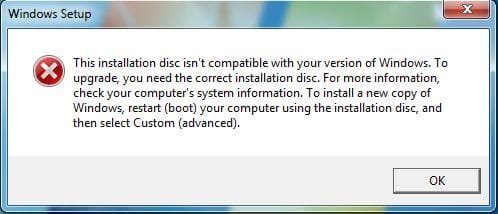
This is all fine, well & good, but the system will NOT let me boot from the CD! It continually indicates that I must have a 64-bit operating system. There is nothing but zeros on the HD, the CMOS has been reset, the BIOS is set to factory default.

DC
 

My Computer

Computer Manufacturer/Model Number
Acer
OS
Windows 7 Ultimate - 32-bit
CPU
Athlon 64
Motherboard
Acer
Memory
4 gb
Graphics Card(s)
Nvidia
Sound Card
Nvidia high-def
Monitor(s) Displays
Viewsonic 23
Hard Drives
Segate 1-tb
PSU
factory
Case
factory
Cooling
factory
We'll need the verbatim error message as there are no known errors "Can't do it with this OS" or "must have a 64-bit operating system."
 

My Computer

Computer Manufacturer/Model Number
Too many to describe...
OS
Windows 7 x64 pro/ Windows 7 x86 Pro/ XP SP3 x86
We'll need the verbatim error message as there are no known errors "Can't do it with this OS" or "must have a 64-bit operating system."

I agree 100%. We need the exact error message.
 

My Computer

Computer Manufacturer/Model Number
Self-Built in July 2009
OS
Windows 7 Ultimate x64
CPU
Intel Q9550 2.83Ghz OC'd to 3.40Ghz
Motherboard
Gigabyte GA-EP45-UD3R rev. 1.1, F12 BIOS
Memory
8GB G.Skill PI DDR2-800, 4-4-4-12 timings
Graphics Card(s)
EVGA 1280MB Nvidia GeForce GTX570
Sound Card
Realtek ALC899A 8 channel onboard audio
Monitor(s) Displays
23" Acer x233H
Screen Resolution
1920x1080
Hard Drives
Intel X25-M 80GB Gen 2 SSD
Western Digital 1TB Caviar Black, 32MB cache. WD1001FALS
PSU
Corsair 620HX modular
Case
Antec P182
Cooling
stock
Keyboard
ABS M1 Mechanical
Mouse
Logitech G9 Laser Mouse
Internet Speed
15/2 cable modem
Other Info
Windows and Linux enthusiast. Logitech G35 Headset.
Error message

Clean HD & CMOS/BIOS reset to factory specs---see attachment.

DC
 

Attachments

  • Err Msg.JPG
    Err Msg.JPG
    25.4 KB · Views: 6

My Computer

Computer Manufacturer/Model Number
Acer
OS
Windows 7 Ultimate - 32-bit
CPU
Athlon 64
Motherboard
Acer
Memory
4 gb
Graphics Card(s)
Nvidia
Sound Card
Nvidia high-def
Monitor(s) Displays
Viewsonic 23
Hard Drives
Segate 1-tb
PSU
factory
Case
factory
Cooling
factory
I think your HD is seeing a hidden / left-over 32bit boot sector somewhere. You may have to write zeros to the HD 3 times in a row to throughly clean it.
 

My Computer

Computer type
PC/Desktop
Computer Manufacturer/Model Number
Built them myself, Science Experiments !
OS
Win7 Enterprise, Win7 x86 (Ult 7600), Win7 x64 Ult 7600, TechNet RTM on AMD x64 (2.8Ghz)
CPU
AMD fx8350 4ghz, AMD-32 2400mhz, AMD-64 3200mhz, AMDx64 2.8G
Motherboard
SIS 755, ECS-K8M890M-M (Ult 7600), GigaByte & others
Memory
2gb, 4gb on the Ult 7600, 4gb on Technet RTM, 32gb on FX8350
Graphics Card(s)
Draw my own Graphics, several nVidia cards
Sound Card
on motherboard
Monitor(s) Displays
19" flat scr, 28" I-Inc widescr,22" Emprex Widescr, 23" Acer
Screen Resolution
1280 x 1024, 1440 x 900, 1920 x 1080
Hard Drives
6 pata Ide HD's & 2 Sata HD's
added 80gb external on Ult 7600 computer,
numerous extra 1tb, 2TB, 3Tb SATA HD's
A collection of ext HD Docks w/ HDs
PSU
430w, 550w, 600w, 700, 800, etc
Case
All Generic Full Towers
Cooling
Open Air & a few fans, some w/ colored LEDs
Keyboard
Compaq & Dell recycled from GoodWill
Mouse
Made in China Optical Wired Mouse
Internet Speed
Fast Cable InterNet
Antivirus
AVG Free on 24 different Desktops, NO Problems!
Browser
IE 8 is preferred, but use FireFox sometimes
Other Info
Linksys Routers, switches, & Hubs
Too Many USB Flash Drives to count, Biggest is 64GB !
Eight computers in my home network.
Sixteen computers at my business network.
Linked via TeamViewer !
Lots of old used spare computer parts everywhere!
The error can only occur if the disk is running from the OS, perhaps after failing to boot. If you've already wiped your HD using the tutorial I posted earlier, then follow Doc's suggestion to wipe it again.
 
How about using a flash drive?

DC
 

My Computer

Computer Manufacturer/Model Number
Acer
OS
Windows 7 Ultimate - 32-bit
CPU
Athlon 64
Motherboard
Acer
Memory
4 gb
Graphics Card(s)
Nvidia
Sound Card
Nvidia high-def
Monitor(s) Displays
Viewsonic 23
Hard Drives
Segate 1-tb
PSU
factory
Case
factory
Cooling
factory
Clean HD & CMOS/BIOS reset to factory specs---see attachment.

DC

You aren't booting from the disc, you are running it from within windows. You cannot do this when you go from 32 to 64 bit.
 

My Computer

Computer Manufacturer/Model Number
Self-Built in July 2009
OS
Windows 7 Ultimate x64
CPU
Intel Q9550 2.83Ghz OC'd to 3.40Ghz
Motherboard
Gigabyte GA-EP45-UD3R rev. 1.1, F12 BIOS
Memory
8GB G.Skill PI DDR2-800, 4-4-4-12 timings
Graphics Card(s)
EVGA 1280MB Nvidia GeForce GTX570
Sound Card
Realtek ALC899A 8 channel onboard audio
Monitor(s) Displays
23" Acer x233H
Screen Resolution
1920x1080
Hard Drives
Intel X25-M 80GB Gen 2 SSD
Western Digital 1TB Caviar Black, 32MB cache. WD1001FALS
PSU
Corsair 620HX modular
Case
Antec P182
Cooling
stock
Keyboard
ABS M1 Mechanical
Mouse
Logitech G9 Laser Mouse
Internet Speed
15/2 cable modem
Other Info
Windows and Linux enthusiast. Logitech G35 Headset.
How about using a flash drive?

DC

Bill2 suggested this earlier and linked the manual method to format USB stick.

The method I use is to install UltraISO trial version, on File tab open ISO (extract it from DVD using ImgBurn if needed), on Bootable tab Write Disk Image, Format, Write. Boot under USB or HD's using one-time BIOS Boot Menu.
 
Back
Top