7 x64 idle memory usage around 1.5Gb, normal?

bvinicius

New member
Local time
1:36 AM
Messages
11
Just curious, my installation uses about 1,5GB of ram with only the microsoft security essentials and ATI catalyst open. If i kill every possible process the use drop to 1,2GB.
Is that normal in the 64 bits version? My another computer, a old sempron with 1GB of ram and using the x86 version, uses 500MB of ram.


My Computer My Computer

OS
7 x64
CPU
Phenom II x4 810
Motherboard
M4A78T-E
Memory
4x2GB OCZ Platinum 1600MHz
Graphics Card(s)
ATI HD 4870
Sound Card
Onbord
Monitor(s) Displays
primary 1920x1080 secondary 1280x1024
Hard Drives
Raid5 3x500GB
It will use as much as it can and pre-fetches a lot of things it thinks you will use... that makes it faster and takes advantage of more memory. Don't worry, if you open some heavy software it will throw out some things it doesn't need. with other words, it actually takes advantage of the memory as opposed to XP. vista did the same thing, but did it less efficiently and used even more RAM. Out of my 8 GB vista consistently used 8 GB. Now W7 uses 2.5 GB with Word, Firefox and some little things open. It looks wasteful, but actually is more efficient and you paid for the RAM anyway. Not using it doesn't get you any money back :-)
 

My Computer My Computer

Computer Manufacturer/Model Number
homemade
OS
W7 Pro 64
CPU
Intel i3 3220 @ 3.3 GHz
Motherboard
ASRock H77M
Memory
2x8GB DDR 3 1600 Kingston
Graphics Card(s)
onboard
Sound Card
onboard
Monitor(s) Displays
two 21" LCD
Hard Drives
128 GB Samsung 830
PSU
OCZ400MXSP
Cooling
Stock
Internet Speed
DSL
Thanks, but I think that it is not prefetch. The screenshot, of the resource monitor, below is more detailed.

1599mb in use, 884mb standby (<- that is prefetch or I am wrong?)

With the same programs as you my use is about that too. Not that there is a problem there, it is just strange that my other 5 years computer use a lot less memory with the same programs. Modern hardware drivers using more memory perhaps? Windows 7 in a virtual machine use about only 400mb here :confused:.
 

My Computer My Computer

OS
7 x64
CPU
Phenom II x4 810
Motherboard
M4A78T-E
Memory
4x2GB OCZ Platinum 1600MHz
Graphics Card(s)
ATI HD 4870
Sound Card
Onbord
Monitor(s) Displays
primary 1920x1080 secondary 1280x1024
Hard Drives
Raid5 3x500GB
Easy formula: Small RAM = small footprint (and slow performance), Large RAM = large footprint (and fast performance). Be glad it uses all your RAM - I assume it is paid for - LOL.
 

My Computer My Computer

Computer Manufacturer/Model Number
HP, Dell, Gateway, Toshiba - 4 laptops and 2 desktops
OS
Vista, Windows7, Mint Mate, Zorin, Windows 8
CPU
from 1.6GHz Duo to i7
Monitor(s) Displays
2x HP w2207
Hard Drives
5x HDD, 7x SSD, 12x Externals
Keyboard
with trackball - no mices
Mouse
Trackball mice
Internet Speed
DSL 6000
The standby memory is the prefetch/readyboost has cached. The more RAM you have, the more RAM Windows caches with programs that are used often, like what Whs said.

So it does look pretty normal your memory usage.
 

My Computer My Computer

Computer type
PC/Desktop
Computer Manufacturer/Model Number
Custom Built
OS
Windows 8.1 Pro x64
CPU
Intel Core i7 4790k
Motherboard
MSI Z97S Krait Edition
Memory
8GB Corsair Dominator 1600MHz
Graphics Card(s)
MSI TwinFrozr GeForce GTX770
Sound Card
ASUS Xonar DX/XD 7.1
Monitor(s) Displays
Dell 24" S2409W + Dell 20" E207WFP
Screen Resolution
1920x1080 + 1680x1050
Hard Drives
1x 120GB OCZ Agility 3, 1x 750GB Western Digital Caviar Black, 1x 1TB Western Digital Caviar Blue
PSU
Corsair HX850 modular
Case
Fractal Design Define R4
Cooling
Corsair H60 w/ twin Corsair SP120 fans
Keyboard
Logitech G510S Keyboard
Mouse
Logitech G500S Laser Mouse
Internet Speed
40Mbps
Antivirus
Microsoft Security Essentials
Browser
Google Chrome
Other Info
LG Blu-Ray player
The standby memory is the prefetch/readyboost has cached. The more RAM you have, the more RAM Windows caches with programs that are used often, like what Whs said.

So it does look pretty normal your memory usage.

+ 1
 

My Computer My Computer

Computer type
PC/Desktop
Computer Manufacturer/Model Number
Systems by SmartEyeball
OS
8 Pro x64
CPU
i7 3770K 4.6GHz
Motherboard
ASUS P8Z77 WS
Memory
16GB G.Skill Trident X 2666mhz
Graphics Card(s)
x2 EVGA 780 Ti Superclocked SLI
Sound Card
SB X-FI Surround 5.1 PRO USB / ATH-AD900 Headphones
Monitor(s) Displays
x3 Dell U2410 / 58" Samsung
Screen Resolution
5760*1200/ 1920*1200
Hard Drives
2x Intel 520 240GB (RAID 0) * 2x WD Caviar Blacks 2TB (RAID 0) * 2TB WD Caviar Black * Sony Optirac DVD
PSU
Silverstone Strider Evolution 1200W
Case
Thermaltake Level 10 GT Snow Edition
Cooling
Noctua NH-D14
Keyboard
Topre Realforce // Ducky Shine MX Black // Filco Ninja TKL
Mouse
Thermaltake Theron (Highly Recommended) + Razer Imperator
Antivirus
MSE
Browser
IE, FF, WaterFox
Other Info
GT Extreme V2 Sim Racing Cockpit + 40" LCD and K/B Mouse stand ▼
Fanatec CSR Elite Wheel + Clubsport V1 Pedals + CSR shifter/7G-H ▼Saitek X52 Pro ▼ TrackIR 5 Pro
Buttkicker v2 Seat Rumbler with Dedicated 5.1 and Sub Woofer attached to frame ▼
=
Bloody Big Grin
Ok, thanks for the answers.;)

Anyone with more that 8GB around here? bigger usage, not including standby memory, or the same thing?
 

My Computer My Computer

OS
7 x64
CPU
Phenom II x4 810
Motherboard
M4A78T-E
Memory
4x2GB OCZ Platinum 1600MHz
Graphics Card(s)
ATI HD 4870
Sound Card
Onbord
Monitor(s) Displays
primary 1920x1080 secondary 1280x1024
Hard Drives
Raid5 3x500GB
The standby memory is the prefetch/readyboost has cached. The more RAM you have, the more RAM Windows caches with programs that are used often, like what Whs said.

So it does look pretty normal your memory usage.

bvinicius has 8gb of memory and idle system uses 1.5gb, I on the other hand have 3gb of memory and my system also uses 1.5gb which kind of sometimes bottlenecks my everyday activities on the computer.

According to what you posted, my system should be using much less memory than it does.

I have i7 920 processor
3gb triple channel memory
DFI LANParty DK X58-T3eH6 motherboard
 

My Computer My Computer

OS
Windows 7 x64
CPU
Intel i7 920
Motherboard
DFI LANParty DK X58-T3eH6
Memory
G-Skill 3x1GB 1066 Triple Channel
Graphics Card(s)
MSI N250GTS Twin Frozr 1G GeForce GTS 250 1GB 256-bit GDDR3
Sound Card
Integrated
Monitor(s) Displays
Samsung SM2233BW 22''
Screen Resolution
1680x1050
Hard Drives
1 HD - WDC WD5000AADS-00M2B0 (465 GB);
2 HD - Maxtor 6Y080L0 (76 GB)
PSU
Silverstone SST-ST60F 600W modular
Case
Shity
Cooling
Stock
Keyboard
Logitech
Mouse
x7 - Oscar XL750 BK
Internet Speed
2 Mb/s
The standby memory is the prefetch/readyboost has cached. The more RAM you have, the more RAM Windows caches with programs that are used often, like what Whs said.

So it does look pretty normal your memory usage.

bvinicius has 8gb of memory and idle system uses 1.5gb, I on the other hand have 3gb of memory and my system also uses 1.5gb which kind of sometimes bottlenecks my everyday activities on the computer.

According to what you posted, my system should be using much less memory than it does.

I have i7 920 processor
3gb triple channel memory
DFI LANParty DK X58-T3eH6 motherboard

It will depend a lot of what you are running. My 3GB system uses 1.19GB right now - and all I have open is the IE for the forum.

You also have to distinguish between RAM that is being used for running programs and RAM being used for caching. For the first category, see comment above. For the cached, the amount of time and the number of previously run programs plays a role.

Your cache will be pretty empty when you fire up the system. But after running 40 different things, it will be well populated. That's where a big RAM gives an advantage over a small RAM. The system needs not go back to the disk all the time to fetch the program you have previously used. Superfetch will just get it from RAM.

Btw: you are not "being bottlenecked". You still have 1.5GBs to go before you get the first serious paging activity.
 

My Computer My Computer

Computer Manufacturer/Model Number
HP, Dell, Gateway, Toshiba - 4 laptops and 2 desktops
OS
Vista, Windows7, Mint Mate, Zorin, Windows 8
CPU
from 1.6GHz Duo to i7
Monitor(s) Displays
2x HP w2207
Hard Drives
5x HDD, 7x SSD, 12x Externals
Keyboard
with trackball - no mices
Mouse
Trackball mice
Internet Speed
DSL 6000
I have 4GB and mine uses 1.5GB at idle as well. Just to let you know it seems normal.
 

My Computer My Computer

Computer Manufacturer/Model Number
NVIDIA
OS
Windows 7 Enterprise x64
CPU
AMD Athlon 64X2 Dual Core 3800+
Motherboard
GeForce 6100-M9
Memory
OCZ Platinum Dual Channel - 4x1Gb
Graphics Card(s)
NVIDIA GeForce 8800 GT PCI Express x16
Sound Card
Creative Audigy Sound Blaster Extreme PCI
Monitor(s) Displays
Compaq 7500
Screen Resolution
1024x768
Hard Drives
C: Seagate ST3250318AS SataII - 250Gb

D: Seagate ST3500418AS SataII - 500Gb
PSU
OCZ 600w Dual 12v Rails
Case
Thermaltake
Cooling
OCZ Heatsinks, Fans, and Thermal Paste on CPU & Chipsets
Keyboard
Logitech
Mouse
Radio Shack PS2
Internet Speed
Cable
Other Info
Dual Pioneer DVD/RW optical drives. LG CD/RW optical drive.
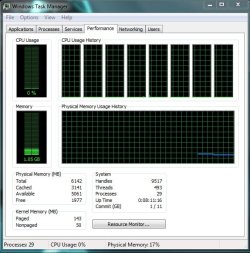
this is with 6GB
 

Attachments

  • Untitled.jpg
    Untitled.jpg
    58.8 KB · Views: 149

My Computer My Computer

Computer Manufacturer/Model Number
Goonie Build 8 2010
OS
Windows 7 64bit Ultimate SP1, VMware Windows 7 64bit Ultimate SP1
CPU
Intel Core i7 920 @ 3.8 or 4.2 when i need it
Motherboard
Gigabyte GA-X58-UD5
Memory
Corsair XMS3 12GB DDR3 1600 1.5v
Graphics Card(s)
MSI GeForce GTX 560Ti OC Twin FrozR II
Sound Card
7.1 HD
Monitor(s) Displays
2x BenQ 24 LED 1080p + LG 50PK590 1080p
Screen Resolution
3840 x 1080p
Hard Drives
Intel X25-M 80GB OS/
Intel X25-M 160GB
Data Robotics Drobo V2 8TB
PSU
Corsair AX 750W ATX Modular
Case
Antec Fusion Remote Max
Cooling
Noctua NH D14
Keyboard
Logitech
Mouse
Logitech
Internet Speed
15Mbs Down 1.3Mbs Up
Other Info
Hauppauge HD PVR/
Pioneer 1017-k - 7.1 THX/
Xbox 360 250 Slim
SkyHD/LG 50PK590 TV
Back
Top