70 celcius graphic card? is this normal temp?

kelapa

New member
Local time
1:58 PM
Messages
30
hello,

i played civilization 5 and future soldier recently.

both can make my GPU meter to 70 celcius and crash after 71 celcius.

why that happen? i've use 5 fan here, a lot of fans i think.

is there any temperature limit to Graphic card to make it crash?

i'm very frustated about it
 

My Computer My Computer

At a glance

64bit3770k i7 Overclock Series16gb 4x4 vengeance550 gtx ti
OS
64bit
CPU
3770k i7 Overclock Series
Motherboard
Asus Durable
Memory
16gb 4x4 vengeance
Graphics Card(s)
550 gtx ti
Monitor(s) Displays
samsung 23" full HD TV series 6
Screen Resolution
1920x1080
Hard Drives
WDC Green 2x 2TB
mind to get SSD, any suggestion?
PSU
700 Watt Cooler Master
Case
X Habu
Cooling
Cooler master
Keyboard
Razer
Mouse
Razer
Internet Speed
1 mbps
Antivirus
MSE
Browser
Aurora
70 for a under load GPU is not bad, assuming it's a dedicated card.
I use evga precision on mine it only works with nvidia cards, but it will boost the fan speed for you when the card gets hot. (the fan in the card typically only runs at around 20 to 30 percent capacity)
EVGA | Software | EVGA Precision
it will work with any nvidia series card made in like the last 10 years so should be fine.
It doesn't have to be a evga card which a lot of people seem to mistakenly believe.
 

My Computer My Computer

At a glance

Windows 7 x64Intel i7 2600kG.skill Ripjaw 16gigs @ 1866Nvidia gtx580 (evga)
Computer Manufacturer/Model Number
Insane hobo technologies. ;-)
OS
Windows 7 x64
CPU
Intel i7 2600k
Motherboard
Asrock z68 extreme 4 gen 3
Memory
G.skill Ripjaw 16gigs @ 1866
Graphics Card(s)
Nvidia gtx580 (evga)
Sound Card
Integrated HD audio + hdmi
Monitor(s) Displays
24" ASUS widescreen + 42" insignia
Screen Resolution
1080p (1920x1080)
Hard Drives
128 Samsung 830
256 Samsung 840
3 x 1tb storage drive (various)
1 western digital 1tb (eSATA)
1 Seagate 1tb (eSATA)
PSU
1 kilowatt SLI/Crossfire rated Silverstone modular
Case
NZXT Phantom + additional 220 fan
Cooling
Zalmann
Keyboard
Microsoft wireless 3000 (v2)
Mouse
MS - wireless 5000 (bluetrack)
Internet Speed
depends on if you ask me or my provider.
Other Info
The above information is provided as is, and the author assumes no responsibility for issues it may cause with your sanity or fanboyism.
80C or so is considered normal.

So, if your running at 65-70 while gaming thats perfectly fine. Well below spec.
 

My Computer My Computer

At a glance

Windows 7 Home Premium 64bitIntel Core i7 2700k8GB Mushkin Redline Ridgebacks @1866EVGA GTX570 SC
Computer Manufacturer/Model Number
Custom (Self Build)
OS
Windows 7 Home Premium 64bit
CPU
Intel Core i7 2700k
Motherboard
eVGA P67 SLI
Memory
8GB Mushkin Redline Ridgebacks @1866
Graphics Card(s)
EVGA GTX570 SC
Sound Card
XiFi Titanium HD
Monitor(s) Displays
LG W2453V
Screen Resolution
1920x1080
Hard Drives
Intel 320 80GB -- Intel X25-V 40GB --WD Black 1TB x2 -- WD Blue 640GB
PSU
Seasonic x750
Case
Corsair 600T SE White
Cooling
eVGA Superclocked CPU Cooler
Keyboard
Saitek Cyborg
Antivirus
Kaspersky
Browser
IE
Other Info
LG BD/DVD
Well, thank you for your opinion.

but here's the complete detail when i use game on my computer :

Gpu Clock usage : 99% @ 70 celcius every time i play that game
Memory clock : 324 Mhz
Used 500 mb Free 500 Mb total 1024 Mb
Usage around 50% all the time
Fan speed 1140rpm usage 45%
PCI Express : x16

all the time i play, that's the information showed from my GPU meter, and when the celcius rise to 71, it begin to crashing everywhere.

is that still considered normal?

thank you
 

My Computer My Computer

At a glance

64bit3770k i7 Overclock Series16gb 4x4 vengeance550 gtx ti
OS
64bit
CPU
3770k i7 Overclock Series
Motherboard
Asus Durable
Memory
16gb 4x4 vengeance
Graphics Card(s)
550 gtx ti
Monitor(s) Displays
samsung 23" full HD TV series 6
Screen Resolution
1920x1080
Hard Drives
WDC Green 2x 2TB
mind to get SSD, any suggestion?
PSU
700 Watt Cooler Master
Case
X Habu
Cooling
Cooler master
Keyboard
Razer
Mouse
Razer
Internet Speed
1 mbps
Antivirus
MSE
Browser
Aurora
70 while gaming is not that bad. many cards get hotter than that. Try the EVGA site for the precision or you can use MSI Afterburner and in the settings set a fan profile that will increase the fan speed and hopefully keep it cooler if your card can't take 70, but it should.

EDIT: why not try lowering some of the graphics settings in the game? It may be crashing because of the 99% usage, not temps.
 

My Computers My Computers

  • At a glance

    Windows 11 ProRyzen 9 5900X32GB G Skill DDR4-3600EVGA RTX 3080 FTW 3 Ultra
    Computer type
    PC/Desktop
    Computer Manufacturer/Model Number
    ALWAYS UNDER CONSTRUCTION
    OS
    Windows 11 Pro
    CPU
    Ryzen 9 5900X
    Motherboard
    Asus X570 Crosshair Viii Hero
    Memory
    32GB G Skill DDR4-3600
    Graphics Card(s)
    EVGA RTX 3080 FTW 3 Ultra
    Sound Card
    On Board/Sennheiser PC37X Headset
    Monitor(s) Displays
    3 X Asus 27"
    Screen Resolution
    2560x1440
    Hard Drives
    2 X 1 TB NVME drives
    PSU
    EVGA 850
    Case
    Phanteks Eclipse P400A
    Cooling
    EVGA 280 AIO
    Keyboard
    Logitech G510s/ Logitech G13
    Mouse
    Logitech G502
    Internet Speed
    24/1
    Antivirus
    ESET/MBAM Pro/SAS Pro
    Browser
    Chrome/ Firefox/ Edge
  • At a glance

    Windows 11 ProIntel Ultra 9 288V32 GB LPDDR5X 8533
    Computer type
    Laptop
    System Manufacturer/Model Number
    Dell 16 Plus
    OS
    Windows 11 Pro
    CPU
    Intel Ultra 9 288V
    Memory
    32 GB LPDDR5X 8533
    Monitor(s) Displays
    16" Mini-LED HDR600 Touch 90 Hz
    Screen Resolution
    2560X1600
    Hard Drives
    1 TB NVME
70 while gaming is not that bad. many cards get hotter than that. Try the EVGA site for the precision or you can use MSI Afterburner and in the settings set a fan profile that will increase the fan speed and hopefully keep it cooler if your card can't take 70, but it should.

EDIT: why not try lowering some of the graphics settings in the game? It may be crashing because of the 99% usage, not temps.


I just ran a benchmark my cards hit 78c there good up tp 85c but no more then that
 

My Computer My Computer

At a glance

Windows 10 Home Premium 64bit sp1Intel I7-6700K @ 4.6 Ghz 1.344 volts everyday OC32GB G-Skill TridentZ 3200mhz 16-18-18-38 DDR4Sli Gigabyte Windforce GTX 980 G1
Computer type
PC/Desktop
Computer Manufacturer/Model Number
CoreI7-6700K MrFingerIII Special Builds
OS
Windows 10 Home Premium 64bit sp1
CPU
Intel I7-6700K @ 4.6 Ghz 1.344 volts everyday OC
Motherboard
Asrock Fatality K6 Z170 Socket 1151
Memory
32GB G-Skill TridentZ 3200mhz 16-18-18-38 DDR4
Graphics Card(s)
Sli Gigabyte Windforce GTX 980 G1
Sound Card
AC97 Creative Rage Tactic 3D Headphones Bluetooth
Monitor(s) Displays
27" Asus ROG Swift PG278Q G-Sync 48" Vizio Smart HD TV
Screen Resolution
2560x1440p 27"- 48" Currently Gaming at 2560x1440p Res 2K
Hard Drives
250GB Samsung Evo840SSD Seagate baracuda 500 GB WD Mybook 500Gb 1TB Seagate Barracuda
PSU
HX1050w Corsair Silver 80plus certified crosfire/sli
Case
Enthod Pro Full Tower
Cooling
Corsair H110i GT 280 mm High Performance WaterBlock
Keyboard
Logitech wireless keyboard
Mouse
Logitech wireless mouse
Internet Speed
Cox Cable 100+ mb
Antivirus
WebRoot Spysweeper with Antivirus
Browser
IE-10, Chrome, Opera
Other Info
My Other Rig is a AMD FX8320E @4.6Ghz 16GB Ballistic Sport Ram
Mobo Asrock Fatality 990FX 120GB OCZ SSD 1TB Seagate Barracuda Corsair H75 Cooling PSU Corsair CX750
GPU GTX Gigabyte 970G1
Highest temp my card has hit is 72C and my card is overclocked to 1215MHz on the core. So OP's card should not be crashing at those temps, could be a faulty card or a memory issue thats causing the crashes not the temps.

I just ran a benchmark my cards hit 78c there good up tp 85c but no more then that

Modern cards can handle higher than that. My card is rated at 97C
 

My Computer My Computer

At a glance

Windows 7 Home Premium x64AMD Bulldozer FX-8 8120 Black Edition @ 4GHzCorsair Vengeance 16GB DDR3 PC3-12800C9 1600MHzMSI nVidia Geforce GTX 670 OC 2048MB GDDR5
Computer type
PC/Desktop
Computer Manufacturer/Model Number
Me
OS
Windows 7 Home Premium x64
CPU
AMD Bulldozer FX-8 8120 Black Edition @ 4GHz
Motherboard
Asus Crosshair V Formula 990FX
Memory
Corsair Vengeance 16GB DDR3 PC3-12800C9 1600MHz
Graphics Card(s)
MSI nVidia Geforce GTX 670 OC 2048MB GDDR5
Sound Card
Sound Blaster X-Fi 2 MB 2
Monitor(s) Displays
Samsung SyncMaster SA350 22" LED HDMI
Screen Resolution
1920x1080
Hard Drives
Seagate Barracuda SATA II 500GB 16MB Cache 7200.12
PSU
Corsair Professional Series Gold AX1200 (1200Watts)
Case
Antec 1200 Ultimate Gaming Case
Cooling
Antec Kuhler H20 620
Keyboard
Logitech G510
Mouse
Microsoft Wireless 3000
Internet Speed
Upto 40Mb/s Fibre Optic Broadband
70 while gaming is not that bad. many cards get hotter than that. Try the EVGA site for the precision or you can use MSI Afterburner and in the settings set a fan profile that will increase the fan speed and hopefully keep it cooler if your card can't take 70, but it should.

EDIT: why not try lowering some of the graphics settings in the game? It may be crashing because of the 99% usage, not temps.


i don't find any difference bettwen normal graphic or high graphic setting, it will always go 99% of the usage :(
 

My Computer My Computer

At a glance

64bit3770k i7 Overclock Series16gb 4x4 vengeance550 gtx ti
OS
64bit
CPU
3770k i7 Overclock Series
Motherboard
Asus Durable
Memory
16gb 4x4 vengeance
Graphics Card(s)
550 gtx ti
Monitor(s) Displays
samsung 23" full HD TV series 6
Screen Resolution
1920x1080
Hard Drives
WDC Green 2x 2TB
mind to get SSD, any suggestion?
PSU
700 Watt Cooler Master
Case
X Habu
Cooling
Cooler master
Keyboard
Razer
Mouse
Razer
Internet Speed
1 mbps
Antivirus
MSE
Browser
Aurora
Odd the card should be fine and not crash at those tempatures,highest i've seen my card reach is 80c and usually sits at 66c when underload and that was after hours of playing crysis 2 in dx11 ultra. The card shouldn't crash at 70c,if your still under warranty I would rma the card and tell them it is having issues and see if they can send you a replacement.Sounds like a faulty video card.
 

My Computer My Computer

At a glance

Windows 10 64bitAMD Phenom II X4 925 (Deneb)(2.8GHz) OC 3.4GHzCorsair Vengeance DDR3 4GBX2 (8192MB)XFX HD 6870 1GB (OC)- 940MHz core, mem 1150MHz
Computer type
PC/Desktop
Computer Manufacturer/Model Number
custom build
OS
Windows 10 64bit
CPU
AMD Phenom II X4 925 (Deneb)(2.8GHz) OC 3.4GHz
Motherboard
M5A78L-MLX Plus
Memory
Corsair Vengeance DDR3 4GBX2 (8192MB)
Graphics Card(s)
XFX HD 6870 1GB (OC)- 940MHz core, mem 1150MHz
Monitor(s) Displays
Vizio 26' 1920x1080 / Acer 1336x768
Screen Resolution
1920x1080 60Hz /1336x768
Hard Drives
Kingston Digital 60GB SSDNow V300/500gb HDD Western Digital 7200rpm (/WD 160GB HDD 7200rpm
PSU
CORSAIR CX600 600w
Case
AZZA Orion 202 EVO
Cooling
cooler master hyper TX3 cpu cooler
Keyboard
Razer DeathStalker
Mouse
Logitech Optical Gaming Mouse G400
Antivirus
Defualt on win 10
Browser
Firefox
Other Info
cpu is overclocked in bios
Odd the card should be fine and not crash at those tempatures,highest i've seen my card reach is 80c and usually sits at 66c when underload and that was after hours of playing crysis 2 in dx11 ultra. The card shouldn't crash at 70c,if your still under warranty I would rma the card and tell them it is having issues and see if they can send you a replacement.Sounds like a faulty video card.

Any idea how to make sure it's video card fault?

well, this video card can't be pushed more 70 celcius, i havent seen this one can be at 72 celcius, cause always crash on 71 and then make it cooler again to 40 celcius :rolleyes:
 

My Computer My Computer

At a glance

64bit3770k i7 Overclock Series16gb 4x4 vengeance550 gtx ti
OS
64bit
CPU
3770k i7 Overclock Series
Motherboard
Asus Durable
Memory
16gb 4x4 vengeance
Graphics Card(s)
550 gtx ti
Monitor(s) Displays
samsung 23" full HD TV series 6
Screen Resolution
1920x1080
Hard Drives
WDC Green 2x 2TB
mind to get SSD, any suggestion?
PSU
700 Watt Cooler Master
Case
X Habu
Cooling
Cooler master
Keyboard
Razer
Mouse
Razer
Internet Speed
1 mbps
Antivirus
MSE
Browser
Aurora
I never get to temps anywhere over around 60-62 since I started using the EVGA app.
You have to let it run in the tray but it does a good job and it never randomly spins the fan up to high speeds like some of the others I have used. It only cranks up the fan when it's actually needed. Best of both worlds you keep your temp down and you prolong the life of the fan as much as possible in process.
 

My Computer My Computer

At a glance

Windows 7 x64Intel i7 2600kG.skill Ripjaw 16gigs @ 1866Nvidia gtx580 (evga)
Computer Manufacturer/Model Number
Insane hobo technologies. ;-)
OS
Windows 7 x64
CPU
Intel i7 2600k
Motherboard
Asrock z68 extreme 4 gen 3
Memory
G.skill Ripjaw 16gigs @ 1866
Graphics Card(s)
Nvidia gtx580 (evga)
Sound Card
Integrated HD audio + hdmi
Monitor(s) Displays
24" ASUS widescreen + 42" insignia
Screen Resolution
1080p (1920x1080)
Hard Drives
128 Samsung 830
256 Samsung 840
3 x 1tb storage drive (various)
1 western digital 1tb (eSATA)
1 Seagate 1tb (eSATA)
PSU
1 kilowatt SLI/Crossfire rated Silverstone modular
Case
NZXT Phantom + additional 220 fan
Cooling
Zalmann
Keyboard
Microsoft wireless 3000 (v2)
Mouse
MS - wireless 5000 (bluetrack)
Internet Speed
depends on if you ask me or my provider.
Other Info
The above information is provided as is, and the author assumes no responsibility for issues it may cause with your sanity or fanboyism.
nvidia and amd should both handle 70C as gpus are designed to run hotter than cpu's. Bad for idle temp but for in game under load temp it shouldnt be seen as too critical.
 

My Computer My Computer

At a glance

windows 8.1 Pro x64intel i5 4670k @ 4.3ghz16 gig ram ddr3 @ 1600 corsair vengeanceevga 970 GTX 4 GIG FTW ACX 2.0
Computer type
PC/Desktop
Computer Manufacturer/Model Number
home built
OS
windows 8.1 Pro x64
CPU
intel i5 4670k @ 4.3ghz
Motherboard
asus z87-plus
Memory
16 gig ram ddr3 @ 1600 corsair vengeance
Graphics Card(s)
evga 970 GTX 4 GIG FTW ACX 2.0
Sound Card
asus xonar D2X
Monitor(s) Displays
benq gw2765ht
Screen Resolution
2560x1440
Hard Drives
Samsung 850 pro SSD 512gig - boot device wooosh
WD black cavalier 640gig WD6401AALS
Seagate 500gig ST3500630AS
WD 2TB Green WDC20EARS
2 x WD Red 3TB WD30EFRX
Samsung 750gig HD753LG - on asmedia controller
PSU
coolermaster silent pro 600watt modular
Case
fractal define R4
Cooling
artic freezer i30, 3 case fans
Keyboard
microsoft business ps2 keyboard
Mouse
microsoft optical black mouse
Internet Speed
80/20 FTTC SkyBB
Antivirus
Nod32 AV v8, HitmanProAlert, SRP, System Hardening
Browser
Chrome x64
Other Info
Intel controller is in AHCI mode currently using IaSTOR 12.8.0.1016 drivers
The real problem is neither the nvidia or ati drivers will automatically adjust the fan speed when the temp gets high, it just shuts it down at whatever the limit has been set too.
 

My Computer My Computer

At a glance

Windows 7 x64Intel i7 2600kG.skill Ripjaw 16gigs @ 1866Nvidia gtx580 (evga)
Computer Manufacturer/Model Number
Insane hobo technologies. ;-)
OS
Windows 7 x64
CPU
Intel i7 2600k
Motherboard
Asrock z68 extreme 4 gen 3
Memory
G.skill Ripjaw 16gigs @ 1866
Graphics Card(s)
Nvidia gtx580 (evga)
Sound Card
Integrated HD audio + hdmi
Monitor(s) Displays
24" ASUS widescreen + 42" insignia
Screen Resolution
1080p (1920x1080)
Hard Drives
128 Samsung 830
256 Samsung 840
3 x 1tb storage drive (various)
1 western digital 1tb (eSATA)
1 Seagate 1tb (eSATA)
PSU
1 kilowatt SLI/Crossfire rated Silverstone modular
Case
NZXT Phantom + additional 220 fan
Cooling
Zalmann
Keyboard
Microsoft wireless 3000 (v2)
Mouse
MS - wireless 5000 (bluetrack)
Internet Speed
depends on if you ask me or my provider.
Other Info
The above information is provided as is, and the author assumes no responsibility for issues it may cause with your sanity or fanboyism.
I suspect the crashing is caused by the drivers but the fan speed is acting normal, 45% at 71c is about right, fan speed kicks in at around 75-80c and usually goes upto 80%
 

My Computer My Computer

At a glance

Windows 7 Ultimate x64 SP1Intel Q6600 @ 2.6Ghz4Gb DDR2 Corsair Dominator @ 800Mhz 5-5-5-15EVGA 560 GTX SC FTW 1GB
Computer type
PC/Desktop
Computer Manufacturer/Model Number
Custom Build
OS
Windows 7 Ultimate x64 SP1
CPU
Intel Q6600 @ 2.6Ghz
Motherboard
Evga NF78-CK-132-A 3-Way SLI
Memory
4Gb DDR2 Corsair Dominator @ 800Mhz 5-5-5-15
Graphics Card(s)
EVGA 560 GTX SC FTW 1GB
Sound Card
Realtek HD 7.1 Audio, Plantronics GameCom780 7.1 Headset
Monitor(s) Displays
Dell S2409W
Screen Resolution
1920 x 1080
Hard Drives
SanDisk SDSSDHII-120G-G25 120GB SSD
Samsung 7200RPM 750Gb SATA
Samsung 850 EVO 120GB SSD
Western Digital Green 1TB 7200RPM
PSU
Xigmatek 750W Quad sli quad core 80% eff
Case
Antec 900 Gaming Case
Cooling
Zalman CNPS9700-NT NVIDIA Tritium
Keyboard
Logitech generic keyboard, MS wireless keyboard
Mouse
Razor Lachesis Banshee V2 Blue, 4000DPI, MS wireless mouse
Internet Speed
152Mb Virgin Media Fibre Optic
Antivirus
Microsoft Security Essentials
Browser
Google Chrome
Other Info
Wireless Gaming Receiver for Windows, Wireless Xbox 360 Pad
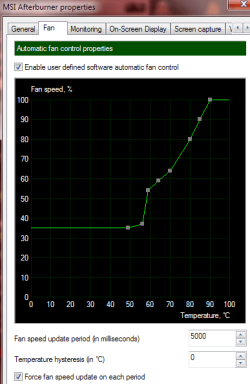
You can use msi afterburner to make a custom fan profile,I have that setup for my amd card.This is my custom fan profile,have it setup like this so it's more quiet and it stays in normal temps and handles it better then CCC does.I have fan control disabled in CCC and let my custom fan profile control it in msi afterburner.
 

Attachments

  • sdfsdf.png
    sdfsdf.png
    11.4 KB · Views: 13

My Computer My Computer

At a glance

Windows 10 64bitAMD Phenom II X4 925 (Deneb)(2.8GHz) OC 3.4GHzCorsair Vengeance DDR3 4GBX2 (8192MB)XFX HD 6870 1GB (OC)- 940MHz core, mem 1150MHz
Computer type
PC/Desktop
Computer Manufacturer/Model Number
custom build
OS
Windows 10 64bit
CPU
AMD Phenom II X4 925 (Deneb)(2.8GHz) OC 3.4GHz
Motherboard
M5A78L-MLX Plus
Memory
Corsair Vengeance DDR3 4GBX2 (8192MB)
Graphics Card(s)
XFX HD 6870 1GB (OC)- 940MHz core, mem 1150MHz
Monitor(s) Displays
Vizio 26' 1920x1080 / Acer 1336x768
Screen Resolution
1920x1080 60Hz /1336x768
Hard Drives
Kingston Digital 60GB SSDNow V300/500gb HDD Western Digital 7200rpm (/WD 160GB HDD 7200rpm
PSU
CORSAIR CX600 600w
Case
AZZA Orion 202 EVO
Cooling
cooler master hyper TX3 cpu cooler
Keyboard
Razer DeathStalker
Mouse
Logitech Optical Gaming Mouse G400
Antivirus
Defualt on win 10
Browser
Firefox
Other Info
cpu is overclocked in bios
My temps were 85c playing Darksiders for 2 hours but didnt realize I didnt have my custom fan profile on so ...... it would be much cooler now since i put it back in effect but hell this card ran good even though it was 80+

If your card is still giving you issues i would just replace it

70c is too low to crash
 

My Computer My Computer

At a glance

Windows 10 Home Premium 64bit sp1Intel I7-6700K @ 4.6 Ghz 1.344 volts everyday OC32GB G-Skill TridentZ 3200mhz 16-18-18-38 DDR4Sli Gigabyte Windforce GTX 980 G1
Computer type
PC/Desktop
Computer Manufacturer/Model Number
CoreI7-6700K MrFingerIII Special Builds
OS
Windows 10 Home Premium 64bit sp1
CPU
Intel I7-6700K @ 4.6 Ghz 1.344 volts everyday OC
Motherboard
Asrock Fatality K6 Z170 Socket 1151
Memory
32GB G-Skill TridentZ 3200mhz 16-18-18-38 DDR4
Graphics Card(s)
Sli Gigabyte Windforce GTX 980 G1
Sound Card
AC97 Creative Rage Tactic 3D Headphones Bluetooth
Monitor(s) Displays
27" Asus ROG Swift PG278Q G-Sync 48" Vizio Smart HD TV
Screen Resolution
2560x1440p 27"- 48" Currently Gaming at 2560x1440p Res 2K
Hard Drives
250GB Samsung Evo840SSD Seagate baracuda 500 GB WD Mybook 500Gb 1TB Seagate Barracuda
PSU
HX1050w Corsair Silver 80plus certified crosfire/sli
Case
Enthod Pro Full Tower
Cooling
Corsair H110i GT 280 mm High Performance WaterBlock
Keyboard
Logitech wireless keyboard
Mouse
Logitech wireless mouse
Internet Speed
Cox Cable 100+ mb
Antivirus
WebRoot Spysweeper with Antivirus
Browser
IE-10, Chrome, Opera
Other Info
My Other Rig is a AMD FX8320E @4.6Ghz 16GB Ballistic Sport Ram
Mobo Asrock Fatality 990FX 120GB OCZ SSD 1TB Seagate Barracuda Corsair H75 Cooling PSU Corsair CX750
GPU GTX Gigabyte 970G1
Back
Top