Is This Normal - RENTED VPS Server with 110MB SVCHOST.EXE Process?

MyRentals

New member
Local time
11:32 PM
Messages
4
Location
UK & USA
I am searching for reasons why a VPS server 2008 R2 that I am renting for my own business websites is using so many memory resources.

For instance, I have been looking into a SVCHOST.EXE Process which is using 110MB of the server memory.

By typing in 'tasklist /svc' in a command window and finding the PID - I see the following services accumulated in the above svchost process:

AeLookpupSvc
CertPropSvc
gpsvc
iphlpsvc
lanmanServer
ProfSvc
Schedule
SENS
SessionEnv
ShellHWDetection
Winmgmt
wuauserv

The Schedule has BIND configured to run every 5 mins with the following batch file:
cd c:\BIND\bin
C:\BIND\bin\rndc reload > test.run

Is BIND normal for a rented VPS through a hosting provider?

Thanks in advance for all feedback.
 

My Computer My Computer

At a glance

Windows 7 Ultimate x32
OS
Windows 7 Ultimate x32
BIND is DNS service and for VPN clients I would strongly recommend keeping it left on.

Is the high memory usage only when the VPN connection is initiated or is it constantly high?

What other services are currently installed on that machine? For example: IIS, Active Directory Domain Services, WDS, FTP, NAP, Exchange... etc

Also, how much RAM does the server have installed?

Many Thanks,
Josh :)
 

My Computer My Computer

At a glance

Windows 7 Professional x64 SP1 ; Windows Serv...Intel Core i5 2400 @ 3.10GHz8.0GB DDR3 @ 665MHz (2GBx4)AMD Radeon HD 6870
Computer type
PC/Desktop
Computer Manufacturer/Model Number
Custom Built
OS
Windows 7 Professional x64 SP1 ; Windows Server 2012 R2 Standard
CPU
Intel Core i5 2400 @ 3.10GHz
Motherboard
Foxconn H67MP-S/-V/H67MP
Memory
8.0GB DDR3 @ 665MHz (2GBx4)
Graphics Card(s)
AMD Radeon HD 6870
Sound Card
Realtek High Definition Audio
Monitor(s) Displays
AOC 2243W & SMB1930NW
Screen Resolution
1440x900 & 1920x1080
Hard Drives
977GB Seagate ST31000524AS ATA Drive (SATA)
250GB WD iSCSI attached Drive
PSU
750W Gaming PSU
Case
Novatech Night
Cooling
Fan
Keyboard
Dell Standard PS/2 Keyboard
Mouse
R.A.T 07 Gaming Mouse
Internet Speed
Download: 10 Mbps Ping: 30ms Upload: 0.81 Mbps
Browser
Google Chrome
Other Info
Optiarc DVD RW AD-5260S ATA Device
..

Is the high memory usage only when the VPN connection is initiated or is it constantly high?

What other services are currently installed on that machine? For example: IIS, Active Directory Domain Services, WDS, FTP, NAP, Exchange... etc

Also, how much RAM does the server have installed?

Many Thanks,
Josh :)

Thanks for your reply Josh, really appreciated.

OK, so BIND and the batch file continuous 5 minute refresh stays on then.

It uses the same memory for the OP mentioned process constantly.
The VPS has 1.5GB allocated on a Xenon 2.4Ghz

Not using Active Directory. IIS7 and SQL Express are running on it.
FileZiller too just with 1 FTP account for admin use.
Domains in their own worker processes.
 

My Computer My Computer

At a glance

Windows 7 Ultimate x32
OS
Windows 7 Ultimate x32
So the whole server has 1.5GB of RAM installed and SVCHOST process is using 110MB of it? As far as I am aware, this is normal :)

You may receive performance issues if the server itself is set to host different services as well as depending on if there is a current FTP session.

Please understand that server operating systems are designed for high amounts of system resources and will use more than a typical client OS.

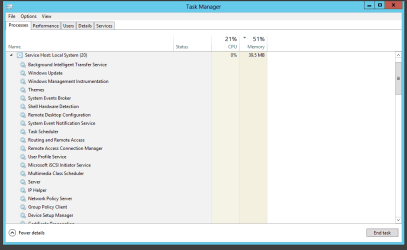
For my local server that only services a maximum of about 5 clients at any one time the memory usage is around 40-250MB of RAM

svchost.PNG

Does your memory usage of SVCHOST change at all or is it constant? What about during idle times?

Josh :)
 

My Computer My Computer

At a glance

Windows 7 Professional x64 SP1 ; Windows Serv...Intel Core i5 2400 @ 3.10GHz8.0GB DDR3 @ 665MHz (2GBx4)AMD Radeon HD 6870
Computer type
PC/Desktop
Computer Manufacturer/Model Number
Custom Built
OS
Windows 7 Professional x64 SP1 ; Windows Server 2012 R2 Standard
CPU
Intel Core i5 2400 @ 3.10GHz
Motherboard
Foxconn H67MP-S/-V/H67MP
Memory
8.0GB DDR3 @ 665MHz (2GBx4)
Graphics Card(s)
AMD Radeon HD 6870
Sound Card
Realtek High Definition Audio
Monitor(s) Displays
AOC 2243W & SMB1930NW
Screen Resolution
1440x900 & 1920x1080
Hard Drives
977GB Seagate ST31000524AS ATA Drive (SATA)
250GB WD iSCSI attached Drive
PSU
750W Gaming PSU
Case
Novatech Night
Cooling
Fan
Keyboard
Dell Standard PS/2 Keyboard
Mouse
R.A.T 07 Gaming Mouse
Internet Speed
Download: 10 Mbps Ping: 30ms Upload: 0.81 Mbps
Browser
Google Chrome
Other Info
Optiarc DVD RW AD-5260S ATA Device
The memory usage of a process will vary widely depending on a variety of factors. These include the amount of RAM in the system, what the process is doing, what other processes are doing, and other recent system activity. The goal of the memory manager is to make maximum use of the available resources to optimize performance. In a desktop the priority is for maximum performance of local applications while in a sever it will be for network users. Minimizing memory usage is NOT a goal.

It is difficult to tell if 110 MB is high for the process in question but it does seem reasonable. Even if the usage is untypical that doesn't mean something is wrong. It may simply be that the process requires a larger amount of memory for it's current meeds.
 

My Computer My Computer

At a glance

Windows 7 Pro 64 bitXeon W35208 GBNvidia Geforce 210
Computer type
PC/Desktop
Computer Manufacturer/Model Number
HP
OS
Windows 7 Pro 64 bit
CPU
Xeon W3520
Memory
8 GB
Graphics Card(s)
Nvidia Geforce 210
Back
Top