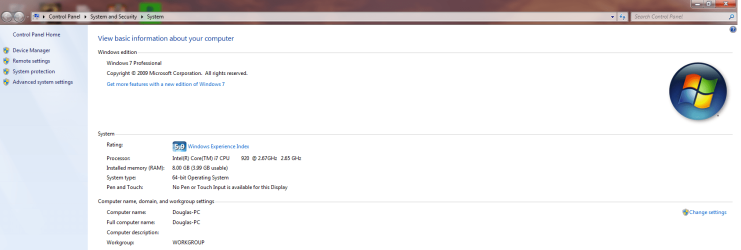
8 gigs total (3.99 RAM usable)?

Crazymaze

New member
Local time
10:09 AM
Messages
8
I've read a lot of forum post about the same problem. I recently purchased Windows 7 64 bit to take advantage of all 8 gigs of RAM that I currently have in my PC that I just built. When I went to check up on my PC stats, it says 8 gigs installed (3.99 usable). I don't know if this a bug or not but I've tried every solution suggested by the forum Reps. and nothing has worked for me. I ran a RAM test to make sure all my ram is working properly and it came out to all 8 gigs working properly. I don't want my PC to think there's only 4 gigs to spare, I want my PC to take advantage of all 8 gigs of RAM.

Here is my build:
Intel i7 920
EVGA GTX 285 1GB
EVGA X58 SLI
CoolerMaster V8
Corsair XMS (2gb x 2) x2
Kingwin Mach 1 1000w
Antec 1200 Gaming Case
 

My Computer My Computer

At a glance

Windows 7 (64bit)Intel i7 920CORSAIR XMS3 DHX 4GB (x2)EVGA GeForce GTX 285 1GB
OS
Windows 7 (64bit)
CPU
Intel i7 920
Motherboard
EVGA X58
Memory
CORSAIR XMS3 DHX 4GB (x2)
Graphics Card(s)
EVGA GeForce GTX 285 1GB
Sound Card
Standard
Monitor(s) Displays
LG
Hard Drives
Western Digital VelociRaptor 300GB
PSU
KINGWIN Mach 1 1000W
Case
Antec 1200 Gaming Case
Cooling
COOLER MASTER V8
This sounds like something in the BIOS. (could still be in Windows)

Make sure all voltage, timing, frequency setting are "set" in the BIOS

Make sure it's running in triple channel too.

You probably have done this but it's just a reminder.

Welcome to the forums.
 

My Computer My Computer

At a glance

Windows 7 Professional x64Intel Core i7 8604GB DDR3 Mushkin 1600Mhz @ 7-8-7-20MSI GTS250 1GB DDR3 Twin Frozr
Computer Manufacturer/Model Number
Keeps changing - (Custom)
OS
Windows 7 Professional x64
CPU
Intel Core i7 860
Motherboard
Gigabyte GA-P55-UD4P
Memory
4GB DDR3 Mushkin 1600Mhz @ 7-8-7-20
Graphics Card(s)
MSI GTS250 1GB DDR3 Twin Frozr
Sound Card
Onboard realtek
Monitor(s) Displays
Samsung SyncMaster 24" P2450 + Samsung 20" 2033
Screen Resolution
1920 X 1080 and 1600 X 900 (#2 system 1440 X 900)
Hard Drives
Patriot Inferno 120GB SSD + 3 WD Blue 640GB drives
PSU
Corsair 750 HX Modular
Case
Lancool PC-K62
Cooling
Cooler Master TX3 CPU cooler and 4-140mm and 1-120mm case
Keyboard
Gigabyte USB keyboard
Mouse
Microsoft wireless laser mouse 5000
Internet Speed
7 Mb down 1.5 up
Other Info
System #2: AMD Phenom II X6 1055T (Freezer 7 Pro cooler) - Gigabyte 880GMA-UD2H - WD 500GB Black - 9500GT (1GB) 500W OCZ modular PSU - Antec 200 case. System #3 (LapTop) Core 2 Duo T6670 - 320GB 7200RPM HD - 4GB DDR3 RAM.
When your computer boots into POST, does the BIOS screen show 8GB of RAM?
 

My Computer My Computer

At a glance

Windows 7Pentium EE 3.73 GHz8GB OCZ SLI PC16000 DDR3 2000MHz2 x EVGA GeForce 9800 GTX 512MB running 2-way...
Computer Manufacturer/Model Number
me
OS
Windows 7
CPU
Pentium EE 3.73 GHz
Motherboard
EVGA nForce 790i Ultra
Memory
8GB OCZ SLI PC16000 DDR3 2000MHz
Graphics Card(s)
2 x EVGA GeForce 9800 GTX 512MB running 2-way SLI
Sound Card
Asus Xonar HDAV 1.3
Monitor(s) Displays
LG 32" LCD
Hard Drives
2 x Western Digital WD15EADS
PSU
Cooler Master M1000
Case
Thermaltake Black Armor VA8000
Cooling
2 x 90mmk / 2 x 120mm
When your computer boots into POST, does the BIOS screen show 8GB of RAM?

Very good point. Use "pause/break" to stop it and take a look then "print scrn" to resume.
 

My Computer My Computer

At a glance

Windows 7 Professional x64Intel Core i7 8604GB DDR3 Mushkin 1600Mhz @ 7-8-7-20MSI GTS250 1GB DDR3 Twin Frozr
Computer Manufacturer/Model Number
Keeps changing - (Custom)
OS
Windows 7 Professional x64
CPU
Intel Core i7 860
Motherboard
Gigabyte GA-P55-UD4P
Memory
4GB DDR3 Mushkin 1600Mhz @ 7-8-7-20
Graphics Card(s)
MSI GTS250 1GB DDR3 Twin Frozr
Sound Card
Onboard realtek
Monitor(s) Displays
Samsung SyncMaster 24" P2450 + Samsung 20" 2033
Screen Resolution
1920 X 1080 and 1600 X 900 (#2 system 1440 X 900)
Hard Drives
Patriot Inferno 120GB SSD + 3 WD Blue 640GB drives
PSU
Corsair 750 HX Modular
Case
Lancool PC-K62
Cooling
Cooler Master TX3 CPU cooler and 4-140mm and 1-120mm case
Keyboard
Gigabyte USB keyboard
Mouse
Microsoft wireless laser mouse 5000
Internet Speed
7 Mb down 1.5 up
Other Info
System #2: AMD Phenom II X6 1055T (Freezer 7 Pro cooler) - Gigabyte 880GMA-UD2H - WD 500GB Black - 9500GT (1GB) 500W OCZ modular PSU - Antec 200 case. System #3 (LapTop) Core 2 Duo T6670 - 320GB 7200RPM HD - 4GB DDR3 RAM.
I have a screen shot down below to show what my problem is, and yea when I checked the BIOS there was 8 gigs present.
 

Attachments

  • Windows 7 pic.png
    Windows 7 pic.png
    55.4 KB · Views: 1,407

My Computer My Computer

At a glance

Windows 7 (64bit)Intel i7 920CORSAIR XMS3 DHX 4GB (x2)EVGA GeForce GTX 285 1GB
OS
Windows 7 (64bit)
CPU
Intel i7 920
Motherboard
EVGA X58
Memory
CORSAIR XMS3 DHX 4GB (x2)
Graphics Card(s)
EVGA GeForce GTX 285 1GB
Sound Card
Standard
Monitor(s) Displays
LG
Hard Drives
Western Digital VelociRaptor 300GB
PSU
KINGWIN Mach 1 1000W
Case
Antec 1200 Gaming Case
Cooling
COOLER MASTER V8
Its a shot in the dark but have you looked in msconfig/boot/advanced options/maximum memory? Make sure its not checked
 

My Computer My Computer

At a glance

windows 8.1 Pro x64intel [email protected]2x8gb ripjaws x @2133asus r9-290@1100/1300
Computer type
PC/Desktop
Computer Manufacturer/Model Number
Elsa
OS
windows 8.1 Pro x64
CPU
intel [email protected]
Motherboard
msi mpower max ac
Memory
2x8gb ripjaws x @2133
Graphics Card(s)
asus r9-290@1100/1300
Sound Card
creative sbz
Monitor(s) Displays
dell u3011
Hard Drives
840 evo 250 & 8.5tb
PSU
evga supernova p2-1000
Case
corsair air 540
Cooling
corsair h100
Keyboard
logitech g710+
Mouse
logitech g502
Internet Speed
50/10
Antivirus
avg
Browser
firefox

My Computer My Computer

At a glance

Windows 7 Professional x64Intel Core i7 8604GB DDR3 Mushkin 1600Mhz @ 7-8-7-20MSI GTS250 1GB DDR3 Twin Frozr
Computer Manufacturer/Model Number
Keeps changing - (Custom)
OS
Windows 7 Professional x64
CPU
Intel Core i7 860
Motherboard
Gigabyte GA-P55-UD4P
Memory
4GB DDR3 Mushkin 1600Mhz @ 7-8-7-20
Graphics Card(s)
MSI GTS250 1GB DDR3 Twin Frozr
Sound Card
Onboard realtek
Monitor(s) Displays
Samsung SyncMaster 24" P2450 + Samsung 20" 2033
Screen Resolution
1920 X 1080 and 1600 X 900 (#2 system 1440 X 900)
Hard Drives
Patriot Inferno 120GB SSD + 3 WD Blue 640GB drives
PSU
Corsair 750 HX Modular
Case
Lancool PC-K62
Cooling
Cooler Master TX3 CPU cooler and 4-140mm and 1-120mm case
Keyboard
Gigabyte USB keyboard
Mouse
Microsoft wireless laser mouse 5000
Internet Speed
7 Mb down 1.5 up
Other Info
System #2: AMD Phenom II X6 1055T (Freezer 7 Pro cooler) - Gigabyte 880GMA-UD2H - WD 500GB Black - 9500GT (1GB) 500W OCZ modular PSU - Antec 200 case. System #3 (LapTop) Core 2 Duo T6670 - 320GB 7200RPM HD - 4GB DDR3 RAM.
Its a shot in the dark but have you looked in msconfig/boot/advanced options/maximum memory? Make sure its not checked


Yes, I have tried msconfig many times now, but I end up with the same result in my screen shot just above.
 

My Computer My Computer

At a glance

Windows 7 (64bit)Intel i7 920CORSAIR XMS3 DHX 4GB (x2)EVGA GeForce GTX 285 1GB
OS
Windows 7 (64bit)
CPU
Intel i7 920
Motherboard
EVGA X58
Memory
CORSAIR XMS3 DHX 4GB (x2)
Graphics Card(s)
EVGA GeForce GTX 285 1GB
Sound Card
Standard
Monitor(s) Displays
LG
Hard Drives
Western Digital VelociRaptor 300GB
PSU
KINGWIN Mach 1 1000W
Case
Antec 1200 Gaming Case
Cooling
COOLER MASTER V8

My Computer My Computer

At a glance

Windows 7 Professional x64Intel Core i7 8604GB DDR3 Mushkin 1600Mhz @ 7-8-7-20MSI GTS250 1GB DDR3 Twin Frozr
Computer Manufacturer/Model Number
Keeps changing - (Custom)
OS
Windows 7 Professional x64
CPU
Intel Core i7 860
Motherboard
Gigabyte GA-P55-UD4P
Memory
4GB DDR3 Mushkin 1600Mhz @ 7-8-7-20
Graphics Card(s)
MSI GTS250 1GB DDR3 Twin Frozr
Sound Card
Onboard realtek
Monitor(s) Displays
Samsung SyncMaster 24" P2450 + Samsung 20" 2033
Screen Resolution
1920 X 1080 and 1600 X 900 (#2 system 1440 X 900)
Hard Drives
Patriot Inferno 120GB SSD + 3 WD Blue 640GB drives
PSU
Corsair 750 HX Modular
Case
Lancool PC-K62
Cooling
Cooler Master TX3 CPU cooler and 4-140mm and 1-120mm case
Keyboard
Gigabyte USB keyboard
Mouse
Microsoft wireless laser mouse 5000
Internet Speed
7 Mb down 1.5 up
Other Info
System #2: AMD Phenom II X6 1055T (Freezer 7 Pro cooler) - Gigabyte 880GMA-UD2H - WD 500GB Black - 9500GT (1GB) 500W OCZ modular PSU - Antec 200 case. System #3 (LapTop) Core 2 Duo T6670 - 320GB 7200RPM HD - 4GB DDR3 RAM.
Its a shot in the dark but have you looked in msconfig/boot/advanced options/maximum memory? Make sure its not checked


Yes, I have tried msconfig many times now, but I end up with the same result in my screen shot just above.
Hello Crazymaze, mem usage is dictated by various factors.
  • BIOS, is bios set up and do you see memeory address in bios?
  • Statrup, do you have a large number of executable files in startup?
  • Running services, do you have a large number of executables that are eating up your memory?
  • Pagefile.sys what do you have set up as the size of pagefile cache?
  • Whats your antivirus, high memory usage tends to lead me to antivirus, Norton is always considered suspect of using high memory.
Check out these factors, as I said I tend to look at antivirus as an issue.
 

My Computer My Computer

At a glance

Windows 7 7600 1 X64AMD PHENOM II X 550 PROCESSOR 3.1 ghzCorsair 4 gig ddr 3ati radeon 3300
Computer Manufacturer/Model Number
Custom Build
OS
Windows 7 7600 1 X64
CPU
AMD PHENOM II X 550 PROCESSOR 3.1 ghz
Motherboard
ASUS M4A78-TE
Memory
Corsair 4 gig ddr 3
Graphics Card(s)
ati radeon 3300
Sound Card
ati hd
Monitor(s) Displays
syncmaster 2033sw
Screen Resolution
1600X900 60 hz refresh
Hard Drives
twin_seagates SATA's 1 TB & 500 Gig, hitachi_slimline 160 gig
PSU
antec_550 watt
Case
cooler master GLite
Cooling
stock_heat sink
Internet Speed
20mbs up/ 1.5mbs down
Other Info
favorite child "stewie"
favorite dog "brian"
Confirm the following at least before attempting what others are suggesting:

If you are using Windows 7 Home BASIC version of Windows 7 installed on your PC it will only address 4GBof physical RAM. You are going to have to upgrade to Windows 7 Home Premium which I think will address either upto 8 or 12 GB of RAM.

The other possibility if you have WIndows 7 Home Premium is that you may have the 32-bit version of Windows 7 installed instead of teh 64-bit version. Check which version was installed on your PC.

BTW - you get both the 32-bit and 64-bit discs with Windows 7 Home Premium and greater. Perhaps you just grabbed the wrong disc out of teh package when you did the install.
 

My Computer My Computer

At a glance

Windiows & Home PremiumIntel® CoreTM 2 Duo P8700 (3MB Cache, 1066MHz...6GB DDR3 - 1333MhzSLITM Dual 1GB GDDR3 NVIDIA® GeForce® GTX 260M7
Computer Manufacturer/Model Number
DELL / Alienware M17x
OS
Windiows & Home Premium
CPU
Intel® CoreTM 2 Duo P8700 (3MB Cache, 1066MHz FSB)
Memory
6GB DDR3 - 1333Mhz
Graphics Card(s)
SLITM Dual 1GB GDDR3 NVIDIA® GeForce® GTX 260M7
Sound Card
Internal High-Definition 5.1 Surround Sound Audio
Monitor(s) Displays
17-inch WideUXGA 1920 x 1200 - (1200p) LCD
Hard Drives
640GB 7,200RPM - RAID 0 (2x320GB)
His screenshot proves he has 64 bit installed.

Every case of this happening involves an EVGA motherboard. I think it has to do with EVGA.

(every case I have read so far....I'm sure it's not EVGA only)

I would shut down and "reseat your RAM" it's something to try
 

My Computer My Computer

At a glance

Windows 7 Professional x64Intel Core i7 8604GB DDR3 Mushkin 1600Mhz @ 7-8-7-20MSI GTS250 1GB DDR3 Twin Frozr
Computer Manufacturer/Model Number
Keeps changing - (Custom)
OS
Windows 7 Professional x64
CPU
Intel Core i7 860
Motherboard
Gigabyte GA-P55-UD4P
Memory
4GB DDR3 Mushkin 1600Mhz @ 7-8-7-20
Graphics Card(s)
MSI GTS250 1GB DDR3 Twin Frozr
Sound Card
Onboard realtek
Monitor(s) Displays
Samsung SyncMaster 24" P2450 + Samsung 20" 2033
Screen Resolution
1920 X 1080 and 1600 X 900 (#2 system 1440 X 900)
Hard Drives
Patriot Inferno 120GB SSD + 3 WD Blue 640GB drives
PSU
Corsair 750 HX Modular
Case
Lancool PC-K62
Cooling
Cooler Master TX3 CPU cooler and 4-140mm and 1-120mm case
Keyboard
Gigabyte USB keyboard
Mouse
Microsoft wireless laser mouse 5000
Internet Speed
7 Mb down 1.5 up
Other Info
System #2: AMD Phenom II X6 1055T (Freezer 7 Pro cooler) - Gigabyte 880GMA-UD2H - WD 500GB Black - 9500GT (1GB) 500W OCZ modular PSU - Antec 200 case. System #3 (LapTop) Core 2 Duo T6670 - 320GB 7200RPM HD - 4GB DDR3 RAM.
His screenshot proves he has 64 bit installed.

Every case of this happening involves an EVGA motherboard. I think it has to do with EVGA.

(every case I have read so far....I'm sure it's not EVGA only)

I would shut down and "reseat your RAM" it's something to try


Ooopppsss! Never saw the screen shot down the page.......:o
 

My Computer My Computer

At a glance

Windiows & Home PremiumIntel® CoreTM 2 Duo P8700 (3MB Cache, 1066MHz...6GB DDR3 - 1333MhzSLITM Dual 1GB GDDR3 NVIDIA® GeForce® GTX 260M7
Computer Manufacturer/Model Number
DELL / Alienware M17x
OS
Windiows & Home Premium
CPU
Intel® CoreTM 2 Duo P8700 (3MB Cache, 1066MHz FSB)
Memory
6GB DDR3 - 1333Mhz
Graphics Card(s)
SLITM Dual 1GB GDDR3 NVIDIA® GeForce® GTX 260M7
Sound Card
Internal High-Definition 5.1 Surround Sound Audio
Monitor(s) Displays
17-inch WideUXGA 1920 x 1200 - (1200p) LCD
Hard Drives
640GB 7,200RPM - RAID 0 (2x320GB)
-Yes
-Just 4 programs (itunes, quicktime, EVGA Precision, and Microsoft Security essentials)
-No, my CPU usage is at 0-1% and memory usage is at 1.06GB
-This is the problem, it says "currently allocated 4087", how do I go about changing it to my 8192?
-Microsoft Security Essentials, but I just want to note that even before I put on MSE, I checked my PC's stats to make sure everything was 'connected' and running at the speed it should be running at.
 

My Computer My Computer

At a glance

Windows 7 (64bit)Intel i7 920CORSAIR XMS3 DHX 4GB (x2)EVGA GeForce GTX 285 1GB
OS
Windows 7 (64bit)
CPU
Intel i7 920
Motherboard
EVGA X58
Memory
CORSAIR XMS3 DHX 4GB (x2)
Graphics Card(s)
EVGA GeForce GTX 285 1GB
Sound Card
Standard
Monitor(s) Displays
LG
Hard Drives
Western Digital VelociRaptor 300GB
PSU
KINGWIN Mach 1 1000W
Case
Antec 1200 Gaming Case
Cooling
COOLER MASTER V8
  • BIOS, is bios set up and do you see memeory address in bios?
  • Statrup, do you have a large number of executable files in startup?
  • Running services, do you have a large number of executables that are eating up your memory?
  • Pagefile.sys what do you have set up as the size of pagefile cache?
  • Whats your antivirus, high memory usage tends to lead me to antivirus, Norton is always considered suspect of using high memory.


-Yes
-Just 4 programs (itunes, quicktime, EVGA Precision, and Microsoft Security essentials)
-No, my CPU usage is at 0-1% and memory usage is at 1.06GB
-This is the problem, it says my virtual memory is "currently allocated 4087", how do I go about changing it to my 8192?
-Microsoft Security Essentials, but I just want to note that even before I put on MSE, I checked my PC's stats to make sure everything was 'connected' and running at the speed it should be running at.[/QUOTE]
 

My Computer My Computer

At a glance

Windows 7 (64bit)Intel i7 920CORSAIR XMS3 DHX 4GB (x2)EVGA GeForce GTX 285 1GB
OS
Windows 7 (64bit)
CPU
Intel i7 920
Motherboard
EVGA X58
Memory
CORSAIR XMS3 DHX 4GB (x2)
Graphics Card(s)
EVGA GeForce GTX 285 1GB
Sound Card
Standard
Monitor(s) Displays
LG
Hard Drives
Western Digital VelociRaptor 300GB
PSU
KINGWIN Mach 1 1000W
Case
Antec 1200 Gaming Case
Cooling
COOLER MASTER V8
This is the problem, it says my virtual memory is "currently allocated 4087", how do I go about changing it to my 8192?

No this should not make any difference. It's the size of the pagefile, not memory in total. It's fine where it is.
 

My Computer My Computer

At a glance

Windows 7 Professional x64Intel Core i7 8604GB DDR3 Mushkin 1600Mhz @ 7-8-7-20MSI GTS250 1GB DDR3 Twin Frozr
Computer Manufacturer/Model Number
Keeps changing - (Custom)
OS
Windows 7 Professional x64
CPU
Intel Core i7 860
Motherboard
Gigabyte GA-P55-UD4P
Memory
4GB DDR3 Mushkin 1600Mhz @ 7-8-7-20
Graphics Card(s)
MSI GTS250 1GB DDR3 Twin Frozr
Sound Card
Onboard realtek
Monitor(s) Displays
Samsung SyncMaster 24" P2450 + Samsung 20" 2033
Screen Resolution
1920 X 1080 and 1600 X 900 (#2 system 1440 X 900)
Hard Drives
Patriot Inferno 120GB SSD + 3 WD Blue 640GB drives
PSU
Corsair 750 HX Modular
Case
Lancool PC-K62
Cooling
Cooler Master TX3 CPU cooler and 4-140mm and 1-120mm case
Keyboard
Gigabyte USB keyboard
Mouse
Microsoft wireless laser mouse 5000
Internet Speed
7 Mb down 1.5 up
Other Info
System #2: AMD Phenom II X6 1055T (Freezer 7 Pro cooler) - Gigabyte 880GMA-UD2H - WD 500GB Black - 9500GT (1GB) 500W OCZ modular PSU - Antec 200 case. System #3 (LapTop) Core 2 Duo T6670 - 320GB 7200RPM HD - 4GB DDR3 RAM.
If you are not seeing the full amount of memory in windows 7 64bit then you need to go into your bios and make sure the max memory option box is unchecked.

Page files, startup programs or whatever do not take up 5gb of memory!

TC
 

My Computer My Computer

At a glance

Windows 7 Ultimate 64bitIntel Quad Core Q9400 2.66ghz8GB PC2-6400 CorsairNvidia 8800GT 512mb
Computer Manufacturer/Model Number
Custom Built
OS
Windows 7 Ultimate 64bit
CPU
Intel Quad Core Q9400 2.66ghz
Motherboard
MSI Nero 3
Memory
8GB PC2-6400 Corsair
Graphics Card(s)
Nvidia 8800GT 512mb
Sound Card
OnBoard Realtek HD
Monitor(s) Displays
Acer 24" H243H LCD
Screen Resolution
1920 x 1080
Hard Drives
120GB Seagate - OS & Programs,
1TB Seagate - Media storage,
1TB Seagate - Media2 storage
PSU
Antec Eartwatts 500W
Case
NZXT black finish, glass side, blue lighting
Cooling
Scythe CPU Cooler w/removable fan
Keyboard
Dell (old)
Mouse
Logitech G5 w/copper accents
Internet Speed
8mb download, 1mb upload
Other Info
2nd computer, asrock board, amd x2-6000 cpu (htpc use)
3rd computer, gigabyte GA-E7AUM-DS2H board, Intel E8400 cpu (htpc use)
This is the problem, it says my virtual memory is "currently allocated 4087", how do I go about changing it to my 8192?

No this should not make any difference. It's the size of the pagefile, not memory in total. It's fine where it is.


Ok, do you have any more suggestions at all that could be linked with the OS before I contact EVGA?
 

My Computer My Computer

At a glance

Windows 7 (64bit)Intel i7 920CORSAIR XMS3 DHX 4GB (x2)EVGA GeForce GTX 285 1GB
OS
Windows 7 (64bit)
CPU
Intel i7 920
Motherboard
EVGA X58
Memory
CORSAIR XMS3 DHX 4GB (x2)
Graphics Card(s)
EVGA GeForce GTX 285 1GB
Sound Card
Standard
Monitor(s) Displays
LG
Hard Drives
Western Digital VelociRaptor 300GB
PSU
KINGWIN Mach 1 1000W
Case
Antec 1200 Gaming Case
Cooling
COOLER MASTER V8
This is the problem, it says my virtual memory is "currently allocated 4087", how do I go about changing it to my 8192?

No this should not make any difference. It's the size of the pagefile, not memory in total. It's fine where it is.


Ok, do you have any more suggestions at all that could be linked with the OS before I contact EVGA?

Go through your BIOS and double check EVERY setting that has anything to do with memory before contacting them. And good luck!
 

My Computer My Computer

At a glance

Windows 7 Professional x64Intel Core i7 8604GB DDR3 Mushkin 1600Mhz @ 7-8-7-20MSI GTS250 1GB DDR3 Twin Frozr
Computer Manufacturer/Model Number
Keeps changing - (Custom)
OS
Windows 7 Professional x64
CPU
Intel Core i7 860
Motherboard
Gigabyte GA-P55-UD4P
Memory
4GB DDR3 Mushkin 1600Mhz @ 7-8-7-20
Graphics Card(s)
MSI GTS250 1GB DDR3 Twin Frozr
Sound Card
Onboard realtek
Monitor(s) Displays
Samsung SyncMaster 24" P2450 + Samsung 20" 2033
Screen Resolution
1920 X 1080 and 1600 X 900 (#2 system 1440 X 900)
Hard Drives
Patriot Inferno 120GB SSD + 3 WD Blue 640GB drives
PSU
Corsair 750 HX Modular
Case
Lancool PC-K62
Cooling
Cooler Master TX3 CPU cooler and 4-140mm and 1-120mm case
Keyboard
Gigabyte USB keyboard
Mouse
Microsoft wireless laser mouse 5000
Internet Speed
7 Mb down 1.5 up
Other Info
System #2: AMD Phenom II X6 1055T (Freezer 7 Pro cooler) - Gigabyte 880GMA-UD2H - WD 500GB Black - 9500GT (1GB) 500W OCZ modular PSU - Antec 200 case. System #3 (LapTop) Core 2 Duo T6670 - 320GB 7200RPM HD - 4GB DDR3 RAM.
You seem to have looked at everything so I will recommend something else. Looking around the web one can see tons of peeps with the same issue on i7 and it turns out to be the voltage and/or the timings and even the cpu not seated properly.
 

My Computer My Computer

At a glance

windows 8.1 Pro x64intel [email protected]2x8gb ripjaws x @2133asus r9-290@1100/1300
Computer type
PC/Desktop
Computer Manufacturer/Model Number
Elsa
OS
windows 8.1 Pro x64
CPU
intel [email protected]
Motherboard
msi mpower max ac
Memory
2x8gb ripjaws x @2133
Graphics Card(s)
asus r9-290@1100/1300
Sound Card
creative sbz
Monitor(s) Displays
dell u3011
Hard Drives
840 evo 250 & 8.5tb
PSU
evga supernova p2-1000
Case
corsair air 540
Cooling
corsair h100
Keyboard
logitech g710+
Mouse
logitech g502
Internet Speed
50/10
Antivirus
avg
Browser
firefox
Back
Top