96 dpi scaling is not working properly

SoulMaril

New member
Local time
11:57 AM
Messages
1
Hi,

I have this strange issue that I have never been able to find a solution maybe you can help me.

I am using a HP8540w with 1920*1080 resolution laptop where a windows7 pro 64bit comes built in. In the beginning the scaling was 120 DPI where I figured out that some applications behawe weird. So I swithched to the 96 dpi scaling (%100) and "XP style" is checked. Most of the problems gone but now I have an other annoying problem. In some applications the fonts are bigger that they do not fit in to the their text boxes.

The stranges thing is when I switch back to 120 dpi scaling the text boxes turn to normal.

See below


Any ideas?

Thanks in advance
 

My Computer My Computer

At a glance

Windows 7 Professional x64
OS
Windows 7 Professional x64
Looks like developers' mistake to me so far.

But name of the application plus picture in normal conditions would be nice.
 

My Computer My Computer

At a glance

Windows 8.1 ; Windows 7 x86 (Dec2008-Jan2013)
Computer type
PC/Desktop
OS
Windows 8.1 ; Windows 7 x86 (Dec2008-Jan2013)
Other Info
"The scale icon at the top right of a post or tutorial is how you can give rep to the member."
I would like to revive this thread.

3 members of my department received new Dell M6800 laptops with identical specs running Win7. When we received them the DPI scaling was set at Medium (Normal) 125%, and we all quickly changed that to Small 100%. While everyone else's machines are working fine, mine is experiencing inconsistent DPI scaling. Most applications appear fine, but Autodesk and Adobe products, along with print dialog boxes for only certain printers, are appearing at 125% instead of the selected 100%. This results in enlarged text and buttons and dialog boxes for only programs, or PARTS of programs.

Our IT person said it must be a driver issue but it's only happening on my computer.

I thought the dual monitors attached to my docking station may have been the problem, but even using the built-in display yields the same results.

Was there ever a solution to this issue?

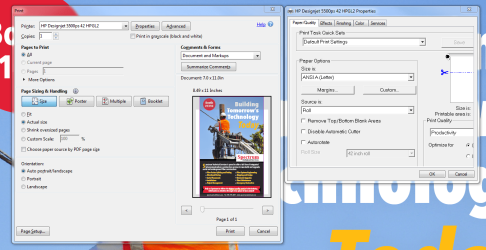
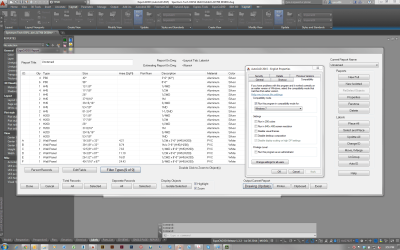
First attachment shows the dialog box to the right is at 125% where the left one is 100%, same driver. The second attachment shows AutoCAD and an add-on from my company that should be at 100% but is at 125%. These both work fine on the other laptops.
 

Attachments

  • DPI example 1.PNG
    DPI example 1.PNG
    107.8 KB · Views: 3
  • DPI example 2.PNG
    DPI example 2.PNG
    108.5 KB · Views: 3

My Computer My Computer

At a glance

Virginiai7-4900MQ16GBNvidia Quadro K5100M
Computer type
Laptop
Computer Manufacturer/Model Number
Dell
OS
Virginia
CPU
i7-4900MQ
Memory
16GB
Graphics Card(s)
Nvidia Quadro K5100M
Screen Resolution
1920x1200
Other Info
Windows 7 Enterprise
I found a solution completely by accident just now. It's simple and it works. Solution was found here:
Windows 7 Incorrect Scaling-Q&A For Super-

This is a known bug that affects users with a high resolution display.

During installation, Windows 7 installs a larger font set which is 125% of the normal size. If you then choose go back to the standard font size (100%), Windows will keep some of the large fonts even though everything else is adjusted for standard fonts, causing some programs to display incorrectly as the DPI is too big for the window size.

Open the Start menu and type regedit and press Enter.
Locate the key HKEY_LOCAL_MACHINE\SOFTWARE\Microsoft\Windows NT\CurrentVersion\Fonts
Find the value MS Sans Serif 8,10,12,14,18,24
Change from SSERIFF.FON to SSERIFE.FON
Find MS Serif 8,10,12,14,18,24
Change from SERIFF.FON to SERIFE.FON
Find Courier 10,12,15
Change from COURF.FON to
COURE.FON
 

My Computer My Computer

At a glance

Virginiai7-4900MQ16GBNvidia Quadro K5100M
Computer type
Laptop
Computer Manufacturer/Model Number
Dell
OS
Virginia
CPU
i7-4900MQ
Memory
16GB
Graphics Card(s)
Nvidia Quadro K5100M
Screen Resolution
1920x1200
Other Info
Windows 7 Enterprise
Back
Top