A few of questions if I may

votemarvel

New member
Local time
6:49 AM
Messages
3
I've been given a copy of Windows 7 Ultimate through my Dad's work and I'm trying to work a few things out that are puzzling me.

There doesn't seem to be a way to keep Computer, Recycle Bin and C:\ as separate icons on the Toolbar, they all get lumped together under one called Explorer. Is there a way to keep them separate?

When I right click on an image and select the Edit command, I want Photoshop Elements to be the program opened but it seems this is not possible. I can change what opens when double clicking on a file but that isn't what I want to do.

Next is something that I think is down to Windows Snap. I want to have my programs full screen but not maximised so I can keep the transparency effect. In XP and Vista I could do this by dragging the program windows to the edges of the screen and then closing it. I try this is Windows 7 though and on reopening the program only takes up half the screen, is there a way to stop 7 from doing this.

Lastly is a matter of cleartype. while my monitor has a native resolution of 1680x1050, I like to run at 1280x800. However while in XP and Vista I can do this and still have text appear clearly, everything appears smudged in Windows 7 no matter how much I tinker with the cleartype. I take it I have no choice but to run at the native resolution and squint at the text.

Sorry that my first post is full of questions but while I accept that my problems are niggles, they are really affecting how I enjoy the operating system and I can feel my fingers itching for my copy of True Image to get XP back on.
 

My Computer My Computer

At a glance

Windows 7 Ultimate 32bitPentium-D 2.8ghz2gbNvidia GeForce 8600GTS 256mb
Computer Manufacturer/Model Number
Philips Iqon
OS
Windows 7 Ultimate 32bit
CPU
Pentium-D 2.8ghz
Motherboard
Gigabyte Technology Co., Ltd. 945GZM-S2
Memory
2gb
Graphics Card(s)
Nvidia GeForce 8600GTS 256mb
Monitor(s) Displays
Acer P223W [Monitor] (22.0"vis, s/n LAE040254301, October 20
Hard Drives
c: (NTFS on drive 0) 164.69 GB
d: (NTFS on drive 5) 250.06 GB
e: (NTFS on drive 6) 750.15 GB
When I right click on an image and select the Edit command, I want Photoshop Elements to be the program opened but it seems this is not possible. I can change what opens when double clicking on a file but that isn't what I want to do.
Hi votemarvel,

Maybe try this registry edit (of course back everything up first): How To Change The Edit Application In Windows

Cheers,

Walker
Windows Outreach Team
 

My Computer My Computer

At a glance

Windows 7 Home Premium (64-bit) *** Windows X...AMD Athlon Neo X2 1.6GHz *** Intel Core i7 Qu...4.00 GB *** 4.00 GBATI Radeon HD 3200, 384MB *** ATI Radeon HD 4...
Computer Manufacturer/Model Number
HP Pavilion dm3 (netbook) *** 27" iMac (Dual-Boot)
OS
Windows 7 Home Premium (64-bit) *** Windows XP SP3 (32-bit), OSX 10.6
CPU
AMD Athlon Neo X2 1.6GHz *** Intel Core i7 Quad Core 2.8GHz
Memory
4.00 GB *** 4.00 GB
Graphics Card(s)
ATI Radeon HD 3200, 384MB *** ATI Radeon HD 4850, 1GB
Sound Card
ATI High Definition Audio *** ATI High Definition Audio
Monitor(s) Displays
LG Flatron W2053TX
Screen Resolution
1600 x 900 (monitor), 1266 x 768 (laptop) *** 2560 x 1440
Hard Drives
300 GB SATA (internal), 500 GB HP SimpleSave (external) *** 1 TB SATA (internal), 160 GB LaCie (external)
Mouse
Logitech Cordless Optical Mouse for Notebooks
Internet Speed
Broadband
I want to have my programs full screen but not maximised so I can keep the transparency effect. In XP and Vista I could do this by dragging the program windows to the edges of the screen and then closing it.
Hi.

In 7 it remains when maximized, so not sure why it isn't for you.
 

My Computer My Computer

At a glance

Windows 7 Ultimate x64 ®™Intel Core 2 Duo (2.2 GHz)2x 2GB Corsair (667 MHz)NVIDIA 8600M GS (256MB)
Computer Manufacturer/Model Number
Sony Vaio FZ21Z
OS
Windows 7 Ultimate x64 ®™
CPU
Intel Core 2 Duo (2.2 GHz)
Motherboard
Sony (Intel Chipset)
Memory
2x 2GB Corsair (667 MHz)
Graphics Card(s)
NVIDIA 8600M GS (256MB)
Sound Card
Sigmatel
Monitor(s) Displays
15.4" TFT X-Black
Screen Resolution
1280x800
Hard Drives
Western Digital 300GB Scorpio Black (7200rpm)
Mouse
Logitech Anywhere MX
Internet Speed
Sky 5MB

My Computer My Computer

At a glance

W 7 64-bit UltimateIntel Q9550 Yorkfield8GB Dominator 8500C5DATI : XFX 5870
Computer Manufacturer/Model Number
* BFK Customs *
OS
W 7 64-bit Ultimate
CPU
Intel Q9550 Yorkfield
Motherboard
ASUS P5Q Pro
Memory
8GB Dominator 8500C5D
Graphics Card(s)
ATI : XFX 5870
Sound Card
Realtek HD Audio 7-1
Monitor(s) Displays
1x 47" LCD HDMI & 3x 26" LCD HDMI
Screen Resolution
1920x1080P & 1920x1200
Hard Drives
1x 80GB Intel X25-M G2 SSD : 1x 500GB & 1x 640GB WD Caviar Black(s)
PSU
Corsair 620HX
Case
Cooler Master RC-690
Cooling
Tuniq Tower 120, 2x 140mm and 3x 120mm case fans
Keyboard
Microsoft 500
Mouse
Razer Diamondback 3G
Internet Speed
14 Mb/s
Other Info
1x Koutech 3Gb/s SATA HDD Hot Swap Rack
I want to have my programs full screen but not maximised so I can keep the transparency effect. In XP and Vista I could do this by dragging the program windows to the edges of the screen and then closing it.
Hi.

In 7 it remains when maximized, so not sure why it isn't for you.


It is for me too, that window was maxed. ;)

77777.JPG
 

My Computer My Computer

At a glance

W 7 64-bit UltimateIntel Q9550 Yorkfield8GB Dominator 8500C5DATI : XFX 5870
Computer Manufacturer/Model Number
* BFK Customs *
OS
W 7 64-bit Ultimate
CPU
Intel Q9550 Yorkfield
Motherboard
ASUS P5Q Pro
Memory
8GB Dominator 8500C5D
Graphics Card(s)
ATI : XFX 5870
Sound Card
Realtek HD Audio 7-1
Monitor(s) Displays
1x 47" LCD HDMI & 3x 26" LCD HDMI
Screen Resolution
1920x1080P & 1920x1200
Hard Drives
1x 80GB Intel X25-M G2 SSD : 1x 500GB & 1x 640GB WD Caviar Black(s)
PSU
Corsair 620HX
Case
Cooler Master RC-690
Cooling
Tuniq Tower 120, 2x 140mm and 3x 120mm case fans
Keyboard
Microsoft 500
Mouse
Razer Diamondback 3G
Internet Speed
14 Mb/s
Other Info
1x Koutech 3Gb/s SATA HDD Hot Swap Rack
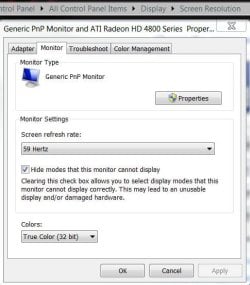
Have you looked at the monitor refresh rate to see if Windows 7 has changed it, it does on mine at install, it'll set my one monitor at 30 Hertz at every install. :confused:
Lastly is a matter of cleartype. while my monitor has a native resolution of 1680x1050, I like to run at 1280x800. However while in XP and Vista I can do this and still have text appear clearly, everything appears smudged in Windows 7 no matter how much I tinker with the cleartype. I take it I have no choice but to run at the native resolution and squint at the text.

Capture.JPG
 

My Computer My Computer

At a glance

W 7 64-bit UltimateIntel Q9550 Yorkfield8GB Dominator 8500C5DATI : XFX 5870
Computer Manufacturer/Model Number
* BFK Customs *
OS
W 7 64-bit Ultimate
CPU
Intel Q9550 Yorkfield
Motherboard
ASUS P5Q Pro
Memory
8GB Dominator 8500C5D
Graphics Card(s)
ATI : XFX 5870
Sound Card
Realtek HD Audio 7-1
Monitor(s) Displays
1x 47" LCD HDMI & 3x 26" LCD HDMI
Screen Resolution
1920x1080P & 1920x1200
Hard Drives
1x 80GB Intel X25-M G2 SSD : 1x 500GB & 1x 640GB WD Caviar Black(s)
PSU
Corsair 620HX
Case
Cooler Master RC-690
Cooling
Tuniq Tower 120, 2x 140mm and 3x 120mm case fans
Keyboard
Microsoft 500
Mouse
Razer Diamondback 3G
Internet Speed
14 Mb/s
Other Info
1x Koutech 3Gb/s SATA HDD Hot Swap Rack
Back
Top