
A few upgrade issues.

Teekz

New member
Power User
Local time
10:06 PM
Messages
142
Location
Doncaster, UK.
Hello, all. Last night I performed an in-place repair upgrade on my PC with Windows 7 Ultimate x64, to repair some errors which could not otherwise be fixed.

All seems to have gone well with the upgrade (aside from the fact that I need to reinstall a few drivers, which is to be expected. :p), except I seem to have run into one bug which has confused me.

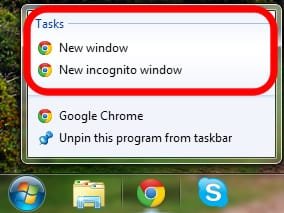
Basically, when I right click an icon on the taskbar, none of the buttons on the "Tasks" menu works. For example, IE9 has "Start InPrivate Browsing" and "Open new tab", Google Chrome has "New Window", etc. I have tried multiple programs, some of which were pinned to the taskbar, others which were not, and none of the buttons seem to work.

I use these menus quite often, so would like to restore functionality to these buttons if possible. A clean installation of my OS would have to be an absolute last resort for me, as I have a lot of program files etc which I don't have the time to reinstall.

Just to clarify, I upgraded from Windows 7 Ultimate x64 SP1 to Windows 7 Ultimate x64 SP1, so I didn't change OS.

Any help is appreciated.

Thanks,
Tom.
 

My Computer

OS
Windows 7 Ultimate (x64) Service Pack 1
CPU
AMD Athlon 64 X2 Dual Core Processor 5600+ 2.80 GHz
Motherboard
GIGABYTE GA-M720-US3
Memory
4GB, Dual Channel, DDR2
Graphics Card(s)
NVIDIA GeForce 8600 GT
Sound Card
Creative SB X-Fi
Monitor(s) Displays
Dual Screen - Dell SE198WFP (19"), & GRUNDIG GU37BLKSE (37")
Screen Resolution
1440x900, 1600x1200
Hard Drives
Hitachi HDS722020ALA330 (2TB Internal), WD 15EADS (1.5TB External)
Keyboard
Microsoft Wireless Laser Keyboard 7000
Mouse
Microsoft Wireless Laser Mouse 7000
Update - I just ran "sfc /scannow" in an elevated command prompt window. Alas, no integrity violations were found. Does anyone have any other suggestions? :(
 

My Computer

OS
Windows 7 Ultimate (x64) Service Pack 1
CPU
AMD Athlon 64 X2 Dual Core Processor 5600+ 2.80 GHz
Motherboard
GIGABYTE GA-M720-US3
Memory
4GB, Dual Channel, DDR2
Graphics Card(s)
NVIDIA GeForce 8600 GT
Sound Card
Creative SB X-Fi
Monitor(s) Displays
Dual Screen - Dell SE198WFP (19"), & GRUNDIG GU37BLKSE (37")
Screen Resolution
1440x900, 1600x1200
Hard Drives
Hitachi HDS722020ALA330 (2TB Internal), WD 15EADS (1.5TB External)
Keyboard
Microsoft Wireless Laser Keyboard 7000
Mouse
Microsoft Wireless Laser Mouse 7000

My Computer

Computer Manufacturer/Model Number
WALLONN7 / LIN BLACK SERIES II
OS
Windows 7 Ultimate x64 SP1
CPU
AMD PHENOM II X6 1090T 3.2GHz
Motherboard
GIGABYTE GA-890FXA-UD7
Memory
8GB G.SKILL RIPJAWS - F3-10666CL7D
Graphics Card(s)
SAPPHIRE ATI RADEON HD 5870 VAPOR X OC
Sound Card
REALTEK DOLBY HOME THEATER
Monitor(s) Displays
LED LG W2486L
Screen Resolution
1080p
Hard Drives
SEAGATE 1TB -ST31000528AS - AHCI MODE - AS SATA
PSU
ZALMAN ZM1000-HP 1000W
Case
THERMALTAKE XASER VI VG4000SWA
Cooling
140MM x3 / 120MM x1 AIR COOLING - THERMALTAKE
Keyboard
MICROSOFT DIGITAL MEDIA KEYBOARD 3000 - USB
Mouse
MICROSOFT BASIC OPTICAL MOUSE 2.0 - USB
Internet Speed
600KBPS
Other Info
MICROSOFT XBOX 360 CONTROLLER
That didn't help, as that disabled the right-click menu on the actual taskbar. My problem is with the right-click menu of programs. I've posted a screenshot of the right-click menu for Google Chrome, and circled the buttons that aren't working in red. It's the buttons in the Tasks section that don't work, for all of the programs I have tried so far, not just Chrome. Sorry if I worded it badly before. :P
 

Attachments

  • chromebuttons.jpg
    chromebuttons.jpg
    12.9 KB · Views: 72
Last edited:

My Computer

OS
Windows 7 Ultimate (x64) Service Pack 1
CPU
AMD Athlon 64 X2 Dual Core Processor 5600+ 2.80 GHz
Motherboard
GIGABYTE GA-M720-US3
Memory
4GB, Dual Channel, DDR2
Graphics Card(s)
NVIDIA GeForce 8600 GT
Sound Card
Creative SB X-Fi
Monitor(s) Displays
Dual Screen - Dell SE198WFP (19"), & GRUNDIG GU37BLKSE (37")
Screen Resolution
1440x900, 1600x1200
Hard Drives
Hitachi HDS722020ALA330 (2TB Internal), WD 15EADS (1.5TB External)
Keyboard
Microsoft Wireless Laser Keyboard 7000
Mouse
Microsoft Wireless Laser Mouse 7000

All seems to have gone well with the upgrade (aside from the fact that I need to reinstall a few drivers, which is to be expected. :p)
( ... )
Just to clarify, I upgraded from Windows 7 Ultimate x64 SP1 to Windows 7 Ultimate x64 SP1, so I didn't change OS.

You reinstalled Windows over the previous installation. I got it wrong? :confused:
Have you used a slipstreamed Windows 7 SP1 DVD? See below. Source.


Attachments

  • Capturar.JPG
    Capturar.JPG
    30 KB · Views: 2

My Computer

Computer Manufacturer/Model Number
WALLONN7 / LIN BLACK SERIES II
OS
Windows 7 Ultimate x64 SP1
CPU
AMD PHENOM II X6 1090T 3.2GHz
Motherboard
GIGABYTE GA-890FXA-UD7
Memory
8GB G.SKILL RIPJAWS - F3-10666CL7D
Graphics Card(s)
SAPPHIRE ATI RADEON HD 5870 VAPOR X OC
Sound Card
REALTEK DOLBY HOME THEATER
Monitor(s) Displays
LED LG W2486L
Screen Resolution
1080p
Hard Drives
SEAGATE 1TB -ST31000528AS - AHCI MODE - AS SATA
PSU
ZALMAN ZM1000-HP 1000W
Case
THERMALTAKE XASER VI VG4000SWA
Cooling
140MM x3 / 120MM x1 AIR COOLING - THERMALTAKE
Keyboard
MICROSOFT DIGITAL MEDIA KEYBOARD 3000 - USB
Mouse
MICROSOFT BASIC OPTICAL MOUSE 2.0 - USB
Internet Speed
600KBPS
Other Info
MICROSOFT XBOX 360 CONTROLLER
Yes, I reinstalled the same OS using the upgrade feature on the installation DVD, essentially reinstalling it whilst leaving my programs etc intact, as explained in the following tutorial: http://www.sevenforums.com/tutorials/3413-repair-install.html

I didn't use a slipstreamed DVD, I used a retail SP1 DVD.
 

My Computer

OS
Windows 7 Ultimate (x64) Service Pack 1
CPU
AMD Athlon 64 X2 Dual Core Processor 5600+ 2.80 GHz
Motherboard
GIGABYTE GA-M720-US3
Memory
4GB, Dual Channel, DDR2
Graphics Card(s)
NVIDIA GeForce 8600 GT
Sound Card
Creative SB X-Fi
Monitor(s) Displays
Dual Screen - Dell SE198WFP (19"), & GRUNDIG GU37BLKSE (37")
Screen Resolution
1440x900, 1600x1200
Hard Drives
Hitachi HDS722020ALA330 (2TB Internal), WD 15EADS (1.5TB External)
Keyboard
Microsoft Wireless Laser Keyboard 7000
Mouse
Microsoft Wireless Laser Mouse 7000
Some programs have an option to repair the installation - Uninstall or change a program - the old add / remove. Have you tried it? If no, unpin them before do it.
 

My Computer

Computer Manufacturer/Model Number
WALLONN7 / LIN BLACK SERIES II
OS
Windows 7 Ultimate x64 SP1
CPU
AMD PHENOM II X6 1090T 3.2GHz
Motherboard
GIGABYTE GA-890FXA-UD7
Memory
8GB G.SKILL RIPJAWS - F3-10666CL7D
Graphics Card(s)
SAPPHIRE ATI RADEON HD 5870 VAPOR X OC
Sound Card
REALTEK DOLBY HOME THEATER
Monitor(s) Displays
LED LG W2486L
Screen Resolution
1080p
Hard Drives
SEAGATE 1TB -ST31000528AS - AHCI MODE - AS SATA
PSU
ZALMAN ZM1000-HP 1000W
Case
THERMALTAKE XASER VI VG4000SWA
Cooling
140MM x3 / 120MM x1 AIR COOLING - THERMALTAKE
Keyboard
MICROSOFT DIGITAL MEDIA KEYBOARD 3000 - USB
Mouse
MICROSOFT BASIC OPTICAL MOUSE 2.0 - USB
Internet Speed
600KBPS
Other Info
MICROSOFT XBOX 360 CONTROLLER
Yes, I've also tried entirely uninstalling and reinstalling a program, but the buttons still do not work. It seems to be an error with Windows, more than with any programs.

I think I might try another repair upgrade tonight, just in case it fixes it this time.

Do you have any more ideas?
 

My Computer

OS
Windows 7 Ultimate (x64) Service Pack 1
CPU
AMD Athlon 64 X2 Dual Core Processor 5600+ 2.80 GHz
Motherboard
GIGABYTE GA-M720-US3
Memory
4GB, Dual Channel, DDR2
Graphics Card(s)
NVIDIA GeForce 8600 GT
Sound Card
Creative SB X-Fi
Monitor(s) Displays
Dual Screen - Dell SE198WFP (19"), & GRUNDIG GU37BLKSE (37")
Screen Resolution
1440x900, 1600x1200
Hard Drives
Hitachi HDS722020ALA330 (2TB Internal), WD 15EADS (1.5TB External)
Keyboard
Microsoft Wireless Laser Keyboard 7000
Mouse
Microsoft Wireless Laser Mouse 7000
No. I ran out of ideas. Sorry. :(
Well, unpin any program before do a repair install again.
Good luck! ;)
 

My Computer

Computer Manufacturer/Model Number
WALLONN7 / LIN BLACK SERIES II
OS
Windows 7 Ultimate x64 SP1
CPU
AMD PHENOM II X6 1090T 3.2GHz
Motherboard
GIGABYTE GA-890FXA-UD7
Memory
8GB G.SKILL RIPJAWS - F3-10666CL7D
Graphics Card(s)
SAPPHIRE ATI RADEON HD 5870 VAPOR X OC
Sound Card
REALTEK DOLBY HOME THEATER
Monitor(s) Displays
LED LG W2486L
Screen Resolution
1080p
Hard Drives
SEAGATE 1TB -ST31000528AS - AHCI MODE - AS SATA
PSU
ZALMAN ZM1000-HP 1000W
Case
THERMALTAKE XASER VI VG4000SWA
Cooling
140MM x3 / 120MM x1 AIR COOLING - THERMALTAKE
Keyboard
MICROSOFT DIGITAL MEDIA KEYBOARD 3000 - USB
Mouse
MICROSOFT BASIC OPTICAL MOUSE 2.0 - USB
Internet Speed
600KBPS
Other Info
MICROSOFT XBOX 360 CONTROLLER
Did you try uninstalling Google Chrome then reinstalling it after a reboot?

In this case I think it would be good to use Revo Uninstaller in Advanced mode so you can get any residual registry keys Chrome leaves behind - it's not that great of a download citizen.

Revo Uninstaller - How To Completely Uninstall Programs

If this works then we can work on IE9 next.

There can be anomalies with Repair Installs, which in the past I've only been able to solve with the clean reinstall. It transfers settings but has to sort corrupt from customized which enters a grey area.
 
I tried uninstalling a different program, then reinstalling it, and the problem still occurs. Plus, Chrome and IE9 are just examples that I gave, every single program which I've tried so far (quite a few) all have the same issue, which leads me to believe that it isn't an error with any specific applications. I plan to try another repair installation tonight, to see if the same bug happens again. Any other suggestions are appreciated, if you have any. :P
 

My Computer

OS
Windows 7 Ultimate (x64) Service Pack 1
CPU
AMD Athlon 64 X2 Dual Core Processor 5600+ 2.80 GHz
Motherboard
GIGABYTE GA-M720-US3
Memory
4GB, Dual Channel, DDR2
Graphics Card(s)
NVIDIA GeForce 8600 GT
Sound Card
Creative SB X-Fi
Monitor(s) Displays
Dual Screen - Dell SE198WFP (19"), & GRUNDIG GU37BLKSE (37")
Screen Resolution
1440x900, 1600x1200
Hard Drives
Hitachi HDS722020ALA330 (2TB Internal), WD 15EADS (1.5TB External)
Keyboard
Microsoft Wireless Laser Keyboard 7000
Mouse
Microsoft Wireless Laser Mouse 7000
Right, I've done another repair upgrade, this time unpinning everything from the taskbar beforehand, just in case it made a difference. Alas, the problem still occurs.

A clean installation must absolutely be my last resort, it's really not an option at the minute.

So, does anyone else have any ideas? Perhaps it could be a permissions error, or something to do with the registry? My best guess is as good as anyone's. :p

If you mean a system restore point, a repair upgrade deletes them all, unfortunately.
 
Last edited by a moderator:

My Computer

OS
Windows 7 Ultimate (x64) Service Pack 1
CPU
AMD Athlon 64 X2 Dual Core Processor 5600+ 2.80 GHz
Motherboard
GIGABYTE GA-M720-US3
Memory
4GB, Dual Channel, DDR2
Graphics Card(s)
NVIDIA GeForce 8600 GT
Sound Card
Creative SB X-Fi
Monitor(s) Displays
Dual Screen - Dell SE198WFP (19"), & GRUNDIG GU37BLKSE (37")
Screen Resolution
1440x900, 1600x1200
Hard Drives
Hitachi HDS722020ALA330 (2TB Internal), WD 15EADS (1.5TB External)
Keyboard
Microsoft Wireless Laser Keyboard 7000
Mouse
Microsoft Wireless Laser Mouse 7000

My Computer

Computer type
PC/Desktop
Computer Manufacturer/Model Number
Self built custom
OS
64-bit Windows 11 Pro for Workstations
CPU
Intel i7-8700K OC'd to 5 GHz
Motherboard
ASUS ROG Maximus XI Formula Z390
Memory
64 GB (4x16GB) G.SKILL TridentZ RGB DDR4 3600 MHz
Graphics Card(s)
ASUS ROG-STRIX-GTX1080TI-O11G-GAMING
Sound Card
Integrated
Monitor(s) Displays
2 x Samsung Odyssey G7 27"
Screen Resolution
2560x1440
Hard Drives
1TB Samsung 990 PRO M.2,
4TB Samsung 990 PRO PRO M.2,
TerraMaster F8 SSD Plus NAS
PSU
Seasonic Prime Titanium 850W
Case
Thermaltake Core P3
Cooling
Corsair Hydro H115i
Keyboard
Logitech wireless K800
Mouse
Logitech MX Master 4
Internet Speed
2 Gb/s Download and 100 Mb/s Upload
Antivirus
Malwarebyte Anti-Malware Premium
Browser
Google Chrome
Other Info
Logitech Z625 speaker system,
Logitech BRIO 4K Pro webcam,
HP Color LaserJet Pro MFP M477fdn,
APC SMART-UPS RT 1000 XL - SURT1000XLI,
Galaxy S23 Plus phone
Unfortunately the buttons still don't work after trying that and then restarting, Brink. :(

Although, before I didn't know that they were called jump lists, and also didn't know that they were the same buttons as in the start menu. I tried the jump list buttons in the start menu, and they don't work either, in case that helps give an idea on what the issue may be.

Thanks for all the help by the way, everyone. It really is appreciated, as always. :D
 

My Computer

OS
Windows 7 Ultimate (x64) Service Pack 1
CPU
AMD Athlon 64 X2 Dual Core Processor 5600+ 2.80 GHz
Motherboard
GIGABYTE GA-M720-US3
Memory
4GB, Dual Channel, DDR2
Graphics Card(s)
NVIDIA GeForce 8600 GT
Sound Card
Creative SB X-Fi
Monitor(s) Displays
Dual Screen - Dell SE198WFP (19"), & GRUNDIG GU37BLKSE (37")
Screen Resolution
1440x900, 1600x1200
Hard Drives
Hitachi HDS722020ALA330 (2TB Internal), WD 15EADS (1.5TB External)
Keyboard
Microsoft Wireless Laser Keyboard 7000
Mouse
Microsoft Wireless Laser Mouse 7000
It's likely going to be registry keys then.

Clean reinstalls are nothing to be afraid of, especially when the goal is to get a perfect reinstall from which you can save a baseline Win7 backup image so that you never have to reinstall again.

Here's how: Reinstalling Windows 7
 
I will perform a clean installation at some point if I have to, but I just can't at the minute. I have a lot of program files which I use on a regular basis (A-Level work, etc), which will take a very long time to reinstall. I'd rather just live without the jump lists for a while, if that's what it takes.

Thanks for all the help, guys. I'll report back here if I make any progress with the situation.
 

My Computer

OS
Windows 7 Ultimate (x64) Service Pack 1
CPU
AMD Athlon 64 X2 Dual Core Processor 5600+ 2.80 GHz
Motherboard
GIGABYTE GA-M720-US3
Memory
4GB, Dual Channel, DDR2
Graphics Card(s)
NVIDIA GeForce 8600 GT
Sound Card
Creative SB X-Fi
Monitor(s) Displays
Dual Screen - Dell SE198WFP (19"), & GRUNDIG GU37BLKSE (37")
Screen Resolution
1440x900, 1600x1200
Hard Drives
Hitachi HDS722020ALA330 (2TB Internal), WD 15EADS (1.5TB External)
Keyboard
Microsoft Wireless Laser Keyboard 7000
Mouse
Microsoft Wireless Laser Mouse 7000
Just a few updates, I performed a clean boot, and the problem still exists, so I don't think it's a program causing the issue. Also, I created a new Administrator user account, and the problem exists within that account as well, so it's not to do with my user profile.
 

My Computer

OS
Windows 7 Ultimate (x64) Service Pack 1
CPU
AMD Athlon 64 X2 Dual Core Processor 5600+ 2.80 GHz
Motherboard
GIGABYTE GA-M720-US3
Memory
4GB, Dual Channel, DDR2
Graphics Card(s)
NVIDIA GeForce 8600 GT
Sound Card
Creative SB X-Fi
Monitor(s) Displays
Dual Screen - Dell SE198WFP (19"), & GRUNDIG GU37BLKSE (37")
Screen Resolution
1440x900, 1600x1200
Hard Drives
Hitachi HDS722020ALA330 (2TB Internal), WD 15EADS (1.5TB External)
Keyboard
Microsoft Wireless Laser Keyboard 7000
Mouse
Microsoft Wireless Laser Mouse 7000
Back
Top