A new Battery Backup system

TechnoMage2016

Retired PC Tech
Pro User
VIP
Local time
11:20 AM
Messages
717
Location
Central Florida
I have asked where to put this topic, but never did get a reply so here goes....

For many years now, I've always used UPS's (battery backup systems) to protect not only my main PC, but also my Internet Modem, routers, and even my TV and Cable box. The only problem with most reasonably priced UPS units is that they come with a wimpy little Gel-Cell battery that will only give you a few minutes of Run-Time.

I have a fix for this problem, but so far I've only got it to work with the "APC" brand of UPS.

To increase the Run-Time of a UPS, from just a few minutes to one, two or even three hours, depending on the load, I just remove the little Gel-Cell battery and extend the POS & NEG wires out to a "EverStart" tractor battery, from Walmart. (less than $30)
29kywyp.jpg


I also added a 30A inline fuse to my hookup.
33dkuic.jpg


Now my little $39 UPS will power my Desktop PC system for over two hours and possibly longer. That's plenty of time for me to finish what I'm doing and perform an orderly Power-Down, in case of a total Line Power failure, like we had (for five days) during Hurricane Irma. (even if I were doing a full HD backup or CLONE)

This "EverStart" battery is gutsy enough to start my car if I ever need it to do that.

Questions?

TechnoMage :cool:
 

My Computer

Computer type
PC/Desktop
Computer Manufacturer/Model Number
Various
OS
Win 7 Pro, SP1, x86, Win-11/Pro/64
CPU
AMD
Motherboard
Various
Memory
8GB Crucial
Graphics Card(s)
Various
Sound Card
OnBoard
Monitor(s) Displays
Acer 21.5"
Hard Drives
Crucial SSD, 500 GB
PSU
OEM
Case
SFF Slim Line Case
Cooling
OEM
Keyboard
eMachines
Mouse
Logitech Wireless
Internet Speed
varies
Antivirus
Windows Defender/Super Anti-Spyware
Browser
Firefox
Hi,
How is Frankenstein doing :)
 

My Computer

Computer type
PC/Desktop
Computer Manufacturer/Model Number
Custom assembled by me :}
OS
Win-7-Pro64bit 7-H-Prem-64bit
CPU
i7-5930K 2nd i9-9940x both water blocked VRM's too
Motherboard
ASUS SABERTOOTH X99 2nd ASUS x299 Apex
Memory
Trident-z 3200C14 2nd Trident-z 3600C16
Graphics Card(s)
EVGA 1080ti ftw3 2nd Titan Xp both water blocked
Sound Card
Built-in Realtek
Monitor(s) Displays
1-AOC G2460PG 24"G-Sync 144Hz/ 2nd 1-ASUS VG248QE 24" 144Hz
Screen Resolution
1920 x 1080 144Hz
Hard Drives
2-Samsung M.2 Evo & Evo Plus
2-Samsung 850 EVO 500GB SSD's/ 3-2.5 W.D. Black 1tb-&3-1tb/3-3.5 WD Black 1tb hdd's
PSU
EVGA SuperNOVA 1000-P2 2nd 1200-P2
Case
2-Corsair Obsidian Series 450D Black ATX Mid Tower
Cooling
Custom water loops
Keyboard
Logitech G710+/ 2nd Logitech G910
Mouse
2-RedDragon M901 Perdition 16400 dpi Gaming mouse = wired
Internet Speed
Comcast Ping 19ms 89.31mbps download speed 6.12mbps upload
Antivirus
Malwarebytes Pro/ Superantispyware Pro
Browser
FireFox & Pale moon
Other Info
2nd ASUS X299 Apex/Intel i9-9940x with Custom water loop/7H-Prem-x64/Corsair 450D case/Ram Trident-z 3600C16 4x8gb / Samsung970Evo plus 500gb SSD/Dual ssd EZ swap evo/PSU EVGA SuperNova 1200w-P2 80+Platinum/GPU Titan Xp /8-ML-140 on push-pull on 2-280GTX rads
"Seven Guru"....that's your Question?
 

My Computer

Computer type
PC/Desktop
Computer Manufacturer/Model Number
Various
OS
Win 7 Pro, SP1, x86, Win-11/Pro/64
CPU
AMD
Motherboard
Various
Memory
8GB Crucial
Graphics Card(s)
Various
Sound Card
OnBoard
Monitor(s) Displays
Acer 21.5"
Hard Drives
Crucial SSD, 500 GB
PSU
OEM
Case
SFF Slim Line Case
Cooling
OEM
Keyboard
eMachines
Mouse
Logitech Wireless
Internet Speed
varies
Antivirus
Windows Defender/Super Anti-Spyware
Browser
Firefox
How long has this set up of yours been running?
 

My Computer

Computer type
PC/Desktop
Computer Manufacturer/Model Number
Custom Build
OS
Win 7 Ultimate 64 bit
CPU
Intel i7-3930K
Motherboard
ASUS P9X79 WS
Memory
Kingston HyperX Genesis 32GB Kit (8x4GB Modules) 1600MHz DDR
Graphics Card(s)
MSI R7850 Twin Frozr 2GD5/OC Radeon HD 7850 2GB 256-bit GDDR
Sound Card
Asus Xonar Essence STX
Monitor(s) Displays
3x Asus VG248QE 24", Vizio 32" TV
Screen Resolution
1920 x 1080, ?
Hard Drives
Samsung 128GB 840 Pro SSD (1),
Samsung 4TB 850 EVO SSDs (4)
Samsung 4TB 850 EVO SSDs (16) external backup drives used in 2.5" hot swap bays in the computer.
PSU
Corsair HX750w
Case
Antec Two Hundred v2 (modified)
Cooling
Cooler Master GeminII S524 120mm (fan replaced with a 140mm)
Keyboard
Logitech G510s
Mouse
Logitech M525 (two in use)
Internet Speed
=< 32Mbps down, 8Mbps up
Antivirus
AVAST!, MBAM, SAS, Spybot S&D (all but MBAM free) Glary Util
Browser
IE11
Other Info
LSI 9211-8i HBA card (8 SATA III ports), 2.5" & 3.5" Hot Swap Bays, HooToo HT-CR001 PCI-E to USB 3.0 Internal Hub + 6 Slot Card Reader, and LG Model CH12LS28 BD-ROM Optical Drive. Also, ScanSnap S1500 ADF duplexing scanner, Canon 9000F flat bed scanner, Corsair SP2500 2.1 speakers, Samsung CLP 415nw laser color printer, Cyberpower PP2200SW UPS
My dear Lady,

This one?

Well, the one I just wrote about has been running now for a little over 24 hours.
Just long enough for it to fully charge its new battery. It stays plugged in to the wall socket, 24x7, and only kicks into battery power when the power line goes down during the not too infrequent power outage.

But I have a 600Watt model that I've had running for over ten years. It uses two car batteries for
its backup power. Otherwise it's plugged into the wall socked like the rest.

:cool:
 

My Computer

Computer type
PC/Desktop
Computer Manufacturer/Model Number
Various
OS
Win 7 Pro, SP1, x86, Win-11/Pro/64
CPU
AMD
Motherboard
Various
Memory
8GB Crucial
Graphics Card(s)
Various
Sound Card
OnBoard
Monitor(s) Displays
Acer 21.5"
Hard Drives
Crucial SSD, 500 GB
PSU
OEM
Case
SFF Slim Line Case
Cooling
OEM
Keyboard
eMachines
Mouse
Logitech Wireless
Internet Speed
varies
Antivirus
Windows Defender/Super Anti-Spyware
Browser
Firefox
Thanks for the info. I had concerns the battery charging circuits in the UPS wouldn't have been able to handle the added load of charging and maintaining the external battery but the other one you've been running for ten years negates that worry. How did you connect the cables from the batteries to the UPS (both the new one and the old one)?
 

My Computer

Computer type
PC/Desktop
Computer Manufacturer/Model Number
Custom Build
OS
Win 7 Ultimate 64 bit
CPU
Intel i7-3930K
Motherboard
ASUS P9X79 WS
Memory
Kingston HyperX Genesis 32GB Kit (8x4GB Modules) 1600MHz DDR
Graphics Card(s)
MSI R7850 Twin Frozr 2GD5/OC Radeon HD 7850 2GB 256-bit GDDR
Sound Card
Asus Xonar Essence STX
Monitor(s) Displays
3x Asus VG248QE 24", Vizio 32" TV
Screen Resolution
1920 x 1080, ?
Hard Drives
Samsung 128GB 840 Pro SSD (1),
Samsung 4TB 850 EVO SSDs (4)
Samsung 4TB 850 EVO SSDs (16) external backup drives used in 2.5" hot swap bays in the computer.
PSU
Corsair HX750w
Case
Antec Two Hundred v2 (modified)
Cooling
Cooler Master GeminII S524 120mm (fan replaced with a 140mm)
Keyboard
Logitech G510s
Mouse
Logitech M525 (two in use)
Internet Speed
=< 32Mbps down, 8Mbps up
Antivirus
AVAST!, MBAM, SAS, Spybot S&D (all but MBAM free) Glary Util
Browser
IE11
Other Info
LSI 9211-8i HBA card (8 SATA III ports), 2.5" & 3.5" Hot Swap Bays, HooToo HT-CR001 PCI-E to USB 3.0 Internal Hub + 6 Slot Card Reader, and LG Model CH12LS28 BD-ROM Optical Drive. Also, ScanSnap S1500 ADF duplexing scanner, Canon 9000F flat bed scanner, Corsair SP2500 2.1 speakers, Samsung CLP 415nw laser color printer, Cyberpower PP2200SW UPS
Hmmm. How to explain it......?

The UPS batteries have spade connectors on them. The wiring in a UPS just plugs onto the battery very easily (more or less). So I prepared two wires, one red for positive and one black for negative, with connectors that match the wiring from the UPS. And on the battery end, I add connectors that can be attached to the battery terminals themselves.

Being an electronics guy (Guru) I've been wiring up things for over 50 years. I have quite a collection of connectors of all types and sizes. I can connect almost anything to anything.
 

My Computer

Computer type
PC/Desktop
Computer Manufacturer/Model Number
Various
OS
Win 7 Pro, SP1, x86, Win-11/Pro/64
CPU
AMD
Motherboard
Various
Memory
8GB Crucial
Graphics Card(s)
Various
Sound Card
OnBoard
Monitor(s) Displays
Acer 21.5"
Hard Drives
Crucial SSD, 500 GB
PSU
OEM
Case
SFF Slim Line Case
Cooling
OEM
Keyboard
eMachines
Mouse
Logitech Wireless
Internet Speed
varies
Antivirus
Windows Defender/Super Anti-Spyware
Browser
Firefox
Hmmm. How to explain it......?

The UPS batteries have spade connectors on them. The wiring in a UPS just plugs onto the battery very easily (more or less). So I prepared two wires, one red for positive and one black for negative, with connectors that match the wiring from the UPS. And on the battery end, I add connectors that can be attached to the battery terminals themselves.

Being an electronics guy (Guru) I've been wiring up things for over 50 years. I have quite a collection of connectors of all types and sizes. I can connect almost anything to anything.

Ok, I get that part. What isn't clear is how do you get the cables out of the UPS without doing a warranty voiding modification? Do you leave the original battery connected?
 

My Computer

Computer type
PC/Desktop
Computer Manufacturer/Model Number
Custom Build
OS
Win 7 Ultimate 64 bit
CPU
Intel i7-3930K
Motherboard
ASUS P9X79 WS
Memory
Kingston HyperX Genesis 32GB Kit (8x4GB Modules) 1600MHz DDR
Graphics Card(s)
MSI R7850 Twin Frozr 2GD5/OC Radeon HD 7850 2GB 256-bit GDDR
Sound Card
Asus Xonar Essence STX
Monitor(s) Displays
3x Asus VG248QE 24", Vizio 32" TV
Screen Resolution
1920 x 1080, ?
Hard Drives
Samsung 128GB 840 Pro SSD (1),
Samsung 4TB 850 EVO SSDs (4)
Samsung 4TB 850 EVO SSDs (16) external backup drives used in 2.5" hot swap bays in the computer.
PSU
Corsair HX750w
Case
Antec Two Hundred v2 (modified)
Cooling
Cooler Master GeminII S524 120mm (fan replaced with a 140mm)
Keyboard
Logitech G510s
Mouse
Logitech M525 (two in use)
Internet Speed
=< 32Mbps down, 8Mbps up
Antivirus
AVAST!, MBAM, SAS, Spybot S&D (all but MBAM free) Glary Util
Browser
IE11
Other Info
LSI 9211-8i HBA card (8 SATA III ports), 2.5" & 3.5" Hot Swap Bays, HooToo HT-CR001 PCI-E to USB 3.0 Internal Hub + 6 Slot Card Reader, and LG Model CH12LS28 BD-ROM Optical Drive. Also, ScanSnap S1500 ADF duplexing scanner, Canon 9000F flat bed scanner, Corsair SP2500 2.1 speakers, Samsung CLP 415nw laser color printer, Cyberpower PP2200SW UPS
I punched two little 1/4" holes, right where the two parts of the case come together and ran the wires out through those holes. The wires are long enough to stick out about 2".

Warranty? You gotta be kidding me. I've been using APC brand of UPS(s) since 1994 (I think it was) and I've never done a warranty return. Whenever one dies, I throw it away and get a new one. Warranty returns are not worth my time and effort. It can take two weeks or more to get a replacement under any warranty, and I wouldn't want to be without backup power that long. It takes me less than an hour to go to Walmart and pick up a new UPS. Eh?
Two added benefits to doing that.....1. I get a new UPS with the latest Electronic Technology and I can even upgrade to a higher wattage unit if I want. 2. I get a new Gel-Cell battery that I can use somewhere else, like for emergency lighting.

Do you have, or have you ever had a UPS?

:cool:
 

My Computer

Computer type
PC/Desktop
Computer Manufacturer/Model Number
Various
OS
Win 7 Pro, SP1, x86, Win-11/Pro/64
CPU
AMD
Motherboard
Various
Memory
8GB Crucial
Graphics Card(s)
Various
Sound Card
OnBoard
Monitor(s) Displays
Acer 21.5"
Hard Drives
Crucial SSD, 500 GB
PSU
OEM
Case
SFF Slim Line Case
Cooling
OEM
Keyboard
eMachines
Mouse
Logitech Wireless
Internet Speed
varies
Antivirus
Windows Defender/Super Anti-Spyware
Browser
Firefox
Thanks again!

Being the cheap old bi...broad I am, I don't like voiding warranties if I can help it. ;)

I have owned three, two of which are still in service. The first one was a 1500W one for my desktop machine. I lasted almost five years. Since it was much too heavy (75 lb.) for me to lift without risking hurting myself so I replaced it with a 900w unit. I run my computer, two powered HDMI splitters, and all three monitors off it. It generally will run for 20 minutes after a power outage although I have it set to shut down (hibernate) one minute after an outage.

The third one is a 340w Cyberpower (not as well designed as my other two Cyberpowers) I use to keep my phone systems powered up during a power outage and to provide surge protection for my modem, router, two dual TV tuners, and the power injector for my amplified TV antenna. I've had it about a year now.
 

My Computer

Computer type
PC/Desktop
Computer Manufacturer/Model Number
Custom Build
OS
Win 7 Ultimate 64 bit
CPU
Intel i7-3930K
Motherboard
ASUS P9X79 WS
Memory
Kingston HyperX Genesis 32GB Kit (8x4GB Modules) 1600MHz DDR
Graphics Card(s)
MSI R7850 Twin Frozr 2GD5/OC Radeon HD 7850 2GB 256-bit GDDR
Sound Card
Asus Xonar Essence STX
Monitor(s) Displays
3x Asus VG248QE 24", Vizio 32" TV
Screen Resolution
1920 x 1080, ?
Hard Drives
Samsung 128GB 840 Pro SSD (1),
Samsung 4TB 850 EVO SSDs (4)
Samsung 4TB 850 EVO SSDs (16) external backup drives used in 2.5" hot swap bays in the computer.
PSU
Corsair HX750w
Case
Antec Two Hundred v2 (modified)
Cooling
Cooler Master GeminII S524 120mm (fan replaced with a 140mm)
Keyboard
Logitech G510s
Mouse
Logitech M525 (two in use)
Internet Speed
=< 32Mbps down, 8Mbps up
Antivirus
AVAST!, MBAM, SAS, Spybot S&D (all but MBAM free) Glary Util
Browser
IE11
Other Info
LSI 9211-8i HBA card (8 SATA III ports), 2.5" & 3.5" Hot Swap Bays, HooToo HT-CR001 PCI-E to USB 3.0 Internal Hub + 6 Slot Card Reader, and LG Model CH12LS28 BD-ROM Optical Drive. Also, ScanSnap S1500 ADF duplexing scanner, Canon 9000F flat bed scanner, Corsair SP2500 2.1 speakers, Samsung CLP 415nw laser color printer, Cyberpower PP2200SW UPS
I tried Cyber Power, but they wouldn't take a car battery as a backup power source.

I also had a problem with one, and sent it back to the company, under warranty. Two weeks later, I got another one in return....it had the same problem as the first one. I couldn't get it to work right with the monitoring program in the PC. I still have that one, it only backs up my telephone answering machine and one digital clock. And, when it finally craps out, I'll just toss it in the trash and go get me another APC.

My UPS's are now just for temporary backup, because during any extended power outage, I'll just fire up my new Generator.

Thank you for your participation!

:cool:
 

My Computer

Computer type
PC/Desktop
Computer Manufacturer/Model Number
Various
OS
Win 7 Pro, SP1, x86, Win-11/Pro/64
CPU
AMD
Motherboard
Various
Memory
8GB Crucial
Graphics Card(s)
Various
Sound Card
OnBoard
Monitor(s) Displays
Acer 21.5"
Hard Drives
Crucial SSD, 500 GB
PSU
OEM
Case
SFF Slim Line Case
Cooling
OEM
Keyboard
eMachines
Mouse
Logitech Wireless
Internet Speed
varies
Antivirus
Windows Defender/Super Anti-Spyware
Browser
Firefox
I tried Cyber Power, but they wouldn't take a car battery as a backup power source.

I also had a problem with one, and sent it back to the company, under warranty. Two weeks later, I got another one in return....it had the same problem as the first one. I couldn't get it to work right with the monitoring program in the PC. I still have that one, it only backs up my telephone answering machine and one digital clock. And, when it finally craps out, I'll just toss it in the trash and go get me another APC.

My UPS's are now just for temporary backup, because during any extended power outage, I'll just fire up my new Generator.

Thank you for your participation!

:cool:

Good to know that Cyberpower won't work with an external battery.

I've considered getting a natural gas powered backup generator for my home. They aren't cheap, though, and the mobile home court I live in might not like it.
 

My Computer

Computer type
PC/Desktop
Computer Manufacturer/Model Number
Custom Build
OS
Win 7 Ultimate 64 bit
CPU
Intel i7-3930K
Motherboard
ASUS P9X79 WS
Memory
Kingston HyperX Genesis 32GB Kit (8x4GB Modules) 1600MHz DDR
Graphics Card(s)
MSI R7850 Twin Frozr 2GD5/OC Radeon HD 7850 2GB 256-bit GDDR
Sound Card
Asus Xonar Essence STX
Monitor(s) Displays
3x Asus VG248QE 24", Vizio 32" TV
Screen Resolution
1920 x 1080, ?
Hard Drives
Samsung 128GB 840 Pro SSD (1),
Samsung 4TB 850 EVO SSDs (4)
Samsung 4TB 850 EVO SSDs (16) external backup drives used in 2.5" hot swap bays in the computer.
PSU
Corsair HX750w
Case
Antec Two Hundred v2 (modified)
Cooling
Cooler Master GeminII S524 120mm (fan replaced with a 140mm)
Keyboard
Logitech G510s
Mouse
Logitech M525 (two in use)
Internet Speed
=< 32Mbps down, 8Mbps up
Antivirus
AVAST!, MBAM, SAS, Spybot S&D (all but MBAM free) Glary Util
Browser
IE11
Other Info
LSI 9211-8i HBA card (8 SATA III ports), 2.5" & 3.5" Hot Swap Bays, HooToo HT-CR001 PCI-E to USB 3.0 Internal Hub + 6 Slot Card Reader, and LG Model CH12LS28 BD-ROM Optical Drive. Also, ScanSnap S1500 ADF duplexing scanner, Canon 9000F flat bed scanner, Corsair SP2500 2.1 speakers, Samsung CLP 415nw laser color printer, Cyberpower PP2200SW UPS
You should consider a deepcycle battery. I'm not speaking of a boat battery since they aren't really true deepcycle batteries. Look at batteries for wheelchairs and scooters. With the right battery you could power the computer for over a month.

Bill
 

My Computer

Computer type
Laptop
Computer Manufacturer/Model Number
Dell Precision 15 7550 Workstation
OS
Windows 10 22H2 Pro
CPU
Intel(R) Xeon W-10885M
Motherboard
Dell
Memory
2x 32 GB DDR4 ECC memory (128 GB max)
Graphics Card(s)
Intel onboard GPU 1080p - Quadro RTX 5000 Max-Q GPU 4K
Hard Drives
1TB Samsung 9100 Pro main M2 SSD
2x 2TB Samsung 9100 Pro temp storage M2 SSD (6 TB max)
Mouse
Logitech MX-25 Bluetooth
Internet Speed
slow
Antivirus
MS
Browser
Pale Moon 34.x.x - x64 AVX2 build
Sounds good, but that's not 100% correct. You might say that I've "been there and done that", and didn't even get the T-shirt.;) If the battery is too large, the little charging circuit in a UPS won't be able to charge it. So it's somewhat of a balancing act, between a battery that is big enough to do the job and one that is too big to be properly charged.

What I've got right now works fine and is 1000 times better than just an off-the-shelf UPS.

My Lady,
You definitely have my sympathy, living in a Mobile Home Park. Yes, they can be finicky about anything that makes any noise. I've been there and done that too.... and that's why I moved my 14x70' single wide from Central Illinois to Central FL, back in '88 and put it on an acre and a quarter of wooded country land. But, in both locations, I'm no stranger to power outages.

Out here in the Boonies, we're subject to a power outage at any minute of any day. Those can last for just a few minutes to several hours, depending on why the outage occurred. It can be half a day if some drunk takes out a power pole. I only mention that, because it's happened more than once.
And there are a lot of OLD trees, that border the power lines, that can fall over at any moment....and they do!

I do have a great little generator that I have rigged up to power my whole house, and well, just not all at once. :sarc:
It does require me to do some "power management".
I got the best performance that I could, for the $'s I had to spend.
But, I won't crank up the generator for every little glitch in the line power. That's what the UPS's are for.

Home Generator use is a topic for a whole different thread. :zip:

UPS batteries don't last forever, and can be expensive to replace, so it's a good idea to Test Drive a UPS every month or so, by unplugging it from the Line Power while under a normal load, and see just how long it runs, before it signals a low battery condition. I've been given numerous UPS's that failed because the battery went bad and the owner was either unwilling or unable to change the battery. Often times it's cheaper to just buy a new UPS than pay for a new battery and pay for the installation.

Y'all have a great day now, Y'hear?
TechnoMage :cool:
 

My Computer

Computer type
PC/Desktop
Computer Manufacturer/Model Number
Various
OS
Win 7 Pro, SP1, x86, Win-11/Pro/64
CPU
AMD
Motherboard
Various
Memory
8GB Crucial
Graphics Card(s)
Various
Sound Card
OnBoard
Monitor(s) Displays
Acer 21.5"
Hard Drives
Crucial SSD, 500 GB
PSU
OEM
Case
SFF Slim Line Case
Cooling
OEM
Keyboard
eMachines
Mouse
Logitech Wireless
Internet Speed
varies
Antivirus
Windows Defender/Super Anti-Spyware
Browser
Firefox
Deepcycle batteries are usually charged at 1 to 2 amps I really don't know what an UPs charges at. Cars on the other hand use 10 to 30 amps.
 

My Computer

Computer type
Laptop
Computer Manufacturer/Model Number
Dell Precision 15 7550 Workstation
OS
Windows 10 22H2 Pro
CPU
Intel(R) Xeon W-10885M
Motherboard
Dell
Memory
2x 32 GB DDR4 ECC memory (128 GB max)
Graphics Card(s)
Intel onboard GPU 1080p - Quadro RTX 5000 Max-Q GPU 4K
Hard Drives
1TB Samsung 9100 Pro main M2 SSD
2x 2TB Samsung 9100 Pro temp storage M2 SSD (6 TB max)
Mouse
Logitech MX-25 Bluetooth
Internet Speed
slow
Antivirus
MS
Browser
Pale Moon 34.x.x - x64 AVX2 build
In the most general and basic terms, I'd have to say that the chargers in most UPS's only put out what might be called a "Trickle Charge" in milliamps rather than Amps.
 

My Computer

Computer type
PC/Desktop
Computer Manufacturer/Model Number
Various
OS
Win 7 Pro, SP1, x86, Win-11/Pro/64
CPU
AMD
Motherboard
Various
Memory
8GB Crucial
Graphics Card(s)
Various
Sound Card
OnBoard
Monitor(s) Displays
Acer 21.5"
Hard Drives
Crucial SSD, 500 GB
PSU
OEM
Case
SFF Slim Line Case
Cooling
OEM
Keyboard
eMachines
Mouse
Logitech Wireless
Internet Speed
varies
Antivirus
Windows Defender/Super Anti-Spyware
Browser
Firefox
...My Lady,
You definitely have my sympathy, living in a Mobile Home Park. Yes, they can be finicky about anything that makes any noise...

It's nowhere as bad as you make it sound, at least the one I live in. The level of finickiness (is that even a word?) depends on the manager we have at the time (I've lived there over 20 years). We have had only one really bad manager (she was horrible harridan and I was just about ready to sic the State on her when she did us all a fabulous favor and got herself fired) and the one we have had for the past several years is a real gem. She treats people like people.

You have to keep in mind mobile homes, especially relative antiques like mine, have thin walls so some finickiness about noise is understandable and is desirable. I don't want to listen to unnecessary noise coming through the walls of my trailer, especially booming bass from loud music, and it's only fair that I don't inflict the same noise on others.

...It can be half a day if some drunk takes out a power pole... :zip:

The standing joke with line crews when I still worked for an electric utility was that the poles jumped out in front of the drunks, based on what some actually told the police before they had time to dry out (and some even after drying out).

...UPS batteries don't last forever, and can be expensive to replace, so it's a good idea to Test Drive a UPS every month or so, by unplugging it from the Line Power while under a normal load, and see just how long it runs, before it signals a low battery condition...

Cyberpower has a self test utility on for their units that seems to work ok. However, from time to time, I also trip the breaker on the circuit that feeds the UPS my computer and monitors are on just to assure myself everything is up to snuff. The UPS that protect the modem, router, tuners, TV antenna voltage injector, and telephone modem and cordless phone base station (only the latter two are connected to the battery protected side) that reside on the self in my bathroom (the only place I had room for it all) has received an occasional "test" from occasional power outages.

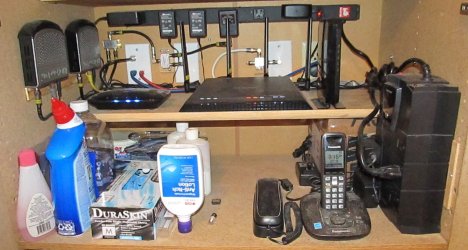
This is the shelf in the closet where I keep all my network "stuff" (the UPS is on the right:

IMG_0001.JPG.

My "landline" phone system is actually a cellular system. It's from Straight Talk, connects to the Verizon network, costs me a whopping $16.60/month for unlimited local and domestic long distance talk, and is portable. I can disconnect the cellular modem, landline phone, and grab them plus a spare antenna and wall wart PSU, then reconnect the phone anywhere I have power and a Verizon signal and have access to my home phone.

(I have no idea why the below image keeps showing up even though I deleted the darned thing. It's an earlier version of the set up before I relocated the UPS to allow me to see the display panel but it's too small to read the captions. :rolleyes: It looks like this is going to be another one of those days.)
 

Attachments

  • New Network Shelf.jpg
    New Network Shelf.jpg
    33.3 KB · Views: 30

My Computer

Computer type
PC/Desktop
Computer Manufacturer/Model Number
Custom Build
OS
Win 7 Ultimate 64 bit
CPU
Intel i7-3930K
Motherboard
ASUS P9X79 WS
Memory
Kingston HyperX Genesis 32GB Kit (8x4GB Modules) 1600MHz DDR
Graphics Card(s)
MSI R7850 Twin Frozr 2GD5/OC Radeon HD 7850 2GB 256-bit GDDR
Sound Card
Asus Xonar Essence STX
Monitor(s) Displays
3x Asus VG248QE 24", Vizio 32" TV
Screen Resolution
1920 x 1080, ?
Hard Drives
Samsung 128GB 840 Pro SSD (1),
Samsung 4TB 850 EVO SSDs (4)
Samsung 4TB 850 EVO SSDs (16) external backup drives used in 2.5" hot swap bays in the computer.
PSU
Corsair HX750w
Case
Antec Two Hundred v2 (modified)
Cooling
Cooler Master GeminII S524 120mm (fan replaced with a 140mm)
Keyboard
Logitech G510s
Mouse
Logitech M525 (two in use)
Internet Speed
=< 32Mbps down, 8Mbps up
Antivirus
AVAST!, MBAM, SAS, Spybot S&D (all but MBAM free) Glary Util
Browser
IE11
Other Info
LSI 9211-8i HBA card (8 SATA III ports), 2.5" & 3.5" Hot Swap Bays, HooToo HT-CR001 PCI-E to USB 3.0 Internal Hub + 6 Slot Card Reader, and LG Model CH12LS28 BD-ROM Optical Drive. Also, ScanSnap S1500 ADF duplexing scanner, Canon 9000F flat bed scanner, Corsair SP2500 2.1 speakers, Samsung CLP 415nw laser color printer, Cyberpower PP2200SW UPS
Update:

After several days of being on a slow charge from my new APC UPS, "Back UPS 450", my external Lead Acid battery is showing 13.43 vdc. I'll have to call that "Full Charge".
It does take longer for the UPS to charge a large Lead Acid battery, than to charge the little Gel-Cell that comes INSIDE the UPS from the factory.

Cheers Mates,
TechnoMage :cool:
 

My Computer

Computer type
PC/Desktop
Computer Manufacturer/Model Number
Various
OS
Win 7 Pro, SP1, x86, Win-11/Pro/64
CPU
AMD
Motherboard
Various
Memory
8GB Crucial
Graphics Card(s)
Various
Sound Card
OnBoard
Monitor(s) Displays
Acer 21.5"
Hard Drives
Crucial SSD, 500 GB
PSU
OEM
Case
SFF Slim Line Case
Cooling
OEM
Keyboard
eMachines
Mouse
Logitech Wireless
Internet Speed
varies
Antivirus
Windows Defender/Super Anti-Spyware
Browser
Firefox
Our power goes out sometimes, and I've looked into getting a generator; but I understand that a gasoline generator is really bad on sensitive electronic equipment, unless you get an expensive inverter model.

On the other hand, if you installed a good battery (such as the car batteries mentioned by TechnoMage) to serve as a buffer between the generator and the sensitive equipment, you would probably be fine.

When I lived in the city, I thought about getting a whole-house natural gas generator, but they are very expensive. Back in those days, we had a natural gas pipe coming from the city to my house. But now we live in the country, and we have no natural gas at our house.
 

My Computer

Computer type
PC/Desktop
Computer Manufacturer/Model Number
Dell
OS
Linux Mint 18.2 xfce 64-bit (VMWare host) / Windows 8.1 Pro 32-bit (VMWare guest)
CPU
Haswell
Memory
4 GB
Monitor(s) Displays
Acer 23"
Screen Resolution
1920 x 1080
Hard Drives
Two hard drives, 1TB each: One for Linux, one for my data.
Keyboard
IBM Model M
Antivirus
Sophos (Linux), Trend Micro (Windows)
Browser
Firefox, Opera
Other Info
I use Samba to share my data drive with the other computers at my house and with my guest session in VMWare Workstation Player.
Mr Jim,
I don't know how you would buffer a 120vac generator with a 12 vdc battery.
"That does not computer, Will Robinson!" (said the Robot)

With my Predator 4000 Generator running, I had one UPS that would cycle on and off, on and off, etc.
But my computer, LED TV, cable box and other electronics ran just fine. All other devices in my house, like the Fridge, Microwave Oven, kitchen appliances and such, ran just fine.

I have limited resources, so when I found I could buy the Predator 4000 Generator at Harbor Freight for just $275, I jumped on that like a goose on a Junebug.

2mnq0sl.jpg
2mnq0sl.jpg

There's NO natural gas out here in the country, so good ol' fashioned Gasoline will have to do.

Cheers Mates, and More POWER to you!
TechnoMage :cool:
 

My Computer

Computer type
PC/Desktop
Computer Manufacturer/Model Number
Various
OS
Win 7 Pro, SP1, x86, Win-11/Pro/64
CPU
AMD
Motherboard
Various
Memory
8GB Crucial
Graphics Card(s)
Various
Sound Card
OnBoard
Monitor(s) Displays
Acer 21.5"
Hard Drives
Crucial SSD, 500 GB
PSU
OEM
Case
SFF Slim Line Case
Cooling
OEM
Keyboard
eMachines
Mouse
Logitech Wireless
Internet Speed
varies
Antivirus
Windows Defender/Super Anti-Spyware
Browser
Firefox
Back
Top