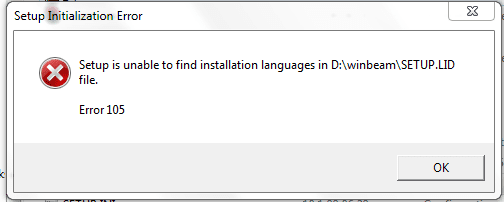
A program WinBeam not running anymore

pafkata90

New member
Member
Local time
7:21 PM
Messages
73
On my Vista 32bit i had a program running ok. It's called WinBeam and it's very small - 1MB. It's an old program and it doesn't have new versions or support. After I upgraded to 7 64bit I can't install it.I get the error below. I tried to run the setup file in compatibility mode but I get this error again. I'm sure that there isn't any missing file, cuz that's the same archive I've used before.
I've heard that there's an XP mode in Seven but I don't know how to use it. Do you think it will help? I'm not sure if the problem is either the Seven or the 64bit OS. The program is kind of important so I would be very grateful to anyone who can help me :)
 

Attachments

  • asd.PNG
    asd.PNG
    5.5 KB · Views: 35

My Computer

Computer Manufacturer/Model Number
Dell Vostro 1700
OS
Windows 7 Ultimate x64
CPU
Intel Core2Duo T9300 @2.5 GHz, 6 MB L2 cache
Motherboard
Dell
Memory
2x2048 DDR2 800 MHz
Graphics Card(s)
nVidia GeForce 8600M GT 256 MB DDR2
Screen Resolution
1440x900
Hard Drives
Samsung 470 Series 128GB SSD;
Western Digital Scorpio 250GB SATA 5400RPM 8 MB Cache
On my Vista 32bit i had a program running ok. It's called WinBeam and it's very small - 1MB. It's an old program and it doesn't have new versions or support. After I upgraded to 7 64bit I can't install it.I get the error below. I tried to run the setup file in compatibility mode but I get this error again. I'm sure that there isn't any missing file, cuz that's the same archive I've used before.
I've heard that there's an XP mode in Seven but I don't know how to use it. Do you think it will help? I'm not sure if the problem is either the Seven or the 64bit OS. The program is kind of important so I would be very grateful to anyone who can help me :)


If its old, probably not compatible with 64 bit.

Try this
http://www.microsoft.com/windows/compatibility/en-us/default.aspx
 

My Computer

Computer type
PC/Desktop
Computer Manufacturer/Model Number
Dell XPS 420
OS
Windows 10, Home Clean Install
CPU
Intel Core2 processsor Q8200(2.33Ghz 1333FSB) Quad Core Tech
Motherboard
Dell
Memory
6 gb
Graphics Card(s)
ATI Radeon 256MB HD3650
Sound Card
Intergrated 7.1 Channel Audio
Monitor(s) Displays
Dell SP2009W 20"
Hard Drives
640 GB Serial ATA Hard drive
Cooling
Fan
Keyboard
Dell USB Keyboard
Mouse
Dell Premium Optical USB
Internet Speed
DSL 2.85
Redownload the app - the installer looks corrupt. The .exe package should include all files, unless the language files are separate.
 

My Computer

Computer Manufacturer/Model Number
Sony Vaio Z46GDU
OS
Windows 7 Ultimate x86-64
CPU
[email protected] 1066MHz FSB
Motherboard
Sony branded
Memory
6GB DDR3 1066MHz
Graphics Card(s)
9300M GS 256MB Dedicated (Speed) + Intel4500MHD (Stamina)
Sound Card
Realtek HD Audio
Monitor(s) Displays
13.1' WXGA
Screen Resolution
1600x900
Hard Drives
320GB 7200RPM w/ 16MB cache
Internet Speed
1MB/s
Well... As I said - I've installed and run this program under Vista 32bit with no problems. The same archive. And just to make sure I downloaded it again and the same error appeared.
richc46 what should I do with this link. I couldn't understand :)
I see that it probably is not compatible with x64 but isn't there any way to run it?
 

My Computer

Computer Manufacturer/Model Number
Dell Vostro 1700
OS
Windows 7 Ultimate x64
CPU
Intel Core2Duo T9300 @2.5 GHz, 6 MB L2 cache
Motherboard
Dell
Memory
2x2048 DDR2 800 MHz
Graphics Card(s)
nVidia GeForce 8600M GT 256 MB DDR2
Screen Resolution
1440x900
Hard Drives
Samsung 470 Series 128GB SSD;
Western Digital Scorpio 250GB SATA 5400RPM 8 MB Cache
Well... As I said - I've installed and run this program under Vista 32bit with no problems. The same archive. And just to make sure I downloaded it again and the same error appeared.
richc46 what should I do with this link. I couldn't understand :)
I see that it probably is not compatible with x64 but isn't there any way to run it?

If its 16-bit you may have issues.
 

My Computer

Computer Manufacturer/Model Number
Sony Vaio Z46GDU
OS
Windows 7 Ultimate x86-64
CPU
[email protected] 1066MHz FSB
Motherboard
Sony branded
Memory
6GB DDR3 1066MHz
Graphics Card(s)
9300M GS 256MB Dedicated (Speed) + Intel4500MHD (Stamina)
Sound Card
Realtek HD Audio
Monitor(s) Displays
13.1' WXGA
Screen Resolution
1600x900
Hard Drives
320GB 7200RPM w/ 16MB cache
Internet Speed
1MB/s
On my Vista 32bit i had a program running ok. It's called WinBeam and it's very small - 1MB. It's an old program and it doesn't have new versions or support. After I upgraded to 7 64bit I can't install it.I get the error below. I tried to run the setup file in compatibility mode but I get this error again. I'm sure that there isn't any missing file, cuz that's the same archive I've used before.
I've heard that there's an XP mode in Seven but I don't know how to use it. Do you think it will help? I'm not sure if the problem is either the Seven or the 64bit OS. The program is kind of important so I would be very grateful to anyone who can help me :)

Im sorry, you said that it was old. You may not be able to run it. Can you tell us if it is 16 or 32 bit?
 

My Computer

Computer type
PC/Desktop
Computer Manufacturer/Model Number
Dell XPS 420
OS
Windows 10, Home Clean Install
CPU
Intel Core2 processsor Q8200(2.33Ghz 1333FSB) Quad Core Tech
Motherboard
Dell
Memory
6 gb
Graphics Card(s)
ATI Radeon 256MB HD3650
Sound Card
Intergrated 7.1 Channel Audio
Monitor(s) Displays
Dell SP2009W 20"
Hard Drives
640 GB Serial ATA Hard drive
Cooling
Fan
Keyboard
Dell USB Keyboard
Mouse
Dell Premium Optical USB
Internet Speed
DSL 2.85
Sorry but I don't know. Here it is. Maybe you can check and see yourself? Actually I think there might be newer version but I don't believe that it will be much different. I can't find anywhere to download it though.
 

Attachments

My Computer

Computer Manufacturer/Model Number
Dell Vostro 1700
OS
Windows 7 Ultimate x64
CPU
Intel Core2Duo T9300 @2.5 GHz, 6 MB L2 cache
Motherboard
Dell
Memory
2x2048 DDR2 800 MHz
Graphics Card(s)
nVidia GeForce 8600M GT 256 MB DDR2
Screen Resolution
1440x900
Hard Drives
Samsung 470 Series 128GB SSD;
Western Digital Scorpio 250GB SATA 5400RPM 8 MB Cache
Sorry but I don't know. Here it is. Maybe you can check and see yourself? Actually I think there might be newer version but I don't believe that it will be much different. I can't find anywhere to download it though.

it works fine on mine (Ultimate 32bit).
anyway, what is it for actually?. maybe we can find an alternative for it that works in 64bit
 
Last edited:

My Computer

Computer type
Laptop
Computer Manufacturer/Model Number
HP EliteBook 8530w Mobile Workstation
OS
Windows 7 Ultimate x64 (XP, 98SE, 95, 3.11, DOS 7.10 on VM) + Ubuntu 10.04 LTS Lucid Lynx
CPU
Intel Core 2 Duo Processor P8600 (2.40 GHz, 3 MB L2 cache)
Motherboard
Mobile Intel PM45 Express Chipset ICH9M-Enhanced
Memory
4GB 800 MHz DDR2 SDRAM
Graphics Card(s)
ATI Mobility FireGL V5700 with 256 MB
Sound Card
SoundMAX Integrated Digital HD Audio
Monitor(s) Displays
15.4-inch WXGA anti-glare (1280 x 800 resolution)
Screen Resolution
1280 x 800
Hard Drives
500GB + 1TB
Mouse
Synaptics PS/2 Port Touchpad, USB Mouse
Internet Speed
4 Mbps
Antivirus
MSE
Browser
Firefox, Chrome, IE
Other Info
Authentec AES2810 Fingerprint Reader
Basically it's a simple program that calculates the forces, moments and reactions that acts on different kind of beams under different circumstances. It's too bad it cannot work under 64bit. That's a program that my teacher gave the class and explained how to use. We haven't started working with it but soon we will. I guess I should ask him for alternatives.
 

My Computer

Computer Manufacturer/Model Number
Dell Vostro 1700
OS
Windows 7 Ultimate x64
CPU
Intel Core2Duo T9300 @2.5 GHz, 6 MB L2 cache
Motherboard
Dell
Memory
2x2048 DDR2 800 MHz
Graphics Card(s)
nVidia GeForce 8600M GT 256 MB DDR2
Screen Resolution
1440x900
Hard Drives
Samsung 470 Series 128GB SSD;
Western Digital Scorpio 250GB SATA 5400RPM 8 MB Cache
Talk to the teacher, I am sure he is familiar with the changing technology. I am sure that he has alternatives. Other students will probably experience the same problem, if they have not already.
 

My Computer

Computer type
PC/Desktop
Computer Manufacturer/Model Number
Dell XPS 420
OS
Windows 10, Home Clean Install
CPU
Intel Core2 processsor Q8200(2.33Ghz 1333FSB) Quad Core Tech
Motherboard
Dell
Memory
6 gb
Graphics Card(s)
ATI Radeon 256MB HD3650
Sound Card
Intergrated 7.1 Channel Audio
Monitor(s) Displays
Dell SP2009W 20"
Hard Drives
640 GB Serial ATA Hard drive
Cooling
Fan
Keyboard
Dell USB Keyboard
Mouse
Dell Premium Optical USB
Internet Speed
DSL 2.85
Yes. I was going to. Just wanted to make sure that there's no way to run this on my computer. Thank you all for the help ;)
 

My Computer

Computer Manufacturer/Model Number
Dell Vostro 1700
OS
Windows 7 Ultimate x64
CPU
Intel Core2Duo T9300 @2.5 GHz, 6 MB L2 cache
Motherboard
Dell
Memory
2x2048 DDR2 800 MHz
Graphics Card(s)
nVidia GeForce 8600M GT 256 MB DDR2
Screen Resolution
1440x900
Hard Drives
Samsung 470 Series 128GB SSD;
Western Digital Scorpio 250GB SATA 5400RPM 8 MB Cache
There are many things that I do not know, but I do know you cannot run 16 bit program on a 64 bit OS.

I could not resolve the problem, but I can wish you good luck, and I do.
 

My Computer

Computer type
PC/Desktop
Computer Manufacturer/Model Number
Dell XPS 420
OS
Windows 10, Home Clean Install
CPU
Intel Core2 processsor Q8200(2.33Ghz 1333FSB) Quad Core Tech
Motherboard
Dell
Memory
6 gb
Graphics Card(s)
ATI Radeon 256MB HD3650
Sound Card
Intergrated 7.1 Channel Audio
Monitor(s) Displays
Dell SP2009W 20"
Hard Drives
640 GB Serial ATA Hard drive
Cooling
Fan
Keyboard
Dell USB Keyboard
Mouse
Dell Premium Optical USB
Internet Speed
DSL 2.85
There are many things that I do not know, but I do know you cannot run 16 bit program on a 64 bit OS.

I could not resolve the problem, but I can wish you good luck, and I do.

i'm not sure if its a 16bit app, because when i installed it the installer said WinBeam 32
 
Last edited:

My Computer

Computer type
Laptop
Computer Manufacturer/Model Number
HP EliteBook 8530w Mobile Workstation
OS
Windows 7 Ultimate x64 (XP, 98SE, 95, 3.11, DOS 7.10 on VM) + Ubuntu 10.04 LTS Lucid Lynx
CPU
Intel Core 2 Duo Processor P8600 (2.40 GHz, 3 MB L2 cache)
Motherboard
Mobile Intel PM45 Express Chipset ICH9M-Enhanced
Memory
4GB 800 MHz DDR2 SDRAM
Graphics Card(s)
ATI Mobility FireGL V5700 with 256 MB
Sound Card
SoundMAX Integrated Digital HD Audio
Monitor(s) Displays
15.4-inch WXGA anti-glare (1280 x 800 resolution)
Screen Resolution
1280 x 800
Hard Drives
500GB + 1TB
Mouse
Synaptics PS/2 Port Touchpad, USB Mouse
Internet Speed
4 Mbps
Antivirus
MSE
Browser
Firefox, Chrome, IE
Other Info
Authentec AES2810 Fingerprint Reader
There are many things that I do not know, but I do know you cannot run 16 bit program on a 64 bit OS.

I could not resolve the problem, but I can wish you good luck, and I do.

i'm not sure if its a 16bit app, because when i installed it the installer said WinBeam 32

Try right clicking and then press troubleshoot compatiblity.
 

My Computer

Computer Manufacturer/Model Number
Sony Vaio Z46GDU
OS
Windows 7 Ultimate x86-64
CPU
[email protected] 1066MHz FSB
Motherboard
Sony branded
Memory
6GB DDR3 1066MHz
Graphics Card(s)
9300M GS 256MB Dedicated (Speed) + Intel4500MHD (Stamina)
Sound Card
Realtek HD Audio
Monitor(s) Displays
13.1' WXGA
Screen Resolution
1600x900
Hard Drives
320GB 7200RPM w/ 16MB cache
Internet Speed
1MB/s
No. It doesn't help. It just gives me again all the options of different compatibility modes. None of them is working.
 

My Computer

Computer Manufacturer/Model Number
Dell Vostro 1700
OS
Windows 7 Ultimate x64
CPU
Intel Core2Duo T9300 @2.5 GHz, 6 MB L2 cache
Motherboard
Dell
Memory
2x2048 DDR2 800 MHz
Graphics Card(s)
nVidia GeForce 8600M GT 256 MB DDR2
Screen Resolution
1440x900
Hard Drives
Samsung 470 Series 128GB SSD;
Western Digital Scorpio 250GB SATA 5400RPM 8 MB Cache
On my Vista 32bit i had a program running ok. It's called WinBeam and it's very small - 1MB. It's an old program and it doesn't have new versions or support. After I upgraded to 7 64bit I can't install it.I get the error below. I tried to run the setup file in compatibility mode but I get this error again. I'm sure that there isn't any missing file, cuz that's the same archive I've used before.
I've heard that there's an XP mode in Seven but I don't know how to use it. Do you think it will help? I'm not sure if the problem is either the Seven or the 64bit OS. The program is kind of important so I would be very grateful to anyone who can help me :)
Pafkata - I am assuming that this problem was never resolved. We have now run into the same problem. And, yes, the program is very important to us also.
 

My Computer

OS
Windos XP 32 bit
Unfortunately it wasn't resolved. I have to do the calculations from the program by hand. I've made a spread sheet in Excel which can do most of them so it's not that big loss for me anymore. I wish you good luck and if you have any success in running it, please let me know :)
 

My Computer

Computer Manufacturer/Model Number
Dell Vostro 1700
OS
Windows 7 Ultimate x64
CPU
Intel Core2Duo T9300 @2.5 GHz, 6 MB L2 cache
Motherboard
Dell
Memory
2x2048 DDR2 800 MHz
Graphics Card(s)
nVidia GeForce 8600M GT 256 MB DDR2
Screen Resolution
1440x900
Hard Drives
Samsung 470 Series 128GB SSD;
Western Digital Scorpio 250GB SATA 5400RPM 8 MB Cache
Win Beam

I found a software company that is going to take a look at it to see if they can develop something similar. It is a long shot, but if they come thru for us I will let you know.
 

My Computer

OS
Windos XP 32 bit
On my Vista 32bit i had a program running ok. It's called WinBeam and it's very small - 1MB. It's an old program and it doesn't have new versions or support. After I upgraded to 7 64bit I can't install it.I get the error below. I tried to run the setup file in compatibility mode but I get this error again. I'm sure that there isn't any missing file, cuz that's the same archive I've used before.
I've heard that there's an XP mode in Seven but I don't know how to use it. Do you think it will help? I'm not sure if the problem is either the Seven or the 64bit OS. The program is kind of important so I would be very grateful to anyone who can help me :)

I had the same problem, but resolved it yesterday. Google "WinBeam", find version 3.2 and download it. It should be a shareware program. If it does not run - use Vista compatibility mode. Or, you can write the author: Mr. David Hesse, 16475 SW Melinda, Beaverton OR USA 97007. It will cost $49.00 per program and it is yours. Runs on my Windows7 64bit perfectly.
 

My Computer

OS
windows 7 home premium 64bit
Thank you for the response, luckycharm. Now I'm doing my internship right now, so I don't really need it but I might once I'm done in a few months and am doing my final project. Thank you also for the contact info and your other advises.
 

My Computer

Computer Manufacturer/Model Number
Dell Vostro 1700
OS
Windows 7 Ultimate x64
CPU
Intel Core2Duo T9300 @2.5 GHz, 6 MB L2 cache
Motherboard
Dell
Memory
2x2048 DDR2 800 MHz
Graphics Card(s)
nVidia GeForce 8600M GT 256 MB DDR2
Screen Resolution
1440x900
Hard Drives
Samsung 470 Series 128GB SSD;
Western Digital Scorpio 250GB SATA 5400RPM 8 MB Cache
Back
Top