A simple search by file name

jagman55

New member
Member
VIP
Local time
4:03 PM
Messages
115
I have spent hours, trying to get even the simplest search for file names using Windows Explorer. One time, spend days and tried ever option 2 or 3 times and then after a re-boot, the simple search stated to work. It has worked for about a month now and now it is back to its old ways.

Example: The objective is to "search" on the ones that have "web-12-(" but somehow Microsoft thinks the second "-" is not important and includes in the search if the "-" is there or not.

File names in the folder are:
web-12-(a&f)001.jpg
web-12(a&f)001.jpg
web-12-(a&f)002.jpg
web-12(a&f)002.jpg
.......
If you enter a search:
*-12-*
you get all of them
If you enter a search:
web-12-(a&f
you get all of them but differently

you get FIRST the: web-12-(a&f)00x.jpg.

BUT then, it makes a second pass and adds the:
web-12(a&f).jpg to the web-12-(a&f)00x.

Yelling and cursing Microsoft and Bill Gates does not stop it from making the second pass and adding the ones without the next "-" too.

Anyone know why it works for a second then adds the that LOOKS similar but is missing the "-"?
What part of Windows 7 does it think that:
web-12-(a&f) looks like
web-12(a&f)????
If it has STOPPED on the first PASS, then it would have found the:
web-12-(a&f).
WHY does it do this?
Why cant it just do a SIMPLE search like XP/Vista/2000/etc?

I suspect it will start WORKING correctly in the next week or 2 but why not NOW?

To say this is infuriating is an understatement.

(don't say use the FILTERS option has it has been GRAYED out ever since I loaded Windows 7.)

since I have no idea of what "natural language search" means and Google or Microsoft will not explain but the setting for above is:

ALL UNCHECKED except the top of Index and non-index.

Somehow, how does one think this is progress when an app can not do a simple search and do it as YOU tell it but will do it because the programmer somehow knows the customer REALLY wants it differently

PS ( the "refresh") in Windows Explorer, most of the time, you have to delete the window and bring it up again to get it to re-read the directory

Comments or help?:cry:
 

My Computer

Computer Manufacturer/Model Number
HP pavilion
OS
windows 7 ultimate
CPU
2 quads @ 2.4
Memory
3gb
Monitor(s) Displays
tv
Hard Drives
many vendors
I also fiind the present win 7 search operation to be infuriating. So much so that I wrote myself a PowerShell script to search. Doesn't have the nice features of loading the located file, but at least I can locate what I am looking for. Maybe someone will help us. Maybe we have to edit the registry to override some of the search defaults. Personally, I strongly prefer the XP approach.
 

My Computer

Computer Manufacturer/Model Number
Toshiba Satellite S875D-S7239 laptop
OS
MS Windows 7 Ultimate SP1 64-bit
CPU
AMD A10-4600M
Motherboard
AMD Pumori (Socket FT1)
Memory
6.00 GB Dual-Channel DDR3 @ 798MHz (11-11-12-28)
Graphics Card(s)
AMD Radeon HD 7660G
Sound Card
High Definition Audio Device
Monitor(s) Displays
Generic PnP Monitor (1600x900@60Hz)
Screen Resolution
1600x900@60Hz
Hard Drives
SSD 119GB Corsair CSSD-V128GB2 ATA Device
Keyboard
Standard PS/2 Keyboard
Mouse
HP Wireless Optical Mobile Mouse Model FHA-3410
Internet Speed
What the local pub, local coffee shop offers.
Other Info
Optical Drive:MATSHITA BD-CMB UJ160B ATA Device


Also have an Asus ha1002xp netbook with Win 7 Ultimate installed.

My Computer

Computer type
PC/Desktop
Computer Manufacturer/Model Number
Lenovo IdeaCenter 450
OS
Windows 10 Pro X64
CPU
Intel Quad Core i7-4770 @ 3.4Ghz
Memory
16.0GB PC3-12800 DDR3 SDRAM 1600 MHz
Graphics Card(s)
Intel Integrated HD Graphics
Sound Card
Realtek HD Audio
Monitor(s) Displays
HP 22" LCD
Screen Resolution
1680 x 1050
Hard Drives
250GB Samsung EVO SATA-3 SSD
2TB Seagate ST2000DM001 SATA-2
1.5TB Seagate ST3150041AS SATA
Keyboard
Dell USB
Mouse
Lenovo USB
Internet Speed
Cable via Road Runner 3MB Upload, 30MB Download
Antivirus
Windows Defender, MBAM Pro, MBAE
Browser
Seamonkey
Other Info
UEFI/GPT
PLDS DVD-RW DH16AERSH
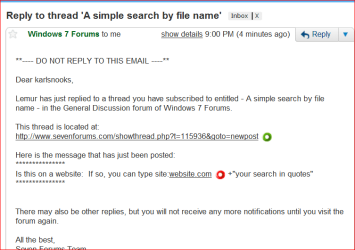
Is this on a website: If so, you can type site:website.com +"your search in quotes"
 

My Computer

Computer Manufacturer/Model Number
Dell and Custom
OS
Systems 1 and 2: Windows 7 Enterprise x64, Win 8 Developer
CPU
System 1: i7 [email protected], System 2: AMD FX-4100 Zambezi 3.6G
Motherboard
System 1:Dell 06NWYK System 2: ASUS M5A97 AM3+
Memory
System 1: 8GB System 2: 8GB
Graphics Card(s)
System 1: ATI FirePro V4800 System 2: Radeon HD 6850
Sound Card
System 1: onboard System 2: onboard
Monitor(s) Displays
System1: Viewsonic HDMI 24"
Screen Resolution
System 1: 1920x1080 System 2: 1920x1080
Hard Drives
System 1: Mirrored .5B drives System 2: Seagate Barracuda ST1000DM003 1TB 7200 RPM 64MB Cache SATA 6.0Gb/s
Case
System 1: Dell System 2: Cooler Master
Internet Speed
10 MBPS
Lemur,
I don't know why but WOT put a red circle by the "link" you gave.

Let's see if I can "snip" what I saw.
Red Alert.PNG
 

My Computer

Computer Manufacturer/Model Number
Toshiba Satellite S875D-S7239 laptop
OS
MS Windows 7 Ultimate SP1 64-bit
CPU
AMD A10-4600M
Motherboard
AMD Pumori (Socket FT1)
Memory
6.00 GB Dual-Channel DDR3 @ 798MHz (11-11-12-28)
Graphics Card(s)
AMD Radeon HD 7660G
Sound Card
High Definition Audio Device
Monitor(s) Displays
Generic PnP Monitor (1600x900@60Hz)
Screen Resolution
1600x900@60Hz
Hard Drives
SSD 119GB Corsair CSSD-V128GB2 ATA Device
Keyboard
Standard PS/2 Keyboard
Mouse
HP Wireless Optical Mobile Mouse Model FHA-3410
Internet Speed
What the local pub, local coffee shop offers.
Other Info
Optical Drive:MATSHITA BD-CMB UJ160B ATA Device


Also have an Asus ha1002xp netbook with Win 7 Ultimate installed.
LOL. I didn't mean to literally use the url and quoted area. site:insertyoursitehere.com +"insertyourtexthere"


And I use WOT, too!
 

My Computer

Computer Manufacturer/Model Number
Dell and Custom
OS
Systems 1 and 2: Windows 7 Enterprise x64, Win 8 Developer
CPU
System 1: i7 [email protected], System 2: AMD FX-4100 Zambezi 3.6G
Motherboard
System 1:Dell 06NWYK System 2: ASUS M5A97 AM3+
Memory
System 1: 8GB System 2: 8GB
Graphics Card(s)
System 1: ATI FirePro V4800 System 2: Radeon HD 6850
Sound Card
System 1: onboard System 2: onboard
Monitor(s) Displays
System1: Viewsonic HDMI 24"
Screen Resolution
System 1: 1920x1080 System 2: 1920x1080
Hard Drives
System 1: Mirrored .5B drives System 2: Seagate Barracuda ST1000DM003 1TB 7200 RPM 64MB Cache SATA 6.0Gb/s
Case
System 1: Dell System 2: Cooler Master
Internet Speed
10 MBPS
I disabled index search for "Users" some time ago and use the brute force (Grep type) search from the user folder or sub folders. It's quick enough for me and I know if the file exists it will be found.

I don't suppose any of you remember the XtreePro days.
 

My Computer

Computer type
PC/Desktop
Computer Manufacturer/Model Number
Own build
OS
Windows 7x64 Home Premium SP1
CPU
Intel i7 2600k
Motherboard
ASUS P8Z68 Deluxe
Memory
G.Skill Ripjaws (DDR3-1600) 2x4GB
Graphics Card(s)
Nvidia GeForce GTS 450; Intel HD Graphics 3000(GT2+)
Monitor(s) Displays
Dell Ultrasharp IPS panel U2311H, Samsung SyncMaster P2350
Screen Resolution
1920x1080
Hard Drives
Samsung 850 Pro SSD 256GB, Samsung SSD 840 120GB, Seagates 1TB Barracuda ST31000528AS x2
PSU
Seasonic M12II 520W
Case
Lian Li Lancool PC-K60
Cooling
Case: 1x120mm, 3x140mm CPU: Hyper 212+
Keyboard
Logitech MK520 (wireless)
Mouse
Logitech MK520
Internet Speed
6-7 Mbps
Antivirus
Norton Security Premium, Malwarebytes on 2 (MSE on 3rd PC)
Browser
FireFox
Other Info
Audio: Logitech Z523 2.1
and some of us pre-date those days.
 

My Computer

Computer Manufacturer/Model Number
Toshiba Satellite S875D-S7239 laptop
OS
MS Windows 7 Ultimate SP1 64-bit
CPU
AMD A10-4600M
Motherboard
AMD Pumori (Socket FT1)
Memory
6.00 GB Dual-Channel DDR3 @ 798MHz (11-11-12-28)
Graphics Card(s)
AMD Radeon HD 7660G
Sound Card
High Definition Audio Device
Monitor(s) Displays
Generic PnP Monitor (1600x900@60Hz)
Screen Resolution
1600x900@60Hz
Hard Drives
SSD 119GB Corsair CSSD-V128GB2 ATA Device
Keyboard
Standard PS/2 Keyboard
Mouse
HP Wireless Optical Mobile Mouse Model FHA-3410
Internet Speed
What the local pub, local coffee shop offers.
Other Info
Optical Drive:MATSHITA BD-CMB UJ160B ATA Device


Also have an Asus ha1002xp netbook with Win 7 Ultimate installed.
I have no idea of what "natural language search" means and Google or Microsoft will not explain but the setting for above is:
-----------------------------------------------------------------------------------------
I assume it means put the full file name in.
Not a bit of it, it will find everything with all those bits and show them, its not rocket science, be specific.

A computer can't think for itself, it has to be given a specific task.

If you walked into a library and asked for a book on a particular subject without giving the full title you'd be offered a shelf full of books on the subject
 

My Computer

Computer Manufacturer/Model Number
Home build.
OS
Vista Ultimate 32 bit, Win 7 Pro 32 bit, Win 7 Pro 64 bit
CPU
Intel i5 CPU 750 @ 2.67 GHZ, OC 3.7 GHZ
Motherboard
Asus P7P55D
Memory
4 Gig
Graphics Card(s)
Nvidia GeForce GTS450
Monitor(s) Displays
Acer 24"
Screen Resolution
1440 x 900
Hard Drives
1000 GIG
1000 GIG
PSU
650
Case
Antec Nine Hundred Two
Internet Speed
14 MB (APPROX)
Modifing the "right click" content on Windows Explorer

You guys are more advanced than I am but I have finally figured out how to modify my right click pop up when putting the cursor over a file in Windows Explorer and to:

bring up notepad and edit the file
bring up VLC to play a video or audio
bring up "better file renamer"
etc.

In one click.

I find it extremely handy as in most cases, when you select the file, right click and there are all the options to play, edit, etc. Some just bring up the program and some bring up the program and exe the file you have chosen.

Let me know if you would like or don't have. It is a simple modification to the registry.
 

My Computer

Computer Manufacturer/Model Number
HP pavilion
OS
windows 7 ultimate
CPU
2 quads @ 2.4
Memory
3gb
Monitor(s) Displays
tv
Hard Drives
many vendors
Searching by file name requires a little typing

In any search box enter
filename:*educate
if you want to see all files where educate appears anywhere in the file name. Note there are NO spaces anywhere in the search line.

You can do more complicated searches using wildcard characters but a * at the beginning is the one I use most often.

If you do want to get fancier remember that:
? matches one arbitrary character.
* matches zero or more arbitrary characters.

Hope this helps.
 

My Computer

OS
windows 7 home premium 64
I am not a naive user but have given up on Windows Search.
I use free FileLocator Lite (previously Agent Ransack) exclusively. The pro version is used in the Corporate world. Try it, I doubt you'll dump it.


PS: It has & I run the 64 bit version.
 

My Computer

Computer type
PC/Desktop
Computer Manufacturer/Model Number
Own build
OS
Windows 7x64 Home Premium SP1
CPU
Intel i7 2600k
Motherboard
ASUS P8Z68 Deluxe
Memory
G.Skill Ripjaws (DDR3-1600) 2x4GB
Graphics Card(s)
Nvidia GeForce GTS 450; Intel HD Graphics 3000(GT2+)
Monitor(s) Displays
Dell Ultrasharp IPS panel U2311H, Samsung SyncMaster P2350
Screen Resolution
1920x1080
Hard Drives
Samsung 850 Pro SSD 256GB, Samsung SSD 840 120GB, Seagates 1TB Barracuda ST31000528AS x2
PSU
Seasonic M12II 520W
Case
Lian Li Lancool PC-K60
Cooling
Case: 1x120mm, 3x140mm CPU: Hyper 212+
Keyboard
Logitech MK520 (wireless)
Mouse
Logitech MK520
Internet Speed
6-7 Mbps
Antivirus
Norton Security Premium, Malwarebytes on 2 (MSE on 3rd PC)
Browser
FireFox
Other Info
Audio: Logitech Z523 2.1
Back
Top