- Local time
- 7:06 AM
- Messages
- 24
Hi
I'm trying to manage my bandwidth allowance from my (mobile wireless broadband) ISP.
I want to use Adobe Flash Player but need to guard against unwanted bandwidth use through peer-assisted-networking.
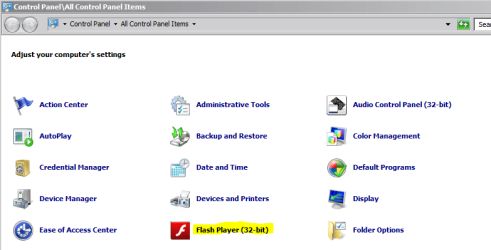
I note the following on the Flash Player Help page: 'Beginning with Flash Player 10.3, the "Local Settings Manager" supersedes th(e) Online Settings Manager for managing global settings on Windows, Mac, and Linux computers. "The Local Settings Manager" can be accessed in the Control Panel on Windows ...'
I can't find anything called a "Local Settings Manager" by searching Win 7/Control panel.
Anyone know the Win 7 title for this (obviously generic) term used on the Adobe page?
Cheers
ausgumbie
I'm trying to manage my bandwidth allowance from my (mobile wireless broadband) ISP.
I want to use Adobe Flash Player but need to guard against unwanted bandwidth use through peer-assisted-networking.
I note the following on the Flash Player Help page: 'Beginning with Flash Player 10.3, the "Local Settings Manager" supersedes th(e) Online Settings Manager for managing global settings on Windows, Mac, and Linux computers. "The Local Settings Manager" can be accessed in the Control Panel on Windows ...'
I can't find anything called a "Local Settings Manager" by searching Win 7/Control panel.
Anyone know the Win 7 title for this (obviously generic) term used on the Adobe page?
Cheers
ausgumbie
My Computer
- Computer Manufacturer/Model Number
- HP Pavilion dv7-4029TX Notebook PC Product Number XG233PA#ABG
- OS
- MS Windows 7 Home Premium 64-bit SP1
- CPU
- Intel Core i7 720QM @ 1.60GHz
- Motherboard
- Hewlett-Packard 1449 (CPU)
- Memory
- RAM 8.00 GB Dual-Channel DDR3 @ 664MHz (9-9-9-24)
- Graphics Card(s)
- Generic PnP Monitor (1600x900@60Hz) / ATI Mobility Radeon HD
- Sound Card
- IDT High Definition Audio CODEC / ATI High Definition Audio
- Monitor(s) Displays
- Generic PnP Monitor on ATI Mobility Radeon HD 5650 / 1600x90
- Hard Drives
- 488GB Seagate ST9500420AS (SATA) / 488GB Seagate ST9500420AS (SATA)