Access folders and files on Domain

vv211

New member
Member
Local time
7:51 PM
Messages
57
Location
Not NYC, NY, USA
I'm running windows 7 64 bit Home Premium.
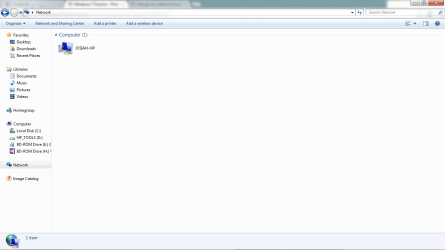
I'm at college and I'd like to be able to access to the printers and some of the files on their network that are available from the computers they have set up in the labs. Now, I know that in order to JOIN a domain, I would need to have Professional or higher, but from reading around it seems that even with just home premium I should be able to have access to the files and such on a domain. But whenever I click on "Network" from from computer all I'm seeing is my own computer.
So, what do I need to do to access the files and printers, or do I actually need to buy professional to do this?
 

Attachments
  • Untitled.png
    Untitled.png
    26.7 KB · Views: 8

My Computer My Computer

At a glance

Windows 7 Professional x64 w/SP1Intel i7-3770 3.4GHz32GB (8GB x4) DDR3 1600MHz Corsair Vengeance ...Sapphire Radeon HD 7950 3GB GDDR5 VRAM
Computer type
PC/Desktop
Computer Manufacturer/Model Number
Custom
OS
Windows 7 Professional x64 w/SP1
CPU
Intel i7-3770 3.4GHz
Motherboard
Gigabyte GA-Z77-D3H
Memory
32GB (8GB x4) DDR3 1600MHz Corsair Vengeance Dual Channel
Graphics Card(s)
Sapphire Radeon HD 7950 3GB GDDR5 VRAM
Sound Card
Sound Blaster ZxR PCIe
Monitor(s) Displays
1x 21.5"
Screen Resolution
1920x1080
Hard Drives
128GB OCZ Vertex 4 SSD
1TB 7200 rpm Seagate Barracuda
4TB 7200 rpm Western Digital Black
PSU
600W Coolmax ZU-600B
Case
Antec Nine Hundred Two V3
Cooling
4 stock case fans. 1 stock cpu fan. 2 stock gpu fans
Keyboard
Logitech K800 wireless backlit
Mouse
Roccat Tyon
Internet Speed
400 KB/s or so
Antivirus
992KB Hosts file, Hardware firewall, not clicking on links
Browser
Chrome
VV211, You might be able to access the files directly by using the share with the fully qualified name ie \\server\share or mapping the share directly by the name. I install printers with the IP of the printer and that also works.

Rich
 

My Computer My Computer

At a glance

Windows 7 Pro x64 SP1Intel Core I716 GigsNVIDIA GeForce GTX 670M
Computer type
Laptop
Computer Manufacturer/Model Number
Toshiba Laptop Qosimo X870
OS
Windows 7 Pro x64 SP1
CPU
Intel Core I7
Motherboard
Toshiba Qosmio
Memory
16 Gigs
Graphics Card(s)
NVIDIA GeForce GTX 670M
Monitor(s) Displays
17.7" laptop
Screen Resolution
1600 x 900
Hard Drives
256 Gig SanDisk SSD for C
256 Gig Intel SSD for D
Internet Speed
50/25 FIOS
Antivirus
Vipre (all you can eat for 10 machines)
Browser
IE and FF
Other Info
I have dos 6.22, wfwg 3.11, win98, 2000 and xp VHD's available for testing. MS's Virtual PC works great.
Ok thanks. I'll give that a try when i have my next class, which will be wednesday.
Also, how exactly do I do that?
 

My Computer My Computer

At a glance

Windows 7 Professional x64 w/SP1Intel i7-3770 3.4GHz32GB (8GB x4) DDR3 1600MHz Corsair Vengeance ...Sapphire Radeon HD 7950 3GB GDDR5 VRAM
Computer type
PC/Desktop
Computer Manufacturer/Model Number
Custom
OS
Windows 7 Professional x64 w/SP1
CPU
Intel i7-3770 3.4GHz
Motherboard
Gigabyte GA-Z77-D3H
Memory
32GB (8GB x4) DDR3 1600MHz Corsair Vengeance Dual Channel
Graphics Card(s)
Sapphire Radeon HD 7950 3GB GDDR5 VRAM
Sound Card
Sound Blaster ZxR PCIe
Monitor(s) Displays
1x 21.5"
Screen Resolution
1920x1080
Hard Drives
128GB OCZ Vertex 4 SSD
1TB 7200 rpm Seagate Barracuda
4TB 7200 rpm Western Digital Black
PSU
600W Coolmax ZU-600B
Case
Antec Nine Hundred Two V3
Cooling
4 stock case fans. 1 stock cpu fan. 2 stock gpu fans
Keyboard
Logitech K800 wireless backlit
Mouse
Roccat Tyon
Internet Speed
400 KB/s or so
Antivirus
992KB Hosts file, Hardware firewall, not clicking on links
Browser
Chrome
Ok thanks. I'll give that a try when i have my next class, which will be wednesday.
Also, how exactly do I do that?

what you do is to go to map network drive
put \\server\share and select the drive letter you wish them to be.
you will have to put in a userid and password that is different from your
local system login.

Most of it is pretty easy to figure out.

Rich
 

My Computer My Computer

At a glance

Windows 7 Pro x64 SP1Intel Core I716 GigsNVIDIA GeForce GTX 670M
Computer type
Laptop
Computer Manufacturer/Model Number
Toshiba Laptop Qosimo X870
OS
Windows 7 Pro x64 SP1
CPU
Intel Core I7
Motherboard
Toshiba Qosmio
Memory
16 Gigs
Graphics Card(s)
NVIDIA GeForce GTX 670M
Monitor(s) Displays
17.7" laptop
Screen Resolution
1600 x 900
Hard Drives
256 Gig SanDisk SSD for C
256 Gig Intel SSD for D
Internet Speed
50/25 FIOS
Antivirus
Vipre (all you can eat for 10 machines)
Browser
IE and FF
Other Info
I have dos 6.22, wfwg 3.11, win98, 2000 and xp VHD's available for testing. MS's Virtual PC works great.
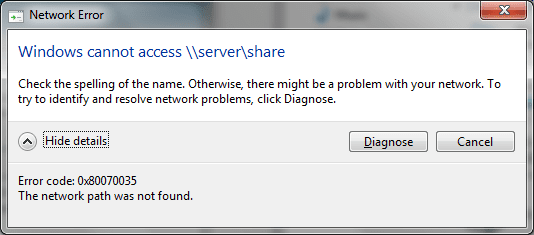
Couldn't connect. Is this something that they would have done on their end? I don't know if they're specifically sharing any of the drives to users outside of the domain
 

Attachments

  • Untitled.png
    Untitled.png
    11.1 KB · Views: 3

My Computer My Computer

At a glance

Windows 7 Professional x64 w/SP1Intel i7-3770 3.4GHz32GB (8GB x4) DDR3 1600MHz Corsair Vengeance ...Sapphire Radeon HD 7950 3GB GDDR5 VRAM
Computer type
PC/Desktop
Computer Manufacturer/Model Number
Custom
OS
Windows 7 Professional x64 w/SP1
CPU
Intel i7-3770 3.4GHz
Motherboard
Gigabyte GA-Z77-D3H
Memory
32GB (8GB x4) DDR3 1600MHz Corsair Vengeance Dual Channel
Graphics Card(s)
Sapphire Radeon HD 7950 3GB GDDR5 VRAM
Sound Card
Sound Blaster ZxR PCIe
Monitor(s) Displays
1x 21.5"
Screen Resolution
1920x1080
Hard Drives
128GB OCZ Vertex 4 SSD
1TB 7200 rpm Seagate Barracuda
4TB 7200 rpm Western Digital Black
PSU
600W Coolmax ZU-600B
Case
Antec Nine Hundred Two V3
Cooling
4 stock case fans. 1 stock cpu fan. 2 stock gpu fans
Keyboard
Logitech K800 wireless backlit
Mouse
Roccat Tyon
Internet Speed
400 KB/s or so
Antivirus
992KB Hosts file, Hardware firewall, not clicking on links
Browser
Chrome
VV211, first you have to know the exact share name and the userid/password for a authorized user.

the name \\server\share was an example not a valid share :)

You need to ask the admin for the share that your trying to get to, what it's name and such are.

Rich
 

My Computer My Computer

At a glance

Windows 7 Pro x64 SP1Intel Core I716 GigsNVIDIA GeForce GTX 670M
Computer type
Laptop
Computer Manufacturer/Model Number
Toshiba Laptop Qosimo X870
OS
Windows 7 Pro x64 SP1
CPU
Intel Core I7
Motherboard
Toshiba Qosmio
Memory
16 Gigs
Graphics Card(s)
NVIDIA GeForce GTX 670M
Monitor(s) Displays
17.7" laptop
Screen Resolution
1600 x 900
Hard Drives
256 Gig SanDisk SSD for C
256 Gig Intel SSD for D
Internet Speed
50/25 FIOS
Antivirus
Vipre (all you can eat for 10 machines)
Browser
IE and FF
Other Info
I have dos 6.22, wfwg 3.11, win98, 2000 and xp VHD's available for testing. MS's Virtual PC works great.
Back
Top