D danjgerry New member Local time 10:34 PM Messages 2 Jan 20, 2016 #1 How do I access Power Supply options? Trying to follow new battery optimization procedures. My Computer Computer typeLaptopComputer Manufacturer/Model NumberToshiba Satellite P745OSWin7 64bitBrowserMozilla Firebird
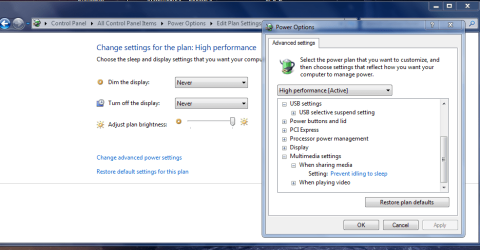
torchwood Well-known member Guru Gold Member VIP Local time 5:34 AM Messages 7,391 Jan 20, 2016 #2 Hi Gerry, Control panel >> power options, select I use High power, apart from the first set you see also click on advanced settings. Roy Attachments powersleep.PNG 37.5 KB · Views: 0 My Computer Computer typePC/DesktopComputer Manufacturer/Model Numbermedionl/Aspire 6930G/acer x55aOSW7 home premium 32bit/W7HP 64bit/w10 tp insider ringCPUE5300 dual coreMotherboardmedion MS7366Memory3gbGraphics Card(s)Nvidia Geforce 7100 Nforce 630iMonitor(s) DisplaysavixcInternet Speedn (isp resticted to 72)Antivirusmse/pandsBrowserpalemoonOther InfoBelkin Fd7050 n USB using Railink RT2870 drivers, more upto date
Hi Gerry, Control panel >> power options, select I use High power, apart from the first set you see also click on advanced settings. Roy
D danjgerry New member Thread Starter Local time 10:34 PM Messages 2 Jan 20, 2016 #3 Accessing Power Supply Options Thanks, Roy. Your directions helped me adjust my settings to let the battery fully discharge. My Computer Computer typeLaptopComputer Manufacturer/Model NumberToshiba Satellite P745OSWin7 64bitBrowserMozilla Firebird
Accessing Power Supply Options Thanks, Roy. Your directions helped me adjust my settings to let the battery fully discharge.